
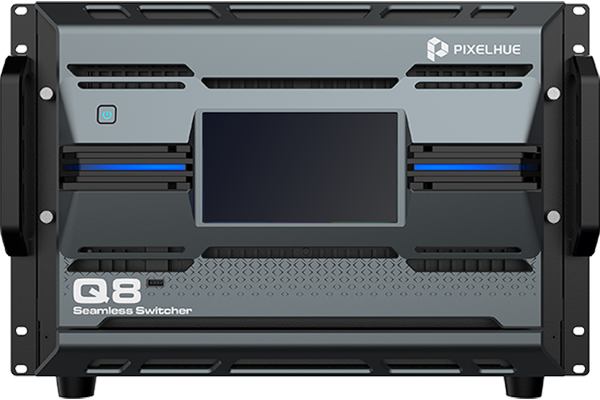
What is the Pixelhue Q8?
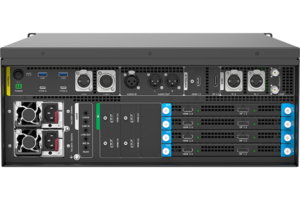
The Pixelhue Q8 is a 4K presentation switcher with nothing fixed on the back. Its sources and its screens both arrive on cards you choose, up to six card slots for coming in and four for going out, so you buy the shape of your show rather than a connector count somebody else picked.
Filled out, one Q8 takes 48 sources at 4K and drives 16 screens at 4K, with as many as 32 pictures stacked on top of each other. It fills seven rack units and weighs 42.6 kg.
It does not light the wall itself. The Q8 builds the picture; the NovaStar controller you already own takes it from there and drives the cabinets.
Buy one when the show is bigger than any fixed box can hold, or when the next show will be a different shape and you would rather change cards than change switchers.
Pixelhue Q8 key features
A card can borrow room from the card beside it
Each output card holds enough for eight large pictures. When one of your screens needs more than its card has left, the card next to it lends what it is not using, so you get the extra room without buying another card or re-planning the rig.
The one condition is physical: a card can only borrow from the card immediately beside it, so how you order the slots decides who can help whom.
Every screen stays in step with every other
Frame synchronisation holds all your outputs together, so a picture spread across several screens does not tear, stutter or show a visible line where two of them meet. On a wall built from several sections that is the difference between one image and several that nearly match.
1,024 saved looks, recalled from either bus
You can save a complete look or just the parts that changed, from the live output or your rehearsal one, and load it back to either. A show with a hundred cues does not run out of room, and a look you built in rehearsal comes back exactly as you left it.
Pixelhue Q8 specifications
Read the card counts first, because everything else on this list depends on what you fit. A Q8 with two cards in it is a different machine from a Q8 with ten, and the power figure below is the fully loaded one.
| Card slots | Up to 6 input cards and 4 output cards, all replaceable |
|---|---|
| Inputs | 8× 4K×2K@60Hz concurrent inputs per input card, up to 48 with six cards fitted; deinterlacing on up to 4 inputs per card; up to 4 sync sources per card |
| Outputs | Up to 4× 4K per output card and 16× 4K concurrent outputs with four cards fitted; output width up to 8192 pixels |
| Layers | Up to 8× 4K layers per output card, 32 across four cards; borders, shadows, copying, flipping and irregular layers |
| Layer sharing | VPU lets an output card lend spare layer resources to the adjacent card only |
| Presets | 1,024 complete and relative presets, saved from and loaded to preview or program |
| Screen tools | Edge blending, 90° output rotation, 3D, virtual pixel configuration, LCD bezel compensation, irregular screen mosaic, synchronised connector splicing |
| Audio | Dante on dual redundant Gigabit ports, AES67 compliant, 64×64 channels at 48 kHz, plus 3.5 mm line in and line out |
| Content protection | HDCP 1.3, 1.4, 2.2 and 2.3, with a global switch for all inputs or outputs |
| Linking | Two Q8 units on the same network share input sources through the front-panel LINK ports |
| Sync and control | Genlock with bi-level and tri-level sync; 7-inch front touchscreen; U5, U5 Pro and U5 MINI; PixelFlow; Stream Deck with Companion built in |
| Backup | Input source backup, device backup, output card backup and 2+1 power redundancy |
| Power | 100–240V~, 50/60Hz; 1,400 W fully loaded |
| Chassis | 482.6 × 694.7 × 335.3 mm, 7U, 42.6 kg net |
| Environment | 0°C to 50°C operating at 0–80% RH; −20°C to +60°C storage |
| Certifications | CE, FCC, IC, RoHS |
Every figure here comes from PIXELHUE’s Q8 specification V2.1.0, the model’s own document rather than a family datasheet.
How big can one Q8 get?
A fully loaded Q8 gets to forty-eight sources in and sixteen screens out, at full 4K, with thirty-two pictures stacked across them. Those numbers are per card rather than per box, which is the part worth being clear about before you order.
Each input card takes eight of your sources at once, so six cards make forty-eight. Each output card drives four screens and holds eight large pictures, so four cards make sixteen screens and thirty-two pictures. Order three input cards and your show has twenty-four sources, not forty-eight.
| What you fit | What one card gives you | Fully loaded |
|---|---|---|
| Input cards | 8 sources at 4K, at the same time | 6 cards, 48 sources |
| Output cards | 4 screens at 4K | 4 cards, 16 screens |
| Layers | 8 large pictures, held on the output card | 32 across four cards |
The layer figure has a wrinkle worth knowing before you plan a screen. Layers belong to the output card driving that screen, not to the machine, so a screen wanting ten pictures cannot simply borrow from anywhere. It borrows from the card physically next to it, and only from that one.
That makes slot order part of your design. Put the two screens most likely to need extra room on adjacent cards and they can help each other; put them at opposite ends and they cannot.
When one Q8 still is not enough for you, two of them on the same network share sources through the LINK ports on the front, so your second machine joins the show rather than duplicating the patch.
Which cards should you order?
Order the cards that match how your sources arrive and how your screens are fed, because that decision is the product. A Q8 chassis on its own does nothing.
| Card | What it gives you | Order it when |
|---|---|---|
| Mixed input card | 4× HDMI 2.0, 4× DP 1.2 and 4× 12G-SDI, eight usable at once | Your sources turn up on whatever the last job left in the case |
| HDMI and SDI input card | 8× HDMI 2.0 and 4× 12G-SDI | Most of the show is HDMI with cameras on SDI |
| Video-over-IP input card | Two 100G optical ports on the ST 2110 standard, plus HDMI 2.1 and DP 1.4 | The venue delivers sources over its network |
| HDMI and DP output card | 4× HDMI 2.0, 4× DP 1.2 and 8 optical ports | Screens are close, or fed over fiber from the rack |
| HDMI and SDI output card | 4× HDMI 2.0, 4× 12G-SDI and 8 optical ports | You need broadcast feeds leaving the box as well as screens |
| Video-over-IP output card | Two 100G optical ports on ST 2110, plus 4× 12G-SDI | The show leaves on the network rather than on cable |
One condition applies only to the video-over-IP output card, and it is worth knowing before you mix it into a build. A screen created on that card cannot span onto any other output card, and content protection cannot be set on it. Keep the screens it drives whole and separate.
Three of these cards also fit the P80, so a fleet running both boxes carries one set of spares rather than two.
What the Q8 plugs into
Your Q8 needs something between it and the LED cabinets, because it cannot address the cards inside them. That job belongs to a NovaStar controller or video processor. Normal screens and projectors take a cable straight from the switcher.
Every output card carries eight optical ports, and those reach a NovaStar controller directly, up to 10 km away on single-mode fiber, with nothing in between. Seven controllers are on that list: the VX400, VX600 and VX1000, the MCTRL 4K and NovaPro UHD Jr, the MX40 Pro and the H series.
Because the signal is already optical when it leaves the rack, you do not need a CVT converter on this leg. Those belong further downstream, on the long run from your controller out to the cabinets.
On a Q8-sized wall the controller usually matters more than the switcher. Check how many optical inputs it has before the cable order goes in, and we can quote the pair together.
Q8 or P80 — which one do you order?
Order the Q8 if the requirement keeps changing, and the P80 if it does not.
Everything on the Q8 is a card, which is what makes it the bigger machine in every sense. Forty-eight sources against twelve, sixteen screens against eight, and the ability to re-shape both between jobs. It costs seven rack units, 42.6 kg and up to 1,400 W to have that.
The P80 gives you twelve sources and eight screens with the connectors built in, in four rack units, 23 kg and 450 W. For a show that fits, the smaller box does the same work on a third of the truck space and a third of the power.
Order the Q8 if you are past twelve sources or eight screens, need video over IP across the whole machine, or expect next season to look nothing like this one. Order the P80 if the show fits inside twelve and eight, and you would rather spend the difference on the wall.
Q8 datasheet, manual and PixelFlow
Take your numbers from the Q8 specification rather than the datasheet if the two disagree. It is the model’s own document and it is updated more often; the manual is a family book covering four switchers and the control desks together, so search it by model name.
Read the release notes before a firmware update. The Q8 has gained card options and the layer-sharing feature across separate versions rather than in one release, so what your machine can do depends on what is loaded on it.
Pixelhue Q8 FAQ
Does a Q8 come with cards, or do I order those separately?
Separately, and they are the decision that matters. The chassis holds up to six input cards and four output cards, and what you fit decides how many sources and screens you actually get. Tell us the source and screen counts and we will quote a configuration rather than a box.
Can I add cards later?
Yes. The cards are replaceable, so a Q8 bought for a twenty-four source show takes more cards when the show grows. That is the main reason to choose it over a fixed switcher.
What happens if one screen needs more layers than its card holds?
It borrows from the card immediately beside it, and only from that one. Plan which screens sit on adjacent cards while you are still deciding slot order, because it cannot borrow across the machine.
Can two Q8 units work together?
Yes. Two on the same network share input sources through the LINK ports on the front panel, so a second machine extends the show instead of running its own separate patch.
Does the Q8 need a NovaStar controller?
Yes, for an LED wall. The Q8 builds the picture but cannot address the cards inside your cabinets, so a NovaStar controller or video processor sits between them. Normal screens and projectors take a cable straight from the switcher.
Is there anything the video-over-IP output card cannot do?
Yes, two things. A screen created on it cannot extend onto another output card, and content protection cannot be set on it. Keep the screens it drives whole and separate from the rest of the build.
What warranty do I get on the Q8?
Three years of serial-tracked manufacturer coverage, supplied through our authorized US channel and shipped from the USA.
How do I get a price on the Q8?
Send us your source count, your screen count and how the sources arrive, and project pricing comes back within one business day. A Q8 is quoted as a configuration, so the card list is what we are pricing.
Is there volume pricing on more than one Q8?
Yes. Give us the count and the pricing moves off the single-unit figure, and a linked pair is quoted as one system rather than two machines.
Can we buy on a purchase order or NET terms?
Yes, for approved buyers. Purchase orders and NET terms, Net 30 included, may be available to schools, government buyers, venues and established integrators.
Reviews
There are no reviews yet.