
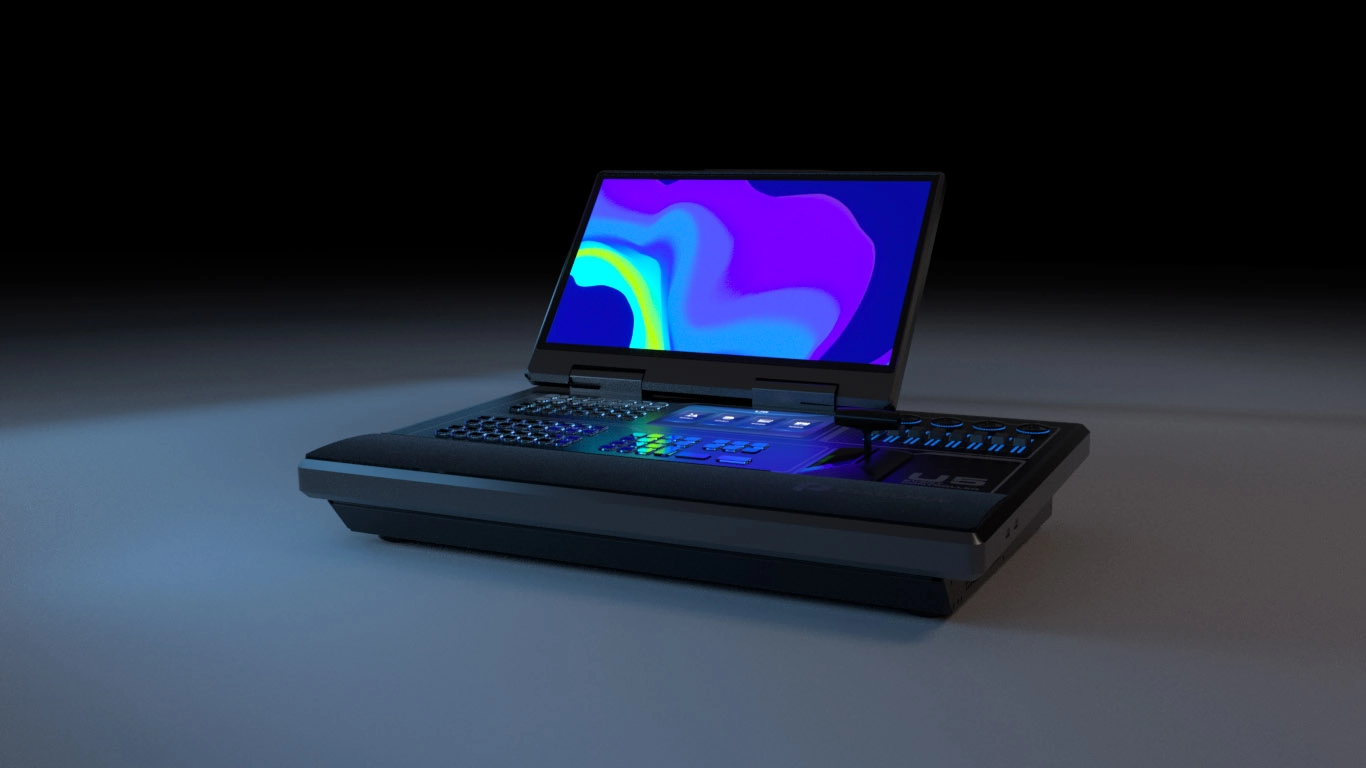
What is the Pixelhue U5?
The Pixelhue U5 is a control desk for live events. It is the surface an operator works from — 87 lit buttons, four encoders, eight faders and a T-bar, under a 21.5-inch touchscreen — and it drives your switchers and media servers over the network.
No video passes through it. Your pictures never leave the switcher, so adding a U5 changes nothing about what reaches the wall. What it changes is how quickly one person can get to the next cue.
It folds for transport, weighs 24 kg on its own, and travels at 55 kg with its case and accessories, so one person gets it in and out of your truck.
Buy one when a show has enough cues that hunting through menus costs you a take, or when one operator has to hold several machines at once.
Pixelhue U5 key features
Every button says what it does
All 87 buttons carry their own small display, so each one shows the name of whatever you assigned to it rather than a number your operator has to remember. Function names and page names appear on the button itself, and you can change the colors and styles to match how your show is laid out.
An operator taking over mid-run reads the desk instead of the paperwork.
The desk exists in software before it exists in the truck
Every physical part of the U5 — buttons, faders, encoders, the T-bar — also appears inside PixelFlow on a laptop, working the same way. You can lay out the desk in advance, save that layout as a file, and carry it to a different machine or a different console.
You program the show before the console ships, and nobody spends your load-in day assigning buttons.
It keeps time with the rest of the production
The U5 generates timecode, receives it, and converts between the three formats a production is likely to hand you. Your video cues sit on the same clock as sound and lighting instead of somebody chasing them by hand.
It also speaks MIDI, so it can trigger third-party gear or be triggered by it, and any button can be turned into a MIDI key.
Pixelhue U5 specifications
The rows to read against your own rig are the weight and the folded design, because a console travels differently from a rack box, and the control list, because it decides what this desk can actually reach.
| Screens | 21.5-inch main touchscreen and 8-inch smart touchscreen; the smaller one shows still images, timecode, device health and Multiviewer views |
|---|---|
| Controls | 87 user-programmable LCD buttons, 4 encoders, 8 faders and a high-resolution T-bar |
| Software | PixelFlow built in, with a full simulator of every button, encoder, fader and the T-bar on a control PC |
| What it controls | Several Pixelhue switchers and media servers at once on the same network and in the same project |
| Timecode | Generating, receiving and conversion; LTC, MTC and MIDI USB formats |
| Third-party control | MIDI protocol in and out, with any button assignable as a MIDI key and a global MIDI switch; KVM; PTZ camera control |
| Body | Anticorrosive aluminum, foldable, main screen readable from 45° to 125°; gas struts for maintenance access |
| Power and noise | AC 100–240V~, 6A, 50/60Hz; 240 W maximum; 40 dB |
| Size and weight | 740 × 651.4 × 431.6 mm; 24 kg net, 55 kg with accessories and flight case |
| Environment | 0°C to 50°C operating at 0–80% RH; −20°C to +60°C storage |
| In the box | Flight case, dust cover, gooseneck lamp, USB drive, two HDMI cables, Cat5e cable, USB cable, optional power cable and the paperwork |
| Certifications | CE, FCC, IC, KC, CB |
Every figure here comes from PIXELHUE’s U5 datasheet V1.4.1, the model’s own document.
What can one U5 control?
One U5 controls several Pixelhue switchers and media servers at the same time, as long as they sit on the same network and in the same project. That is the whole point of the desk: one operator, one surface, however many machines the show turned out to need.
In practice that means a P20 handling the main screens and a second machine handling something else can both be driven from the same faders, without anybody swapping laptops mid-show.
What it does not control is the wall itself. The U5 talks to the switcher; the switcher talks to your NovaStar controller; the controller drives the cabinets. Adding a console changes nothing further down that chain.
Outside the Pixelhue family it speaks MIDI, so it can fire cues on third-party gear or take cues from a lighting desk. It also carries KVM, which lets it drive a connected computer, and PTZ control for moving cameras.
Do you need a console at all?
Not for every show, and it is worth being straight about that. PixelFlow runs free on a Windows or macOS laptop and does everything a U5 does, including a working copy of every button, fader and the T-bar.
What you buy with the console is speed under pressure. A physical fader moves faster than a mouse, a lit button tells you what it does without a glance at the screen, and a T-bar is something an operator’s hand finds without looking. On a show where cues arrive faster than you can point at them, that is the difference between a clean take and a late one.
The second thing you buy is a fixed position. A laptop gets borrowed, closed, or moved; a console stays where the operator sits, with the same layout every day of the run.
Skip the console if one person runs a handful of cues from a table with time to think between them. Order one if the cue list is long, if the show runs several days with different operators, or if you are holding more than one machine at once.
U5 or U5 Pro — which one do you order?
Order the U5 unless you need more buttons in front of you than it has, in which case the U5 Pro is the same idea at a larger scale.
The two run the same software and control the same machines. What separates them is the size of the surface and what fits on the desk.
| Specification | U5 | U5 Pro |
|---|---|---|
| Main screen | 21.5-inch touchscreen | 43.8-inch ultrawide touchscreen |
| Programmable buttons | 87 | 203 |
| Encoders and faders | 4 and 8 | 4 and 8 |
| Keyboard and storage | None built in | Built-in keyboard and two drawers |
| Transport | Folds; 24 kg net, 55 kg cased | Does not fold; 46 kg net, 107 kg cased |
| Width | 740 mm | 1,129.6 mm |
| Power | 240 W | 330 W |
Order the U5 if it has to travel, or if the operating position is a table rather than a fitted desk. Folding down and weighing half as much is the whole argument.
Order the U5 Pro if the show has more cues than 87 buttons can hold, or if the console lives in one place and never moves. The extra 116 buttons and the ultrawide screen are what you are paying for; 52 kg more on the truck is what it costs.
U5 datasheet, manual and PixelFlow
The datasheet is the U5’s own document and the source of every figure on this page. The manual is a family book covering the consoles alongside four switchers, so search it by model name rather than reading it through.
PixelFlow itself is worth downloading before you decide anything. It is free for Windows and macOS, and its simulator lets you lay out the desk and run a rehearsal without the console in the room.
Pixelhue U5 FAQ
Does video pass through the U5?
No. It is a control surface only. Your pictures stay on the switcher and go to the wall exactly as they did before, so adding a console cannot change what the audience sees.
Can one U5 control more than one machine?
Yes, several switchers and media servers at once, as long as they are on the same network and in the same project. That is the main reason to have one rather than a laptop per machine.
Do I still need a laptop if I have a U5?
No, PixelFlow is built into the console. A laptop is still useful for building the show in advance, and a layout you make on it transfers to the console as a file.
Can I try the layout before the console arrives?
Yes. PixelFlow includes a working copy of every button, encoder, fader and the T-bar, so you can lay out the desk and rehearse the show on a laptop, then carry the layout across as a file.
Will it work with a lighting or sound desk?
Yes, over MIDI. The U5 can trigger third-party gear or take triggers from it, any button can be assigned as a MIDI key, and it handles LTC, MTC and MIDI USB timecode.
Does it fit in a case for touring?
Yes, and a flight case is included. It folds for transport, weighs 24 kg on its own and 55 kg packed with its accessories and case.
What warranty do I get on the U5?
Three years of serial-tracked manufacturer coverage, supplied through our authorized US channel and shipped from the USA.
How do I get a price on the U5?
Send us the model and the quantity and project pricing comes back within one business day. Tell us which switchers it will be driving and we will quote the pair together.
Is there volume pricing on more than one U5?
Yes. Give us the count and the pricing moves off the single-unit figure, and a fleet going to several crews is handled as one order.
Can we buy on a purchase order or NET terms?
Yes, for approved buyers. Purchase orders and NET terms, Net 30 included, may be available to schools, government buyers, venues and established integrators.
Reviews
There are no reviews yet.