
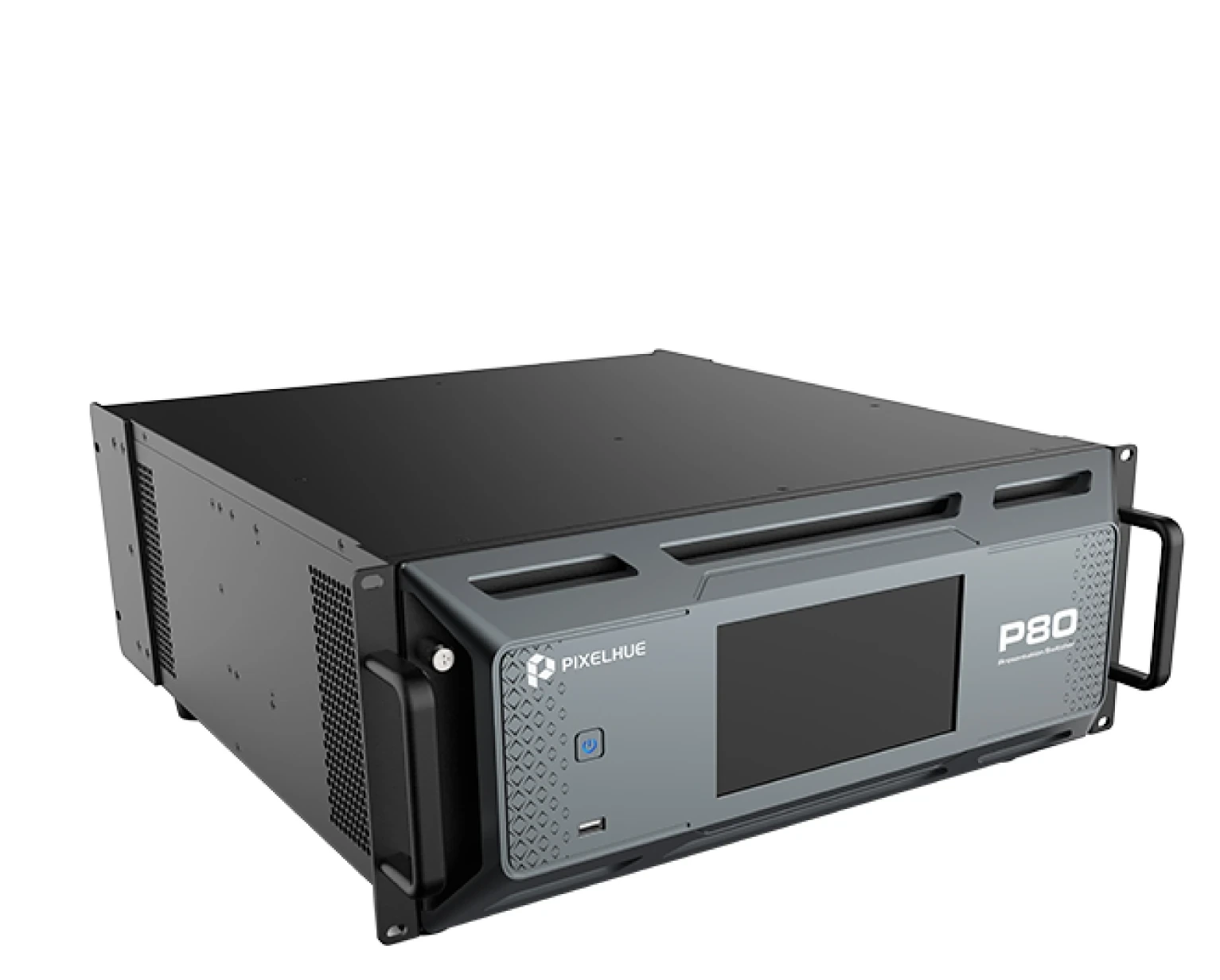
What is the Pixelhue P80?
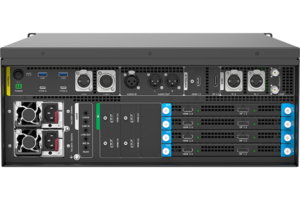
The Pixelhue P80 is a 4K presentation switcher that runs up to eight large screens from one box, and keeps a separate set of sockets for the recording and monitoring feeds so those never come out of your screen count. It takes four rack units.
It suits a show that wants more pictures than one switcher usually has room for: the main screen, the panels either side of the stage, a monitor for the producer, and a clean feed for whoever is recording — all at the same time, from one machine.
It does not light the wall itself. The P80 builds the picture; the NovaStar controller you already own takes that picture and drives the cabinets, exactly as it does today.
Buy one when the show has outgrown four screens, or when the extra feeds around the edges have started eating outputs you wanted for the audience.
Pixelhue P80 key features
One power supply can die without the show noticing
There are two, and the second does nothing until the first stops. The same thinking runs through the rest of the box: any source can have a standby source behind it, any screen can have a standby socket, and the whole machine can have a standby machine.
Two people can watch different things
The screen an operator uses to see every source at once is called a multiviewer, and the P80 drives two of them. Your operator and your producer each get their own, laid out the way they want it, instead of leaning over the same monitor.
Content that was graded for a different screen still works
A client hands you a master made for a bright screen and the wall in the venue is set up for a normal one, or the other way round. The P80 converts between the three formats in use today, so that stops being something you fix in the edit.
Pixelhue P80 specifications
Two rows are worth reading against your own rig before anything else: the two output counts, because four main screens plus four extras is a different rack plan from four screens in total, and the power figure, because 450 W changes what else goes on the circuit.
| Fixed inputs | 12× 4K: 4× HDMI 2.0, 4× HDMI 2.0/DP 1.2 pairs where one connector carries a source at a time, and 4× 12G-SDI |
|---|---|
| Swappable input card | One slot taking the P_HDMI2.0_DP1.2_OPT link card, or the Q8 HDMI/DP/SDI, 8× HDMI 2.0, or ST 2110 input cards |
| Main outputs | 8× HDMI 2.0 in four pairs; copy mode gives 4× 4K, split mode gives 8× dual-link; maximum width 8192 pixels, maximum height 7680 pixels |
| Flex outputs | 4× HDMI 2.0, configurable as up to 4 independent 4K screens or edge-blended widescreens |
| Matrix outputs | 4× 12G-SDI, fed from any input source, either Multiviewer, the program or any flex output |
| Multiviewer outputs | 2× HDMI 2.0; independent mode gives 2× dual-link, copy mode gives 1× 4K plus a copy |
| Fiber outputs | 8× 10G SFP copying the HDMI outputs, supporting 4× 4K |
| Layers and presets | 8× 4K mixing main layers and 4× 4K mixing PIP layers; 256 presets and 256 layer presets |
| Dynamic range | Conversion between SDR, HDR10 and HLG; 12-bit, 10-bit and 8-bit sources |
| Audio | Dante on two Gigabit ports with dual redundancy, AES67 compliant, 64×64 channels at 48 kHz; de-embedding and re-embedding on every input and output |
| Backup | Input source hot-backup, output copying, device backup and dual power supply redundancy |
| Sync and control | Genlock in and out with loop-through and tri-level sync; 7-inch front touchscreen; U5, U5 Pro and U5 MINI; PixelFlow; Stream Deck |
| Power | 450 W maximum across the two supplies |
| Chassis | 4RU, 23.0 kg net, with a cleanable dust filter |
| Certifications | FCC, IC, CE, RoHS, CB, KC, PSE |
Every figure here comes from PIXELHUE’s P80 specification V1.3.0, the model’s own document rather than a family datasheet.
Where does each of your screens plug in?
Eight screens, all at full 4K. Four of them are your main screens and four are extras the P80 keeps on their own sockets, and either group can run as separate screens or be joined into one wide picture.
The eight main sockets work in pairs, and you choose what each pair does. Set a pair to mirror and you get one screen with a second socket carrying the same picture as a spare. Set it to share and the two sockets split one larger picture between them, which is how you drive a screen too wide for a single cable.
The four SDI sockets are the ones that change how you rig a show. They are not copies of anything: you pick what leaves each one. Send a camera, send what the operator is watching, send the live programme, send one of the extra screens. Your recorder, your streaming encoder and your producer’s monitor all get fed, and none of them costs you a screen.
| Sockets | How many | What they are for |
|---|---|---|
| Main, HDMI 2.0 | 8, in 4 pairs | Up to 4 screens at 4K, or 8 sockets sharing 4 wider pictures between them |
| Extra screens, HDMI 2.0 | 4 | Up to 4 more screens at 4K, separate or blended into one wide picture |
| Feeds, 12G-SDI | 4 | Anything on the box sent anywhere — recorder, stream, monitor |
| Operator views, HDMI 2.0 | 2 | Two people watching different things, each with their own layout |
| Fiber, 10G SFP | 8 | The same pictures sent long-distance on fiber, up to 4 of them at 4K |
How much you can stack on top of each other is counted in full-size pictures here: eight on the main screens, plus four floating windows on the extras. The P20 counts the same thing in half-size pictures, which is the real gap between the two boxes.
If a socket fails part-way through a build, you move its share of the screen onto another one in software. Up to 256 saved looks sit on the box waiting for you to call them back.
Which input card should you order with it?
You should order the input card that matches how your sources arrive, and there are four to choose from. Twelve source connections are fixed on the box already, which covers most shows on its own; the card fills one extra slot above them.
Picking the wrong one does not break anything, but you will have paid for connections you cannot use.
| Card | What it adds | Order it when |
|---|---|---|
| Link card | 4 more source connections, plus two optical ports for joining a second P80 | One P80 will not be enough and you would rather share sources than patch them twice |
| Mixed HDMI and DP card | 4× HDMI 2.0 and 4× DP 1.2 | Your sources arrive on a mix of connectors |
| 8× HDMI card | 8× HDMI 2.0 | Everything arrives on HDMI and you just need more of it |
| Video-over-IP card | Two 100G optical ports on the ST 2110 standard, plus 2× HDMI 2.1 or DP 1.4 | The venue sends video over its network rather than down cables |
The link card is the one worth a second look. It lets two P80s work as a pair: each machine shares eight of its sources with the other, so between them they draw on sixteen instead of keeping two separate lists.
Two conditions come with it. Both machines have to be set up in the same project and carry the same version of the card. You can plug and unplug the link with the power on.
Three of the four cards are the same ones the Q8 uses, so if you already own a Q8 the spares cover both boxes.
Does the P80 handle your show audio?
Yes, and it is built in rather than sold as a separate model. The P80 puts sound onto a network using Dante, the standard most audio desks already speak, with 64 channels going out and 64 coming back.
Sound usually arrives buried inside your video sources. The P80 pulls it out, hands it to the sound desk, and puts the finished mix back onto whatever leaves the box — so your stream and your recording go out with audio already on them.
Two network ports carry it, one of them standing by in case the other stops.
The P20 only does any of this if you order the P20-DS version instead, and the P10 does not do it at all. If your show runs sound through the switcher, that usually settles which model you buy.
P80 or Q8 — which one do you order?
Order the P80 if your show fits inside a fixed box, and the Q8 if it has already outgrown one.
On the P80 the connections are built in. You get what is on the back plus whatever goes in that one slot, and the box stays small: 4RU, 23 kg, 450 W. The limit is real, though. When a bigger show turns up, a second P80 is another machine to run rather than more room in the same one, unless you join a pair with the link card.
On the Q8 almost nothing is built in. Inputs and outputs arrive on cards you choose — up to six input cards and four output cards — so you buy the shape of the show and change it later. That costs 7RU, 42.6 kg and up to 1,400 W, which is roughly three times the P80 on all three counts.
Order the P80 if four main screens plus four extras cover the design and you want the truck and the power circuit to stay small. Order the Q8 if you are past twenty sources, need 8K, or expect the requirement to change between shows.
P80 datasheet, manual and PixelFlow
Take your numbers from the P80 specification rather than the datasheet if the two disagree. It is the model’s own document and it is updated more often; the manual is a family book covering four switchers and two control desks together, so search it by model name.
Read the release notes before you run a firmware update. The P80 has gained card options, two-machine linking and new effects across separate versions rather than in one release, so what your box can do depends on what is on it.
Pixelhue P80 FAQ
How many screens can one P80 run?
Eight at 4K: four main screens and four extras on their own sockets. Either group can run as separate screens or be joined into one wide picture.
Can I feed a recorder without giving up a screen?
Yes. That is what the four SDI sockets are for. You choose what leaves each one — a camera, the live programme, what the operator is watching, or one of the extra screens — so recording and streaming feeds never come out of your screen count.
Can two P80 units work as one?
Yes, if both have the link card fitted. Each machine shares eight of its sources with the other, giving sixteen between them. Both have to be in the same project with the same version of the card, and the link can be plugged in with the power on.
Do I still need a NovaStar controller?
Yes, for an LED wall. The P80 builds the picture but cannot address the cards inside your cabinets, so a NovaStar controller or video processor goes between them. A normal screen or a projector takes a cable straight from the switcher.
Is the audio networking an option or is it included?
Included. Sixty-four channels out and sixty-four back, over two network ports so one can fail, with sound stripped from your sources and put back on whatever leaves the box. There is no separate part number for it.
Which control desk works with it?
The U5, the U5 Pro or the U5 MINI. The 7-inch touchscreen on the front runs the box on its own, PixelFlow runs it from a laptop, and Stream Deck works as a third-party surface.
What warranty do I get on the P80?
Three years of serial-tracked manufacturer coverage, supplied through our authorized US channel and shipped from the USA.
How do I get a price on the P80?
Send us the model and the quantity and project pricing comes back within one business day. Name the input card you want in the same request, because it is a separate line and it changes the total.
Is there volume pricing on more than one P80?
Yes. Give us the count and the pricing moves off the single-unit figure, and a linked pair is quoted as one system rather than two boxes.
Can we buy on a purchase order or NET terms?
Yes, for approved buyers. Purchase orders and NET terms, Net 30 included, may be available to schools, government buyers, venues and established integrators.
Reviews
There are no reviews yet.