
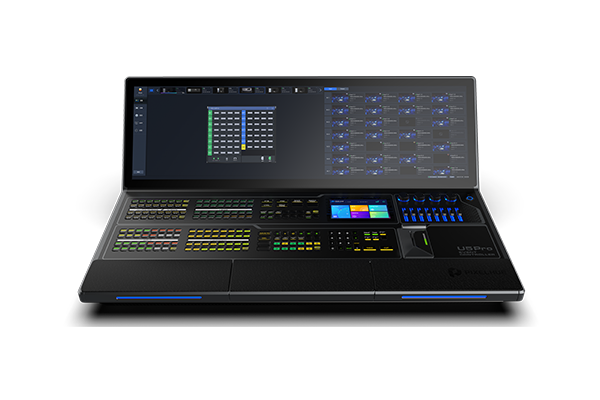
What is the Pixelhue U5 Pro?
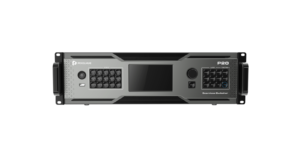
The Pixelhue U5 Pro is the large control desk in the Pixelhue range: 203 lit buttons, four encoders, eight faders and a T-bar under a 43.8-inch ultrawide touchscreen, with a keyboard and two drawers built into the body. It drives your switchers and your media servers over the network.
Nothing you send to the wall goes through this desk. It talks to the switcher over a network cable and the switcher does the rest, so a console cannot cause a black screen, a dropped frame or a colour shift — the worst it can do is be slow to reach.
It is 1.13 m wide, weighs 46 kg, and does not fold. Plan on installing it rather than carrying it, because that decides where you can put it more than anything else on this page.
Buy one if your room runs shows regularly from the same position, or if your cue list will not fit on a smaller surface.
Pixelhue U5 Pro key features
One screen instead of three
The 43.8-inch screen is wide enough to hold several parts of the software side by side, so your layer list, your source list and the preview do not have to take turns. A second, smaller screen above the buttons carries still images, timecode, machine health and your operator’s view of every source.
You click less between seeing something and changing it, which is most of what makes a long show tiring.
The keyboard is part of the desk
A full keyboard is built into the body and two drawers sit under it. You name a hundred presets, type a screen size or rename your sources in place, without a laptop balanced on the corner of the desk or a keyboard sliding around during your show.
The layout moves between desks as a file
PixelFlow carries a working copy of this desk on a laptop, down to the T-bar. Whatever you lay out there saves as a configuration file, and that file loads onto this console, onto a smaller one, or back onto the laptop.
A house desk and a touring desk end up with the same layout, so nobody has to re-learn where things are between venues, and a substitute operator does not spend the first hour hunting.
Pixelhue U5 Pro specifications
Read the width and the weight against your own room first. At 1.13 m across and 46 kg this console decides the shape of your operating position rather than fitting into whatever you have.
| Screens | 43.8-inch ultrawide main touchscreen and 8-inch smart touchscreen; the smaller one shows still images, timecode, device health and Multiviewer views |
|---|---|
| Controls | 203 user-programmable LCD buttons, 4 encoders, 8 faders and a high-resolution T-bar |
| Built in | Full keyboard and two storage drawers in the body; two gooseneck lamps supplied |
| Software | PixelFlow built in, with a full simulator of every button, encoder, fader and the T-bar on a control PC, and layouts saved as transferable files |
| What it controls | Several Pixelhue switchers and media servers at once on the same network and in the same project |
| Timecode | Generating, receiving and conversion; LTC, MTC and MIDI USB formats |
| Third-party control | MIDI protocol in and out, with any button assignable as a MIDI key and a global MIDI switch; KVM; PTZ camera control |
| Body | Anticorrosive aluminum; designed for disassembly and maintenance access; does not fold |
| Power and noise | AC 100–240V~, 6A, 50/60Hz; 330 W maximum; 40 dB |
| Size and weight | 1,129.6 × 695.4 × 422.7 mm; 46 kg net, 107 kg with accessories and flight case |
| Environment | 0°C to 50°C operating at 0–80% RH; −20°C to +60°C storage |
| In the box | Flight case, dust cover, two gooseneck lamps, USB drive, two HDMI cables, Cat5e cable, USB cable, two optional power cables and the paperwork |
| Certifications | CE, FCC, IC |
Every figure here comes from PIXELHUE’s U5 Pro datasheet V1.4.1, the model’s own document.
Will it fit your operating position?
Measure before you order, because a U5 Pro fits a position rather than the other way round. It is 1,129.6 mm wide and 695.4 mm deep with the handles and rack ears on, and it does not fold.
Two numbers usually decide whether it will fit. The first is the width of the desk or riser it sits on, which has to clear 1.13 m with room for an operator’s hands either side. The second is how it gets into the room: 107 kg in its case, so check the doorway, the lift and the floor before the order goes in rather than on delivery day.
Once it is in, it stays. Unlike the U5, this console does not fold down at the end of a show, so a rig that has to strike every night is the wrong home for it. Venues, broadcast galleries and permanent production offices are the right one. Getting that wrong is an expensive spare desk rather than a fixable mistake.
Power and heat are the easy part for you. It draws 330 W at most and runs at 40 dB, so you can leave it in the room with the crew without anybody hearing it.
U5 Pro or U5 — which one do you order?
Order the U5 Pro if the console stays in one place, and the U5 if it travels.
| Specification | U5 Pro | U5 |
|---|---|---|
| Main screen | 43.8-inch ultrawide | 21.5-inch |
| Programmable buttons | 203 | 87 |
| Encoders and faders | 4 and 8 | 4 and 8 |
| Keyboard and drawers | Built in | None |
| Folds for transport | No | Yes, 45° to 125° |
| Width | 1,129.6 mm | 740 mm |
| Weight | 46 kg net, 107 kg cased | 24 kg net, 55 kg cased |
| Power | 330 W | 240 W |
What separates them for you is the surface, not the capability. Both hold the same encoders and faders, run the same software, control the same machines and handle the same timecode and MIDI.
Order the U5 Pro if the cue list is long enough to need more than 87 buttons, or the room has a fitted position waiting for it. Order the U5 if it goes in a truck. The smaller desk folds, weighs half as much cased, and does everything else the same.
U5 Pro datasheet, manual and PixelFlow
Two documents matter here and they are very different sizes. The short one is this model’s own datasheet, which is where every number above came from. The long one covers both consoles and four switchers in a single volume, so go to it with a model name and a search box rather than a free evening.
Download PixelFlow before you commit to a size. It is free for Windows and macOS, and its simulator lets you build the layout your show needs and count how many buttons you actually reach for.
Pixelhue U5 Pro FAQ
Does the U5 Pro fold for transport?
No, and that is the main practical difference from the U5. It is 1.13 m wide and 46 kg on its own, 107 kg in its case, so plan an installed position rather than a nightly load-in.
Does video pass through it?
No, only a network cable connects it to anything. That is worth knowing when you are weighing the risk of adding a desk to a working rig: it cannot break a picture that already works.
Can it do anything the U5 cannot?
Only in the size of the surface. Both consoles run the same software, control the same machines, carry the same four encoders and eight faders, and handle the same timecode and MIDI. The U5 Pro gives you 203 buttons instead of 87, a wider screen, and a keyboard and drawers built in.
Can one U5 Pro control several machines?
Yes. Put them on the same network, open them in one project, and the desk holds all of them — which is what stops an operator swapping laptops halfway through a show.
Can I build the show before the console arrives?
Yes, and it is the cheapest way to avoid a rework. Build the layout in PixelFlow on a laptop, count how many buttons the show really needs, and carry the file across when the desk lands.
Will it work with a lighting or sound desk?
Yes, over MIDI, in either direction, and it handles LTC, MTC and MIDI USB timecode. Any button can also be assigned as a MIDI key.
What warranty do I get on the U5 Pro?
Three years of serial-tracked manufacturer coverage, supplied through our authorized US channel and shipped from the USA.
How do I get a price on the U5 Pro?
Send us the model and the quantity and project pricing comes back within one business day. Tell us which switchers it will be driving and we will quote them together.
Is there volume pricing on more than one U5 Pro?
Yes. Give us the count and the pricing moves off the single-unit figure, and consoles going into several rooms are handled as one order.
Can we buy on a purchase order or NET terms?
Yes, for approved buyers. Purchase orders and NET terms, Net 30 included, may be available to schools, government buyers, venues and established integrators.
Reviews
There are no reviews yet.