
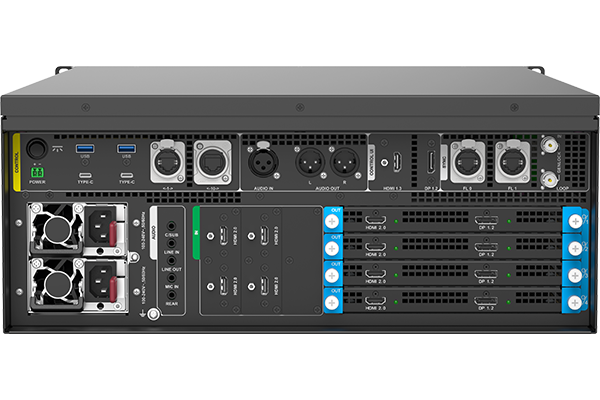
What is the Pixelhue X400?
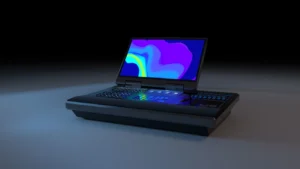
The Pixelhue X400 is a media server: a machine that stores your finished video, arranges it into programs and plays it out to the screens. It is not a switcher — nothing live gets cut on it. It plays what you loaded onto it, on cue and on time.
One X400 drives up to four of your screens at 4K or sixteen at 2K, and it decodes 8K video in hardware, so your ultra-wide master plays as one file rather than as four you have to keep lined up.
It does not light the wall itself. The X400 hands its picture to whatever NovaStar controller is already driving your cabinets, and that part of the rig does not change.
Buy one if your show runs from finished content rather than live sources, or if your content is bigger than a laptop and a playback app can carry safely.
Pixelhue X400 key features
Two of everything that can stop a show
There are two drives, each with its own copy of the operating system, and two power supplies. If one fails mid-run, the machine already has the other in place rather than leaving you to find a spare in a flight case.
On a month-long installation that is the difference between a phone call and you driving back to site.
You can build the next program while this one plays
The software keeps editing separate from playing, so you can lay out tomorrow’s program, adjust a slice or swap a file while today’s is still running on the wall. Nothing you touch reaches the screen until you send it.
More machines stay in step with each other
When one server is not enough for your wall, more of them cascade and hold sync through a shared clock, so a picture spread across several machines does not drift apart on you. Frame sync keeps the output smooth rather than nearly-together.
Pixelhue X400 specifications
Read the playback row against your own content first. Everything else follows from whether your show is one big file, four medium ones or sixteen small ones.
| Playback | One 8K×4K@60fps video, or 4× 4K×2K@60fps, or 16× 2K×1K@30fps; unlimited layers and programs |
|---|---|
| Outputs | 4× 4K or 16× 2K; 8192×1080@60Hz, 4096×2160@60Hz or 2048×1152@60Hz; 4:4:4 10-bit |
| Inputs | Up to 4× 4K live inputs at 4096×2160@60Hz, plus network, screen-share and web-page sources |
| Card slots | 2 input slots and 4 output slots, plus a sync card; each card type has its designated slot |
| Storage and OS | Two high-speed drives, each carrying its own operating system |
| Media formats | H.263, H.264, H.265, ProRes, VP6 to VP9, HAP and HAP-Alpha, DVX, WMV, VC1, AV1, AVS, MPEG1 to MPEG4, MJPEG, plus JPEG2000, TIFF, BMP, GIF, PNG and PSD stills |
| Audio | XLR in and out, plus 3.5 mm in and out; mp3, aac, flac, amr, ape, wav, wma and ogg |
| Sync | Genlock in and loop, frame sync card, and cascading across more machines on one clock |
| Monitoring | A separate connector for the operator’s screen, plus a front-panel display for running status and fault alarms |
| Control | Pilot MS3 Pro built in; remote and central control over the network; 2 USB on the front and 4 on the rear |
| Network | 10 Gigabit Ethernet |
| Power and noise | 100–240V~, 50/60Hz, dual supplies; 800 W maximum; 51 dB |
| Environment | 0°C to 40°C operating at 0–80% RH; −10°C to +60°C storage |
| Chassis | 482.6 × 694.7 × 183.5 mm, 4U rack mountable, with an industrial ruggedized build; 54.8 kg fully packed with case and accessories |
| Certifications | CB, CE, EAC, FCC, IC, KC, RCM, UKCA, PSE |
Every figure here comes from PIXELHUE’s X400 (G1) datasheet V1.1, the model’s own document.
How much can one X400 play at once?
How much it plays depends on how big the pictures are, and the three cases are worth knowing before you cut the content. One 8K picture, four 4K ones, or sixteen at 2K.
| If your content is | One X400 plays | Typical use |
|---|---|---|
| One very large master | 1 video at 8K×4K, 60 frames a second | A single ultra-wide wall driven as one image |
| Several large files | 4 videos at 4K×2K, 60 frames a second | A main screen and three others, each with its own content |
| Many smaller files | 16 videos at 2K×1K, 30 frames a second | A set of scenic screens or a room full of separate displays |
The layer count is not a limit for you here. Stack as many pictures and build as many programs as your job needs; what runs out first is the decoding capacity in the table above, not a number in the software.
Live sources sit alongside your files. Up to four 4K feeds come in on cards, and the software also takes network streams, a shared computer screen and a web page, so your live dashboard sits beside the played-out content without a second machine.
Which cards go in which slots?
Cards go only in the slots they were designed for, and this is the one thing to get right before anybody opens the box. PIXELHUE is explicit about it: a card fitted to the wrong slot causes device failure, not a warning message.
There are two input slots, four output slots and a place for the sync card. What you put in them decides how your sources arrive and how many of your screens get fed.
| Card | What it gives you | Order it when |
|---|---|---|
| 4K HDMI input card | 4 live sources at up to 3840×2160@60Hz, all four at once | Cameras, players or laptops arrive on HDMI |
| 4K SDI input card | 4 live sources on 12G-SDI, each up to 4096×2160@60Hz | The production runs on SDI and the cable is already there |
| 4K output card | One large screen, on two connectors carrying the same picture | A big screen, or one fed on whichever connector the controller has |
| 2K output card | 4 smaller screens, or 4 sockets joined into one 2×2 picture | Scenic screens, monitors or a set of separate displays |
| Sync card | Two clock inputs and two loop-through clock connectors | More than one machine has to stay in step |
Order the cards with the machine rather than after it. A part-populated X400 is not a smaller X400 — it is a machine that cannot reach some of the screens on your own plan.
What the X400 plugs into
Your X400 needs a NovaStar controller or video processor between it and the LED cabinets, because a media server has no way to address the cards inside them. Normal screens and projectors take a cable straight from the server.
Match the picture size to the controller before the connector. A screen the X400 sends out at 4K carries roughly 8.8 million pixels, and not every controller loads that much on its own; the larger units do, the smaller ones need the wall split between two of them.
Our controller calculator turns a pixel count into the list of controllers we stock that carry it, which is usually a faster way to settle this than reading datasheets.
On the control side the X400 takes instructions over the network from a production system, and a U5 or U5 Pro console can hold it alongside your switchers so one operator runs both.
Do you need a media server or a switcher?
You need a media server if the show is content you already made, and a switcher if it is sources arriving live. Most large shows turn out to need both, but they are not alternatives and buying the wrong one is an expensive mistake.
The X400 plays. It stores finished video, arranges it into programs, and puts it on screen on cue. It handles pictures far larger than a switcher will take, holds as many layers as the design needs, and runs unattended for as long as the installation lasts.
A switcher cuts. A P20 or P80 takes cameras, laptops and players that are producing pictures right now, rehearses the next look off air and takes it live. It does not store your content.
In a typical large show your X400 is one of the sources feeding the switcher, and the switcher decides when its content reaches the wall. If your show has no live sources at all, the server drives your controllers directly and the switcher is an expense you can drop.
X400 datasheet, software manual and Pilot MS3 Pro
The datasheet covers the machine and the cards. The playback software has its own manual, and that is the one to read before the show is built, because how programs, slices and the timeline work is a software question rather than a hardware one.
There is also a control protocol document, which matters if a production system is going to fire cues at the server rather than an operator doing it by hand.
Pixelhue X400 FAQ
How many screens can one X400 drive?
Four at 4K, or sixteen at 2K, depending on which output cards are fitted. Both figures assume a fully populated machine, so order the cards with it.
Can it really play 8K?
Yes, one 8K×4K video at 60 frames a second, decoded in hardware. That is one file rather than four that have to stay lined up, which is the reason to choose a server for a very wide wall.
Is there a limit on layers?
No. Layers and programs are unlimited in the software. What runs out is decoding capacity, so plan against the playback figures rather than a layer count.
What happens if a drive fails during a run?
There is a second one with its own copy of the operating system, and a second power supply beside it. That is the point of the design: an installation that runs for months does not depend on one of anything.
Does the X400 replace a switcher?
Only if your show has no live sources. A server plays content you made earlier; a switcher cuts between cameras and laptops producing pictures right now. Large shows usually run both, with the server feeding the switcher.
Does it need a NovaStar controller?
Yes, for an LED wall. The X400 produces a picture but cannot address the cards in your cabinets, so a NovaStar controller sits between them. Normal screens and projectors connect directly.
What warranty do I get on the X400?
Three years of serial-tracked manufacturer coverage, supplied through our authorized US channel and shipped from the USA.
How do I get a price on the X400?
Send us your screen count and how your sources arrive, and project pricing comes back within one business day. The card list is part of the quote, so tell us both.
Is there volume pricing on more than one X400?
Yes. Give us the count and the pricing moves off the single-unit figure, and machines that will be cascaded together are quoted as one system.
Can we buy on a purchase order or NET terms?
Yes, for approved buyers. Purchase orders and NET terms, Net 30 included, may be available to schools, government buyers, venues and established integrators.
Reviews
There are no reviews yet.