
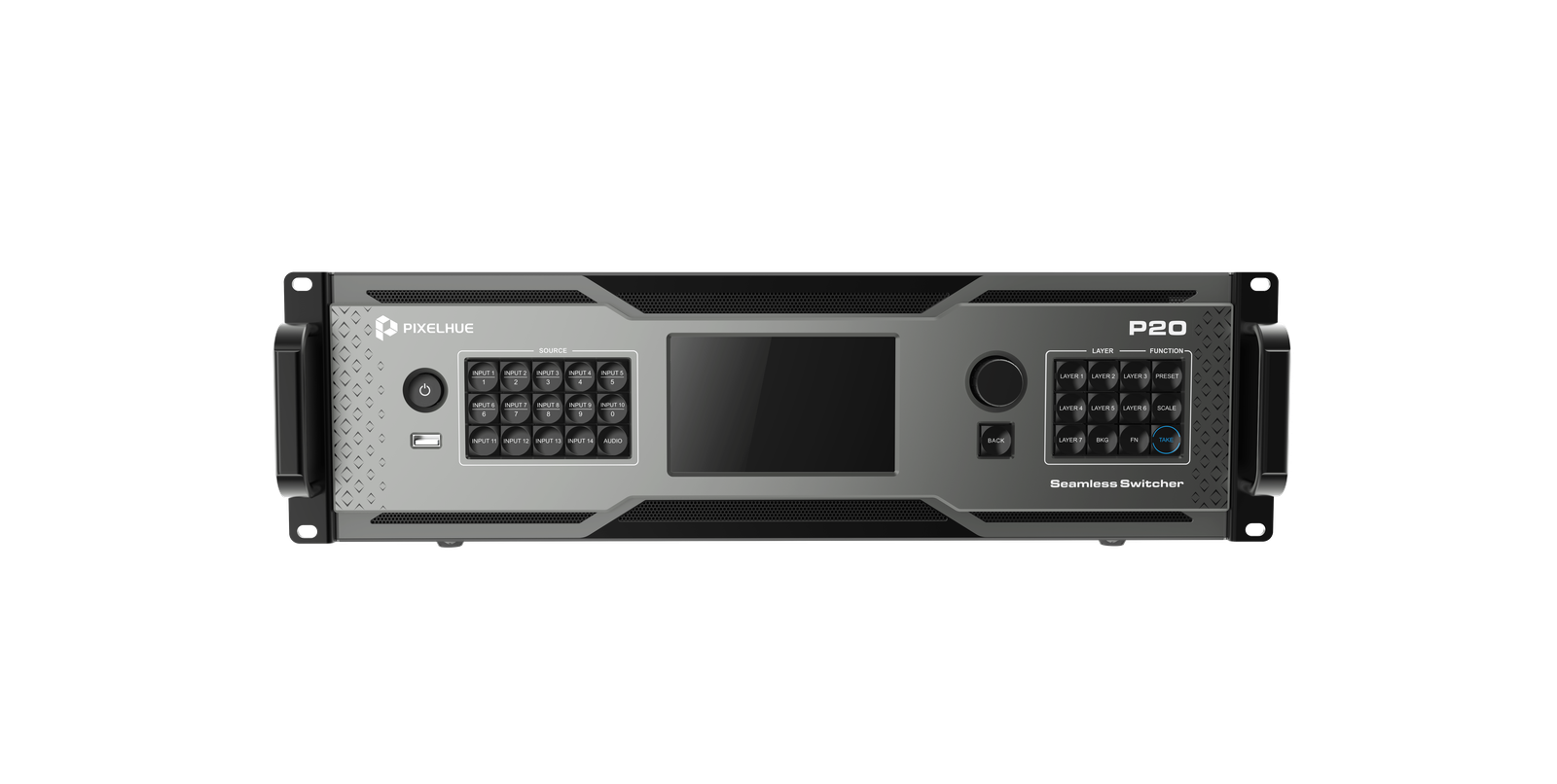
What is the Pixelhue P20?
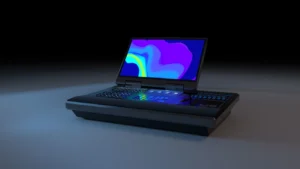
The Pixelhue P20 is a 4K presentation switcher that takes up to twelve sources, arranges them into layers on the screens you define, and cuts from a rehearsed picture to the live one. It takes three rack units.
You build the next look off air, on a screen only your operator sees, then take it live when you are ready. One main screen with two side panels, ten or twelve sources, one operator on a T-bar — that is the shape of show it was built for.
It does not drive your cabinets. The P20 finishes the picture and hands it to whatever NovaStar controller is already on the wall, and that controller carries on doing exactly what it does today.
Buy one when your show needs two independent 4K screens with a preview behind them, or twelve sources patched at once.
Pixelhue P20 key features
One box for two different weeks
Your Monday general session wants one large picture and your Tuesday breakouts want four smaller ones, and a box sized for one of those weeks is usually the wrong shape for the other. The eight output sockets switch between full-size and half-size pictures from the front panel menu. Changing the plot is a menu, not a rack visit.
A laptop can die without the room seeing it
Pair any input with a backup source and the P20 changes over on its own the moment the primary loses signal, or you throw it by hand from the panel. A presenter’s machine dropping out mid-keynote never reaches the screen as a black frame.
A dead output port does not cost you the screen
If an output connector fails inside a mosaic, you hand that section of the screen to another connector in software. You are re-patching one lead rather than re-measuring the whole wall on show day.
Pixelhue P20 specifications
You are checking three things against this table: how many sources you can patch, how much rack you give up, and whether the show fits inside one box.
| Video inputs | 12× 4K: 4× 12G-SDI with loop output, and 8× DP 1.2/HDMI 2.0 where only one connector in a pair carries a source at a time |
|---|---|
| Input handling | 8-bit, 10-bit and 12-bit sources; up to 4096×2160@60Hz or 8192×1080@60Hz; up to 240 Hz; HDR on the HDMI 2.0 connectors only; SDI deinterlacing |
| Main outputs | 8× HDMI 2.0, capacity switchable between 4K and dual-link; maximum width 8192 pixels, maximum height 7680 pixels |
| Fiber outputs | 8× 10G OPT copying the HDMI outputs; up to 10 km on single-mode fiber |
| AUX and Multiviewer | 4× HDMI 1.3 AUX at 1920×1080@60Hz by default and 2048×1152@60Hz maximum; 1× HDMI 1.3 Multiviewer at 1920×1080@60Hz |
| Layers | 12 dual-link as 2 MAIN plus 10 PIP, or 8 dual-link as 4 MAIN plus 4 PIP; every layer can cross output connectors |
| Presets | 128, complete and relative, loaded to preview or program |
| Processing | 4:4:4 10-bit; BT.601, BT.709, BT.2020 and DCI-P3; conversion between SDR, HDR10 and HLG; smart, luma and chroma key |
| Screen tools | Edge blending, LCD bezel compensation, Cut & Fill, virtual pixel configuration, custom test patterns |
| Sync and control | Genlock in with loop; 5-inch front LCD; U5 and U5 Pro; PixelFlow; Stream Deck with Companion built in |
| Network | 2× Gigabit control ports, one primary and one backup, sharing a single IP address |
| Audio | 2× line in and 2× line out on 3.5 mm at 48 kHz; PIXELHUE lists the audio function as a future update |
| Power and noise | 100–240V~, 50/60Hz; 140 W maximum; 45.6 dB(A) typical at 25°C |
| Environment | 0°C to 50°C operating at 0–80% RH; −20°C to +60°C storage; non-condensing |
| Chassis | 482.6 × 501.0 × 139.0 mm, 3RU, 10.2 kg net; four M5×12 screws into a rack rated for 41.0 kg |
| Certifications | FCC, IC, CE, RoHS, KC, CB |
Twelve inputs and no card slots: your source count is fixed the day the P20 arrives.
How many screens can one P20 run?
Two at 4K if you want a preview, four at 4K if you give the preview up, and four at dual-link either way. Eight connectors on the back, and never eight pictures.
In 4K switcher mode connectors 1 and 5 are your primaries and each takes its own resolution. Connectors 2, 3 and 4 copy connector 1, and 6, 7 and 8 copy connector 5.
There is a second mode that promotes four sockets instead of two, so you get four screens. What you give up is the rehearsal screen: a saved look loads straight to the live output, and you cannot turn that off. Whatever you are building, the room is already watching it.
Your resolutions come in pairs. Connectors 1 and 3 share one and 5 and 7 share another, so two screens at 3840×2160 alongside two at 2560×1440 is not a layout you can build on this box. You want those pairs settled before your plot goes out, because changing them later moves every screen on the switcher.
Dual-link capacity gives you four primaries in either mode, on the same pairing rule.
| Mode and capacity | Primary connectors | What the rest do | Independent pictures |
|---|---|---|---|
| 4K, switcher mode | 1 and 5 | 2, 3 and 4 copy connector 1; 6, 7 and 8 copy connector 5 | 2, each set to its own resolution |
| 4K, PGM only mode | 1, 3, 5 and 7 | 2, 4, 6 and 8 copy them in order | 4, with 1 tied to 3 and 5 tied to 7 on resolution |
| Dual-link, either mode | 1, 3, 5 and 7 | 2, 4, 6 and 8 copy them in order | 4, on the same pairing rule |
Those copy connectors are redundancy you have already paid for rather than extra screens. Every primary has a spare port carrying the same picture, so a cable that dies at the connector costs you a move to the socket beside it and nothing else.
What you put on those screens comes out of a layer budget you can re-shape. Twelve dual-link layers arrive as two MAIN plus ten PIP, or as eight in a four-and-four split, so an open on a full-frame roll and a close on six confidence windows can each have the arrangement they want. Four big pictures costs you six small ones.
If your design needs more than four independent 4K screens, you want a P80 or a Q8 rather than a second P20 — two P20s give you two sets of presets to run, not one bigger show.
What the P20 plugs into
Your P20 needs something between it and the LED cabinets, because it cannot address a receiving card itself. That job belongs to a NovaStar controller or video processor. LCD screens and projectors are the exception — those take HDMI straight off the switcher.
What the eight OPT ports buy you is distance. Up to 10 km on single-mode fiber, straight into that controller with nothing in between, whenever your control position sits further from the wall than copper will reach.
How many fibers a picture costs you depends on the size you set. At full 4K one picture travels as two halves, so it uses two of the eight ports — one carries the left of the image, the next carries the right. At half size one port carries the whole picture and the port beside it holds a duplicate.
| Capacity and mode | What the eight ports carry | Unique pictures on fiber | Fibers per picture |
|---|---|---|---|
| 4K, switcher mode | OPT 1–2 and OPT 3–4 both split HDMI 1; OPT 5–6 and OPT 7–8 both split HDMI 5 | 2 | 2, with a duplicate pair standing by |
| 4K, PGM only mode | OPT 1–2 split HDMI 1, OPT 3–4 split HDMI 3, OPT 5–6 split HDMI 5, OPT 7–8 split HDMI 7 | 4 | 2 |
| Dual-link, either mode | OPT 1 and 2 both copy HDMI 1, OPT 3 and 4 copy HDMI 3, and so on up the ports | 4 | 1, with a duplicate |
One 4K picture lands on two optical inputs at the far end, so the OPT port count on your controller sets the ceiling before the fiber order does.
The controllers PIXELHUE currently lists for that fiber path are the VX1000, VX600, VX400, MCTRL 4K, MX40 Pro, NovaPro UHD Jr and the H series. We stock every one of them, so your switcher and your controller come off one quote instead of two lead times.
Because your picture leaves the P20 already on fiber, you do not need a CVT converter on this leg at all. Those earn their place further downstream, where the run from your controller out to the cabinets is longer than copper will carry. Two fibers per 4K picture, and nothing in the middle.
Can the P20 handle your show audio?
Your show audio has to reach the PA some other way. The P20’s two line-in and two line-out jacks are fitted on the rear panel and there is an AUDIO button on the front, but PIXELHUE’s specification marks both as functions to be implemented in a future update.
Nothing in the current specification strips sound out of a source or puts it back on the way out, so your sound stays on the desk and this switcher stays picture only.
If you do need sound through the switcher, that is the P20-DS. It puts audio onto a network using Dante, the standard most sound desks already speak, with 32 channels going out and 32 coming back over two ports so one can fail. It also adds four SDI sockets carrying copies of your main outputs.
One condition rides with those SDI sockets. Give an output a non-standard picture size and the SDI socket paired with it stops working, so a wall on an unusual size and a broadcast feed taken off the same pair will not coexist.
Ask for the P20-DS by name if your show routes audio through the switcher or needs an SDI feed off the program. We quote it rather than hold it on the shelf, so put the part number on your request and the answer comes back with a lead time as well as a price.
P20, P10 or P80 — which one do you order?
Order on your input count first and on the number of independent 4K screens you need second, because that is where the P10, P20 and P80 separate.
Order the P10 if six sources and one 4K screen cover the show. You get half the inputs and half the layers, and every screen it creates has to be the same size — the limit the P20 relaxes into two pairs.
Order the P20 if you are patching ten or twelve sources, or you need two independent 4K screens you can rehearse off air before you take them.
Order the P80 if you need four main screens plus four extra ones, and a second screen for your producer to watch. You keep twelve sources, gain a slot for a card of your choosing, and gain four SDI sockets you can send anything out of. It takes one more rack unit.
Order the Q8 if you are past twenty inputs, or your build has to grow after this show. Its inputs and outputs live on cards rather than on the chassis, which is the one thing the P-series cannot do for you later.
| Specification | P10 | P20 | P80 |
|---|---|---|---|
| 4K inputs | 6 | 12 | 12 fixed, plus a swappable input card |
| Main outputs | 2× HDMI 2.0 and 6× HDMI 1.3 | 8× HDMI 2.0 | 8× HDMI 2.0, plus 4× 4K flex and 4× 12G-SDI matrix |
| Independent 4K pictures | 1 in switcher mode, 2 in PGM only | 2 in switcher mode, 4 in PGM only | Up to 4 main, plus the flex screens |
| Layers | 6 dual-link, 2 MAIN and 4 PIP | 12 dual-link (2+10) or 8 dual-link (4+4) | 8× 4K MAIN and 4× 4K PIP |
| 10G OPT ports | 4 | 8 | 8 |
| Multiviewer outputs | 1 | 1 | 2 |
| Presets | 128 | 128 | 256 |
| Chassis and weight | 2RU, 7.9 kg | 3RU, 10.2 kg | 4RU, 23.0 kg |
Stepping up from the P10 buys you inputs and a second 4K screen. Stepping up to the P80 buys you the extra screens, the second operator view and the sockets that feed a recorder without costing you a screen — for one more rack unit and 13 kg on the truck.
P20 datasheet, manual and PixelFlow
You will want four documents, and each answers a different question. The datasheet is the two-page overview that puts the P20 beside the P20-DS and the P10. The specifications document is where every figure on this page comes from: the output capacity tables, the OPT copy map and the connector-by-connector limits.
The user manual is a family book. One volume covers the P20, P20-DS, P10 and Q8 together with PixelFlow and the U5 consoles, so search it by model rather than reading it front to back. The release notes matter more here than they usually do: layer and preset behavior has changed more than once between versions, so you want to know what an update moves before you run it.
PixelFlow is a free Windows and macOS download from PIXELHUE, so you can drive several P20 units from one laptop on the same network before you buy a console.
Pixelhue P20 FAQ
Do I need a NovaStar controller behind the P20?
Yes, if your picture is going to an LED wall. The P20 puts video out on HDMI 2.0 and on 10G fiber, and a NovaStar controller or video processor is what turns that into the data the receiving cards in your cabinets read. Screens and projectors that take HDMI can hang off the P20 directly.
Is Pixelhue the same company as NovaStar?
Yes. Pixelhue was founded in 2018 as NovaStar’s presentation-switcher and event-control brand, which is why its optical outputs list NovaStar controllers and no others.
Can I drive four independent 4K screens from one P20?
Yes, but only in PGM only mode, where connectors 1, 3, 5 and 7 all become primary. Connectors 1 and 3 share a resolution and 5 and 7 share another, and PGM only mode leaves you nowhere to build off air, so your presets load straight to the live output.
Do I need a U5 console to run the P20?
No. The 5-inch front panel runs it, and so does PixelFlow on your laptop. A U5 or U5 Pro gives your operator the T-bar, the faders and the programmable buttons that matter when the cues are live, and one console can hold several switchers in one project.
Can I bring an HDR source in on DisplayPort?
No; bring that source in on HDMI instead. HDR is listed on the P20’s HDMI sockets only, not on its DisplayPort or SDI ones. Once it is in on HDMI the P20 can convert it to whichever of the three formats your wall expects.
What comes in the box?
The switcher, four cables and the paperwork. PIXELHUE lists the accessories as:
- Power cable, Ethernet cable, HDMI cable and DP cable
- Customer letter and quick start guide
- Safety manual and certificate of approval
A flight case is a packing option to name on your order, not a listed accessory.
What warranty do I get on the P20?
Three years of serial-tracked manufacturer coverage, supplied through our authorized US channel and shipped from the USA.
How do I get a price on the P20?
Send us the model and the quantity and project pricing comes back within one business day. Tell us whether you want the P20 or the P20-DS, and add the controller and any flight case to the same request so the quote covers your rack rather than one line of it.
Is there volume pricing on more than one P20?
Yes. Send the model and the count and we price it as a project rather than per unit, and a multi-room or multi-venue rollout is quoted as one order.
Can we buy on a purchase order or NET terms?
Yes, for approved buyers. Purchase orders and NET terms, Net 30 included, may be available to schools, government buyers, venues and established integrators.
Reviews
There are no reviews yet.