
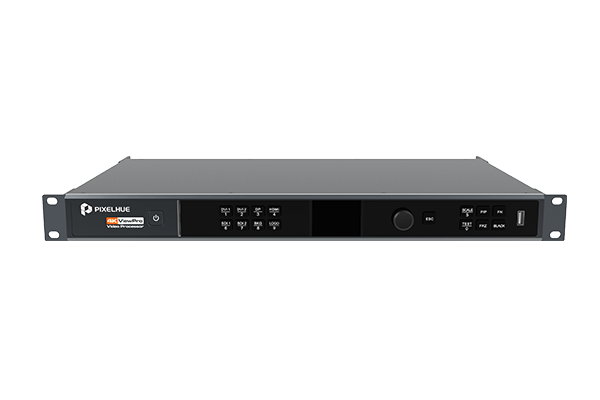
What is the Pixelhue 4K ViewPro?
The Pixelhue 4K ViewPro is a 4K video processor: a 1RU box that takes a picture in one format and size and sends it out in another, cleanly and with almost no delay. It scales, it converts between connector types, and it switches between a handful of sources.
It is the small one in the Pixelhue range. Three pictures on screen at once, sixteen saved looks, one screen out. Where the switchers are built to run your show, this is built to fix a signal that will not fit.
It weighs 4.65 kg, draws 55 W and takes one rack unit. If you are short on rack space, this is the one box in the range that costs you almost none.
Buy one when your source and your screen do not match — wrong size, wrong connector, wrong frame handling — and the fix has to be invisible to the audience.
Pixelhue 4K ViewPro key features
You set it up from a browser
There is a web page built into the box. Point any laptop or tablet on the same network at it and you get the full interface, with nothing to install and no licence to find. The front panel does the same job when you are standing in front of the rack.
That matters most on the day somebody else has to change something and your laptop is not in the building. You avoid a site visit for what turns out to be a two-minute setting.
One frame of delay, not several
The delay through the box is as low as a single frame in the right configuration. On a stage where your screen sits beside the person it is showing, that is the difference between a picture that looks live and one the audience can see lagging behind them.
It can turn the picture sideways
The output rotates in quarter turns, so a screen mounted portrait takes your landscape source without anybody re-cutting the content or re-hanging the panels. That avoids a rework of every file, which is what a portrait screen usually costs you.
Pixelhue 4K ViewPro specifications
Read the layer count and the input list against your own job. Three pictures and one screen is the whole shape of this box, and the input list is unusually broad for its size.
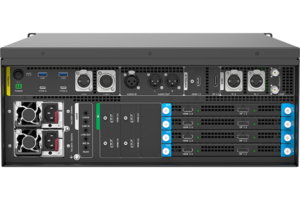
| Inputs | 2× 12G-SDI with a re-driven loop-through, 2× HDMI 2.0, 1× DP 1.2 and 2× dual DVI |
|---|---|
| Outputs | 1× HDMI 2.0, 1× DP 1.2 and 1× 12G-SDI |
| Picture sizes | Up to 4096×2160@60Hz in and out; output width up to 8192 pixels and height up to 4096 |
| Processing | 4K60 at 4:4:4 10-bit; latency as low as 1 frame in the right configuration; motion-adaptive deinterlacing |
| Layers | 3: one main picture and two picture-in-picture, plus a still background and a logo |
| Presets | 16 saved looks |
| Picture tools | Output rotation in quarter turns, layer masking, flipping and cropping, an area-of-interest crop, a strobe with a set duration, and test patterns |
| Reliability | Input backup; passed 35 drop, shock, vibration and thermal tests |
| Sync and control | Genlock accepting bi-level or tri-level signals; front panel and built-in web interface |
| EDID | Managed on every input except the SDI ones |
| Content protection | HDCP 2.2 on HDMI 2.0, 1.3 on DP 1.2 and 1.4 on dual DVI |
| Power and noise | AC 100–240V, 50/60Hz; 55 W; 45 dB front and rear |
| Environment | 0°C to 50°C operating; −10°C to +60°C storage; 0–85% RH non-condensing |
| Chassis | 482.6 × 50.5 × 295.5 mm with handles and rack ears; 4.65 kg net, 7.70 kg shipped |
Every figure here comes from PIXELHUE’s 4K ViewPro datasheet V1.3.0, the model’s own document.
What can you plug into it?
You can plug in almost anything that produces a picture, which is the reason this box gets bought. Seven inputs across four connector types, including two that most modern equipment has stopped fitting.
The dual DVI pair is the one worth pointing out. Plenty of working gear — older media players, medical and industrial sources, legacy graphics machines — still leaves on DVI, and very little new equipment will take it. The 4K ViewPro accepts your DVI cable and sends the result out on whatever your screen wants, which saves replacing a source that otherwise still works.
The SDI inputs carry a loop-through that re-drives the signal, so your camera feed reaches a recorder as well as this box without a distribution amplifier in between — one less thing to fit and one less cable to run.
| Connector | How many | What it takes |
|---|---|---|
| 12G-SDI | 2, plus a loop-through | Cameras and broadcast gear, up to 4096×2160@60Hz, interlaced signals included |
| HDMI 2.0 | 2 | Laptops, players and most current equipment, up to 4096×2160@60Hz |
| DP 1.2 | 1 | Computers with DisplayPort, up to 4096×2160@60Hz |
| Dual DVI | 2 | Older equipment that still leaves on DVI, up to 3840×2160@30Hz |
On the way out there are three connectors and one picture: HDMI, DisplayPort and SDI all carry the same image, so your screen and your recorder each take whichever cable suits them.
Is it a switcher or a converter?
Both, but it is a converter first, and it is worth knowing which job you are buying it for before the order goes in. It switches between your sources, and it holds three pictures on screen with sixteen saved looks — useful, and a long way short of running a show.
A show switcher exists to rehearse the next look off air and take it live on a T-bar, with enough buttons and presets to hold a hundred cues. The 4K ViewPro has none of that, and adding a console does not change it.
What it does better than any of them is fit a picture to your screen. Wrong size, wrong connector, interlaced content that needs cleaning up, a portrait screen fed from a landscape source: those are its jobs, and it does them in one rack unit for 55 W.
Order it as a converter when a source and a screen do not match and everything else in the rig is settled. Order it as a small switcher only when three pictures and sixteen looks genuinely cover the show.
4K ViewPro or a P-series switcher — which do you need?
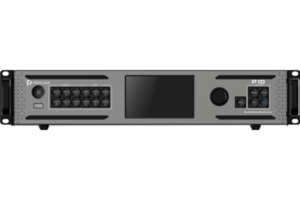
Order the 4K ViewPro if you have one screen and a format problem, and a P10 or P20 if you have a show to run.
| Specification | 4K ViewPro | P10 |
|---|---|---|
| Sources | 7 connectors, 4 types, including dual DVI | 6 at 4K, no DVI |
| Screens out | 1 | 1 at 4K, or up to 8 smaller |
| Pictures on screen | 3 | 6 |
| Saved looks | 16 | 128 |
| Rehearse off air | No | Yes |
| Fiber to the wall | No | 4 optical ports, up to 10 km |
| Size, weight and power | 1RU, 4.65 kg, 55 W | 2RU, 7.9 kg, 82 W |
The gap that usually decides it is the rehearsal screen. Without one, every change your operator makes is a change the audience watches happen, and there is no way to avoid that on this box.
Order the 4K ViewPro for a fixed installation, a scenic screen or a legacy source that has to reach a modern wall. Order the P10 the moment somebody is cutting between sources while people are watching.
4K ViewPro datasheet and manual
The datasheet is the short document and the source of every figure on this page. The user manual is the one to read before commissioning, because the web interface, the picture tools and the preset behaviour are all software questions.
Unlike the switchers, this model does not share a manual with the rest of the range, so both documents are about this box only.
Pixelhue 4K ViewPro FAQ
Will it take a DVI source?
Yes, two of them, up to 3840×2160@30Hz. That is unusual on current equipment and it is the most common reason people buy this box: something in the rig still leaves on DVI and the screen will not take it.
Do I need software to set it up?
No. There is a web page built into the box, so any laptop or tablet on the same network reaches the full interface with nothing installed. The front panel does the same job at the rack.
How many pictures can it show at once?
Three: one main picture and two smaller ones over it, plus a still background and a logo. Sixteen looks can be saved and recalled.
Can it drive a portrait screen?
Yes. The output rotates in quarter turns, so a landscape source fills a portrait screen without re-cutting the content or re-hanging the panels.
Can I run a show on it?
Only a simple one. There is no rehearsal screen, so every change an operator makes happens in front of the audience. A P10 is the smallest model in the range that lets you build the next look off air.
Does it need a NovaStar controller?
Yes, for an LED wall. It produces a picture but cannot address the cards in your cabinets, so a NovaStar controller sits between them. A normal screen or a projector connects directly.
What warranty do I get on the 4K ViewPro?
Three years of serial-tracked manufacturer coverage, supplied through our authorized US channel and shipped from the USA.
How do I get a price on the 4K ViewPro?
Send us the model and the quantity and project pricing comes back within one business day. Tell us what is going in and what is coming out, in case a different model fits the job better.
Is there volume pricing on more than one?
Yes. Give us the count and the pricing moves off the single-unit figure, and a set going into several rooms is handled as one order.
Can we buy on a purchase order or NET terms?
Yes, for approved buyers. Purchase orders and NET terms, Net 30 included, may be available to schools, government buyers, venues and established integrators.
Reviews
There are no reviews yet.