
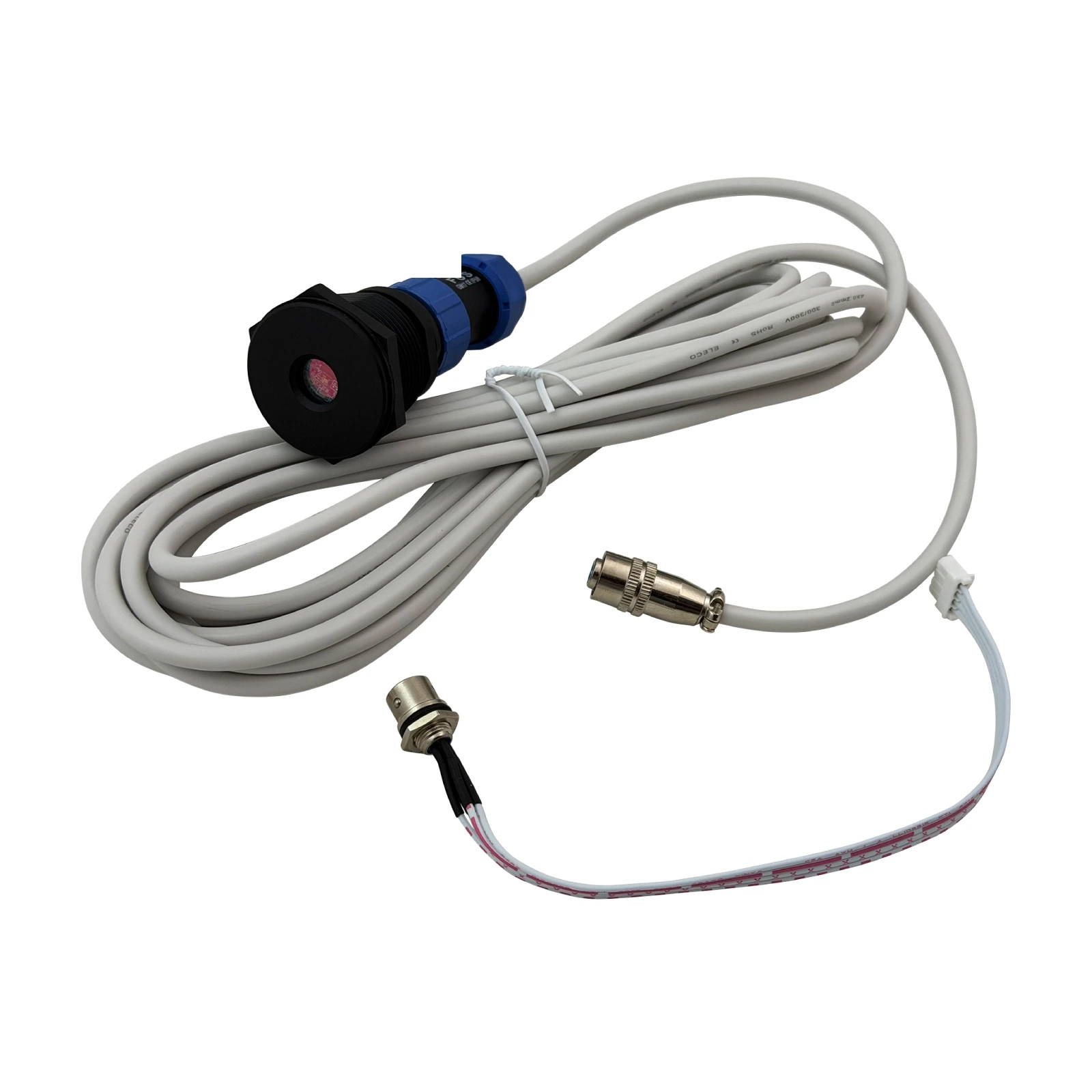
What is the NovaStar NS060-5A?
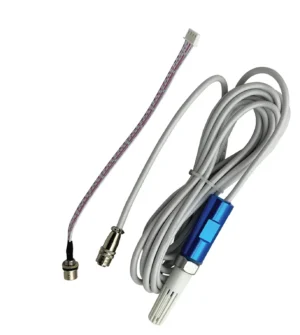
If your screen is painful to look at after dark and washed out at noon, the NovaStar NS060-5A is the part you are missing: a light sensor that reads the light around your screen and passes it to your controller, which moves screen brightness to match. Right now that screen is running one fixed brightness all day.
You mount it outside, in the same light your screen is in. It takes its power from the port it plugs into, so there is no adapter to source and no second cable to run.
It does not decide anything by itself. How dark your screen goes at what ambient level is a curve you set once in NovaLCT, and the sensor just supplies the number.
Buy one when your screen runs unattended outdoors, or anywhere the light changes enough that a single brightness setting cannot be right all day.
What the NS060-5A plugs into
Your NS060-5A needs a light-sensor port, and NovaStar puts those on three kinds of device: sending cards such as the MCTRL300, MSD300 and MSD600, asynchronous player cards, and the MFN300 multifunction card.
Check your own device for that port before you order, because it is the only compatibility question that matters here. If the port is there, the sensor works; if it is not, no adapter makes it work.
Where you plug it in changes one thing worth knowing. On a sending card the sensor is ready as soon as you set the brightness curve. On an MFN300 you also have to add the sensor on the multifunction card page in NovaLCT before the brightness settings can see it.
The MFN300 route is the one to take when your controller has no sensor port, or when you want more than one sensor and the controller only has a single socket.
NS060-5A key features
Built to stay outside for years
Most sensors that fail outdoors fail at the seal or fade in the sun. The NS060-5A body is aluminum alloy with a micro-arc oxidation surface, which NovaStar rates as highly UV-resistant and non-discoloring, and the joint where the cable meets the body sits in a deep groove. It is rated IP65 and designed against mildew, moisture and salt mist.
NovaStar still recommends putting outdoor waterproof adhesive on that joint after you fit it, and checking it from time to time. Worth doing on a coastal site.
Nothing else to power
You are not adding a power supply, a socket or a second run of cable. The sensor draws 5 V from the port it plugs into, which is why a light-sensor port is the only thing you need to find on your controller.
Reads from near-darkness to direct sun
The measuring range is 0 to 65,535 lux. Overcast daylight and full summer sun both sit inside that, and so does an unlit car park at 3am, so the curve you draw in NovaLCT is not going to run off the end of what the sensor can see.
NovaStar NS060-5A specifications
The row to check against your own site is the cable length, because it is the difference between this model and the NS060-10A.
| Cable length | 5 m on the NS060-5A; 10 m on the NS060-10A |
|---|---|
| Brightness measurement range | 0 lux to 65,535 lux |
| Rated voltage | 5 V DC, taken from the port it plugs into |
| External power supply | Not required |
| IP rating | IP65 |
| Operating temperature | −20°C to +70°C |
| Operating humidity | 0% RH to 99% RH, non-condensing |
| Body | Aluminum alloy, micro-arc oxidation surface |
| Connects to | Sending cards, asynchronous cards, multifunction cards |
| Certifications | EMC, RoHS, PFOS |
Figures come from NovaStar’s NS060 Light Sensor Specifications V1.1.2, which covers both cable lengths in one document.
5 m or 10 m — measure before you order
Measure from where the sensor will sit to the card it plugs into, then pick the model: this one gives you 5 m, the NS060-10A gives you 10 m. You are choosing a cable as much as a sensor.
Get it short and you have a problem you cannot fix cheaply. NovaStar documents a replacement cable for its MTH310 temperature sensor but publishes no such option for the NS060, so the length you order is the length you keep.
Two things push that measurement longer than people expect. The sensor has to sit in the same light as the screen, which usually means outside the cabinet and off to one side, and the run has to reach whichever card carries the sensor port — often back inside the control position rather than at the nearest cabinet.
Measure the route, not the straight line.
What happens if the sensor fails or gets fooled
Your screen does not go dark. NovaLCT holds the last brightness value the sensor gave it, and keeps the screen there until the sensor comes back.
You can do better than that in the same settings page. There is a tick box for a fallback brightness — set a value there and a failed sensor sends the screen to that level instead of freezing at whatever it happened to be reading when it died.
A fooled sensor is the more common problem, and it usually happens at night. A streetlight, a passing truck or a reflection convinces the sensor it is brighter outside than it is, and the screen answers by going up. Night mode caps maximum brightness across a time window you choose, which is the setting that stops a screen blinding a residential street at 2am.
NovaLCT also has a Light Sensor Test button that reads every sensor connected to your sending cards and multifunction cards. Run it before you leave site.
Do you need more than one?
One is enough for most screens. Buy a second when your screen is wide enough that one end is in shadow while the other is in full sun, because a single reading then has to speak for both.
NovaLCT handles several sensors by averaging them, and it is a careful average rather than a raw one. You set how often it samples and how many samples it uses; it then throws away the highest and the lowest reading before averaging the rest.
That is why a second sensor buys you more than coverage. One bad reading — a headlight, a bird, a reflection — gets discarded instead of moving your screen.
NS060-5A datasheet and NovaLCT setup
Nothing about your screen is stored in the sensor, so a replacement needs no files and no backup. You plug the new one in and the curve you already set carries on working.
The setup itself lives in NovaLCT, under the brightness settings, where you build the table that maps ambient light to screen brightness. If your sensor is on an MFN300 rather than a sending card, add it on the multifunction card page first.
NovaStar NS060-5A FAQ
What is the difference between the NS060-5A and the NS060-10A?
The cable. The -5A comes with 5 m and the -10A with 10 m; the sensor itself is the same part with the same range and the same IP65 rating.
Will the brightness still change if my control PC is switched off?
Yes, if your sending card is set to hardware adjustment mode, which is what it falls back to when the PC disconnects. One exception matters: NovaStar states that combined screens do not support hardware mode, so a combined screen needs the PC connected and monitoring running for automatic brightness to keep working.
Does the NS060-5A need its own power supply?
No. It runs on 5 V taken from the port it plugs into, so there is nothing else to buy or mount.
Can I mount it outdoors in the rain?
Yes. It is rated IP65 with an aluminum body designed against mildew, moisture and salt mist. NovaStar recommends sealing the cable joint with outdoor waterproof adhesive after fitting and checking that seal periodically.
How do I stop the screen going too bright at night?
Turn on night mode in NovaLCT and set a maximum brightness for the hours you choose. That caps the screen even when a streetlight or a reflection makes the sensor read higher than it should.
Can I connect it to a Taurus player or an async card?
Yes, where that card has a light-sensor port. NovaStar lists asynchronous cards alongside sending cards and multifunction cards as devices the NS060 works with, so the port is the thing to confirm on your exact model.
Can one screen use two light sensors?
Yes. NovaLCT averages the readings from every connected sensor, discarding the highest and lowest before it averages, so a second sensor also protects you from one odd reading moving the screen.
What warranty covers an NS060-5A?
Three years of serial-tracked manufacturer coverage, because these sensors come through our authorized US NovaStar channel.
Can I get volume pricing or Net 30 terms?
Yes. Send the model and the quantity for volume pricing. Purchase orders and Net 30 terms may be available for approved schools, government buyers, venues and established integrators.
How do I order an NS060-5A?
Pricing here is per sensor. Orders placed before 3 PM ET on in-stock items ship the same business day from Florida. Contact us to confirm current availability.
Reviews
There are no reviews yet.