
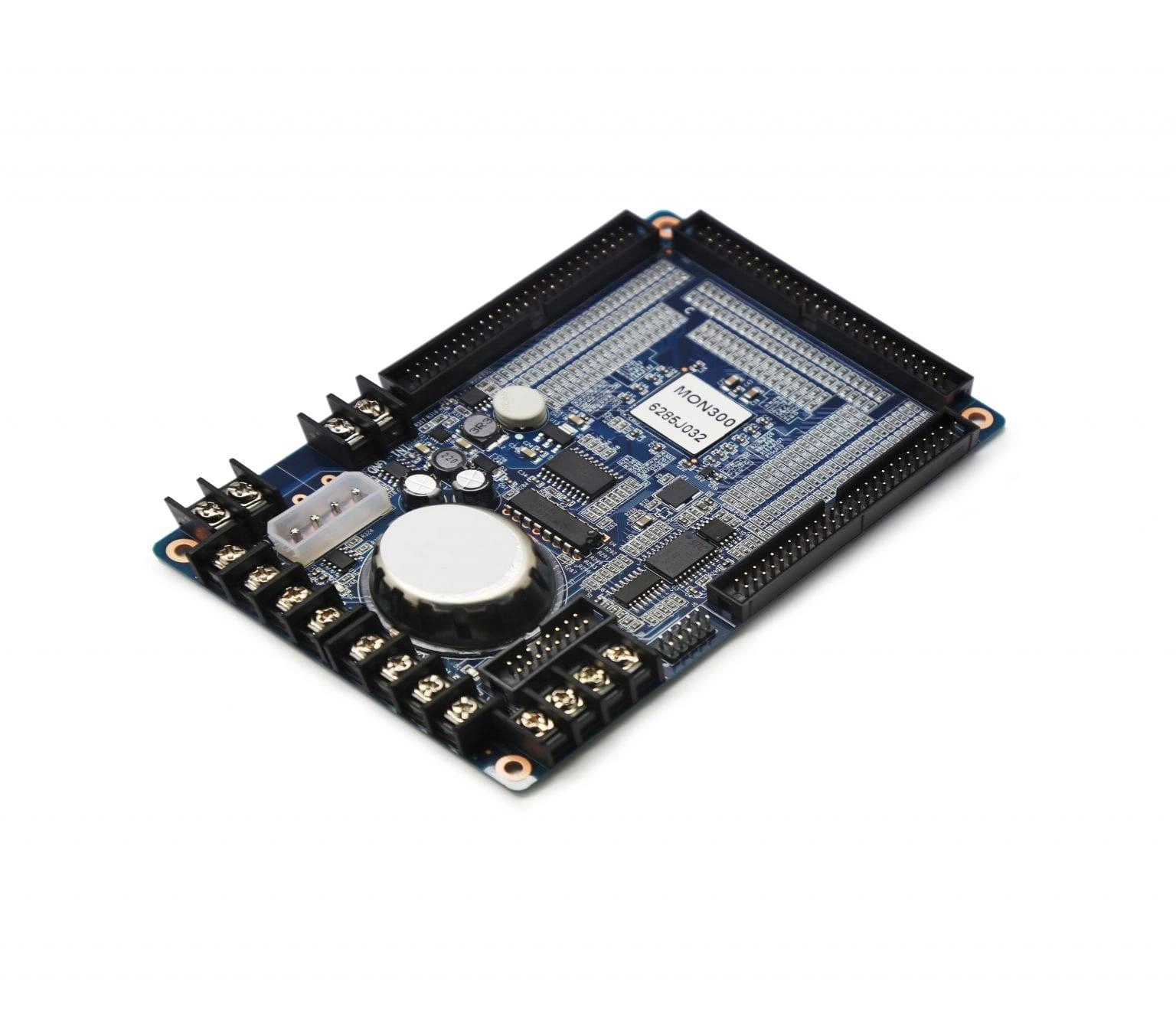
What is the NovaStar MON300?
If a cabinet in your screen is on its way to failing, the NovaStar MON300 is what tells you before it does. It is a monitoring card that sits inside one cabinet and watches what your receiving card cannot: fan speeds, power supply voltages, temperature, humidity, the door, and smoke.
It sends all of that back to NovaLCT over the connection your screen already has. So a fan slowing down in cabinet 14 reaches you as a line on a monitoring page, not as a dark patch three weeks later.
NovaStar builds it for engineering projects and installs with high safety requirements — the ones where somebody has to answer for the screen, not just look at it.
Will the MON300 fit your receiving cards?
Two of them, and only two: the MON300 fits the MRV320 and the MRV560. It goes at the far end of your module chains, with a 16-pin flat cable running back to the receiving card, so a different receiving card in your cabinets makes this the wrong part.
There is a bigger question ahead of that one, though, and it can save you the whole order. If your cabinets run A-series receiving cards — A5s Plus, A8s, A10s Plus and the rest of that line — you probably do not need a MON300 at all.
NovaStar gives those cards two other ways to report the same kinds of readings, called smart-module monitoring and HUB monitoring. NovaLCT reads them straight off the receiving card, with no extra hardware fitted.
So the MON300 is a part for an installed base. You order it when you are maintaining or extending an older MRV320 or MRV560 screen and want monitoring on it. It is not what you specify into a new build.
If you are not sure which cards are in your cabinets, the receiving card chart lists the family each model belongs to.
What the MON300 watches
Eight power supply voltages and four fan speeds
A power supply that is drifting low and a fan that is slowing down both kill a cabinet eventually, and neither announces itself. The MON300 reads voltage on up to eight supplies and speed on up to four fans. You set an alarm threshold on each one in NovaLCT, so the warning reaches you while it is still a maintenance visit.
One condition applies to the fans and not to the voltages. NovaStar specifies a fan with a pulse signal output cable for speed detection, so ordinary two-wire cabinet fans report nothing back. Check what is fitted in your cabinets before you count on that half of the feature.
Temperature and humidity with no extra module to buy
Both sensors are on the card already, so unlike a multifunction card you are not adding a separate probe on a lead to get these two numbers. Humidity is read from 1% RH to 99% RH.
One warning goes with that, and it is the kind that ruins a batch. NovaStar states plainly that conformal coating must not be applied to the MON300 surface, because it can stop the humidity monitoring working. If your cabinet assembler coats boards as standard, tell them this one is excluded.
The cabinet door
The card reports whether each cabinet door is open or closed. On a public-facing or roadside screen that is the cheapest theft and tamper alert you will fit, and it costs you nothing extra once the card is in.
NovaStar MON300 specifications
The row to measure against your cabinet is the height, because the card has to find room in a cabinet that is already full. Two more things are worth knowing: the card takes its own DC 5 V feed from a cabinet power supply rather than from the receiving-card link, and the smoke sensor carries a tighter humidity limit than the card itself.
| Receiving cards | MRV320 and MRV560 only |
|---|---|
| Monitors | 8 power supply voltages, 4 fan speeds, temperature, humidity, smoke, cabinet door, per-LED open circuit, flat cable faults |
| Humidity monitoring range | 1% RH to 99% RH |
| Voltage monitoring range | 0 V to 12 V |
| Supply voltage | DC 5.0 V |
| Current draw | 0.15 A |
| Power draw | 0.75 W |
| Operating environment | −20 °C to 60 °C, 0% RH to 95% RH non-condensing |
| Smoke sensor environment | −20 °C to 60 °C, 0% RH to 60% RH non-condensing |
| Board size | 144.0 mm × 91.5 mm, 22.5 mm tall |
| Weight | 115.7 g |
| Conformal coating | Must not be applied — it can disable humidity monitoring |
| Certifications | EMC, RoHS, PFOS |
Figures come from NovaStar’s MON300 Monitoring Card Specifications V2.2.0. The 22.5 mm is the board plus the tallest components on both sides, not bare board thickness.
Will per-LED detection work on your modules?
Three things have to line up in your modules and cabinets first, and they are worth checking before you order rather than after. The headline feature — finding a single dead LED instead of hunting for it — is the one with conditions attached.
Your module driver IC has to support LED error detection in the first place. Your hub board has to support it too, and the same goes for the flat cable fault detection.
The third condition is the one that catches people. NovaStar specifies that your modules must run 1/16 scan or below for the monitoring card to do per-LED detection. The card also has to sit in the connection between the module and the MRV320 or MRV560. A 1/32 scan module is outside that.
The scan rate is the one to settle first. It is the quickest of the three to answer, and the one most likely to rule you out.
Everything else on the card — voltages, fans, temperature, humidity, door, smoke — works without any of those three conditions.
How many MON300 cards to order
One per cabinet you want to monitor, and that is also the ceiling. NovaLCT asks you how many monitoring cards are connected to each cabinet and accepts only 0 or 1, so a second card in the same cabinet buys nothing.
You do not have to fit every cabinet. Monitoring the cabinets that hold the power supplies, or the row that sits in full afternoon sun, gives you most of the warning for a fraction of the count.
If you want smoke to trigger an automatic response rather than just an alert, NovaStar requires an MFN300 multifunction card configured beforehand. Budget for that alongside the monitoring cards if a shutdown-on-smoke rule is the reason you are buying.
MON300 datasheet and NovaLCT setup
No screen configuration lives on a MON300, so swapping one puts no cabinet map at risk.
One NovaLCT feature is worth knowing about before you start pulling cabinets apart. If the monitoring card’s wiring has ended up in the wrong order, a data set exchange function swaps the data groups in software instead. A wiring mistake found at commissioning is then a settings change rather than a rewire.
NovaStar MON300 FAQ
Which receiving cards does the MON300 work with?
The MRV320 and the MRV560, and no others. It picks up the far end of your module chains and links back to that receiving card on a 16-pin flat cable.
Do I need a MON300 if my cabinets use A-series receiving cards?
No. Cards such as the A5s Plus, A8s and A10s Plus report through smart-module or HUB monitoring instead, which NovaLCT reads directly with no extra card fitted.
Can it find a single dead LED?
Yes, when three conditions are met: your driver IC supports LED error detection, your hub board supports it, and your modules run 1/16 scan or below. Outside those, the rest of the monitoring still works.
How many do I need?
One per cabinet you want to monitor. NovaLCT accepts 0 or 1 monitoring cards per cabinet, so there is no benefit to a second one in the same box.
Does it need a separate temperature or humidity probe?
No. Both are on the card, which is the difference between this and monitoring through a multifunction card, where temperature comes from a sensor on a lead.
Can my cabinet builder apply conformal coating to it?
No. NovaStar states that coating the MON300 surface may stop humidity monitoring working, so it has to be excluded from any coating process your assembler runs as standard.
Can smoke detection shut the screen down automatically?
Yes, but not with the MON300 alone. NovaStar requires a multifunction card to be configured first before smoke can be set as an automatic control type in NovaLCT.
What warranty covers a MON300?
Three years of serial-tracked manufacturer coverage, because these cards come through our authorized US NovaStar channel.
Can I get volume pricing or Net 30 terms?
Yes, and monitoring is usually a per-cabinet order, so quantity adds up quickly. Send the model and the count for volume pricing. Purchase orders and Net 30 terms may be available for approved schools, government buyers, venues and established integrators.
How do I order a MON300?
Pricing here is per card. Orders placed before 3 PM ET on in-stock items ship the same business day from Florida. Contact us to confirm current availability.
Reviews
There are no reviews yet.