
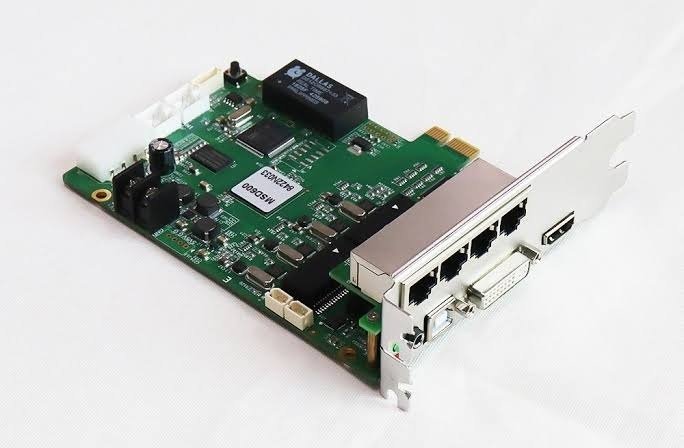
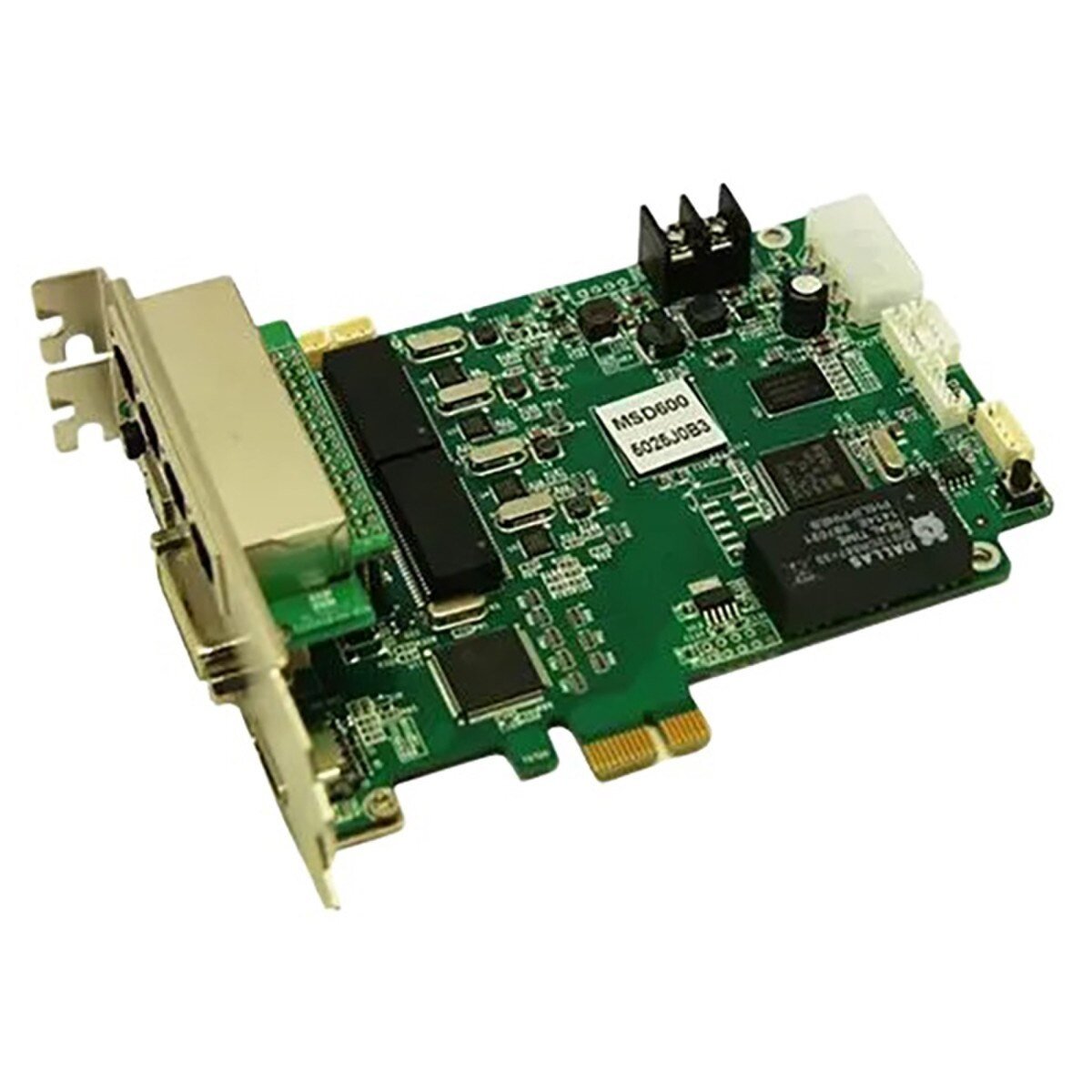
The NovaStar MSD600 accepts a prepared DVI or HDMI video signal and sends the mapped image to an LED wall through four Gigabit Ethernet outputs. It supports inputs up to 1920×1200@60Hz at 8-bit, includes Ethernet-port redundancy and connects to a configuration computer through USB Type-B.
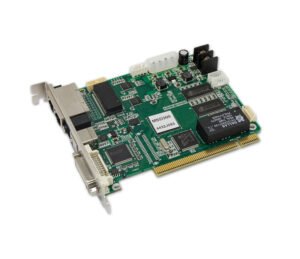
The MSD600 is a bare internal card, not a self-contained rack controller. Before ordering, confirm the host's mechanical fit, DC power, video format, Ethernet-port loading and receiving-card system.
What is the NovaStar MSD600 sending card?
The MSD600 is the four-port sender in the control chain. A GPU, playback server or upstream processor first renders the finished LED canvas. An external DVI or HDMI cable carries that canvas into the card. The MSD600 maps it across the Ethernet outputs, and the receiving cards use the mapped data to drive the modules in each cabinet.
This is different from a video processor. The MSD600 specification does not list built-in scaling, multi-layer composition or seamless source switching. If the source cannot output the finished screen resolution, place a suitable video processor before the card.
It is also different from a receiving card. The MSD600 stays in the control system; receiving cards stay in the LED cabinets.
MSD600 host, slot and power requirements
The MSD600 is sold as a card rather than an enclosed AC-powered controller. Its product drawing shows an edge connector, but NovaStar's current specification does not describe that connector as the video or USB-control path. Video enters through DVI or HDMI, and PC control uses the USB Type-B port.
NovaStar specifies DC 3.3–5.5V input, 1.32A rated current and 6.6W rated power. Do not assume that an open computer slot automatically provides the correct power or pinout. Before installation, verify:
- the host or custom chassis is designed for the MSD600 card;
- the card receives a stable supply within the documented DC range;
- the 137.9×99.7×39.0mm board has enough clearance and airflow;
- DVI/HDMI, USB and all four Ethernet connectors remain accessible; and
- the receiving-card system and Ethernet cabling are known before the port map is built.
Power down the host and LED system before inserting, removing or rewiring the card. If the host's slot, pinout or power design is not documented, ask the chassis supplier or system integrator to confirm compatibility.
MSD600 DVI and HDMI signal path
The MSD600 uses four separate paths for video, power, control and LED data:
- Prepare the image. A GPU, media server or video processor outputs the finished LED canvas.
- Feed the MSD600. Connect that source to the card's single-link DVI input or HDMI 1.3 input with an external video cable.
- Configure the screen. Connect the MSD600's USB Type-B port to the Windows configuration computer running NovaLCT.
- Send data to the wall. Connect the four RJ45 outputs to the first receiving cards in their assigned cabinet chains.
The DVI or HDMI cable carries video. USB carries configuration communication. The RJ45 outputs carry mapped LED data. UART links several sending devices for control. Keeping those paths separate makes setup and troubleshooting much easier.
The HDMI input is HDCP 1.4 compliant. Neither DVI nor HDMI accepts an interlaced signal, so the source must output progressive video.
Can the MSD600 drive your LED wall?
Start with the full canvas, then check every Ethernet port.
At 8-bit, the documented maximum input is 1920×1200@60Hz, or 2,304,000 pixels. The MSD600 also supports custom timings, including the documented examples 3840×600@60Hz and 548×3840@60Hz. A custom timing still has to remain within the device's input limits and the source must be able to produce it reliably.
Each of the four Gigabit Ethernet outputs supports up to 650,000 pixels. That does not make the usable one-card canvas 2.6 million pixels. The four per-port ceilings add up to 2.6 million, but the card's documented input ceiling remains 2.304 million pixels.
Use this check before ordering:
| Example canvas | Total pixels | First fit check |
|---|---|---|
| 1920×1080 | 2,073,600 | Within the 8-bit input ceiling; divide the cabinets so no port exceeds 650,000 pixels. |
| 1920×1200 | 2,304,000 | At the documented 8-bit ceiling; verify the source timing and every port map. |
| 3840×600 | 2,304,000 | Documented wide custom example; confirm the source can output this timing. |
| 1440×900 | 1,296,000 | Documented maximum when the source is 10-bit or 12-bit. |
| 2560×1080 | 2,764,800 | Above the documented one-card input ceiling. Use another architecture rather than relying on port-sum math. |
For an exact check, total the active pixels in every cabinet chain and include the planned redundancy topology. A backup port is not extra active display capacity.
MSD600 8-bit, 10-bit and 12-bit input limits
The maximum input changes with bit depth:
- 8-bit RGB 4:4:4: up to 1920×1200@60Hz;
- 10-bit RGB 4:4:4: up to 1440×900@60Hz; and
- 12-bit RGB 4:4:4: up to 1440×900@60Hz.
This matters when a project values smoother gradients but also needs a large canvas. A source set to 10-bit or 12-bit cannot use the full 1920×1200 input size documented for 8-bit. Confirm the bit depth, timing and screen resolution together instead of treating them as separate settings.
The current V2.4.1 specification lists RGB 4:4:4. Older dealer pages may mention other sampling formats, but those claims should not be used for a new design without confirmation from NovaStar.
MSD600 Ethernet outputs, redundancy and light-sensor control
The four RJ45 ports connect the sending card to NovaStar receiving cards in the LED cabinets. NovaLCT uses the cabinet map to decide which part of the image each port and receiving-card chain will display.
Ethernet-port redundancy is supported, but the backup relationship must be configured and tested for the actual system. Do not count a redundant port twice when calculating screen capacity.
The light-sensor connector can work with a compatible sensor to monitor ambient light and support automatic screen-brightness adjustment. This is useful for fixed displays that must remain readable during the day without staying unnecessarily bright at night.
UART IN and UART OUT can cascade up to 20 sending devices for control. UART does not carry the video canvas and does not combine several MSD600 cards into one larger 2.6M-per-card screen. A multi-card wall needs a complete source, timing and mapping design.
How to set up the MSD600 with NovaLCT
- Install the card in a confirmed compatible host and connect the documented DC supply.
- Connect the prepared source to DVI or HDMI.
- Connect USB Type-B from the MSD600 to the configuration computer.
- Connect one Ethernet output to the first cabinet chain and confirm the correct receiving-card configuration before adding the rest of the wall.
- In NovaLCT, load or read the correct receiving-card file, set the screen size and map the cabinets in the same order as the physical Ethernet chains.
- Add the remaining ports, checking that each stays below 650,000 pixels and the whole canvas stays within the selected bit-depth limit.
- Configure redundancy or light-sensor control only if the project uses those functions.
- Save the final configuration to the hardware, restart the system and test every port, cabinet chain and source format.
Do not update firmware simply because a download has a higher version number. Confirm that the package explicitly supports MSD600, save the current configuration and keep stable power during the update. If the only copy of the receiving-card file is on the live wall, back it up before changing software or firmware.
NovaStar MSD600 specifications
The values below are checked against NovaStar MSD600 Sending Card Specifications V2.4.1, released December 6, 2024.
| Specification | MSD600 value |
|---|---|
| Product type | Internal LED display sending card |
| Video inputs | One single-link DVI connector and one HDMI 1.3 connector |
| Audio input | One separate AUDIO connector |
| Maximum 8-bit input | 1920×1200@60Hz |
| Maximum 10/12-bit input | 1440×900@60Hz |
| Sampling format | RGB 4:4:4 |
| Custom timing examples | 3840×600@60Hz; 548×3840@60Hz |
| Interlaced input | Not supported |
| HDMI content protection | HDCP 1.4 |
| LED outputs | 4× RJ45 Gigabit Ethernet |
| Capacity per output | Up to 650,000 pixels |
| Ethernet redundancy | Supported |
| PC control | 1× USB 2.0 Type-B |
| Device cascade | UART IN/OUT; up to 20 devices |
| Light sensor | 1× connector |
| Input voltage | DC 3.3–5.5V |
| Rated current | 1.32A |
| Rated power | 6.6W |
| Dimensions | 137.9×99.7×39.0mm |
| Net weight | 125.3g |
| Operating temperature | −20°C to +75°C |
| Operating humidity | 10–90% RH, non-condensing |
| Included accessories | 1× USB cable; 1× DVI cable |
Use the current MSD600 datasheet for the complete connector, pin and compliance notes before final system design.
MSD600 manual, datasheet, software and firmware
If you searched for a NovaStar MSD600 manual, start with the documents that can be verified for this exact model:
NovaStar's reviewed archive does not provide a standalone MSD600 hardware manual. The linked setup page therefore identifies the genuine Nova M3 file as a system manual instead of relabeling a dealer-written installation page. Use it with the MSD600 specification and the documentation supplied with the host chassis and receiving cards.
The linked datasheet is V2.4.1, released December 6, 2024, so the document revision is clear before download.
Firmware download: MCTRL600 / MSD600 family firmware package. This is a family firmware package, not a model-only file. Confirm the hardware revision, save the working configuration and read the release notes before updating.
Direct PDF links: MSD600 User Manual PDF · MSD600 Datasheet PDF
MSD600 applications in integrated LED systems
Integrated LED control computers
Use the internal card format when the control PC or custom chassis was designed to house an MSD600 and provide its documented low-voltage power. This keeps the source, configuration computer and LED sender in one engineered system.
Service replacement for an existing MSD600 system
An MSD600 can be the right replacement when the host, wiring, receiving cards and saved configuration were built around this exact model. Confirm hardware revision and configuration backups before swapping the card.
Fixed displays using redundancy or brightness sensing
Four Ethernet outputs, supported port redundancy and a light-sensor connector suit fixed systems that need a planned backup path or automatic brightness control. These functions still need project-specific configuration and testing.
Protected rental or production-control chassis
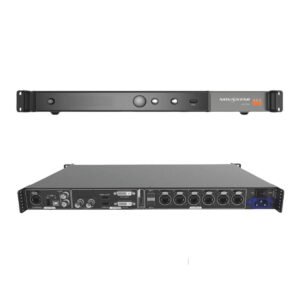
NovaStar lists rental and live-event use, but a bare card should be mounted in a protected, serviceable host rather than treated like loose rack equipment. Choose an external controller when a self-contained 1U unit is easier to cable, cool and replace onsite.
MSD600 vs MSD600-1 vs MCTRL600
| Model | Format | Documented inputs | Outputs | Power/installation | Best fit |
|---|---|---|---|---|---|
| MSD600 | Internal bare sending card | DVI, HDMI 1.3, separate audio | 4 | DC 3.3–5.5V; host fit and power must be confirmed | Existing or engineered integrated systems that need the MSD600 form factor and audio connector. |
| MSD600-1 | Internal bare sending card | DVI and HDMI 1.3; current spec does not list the separate audio input | 4 | Same documented DC range, but a larger board and different dimensions | Systems designed for the MSD600-1; do not assume it is a drop-in replacement. |
| MCTRL600 | External 1U sending controller | DVI and HDMI 1.3 | 4 | Self-contained AC-powered rack unit | Installations that want an independent controller instead of integrating a bare card into a host. |
All three are sending devices, not full video processors. If the source needs scaling, multiple layers or production switching, add an upstream processor or choose a controller that documents those functions.
Availability also matters. Some dealer pages label MSD600 EOL, while NovaStar's current download index still lists the model and its documentation. Check current store availability, avoid a global discontinuation claim, and confirm the replacement path before assuming MSD600-1 or MCTRL600 compatibility.
MSD600 FAQs
Is the MSD600 a sending card or a receiving card?
It is a sending card. It accepts video in the control system and sends mapped LED data through four Ethernet ports. Receiving cards are installed inside the LED cabinets.
Can the MSD600 drive 2.6 million pixels?
Do not plan a 2.6-million-pixel canvas from the four port ratings alone. NovaStar documents a maximum 8-bit input of 1920×1200@60Hz, which is 2,304,000 pixels, while each Ethernet port supports up to 650,000 pixels.
Does the MSD600 get video through its card edge connector?
NovaStar documents DVI and HDMI as the video inputs. USB Type-B is the PC-control connection. The current specification does not document the card edge as a video path.
Can any computer slot power the MSD600?
Do not assume that. The specification gives DC 3.3–5.5V, 1.32A and 6.6W but does not describe a universal PC-slot power arrangement. Verify the host, pinout and mechanical fit with the chassis supplier or integrator.
Does UART cascading increase the screen capacity?
No such capacity increase is documented. UART cascades up to 20 devices for control. A multi-sender screen still needs a designed source and mapping architecture.
Is the NovaStar MSD600 discontinued?
Several dealers describe it as EOL, but an official global discontinuation notice was not found and NovaStar still lists MSD600 resources in its download index. Check the seller's live stock and support status before ordering.
Where can I download the MSD600 manual?
Use the MSD600 datasheet for model-specific hardware information and the MSD600 setup manual for the genuine Nova M3 system configuration guide. NovaStar's reviewed archive does not provide a separate MSD600 hardware manual.
Does the MSD600 support 4K input?
No 4K input mode is documented. The maximum 8-bit input is 1920×1200@60Hz, with custom examples up to 3840 pixels on one axis but only within the documented total input limits.
Not sure whether the MSD600 fits your existing host? Send us the host or chassis model, source resolution, bit depth, cabinet count, receiving-card model and saved screen configuration. We can check the signal path and suggest the internal or external controller format that fits the system.
Reviews
There are no reviews yet.