
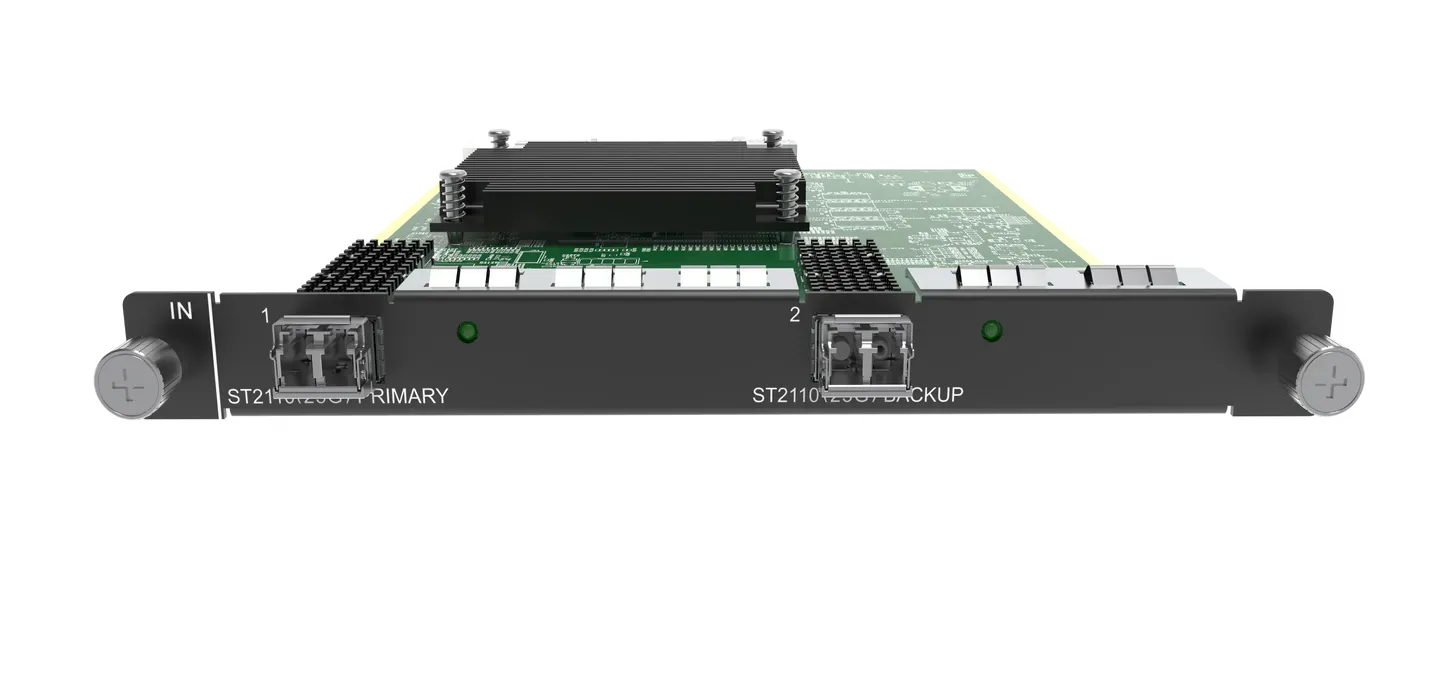
What is NovaStar H_1xST2110 input card?
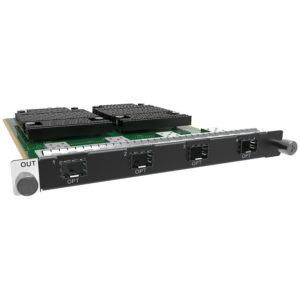
The NovaStar™ H Series ST 2110 Input Card adds one broadcast-IP source to a compatible H Series chassis. It is for a facility whose video signal is already planned as SMPTE ST 2110 over 25G fiber—not for a typical office network or a regular IP camera.
OPT 1 receives the planned primary stream. OPT 2 is its backup path, so the two front-panel ports protect one source route instead of creating two unrelated live channels. Once the card receives the source, the H Series chassis arranges it for the screen layout, and separately selected LED output cards deliver the completed picture to the cabinets.
Request H_1xST2110 Input Card bulk pricing →
For confirmed multi-card or project quantities. Direct checkout is appropriate when the ST 2110 stream, 25G primary/backup route and H Series input-card slot are already specified.
NovaStar H_1xST2110 input card key features: what makes it different?
- It gives a modular H Series rack a real broadcast-IP source entrance: OPT 1 accepts the primary ST 2110 stream over 25G fiber, so an LED wall can use a source already established in the facility’s production network.
- Its second optic has a defined purpose: OPT 2 backs up OPT 1 under SMPTE 2022-7. This matters for a critical display position because the backup route is part of the card’s source design, not an improvised extra connection.
- It handles one 4K60 source or a planned group of 2K inputs: NovaStar publishes up to one 4096 × 2160@60 input or four 2K inputs per card. That is a source-input capacity; it does not state how many LED cabinets the output side can serve.
- It supports the configuration methods a broadcast plan expects: load an SDP file or enter stream details directly, then use the documented multicast/IP behavior in the network design.
- It comes ready for the defined optical role: the two 25G optical modules are included and pre-installed. The project still needs to confirm its 25GBASE-LR/SR path and final network design.
NovaStar H_1xST2110 input card specifications
These facts describe the broadcast source entering H Series. They do not describe LED output-card capacity, cabinet wiring or the finished physical LED wall.
When does NovaStar H_1xST2110 input card fit the source plan?
Start with the source protocol and the network already in the project drawing. A 25G broadcast-IP card earns its place only when the source, the primary/backup fiber plan and the stream configuration are all specified.
How NovaStar H_1xST2110 input card fits into an H Series LED system
The card has one clear role in this sequence: it brings the planned broadcast feed into the chassis. The chassis builds the layout, then the selected cabinet-output path carries the finished picture to the LED wall.
Bring the primary and backup ST 2110 routes to the card
The broadcast network provides the planned primary stream to OPT 1 and its backup route to OPT 2 over the qualified 25G fiber path.
Load the stream details in H Series
The qualified installer loads an SDP file or enters the stream information directly, then confirms that the card sees the planned source.
Place the source in the required screen layout
The H Series chassis scales, crops and positions the incoming feed with the other selected content for the intended LED display area.
Send the finished layout to LED cabinets
The selected H_16xRJ45+2xFiber Output Card carries cabinet data. NovaStar receiving cards, the cabinet file and physical port map are configured on the cabinet side in NovaLCT.
NovaStar H_1xST2110 input card compatibility and setup checks
- Confirm that the source is actually ST 2110: the card is for the documented 25G broadcast-IP workflow, not a generic network-video input. Record the real source standard, stream and required format before assigning a card slot.
- Design primary and backup as a pair: OPT 1 is primary and OPT 2 is the backup. Confirm both fiber routes and their network behavior with the project’s broadcast-network team before installation.
- Prepare the stream configuration: the H Series installer can load an SDP file or enter stream details directly. Input resolution is not set on this card, and interlaced sources are not supported.
- Keep the cabinet plan separate: reserve a compatible slot in H2, H5, H9, H15, H20, then configure the selected output card, receiver model, cabinet file and cable map in NovaLCT. The ST 2110 card only solves the source side.
H_1xST2110 input card vs H Series network input cards
All three options use a network in some form, but they answer different source questions. Select the source protocol already designed for the project; do not choose by connector count alone.
Where to use NovaStar H_1xST2110 input card
These are real installation situations where the card’s 25G primary-and-backup source design is useful in a complete H Series LED system.
A broadcast control room with an LED status wall
A broadcast engineering team has already assigned a ST 2110 source and a primary/backup fiber route. The card brings that selected source into H Series, where operators can place it beside the other planned feeds.
A studio production display fed from the IP plant
A studio brings an approved 4K60 broadcast-IP source to an LED backdrop or confidence display. The source stays in the production network until it reaches the H Series input card.
A critical display position with a planned backup route
Where display continuity matters, the project deliberately assigns OPT 1 as primary and OPT 2 as the 2022-7 backup. This tells the buyer exactly why the card has two ports.
A modernized H Series rack after an IP migration
An existing modular H Series chassis adds a qualified ST 2110 input position as the facility moves an agreed source from a legacy handoff into its broadcast-IP workflow.
NovaStar H_1xST2110 input card manual, datasheet and H Series firmware
NovaStar documents this product inside current H Series chassis specifications rather than in a standalone public card PDF. The resource labels state the scope clearly.
NovaStar H_1xST2110 Input Card specifications (PDF)
Official H20 specification that documents this card’s ST 2110 standards, 25G ports, primary/backup roles, formats, optics and power.
NovaStar H Series user manual (PDF, V1.15.0)
H Series family manual for stream information, primary/backup port setup and layout configuration; not an H_1xST2110-only manual.
NovaStar H Series firmware (ZIP, V2.2.0.0)
Verified H Series family firmware package, not H_1xST2110 Input Card-only firmware.
NovaStar H Series firmware release notes (TXT, V2.2.0.0)
Version changes and update notes for the same verified H Series family firmware package.
NovaStar H_1xST2110 input card FAQs
What is NovaStar H_1xST2110 Input Card?
It is a source-input card for a compatible H Series chassis whose incoming program is already distributed as SMPTE ST 2110 over 25G fiber. It does not replace the chassis or send LED cabinet data.
Why does the card have two 25G OPT ports?
OPT 1 is the primary input. OPT 2 is the defined backup for OPT 1 and supports SMPTE 2022-7. They are not two independent program inputs.
Can it receive a 4K60 ST 2110 source?
NovaStar lists up to one 4096 × 2160@60 VESA input per card, or up to four 2K inputs. Confirm the actual stream configuration and source format in the project.
Can one card receive four sources?
The official specification states up to four 2K inputs per card. Do not count the primary and backup fiber ports as four independent sources; plan the configured stream inputs with the broadcast team.
Are optical modules included?
Yes. Two 25G optical modules are included with the card and already installed into the OPT ports.
Can I change the input resolution on the card?
No. NovaStar states that input resolution settings are not allowed. The actual ST 2110 source timing and format must be planned to fit the documented capability.
Does it accept interlaced video?
No. The official specification says interlaced signal input is not supported.
Is it the right card for an NDI source?
No. Select the H_1x NDI Input Card when the project sends NDI. Select this product when the incoming source is an engineered ST 2110 workflow on 25G fiber.
Does it configure LED cabinets?
No. This product brings the source into H Series. Use the installed output card, NovaStar receiving cards, cabinet file and NovaLCT for the cabinet side.
Which chassis can use it?
Current H2, H5, H9, H15 and H20 specifications list it. Confirm the exact chassis, free input-card slot and the complete source/network design through the H Series category before ordering.
Reviews
There are no reviews yet.