
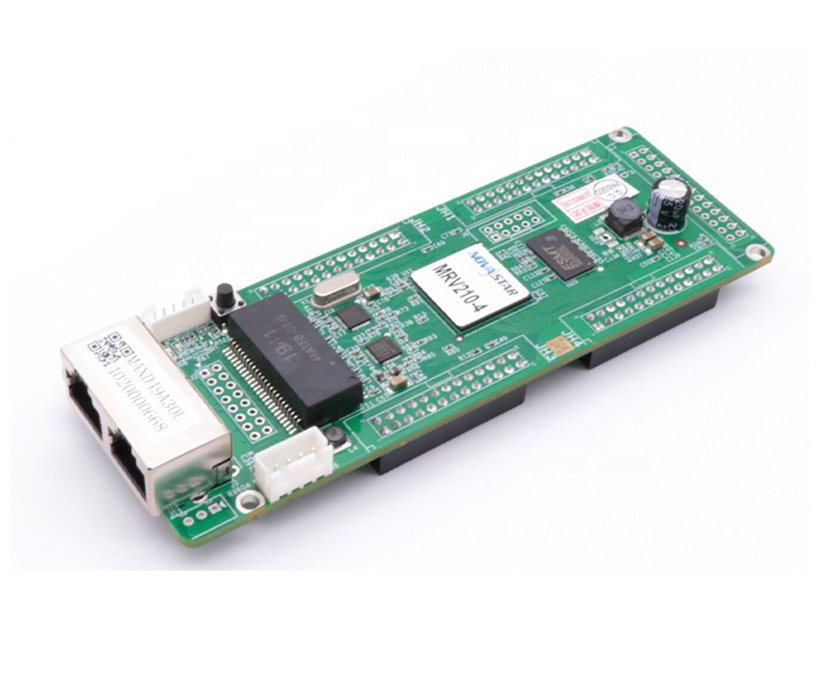
What is the NovaStar MRV210-4 receiving card?
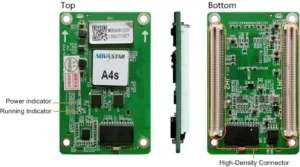
The NovaStar MRV210-4 is the bottom-side female-header version of NovaStar’s MRV210 receiving-card family. It lives inside a compatible LED cabinet, receives that cabinet’s image data from the sender or previous cabinet, and passes the data to LED modules through four hub connections.
The suffix matters because the four female headers are on the bottom side of the board. The cabinet must provide matching pins and enough room beneath the card. A different MRV210 suffix can have the same family name and similar dimensions but still be impossible to seat in the cabinet.
MRV210-4 key features
- Bottom-side female hardware match: the `-4` form is for a cabinet whose mating pins are below the board. This is the first check before a repair order is placed.
- Keep a working cabinet record: configuration readback allows the existing scan, wiring and pixel map to be saved before an old card is unplugged.
- Help find the fault before swapping parts: the card supports temperature and voltage monitoring. When a compatible cabinet LCD is installed, those values can also be seen at the cabinet.
- Better behavior during a signal interruption: a pre-stored image can be selected for startup, a missing source or a disconnected Ethernet cable. It does not repair the signal path, but it can prevent one cabinet from going black while the path is checked.
- Loop backup for an already redundant wall: when main and backup Ethernet paths were wired into the system, the replacement card can retain that protection. It cannot create backup from a single cable.
NovaStar MRV210-4 specifications
Use the table to check the card itself, then confirm the cabinet’s header arrangement and configuration. The load is for one receiving card, not for each hub connector.
| Receiving-card load | Up to 256 × 256 pixels per card |
|---|---|
| Hub arrangement | Four female headers on the bottom side |
| Parallel module data | 16 RGBR′ groups at 1/32 scan; 20 RGB groups at 1/16 scan; 24 RGB groups at 1/4 scan |
| Serial data | Up to 64 groups |
| Input and power | DC 3.3–5.5 V; 0.5 A rated current; 2.5 W rated power |
| Board size | 138.9 × 47.9 × 17.5 mm |
Four hubs help distribute the cabinet’s module connections. They do not mean four separate 256 × 256 capacities. A cabinet can still exceed the card’s practical fit when its scan mode or module data path does not match.
MRV210-4 bottom female connector and cabinet clearance
Look at the old board before ordering. For an MRV210-4 replacement, the cabinet should show four mating pins below the board, because the card supplies the female sockets on its bottom side. Photograph the whole label and both sides of the card; a top view alone can hide the exact difference between -3 and -4.
- Confirm the full suffix: the installed label should say MRV210-4, not simply MRV210.
- Inspect the cabinet side: verify four clean, undamaged mating-pin locations below the board and the space needed for the connector depth.
- Save the working setup: read the existing receiver configuration in NovaLCT before removing the old card.
- Replace one cabinet first: restore the saved configuration to one new card and inspect the complete picture before fitting a quantity of boards.
This approach is useful when a wall is being repaired under time pressure. A card that powers up but shows duplicated modules, stripes or an out-of-order image may have the wrong cabinet file or hub connection. It is not evidence that a larger receiver card is the right substitute.
Keep one known-good original card and its file available until the first replacement is accepted. It provides a direct reference for the next cabinet instead of leaving every board in a batch dependent on the same untested assumption.
MRV210-4 replacement setup with NovaLCT
NovaLCT matters during an MRV210-4 swap because the card needs the cabinet’s existing configuration as well as the correct physical interface. The configuration stores the module arrangement, scan and pixel map. Firmware is a different file: it is the program that runs on the receiving card. One cannot replace the other.
For a cabinet that still works, read the current card in NovaLCT and save the configuration first. Fit one correctly oriented board, send that saved configuration to the single cabinet, and inspect the image before touching the rest of the wall. If the old board has already failed and no saved file is available, obtain the original file from the cabinet maker or a proven matching cabinet rather than guessing from a similar screen.
Do not update firmware simply because another package has a higher version number. Match its listed hardware applicability to the installed PCB and module driver, and retain the version information from the working cabinet. A newer package cannot correct a mismatched bottom-side connector or a wrong pixel map.
MRV210-4 datasheet, firmware and NovaLCT
The MRV210-4 datasheet is the reference for card size, data modes and card-wide load. Use NovaLCT before service to save a working cabinet configuration. Firmware documentation comes after those two checks, because it must match the hardware already in the cabinet.
Keeping the original configuration and program information alongside the cabinet record turns a future spare-card replacement into a short verification rather than a full screen rebuild.
MRV210-4 vs MRV210-1, -2 and -3
The MRV210 suffixes share a family specification. Their header position and gender decide whether a particular cabinet can accept the card.
| Model | Hub header position | Replacement check |
|---|---|---|
| MRV210-4 | Female, bottom side | Use for a cabinet with matching pins below the board. |
| MRV210-1 | Male, top side | Different connector gender and side. |
| MRV210-2 | Male, bottom side | Same side, but the connector gender differs. |
| MRV210-3 | Female, top side | Same gender, but header location can block installation. |
NovaStar MRV210-4 FAQ
What makes MRV210-4 different from MRV210-3?
Both use female headers, but MRV210-4 has them on the bottom side and MRV210-3 has them on the top. The cabinet must match that physical arrangement.
Is 256 × 256 the capacity of each MRV210-4 hub?
No. It is the documented maximum for the receiving card as a whole. The four hub connections share the cabinet’s module data path.
Can I replace MRV210-4 with another suffix?
Only after the cabinet maker confirms connector side, gender, hub pinout, module data mode, power and configuration-file path. Matching family name alone is not enough.
What should I save before an MRV210-4 replacement?
Save the working receiving-card configuration in NovaLCT, record the full card label and retain the working firmware information. Test one cabinet before changing several cards.
Why is a replacement card connected but the cabinet image is wrong?
Check the exact suffix and hub mating first. Then restore the correct cabinet configuration and inspect the module scan/data arrangement. A connected card can still have the wrong pixel map.
Should I update MRV210-4 firmware before every replacement?
No. Update only after its listed PCB and module-driver applicability have been verified. A newer version cannot repair an incorrect cabinet configuration.
Can I request an MRV210-4 quantity and volume-pricing quote?
Yes. Send front and rear card photos, the mating hub board, cabinet pixel size and required quantity. We can check the bottom-side female form before quoting.
Reviews
There are no reviews yet.