
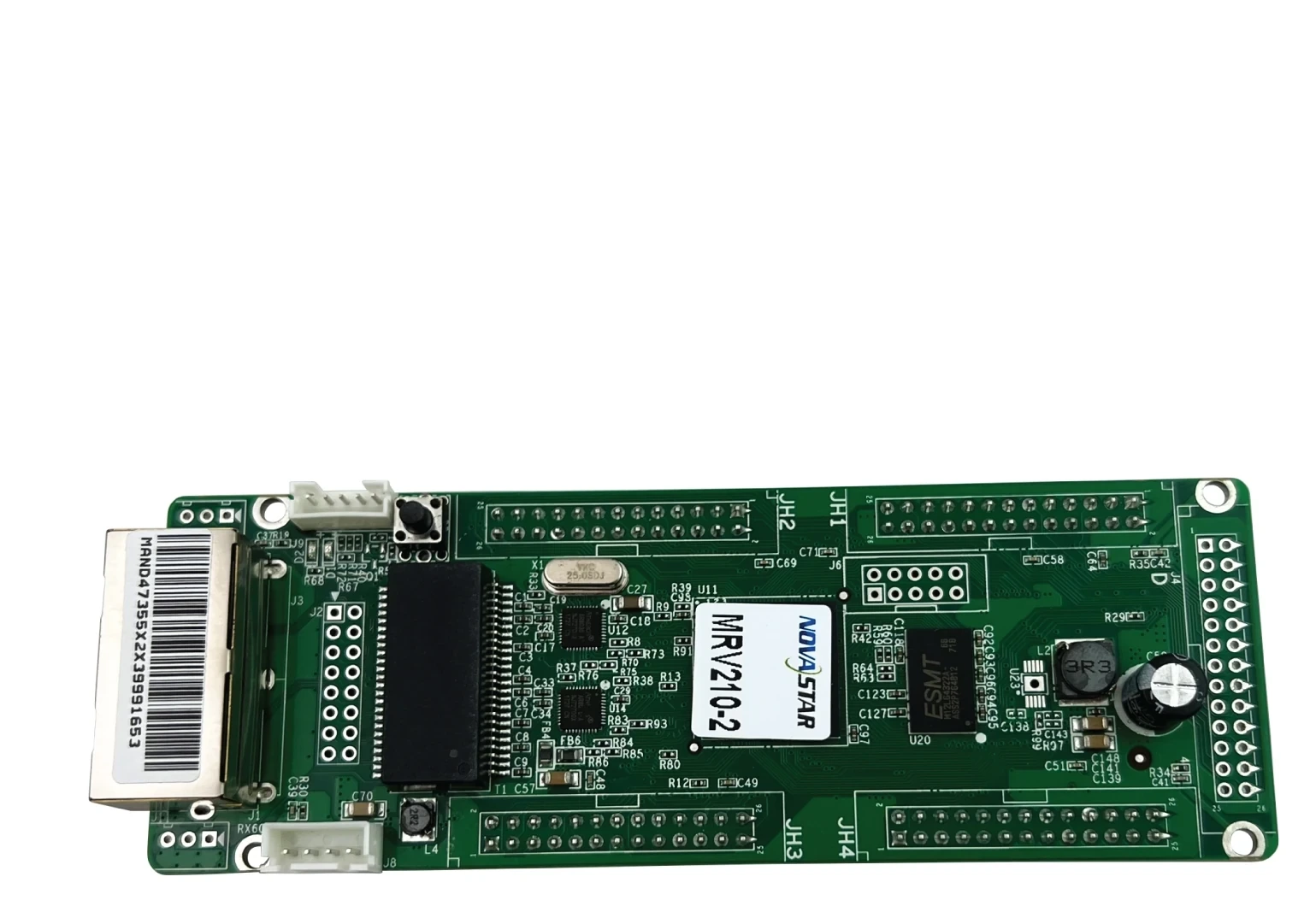
What is the NovaStar MRV210-2 receiving card?
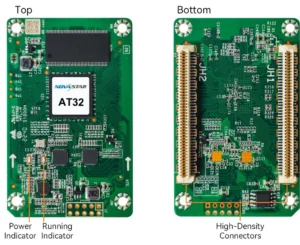
The NovaStar MRV210-2 is the bottom-side male-header version of the MRV210 receiving-card family. It sits inside a compatible LED cabinet, receives that cabinet’s image data from the sender or previous cabinet, and passes the assigned data to the LED modules through four hub connections.
Most MRV210-2 orders are repairs. The first question is not “does it have enough pixels?” but “will these four bottom-side male headers meet the cabinet’s mating board without forcing or modifying anything?” If the old card and the hub board show that same layout, the MRV210-2 is the exact spare to consider.
MRV210-2 key features
- Bottom-side mechanical match: this suffix is for cabinets whose hub board expects male headers on the bottom of the long MRV210 board. A matching part number matters more than a similar capacity.
- Keep a working cabinet known: configuration readback lets a technician retain the screen’s scan, wiring and pixel map before an old card is removed.
- Useful fault clues: the card supports temperature and voltage monitoring, and a compatible cabinet LCD can show operating information instead of leaving a service visit to guesswork.
- Less disruptive signal loss: a stored image can be selected for startup, missing source or disconnected Ethernet. It does not repair a signal fault, but it can avoid a single black cabinet while the path is checked.
- Protection already designed into the wall: loop backup works when the sender and cabinet chain have been wired with main and backup paths. A replacement card preserves that design; it does not create redundancy on its own.
NovaStar MRV210-2 specifications
Use this short table to rule out the obvious mismatch. The MRV210-2’s capacity is a card-wide number, so do not multiply it by the four hub connections.
| Receiving-card load | Up to 256 × 256 pixels per card |
|---|---|
| Hub arrangement | Four male headers on the bottom side |
| Parallel module data | 16 RGBR′ groups at 1/32 scan; 20 RGB groups at 1/16 scan; 24 RGB groups at 1/4 scan |
| Serial data | Up to 64 groups |
| Input and power | DC 3.3–5.5 V; 0.5 A rated current; 2.5 W rated power |
| Board size | 138.9 × 47.9 × 17.5 mm |
Will the MRV210-2 clear and mate with your cabinet hub board?
Yes—an MRV210-2 can clear and mate with a cabinet hub board only when that cabinet accepts four male headers on the bottom side. Take a front and rear photo of the old card before ordering. The card needs room for its connector pins below the board; a same-size version with top-side headers can still be impossible to seat.
- Match the full suffix: the installed label must say MRV210-2, not only MRV210.
- Look at the mating side: confirm four male headers on the bottom and check that the cabinet has the required clearance.
- Save the working cabinet: in NovaLCT, read and save the receiving-card configuration before unplugging the failed board.
- Test one cabinet first: restore the known-good configuration to one replacement and inspect a complete, correctly ordered image before fitting the rest.
That one-cabinet test is the practical safeguard. A reversed module order, stripes or repeated image is usually a hub/scan/configuration problem, not evidence that a larger receiving card should be substituted.
For a multi-cabinet repair, keep the original card beside the tested replacement and repeat the same check cabinet by cabinet. It is faster than pulling a whole wall apart after a batch has been fitted, and it preserves a known working reference if one cabinet needs a different file.
MRV210-2 scan mode and module data before ordering
The four hubs do not mean every cabinet uses the same module path. NovaStar documents three parallel modes: 16 RGBR′ groups for 1/32 scan, 20 RGB groups for 1/16 scan, and 24 RGB groups for 1/4 scan. There is also a 64-group serial mode. These figures tell an installer which type of module data the card can carry; they are not extra capacity to add together.
For a straight replacement, the saved configuration is more useful than trying to recreate the scan mode from memory. For a cabinet build, confirm the module driver and scan design with the cabinet maker before choosing the receiving card. This keeps a small header-orientation choice from becoming a screen-rebuild project.
MRV210-2 datasheet, firmware and NovaLCT
The MRV210-2 datasheet confirms the board size, data modes and card-wide 256 × 256 load. Before changing a working card, use NovaLCT to save the receiver configuration. Firmware is the program that runs on the card; the RCFGX/NCP file is the cabinet’s scan and pixel map. Keep both, because neither can replace the other.
NovaStar’s MRV210 V4.6.0.0 release notes list the family and the applicable chips. Do not update only because the version is newer: first match the PCB, module driver and existing working version. The most reliable repair starts with the original program and configuration, not a random firmware archive.
MRV210-2 vs MRV210-1, -3 and -4
These versions use the same MRV210 family specification, but their connector side and gender decide whether a cabinet can accept the board. Use the installed cabinet’s form, not the most available suffix.
| Model | Hub header position | Replacement guidance |
|---|---|---|
| MRV210-2 | Male, bottom side | Use when the old card and hub board show this exact arrangement. |
| MRV210-1 | Male, top side | Same gender, but the header side can block installation. |
| MRV210-3 | Female, top side | Different connector gender and side. |
| MRV210-4 | Female, bottom side | Same side, different connector gender. |
NovaStar MRV210-2 FAQ
What makes MRV210-2 different from MRV210-1?
Both are male-header variants, but MRV210-2 has headers on the bottom side and MRV210-1 has them on the top. That physical orientation can decide whether the card can mate with the cabinet hub board.
Is 256 × 256 the capacity of each MRV210-2 hub?
No. It is the documented maximum for the receiving card as a whole. The four hub connections share the cabinet’s module data path.
Can I replace the MRV210-2 with a different suffix?
Only after the cabinet maker confirms connector side, gender, hub pinout, scan/data mode, power and configuration-file path. A shared MRV210 name is not sufficient.
What should I save before an MRV210-2 repair?
Save the working receiving-card configuration in NovaLCT, record the full card label and retain the working firmware version. Test one replacement cabinet before changing several cards.
Why is a replacement card connected but the image is wrong?
First check the exact suffix and hub mating. Then restore the correct cabinet configuration and inspect the module scan/data arrangement. A connected card can still have the wrong pixel map.
Should I update MRV210-2 firmware before every replacement?
No. Use an update only when its driver-chip and PCB applicability have been verified. A newer firmware version cannot repair an incorrect cabinet configuration.
Can I request an MRV210-2 quantity and volume-pricing quote?
Yes. Send front and rear card photos, a photo of the hub board, cabinet pixel size and required quantity. We can check the bottom-side male form and provide volume pricing where applicable.
Reviews
There are no reviews yet.