
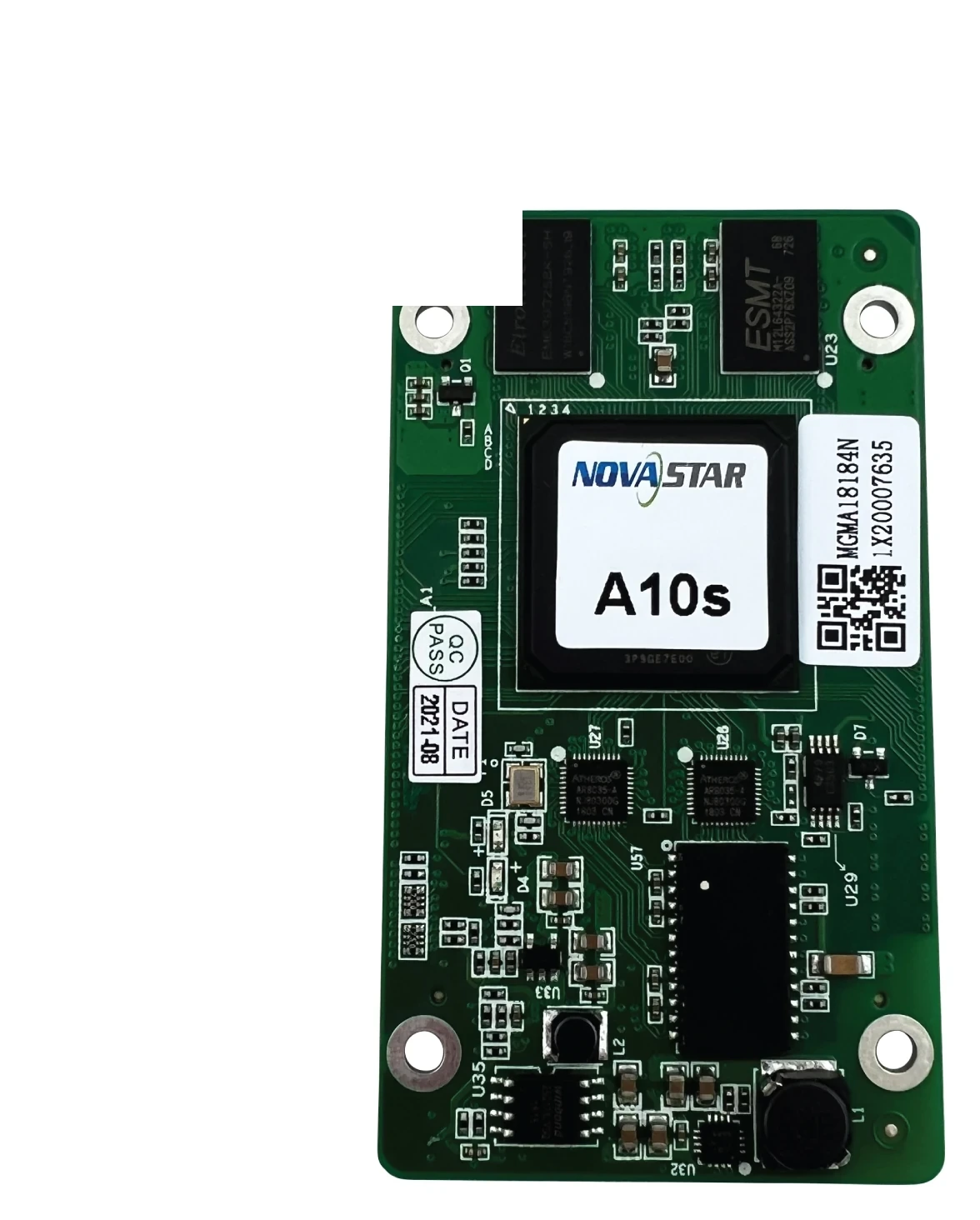
What is the NovaStar A10s receiving card?
The NovaStar A10s is a receiving card for an LED cabinet built around the original A10s board and hub-board connection. It takes the image data assigned by the controller and passes it to that cabinet’s LED modules. Today, most A10s searches come from owners keeping an older wall running, so the useful question is not which card has the longest feature list. It is whether the replacement will fit, connect and restore the existing cabinet correctly.
Do not treat A10s, A10s Plus and A10s Pro as different names for one interchangeable part. Each model belongs to a different cabinet decision. For an installed A10s wall, start with the exact board label, the hub board and the saved cabinet record.
A10s key features
A calibration path for a matched cabinet
NovaLCT identifies the A10s as compatible with full-grayscale and low-grayscale calibration. On a cabinet that already uses the A10s, that gives the technician a way to keep adjacent modules visually even after a repair. Calibration can refine a matching cabinet; it cannot correct a wrong scan file, a mismatched hub board or an unrelated module type.
Preserve a cabinet that already works
A known-good receiving-card program and cabinet configuration are often more valuable than a newer-looking board. The program tells the card how to communicate with the cabinet electronics. The cabinet configuration holds the scan, wiring and pixel map. Saving both before a swap makes it possible to bring one repaired cabinet back into the wall without rebuilding the screen from memory.
A spare is only useful when the physical connection matches
A receiving card can look nearly identical while using a different board outline, hub-board mating position or cabinet power arrangement. Confirm those physical details before the order is packed. It is the fastest way to avoid a spare that cannot be installed in the cabinet it was bought to repair.
NovaStar A10s specifications
The original A10s is a legacy model and its current primary specification sheet is not available in NovaStar’s public library. The table separates what can safely identify an existing A10s cabinet from details that must be confirmed from the removed card or cabinet maker’s record.
| Check | Safe buying use | What to verify before ordering |
|---|---|---|
| Product role | Legacy NovaStar LED receiving card | The front and back of the removed card must be labelled A10s, not A10s Plus or A10s Pro. |
| Legacy load reference | 512 × 256 pixels is consistently shown in legacy A10s listings | Use it only to help identify an existing card. Do not use it as a new-cabinet capacity quote because the original operating conditions have not been recovered from a current primary sheet. |
| Calibration | Full-grayscale and low-grayscale calibration are listed for A10s in NovaLCT documentation | Confirm the cabinet, controller and calibration files support the repair you plan to make. |
| Physical fit | Card label, board outline, hub-board connector position and cabinet supply | Compare a clear photo or the removed card before choosing a substitute. |
| Configuration | Receiving-card program and cabinet configuration | Read and save both from a working cabinet before removing its original card. |
A10s replacement compatibility
An A10s order should start with a cabinet match, not a resolution match. First, compare the exact A10s label on both sides of the old card. Then check the hub board, connector orientation, mounting points and cabinet supply. Finally, keep the working program and cabinet configuration before the old card is removed. These checks answer different questions, and skipping any one of them can turn a simple repair into a cabinet rebuild.
| What you have | What it tells us | Next step |
|---|---|---|
| Exact A10s label and clear board photos | The model identity and likely connector side | Compare them with the candidate card before purchasing. |
| Hub-board part number and cabinet model | Whether the card can mate with the cabinet’s module path | Check the hub-board drawing or send a photo for a physical-fit review. |
| Saved program and cabinet configuration | The screen’s scan, wiring and pixel map | Restore one repaired cabinet first, then inspect it before changing more cards. |
| Only a symptom or a resolution | Not enough evidence for an exact receiving-card order | Identify the card and hub board before selecting a different A-series model. |
If the old A10s is still powered, use NovaLCT to read the existing files before the swap. If it has already failed, send the card label, front-and-back photos, hub-board photo, cabinet model and quantity needed through our replacement support form. That gives the order a concrete starting record instead of relying on a board that merely looks similar.
A10s calibration and cabinet configuration
A new or repaired module can stand out as a bright or dark patch even when it is electrically healthy. On a matched A10s cabinet, calibration data helps bring that cabinet back into the visual balance of the rest of the wall. The sequence matters: restore the correct cabinet map first, confirm that the image is wired in the right order, and then use the appropriate calibration routine.
Keep the receiving-card program and cabinet configuration as separate files. The first governs how the card works with the cabinet electronics. The second describes the cabinet’s scan and pixel wiring. Replacing one with the other can leave the screen scrambled, mirrored or uneven. A working file set should be copied before any firmware or configuration change is considered.
A10s vs A10s Plus and A10s Pro
The model names are close, but they are not a safe replacement path. Use the existing cabinet as the reference. A different A-series card belongs in the conversation only when its board, hub board, modules and configuration are all being checked as one system.
| Model | Best reason to consider it | Important boundary |
|---|---|---|
| A10s | You are restoring a cabinet that is documented or physically labelled for the original A10s. | Match the old board and retain its files; do not assume newer A-series specifications apply. |
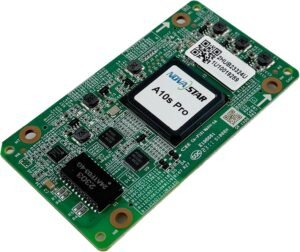
| A10s Plus | You are reviewing a cabinet designed specifically for the A10s Plus board and electrical requirements. | It is not an automatic replacement for an original A10s cabinet. |
| A10s Pro | You are planning a compatible newer cabinet and need the documented A10s Pro feature set. | It requires its own cabinet and configuration review rather than an A10s file transfer. |
A10s firmware, configuration and NovaLCT
No exact public A10s firmware package or current A10s datasheet PDF has been verified for this legacy model, so we do not attach a guessed file. Use NovaLCT to protect the files from a working cabinet. If a firmware change is necessary, verify the original board and module electronics against NovaStar’s current download center before anything is sent to the screen.
NovaStar A10s FAQ
What does the NovaStar A10s do?
The A10s is the receiving card inside a compatible LED cabinet. It receives the image data mapped by the controller and passes that cabinet’s assigned pixel data to the LED modules through the matching hub board.
Can A10s Plus replace an original A10s?
Not as an automatic swap. The card label, physical board fit, hub board, cabinet supply, module path and saved configuration all need to match the cabinet before another A-series model is considered.
What is the A10s load capacity?
Legacy A10s listings consistently show 512 by 256 pixels, but the original operating conditions are not available in a current primary specification sheet. Use that number to help identify an existing card, not to design a new cabinet.
Does A10s support calibration?
NovaLCT documentation lists the A10s for full-grayscale and low-grayscale calibration. The cabinet, controller and saved files still need to match the repair.
What should I save before replacing an A10s?
Save both the working receiving-card program and the cabinet configuration in NovaLCT. They serve different purposes and together preserve the cabinet’s image map and operating relationship.
Why is a similar-looking receiving card not enough?
Similar cards can use a different board outline, hub-board connection, power arrangement or configuration. A wrong card may not fit or may produce a scrambled image even if it powers up.
Where can I download A10s firmware?
We have not verified a current public package that can safely be labelled as exact A10s firmware. Keep the known-good files from a working cabinet and use NovaStar’s download center only after the original hardware has been confirmed.
What information helps confirm an A10s replacement?
Send the A10s label, clear front-and-back photos, hub-board photo, cabinet model, number of cards needed and any saved configuration. Those details let the physical and configuration match be reviewed together.
Can I request quantity pricing for A10s spares?
Yes. Include the required quantity and cabinet details in a replacement support request so pricing is based on the exact card evidence rather than a general A-series substitute.
Reviews
There are no reviews yet.