
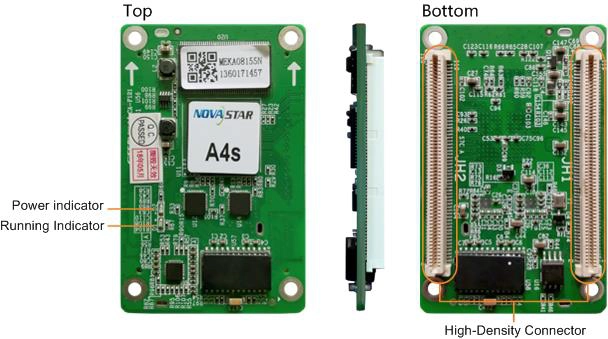
What is the NovaStar A4s receiving card?
The NovaStar A4s is the receiving card inside a compatible LED cabinet. It takes the image data sent to that cabinet and supplies the signals the LED modules use. For an existing A4s cabinet, match the complete cabinet package rather than choosing a similar-looking board from a later A-series model.
The A4s supports up to 256 by 256 pixels and 24 parallel RGB data groups. Those two limits are more useful than an overall family name when you are checking whether an existing cabinet can keep its hub board and module wiring.
A4s key features
A replacement module that blends into the wall
A new module can look brighter or carry a colour cast that makes one cabinet stand out from the rest of a wall. A4s supports pixel-level brightness and chroma calibration with compatible NovaStar tools, giving a matched cabinet a way to correct that difference when the relevant calibration coefficients are available.
A targeted fix for a visible cabinet seam
A dark stripe or bright line at a cabinet join needs a different response from a dead card or a bad cable. A4s supports adjustment for those seams. If the cabinet is mirrored or scrambled instead, check the scan and configuration first; a seam setting cannot repair a wrong pixel map.
An alternate signal path when the wall is wired for it
For a cabinet run wired with primary and backup lines, A4s supports loop backup. If one point in that configured run fails, the alternate path can keep the screen showing its image. The result depends on the finished cable topology, so a single replacement card does not add redundancy to a cabinet that was not wired for it.
A cabinet that is easier to locate during service
Mapping can display the receiving-card number and Ethernet-port information on the cabinet. That turns a number in NovaLCT into a physical location on a long wall, which is useful when one cabinet needs service and the cable route is not obvious from the front of the screen.
NovaStar A4s specifications
These figures establish the A4s cabinet envelope. Read the capacity section for the 24-group constraint that generic product listings often miss.
| Maximum load | Up to 256 × 256 pixels per card |
|---|---|
| Parallel RGB data | Up to 24 groups |
| Serial data | 64 groups, expandable to 128 |
| Input voltage | DC 3.3 V to 5.5 V |
| Dimensions | 70.0 × 45.0 × 8.0 mm |
| Fitted hub-board spacing | 5.0 mm connector spacing |
| Operating environment | −20°C to +70°C; 10% to 90% RH, non-condensing |
| Certifications | RoHS and EMC Class B |
A4s 256 × 256 load capacity and 24-group limit
An A4s can carry up to 256 by 256 pixels. A cabinet at that size can use one card, but the module wiring must also stay inside the A4s limit of 24 parallel RGB groups. A 32-group claim is not an A4s specification; modules that need more than 24 groups need a different card and cabinet path.
| Cabinet check | A4s limit | What it changes |
|---|---|---|
| Pixel map | Up to 256 × 256 per card | A larger map requires another card or another cabinet design. |
| Parallel RGB data | Up to 24 groups | Modules needing more groups require a higher-group receiving-card path. |
| Serial data | 64 groups; expandable to 128 | Confirm how the installed hub board uses serial data before changing cards. |
The pixel figure and the data-group figure have to pass together. A 256 by 256 cabinet can still be wrong for A4s if its modules or hub board need more parallel groups than the card can supply.
A4s replacement compatibility: what must match
Board size is only the first check. A safe A4s replacement matches the complete card label, hub board, module driver IC, scan, power rail and saved cabinet configuration. A different card may plug into a similar board and still show no image, a scrambled image or the wrong module map.
| Model | Choose it when | What to verify |
|---|---|---|
| A4s | You are replacing an installed A4s in a cabinet that already works. | Confirm the 24-group data path, exact label, hub board, modules and saved configuration. |
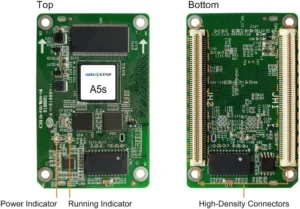
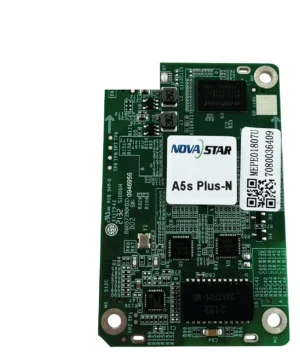
| A5s | A cabinet is explicitly documented for A5s and its 32-group path. | Do not treat the A5s label or capacity as proof that it can replace A4s in the same cabinet. |
| A5s Plus | A new cabinet is planned around the A5s Plus specification and matching module package. | A similar outline does not make A4s firmware or configuration files transferable. |
Before removing a working A4s, use NovaLCT to save the receiving-card program and cabinet parameters. Firmware operates the matched card electronics; the cabinet file preserves the scan, wiring and pixel map. One does not replace the other.
A4s datasheet, firmware and NovaLCT downloads
The A4s datasheet establishes the card’s 256 by 256 and 24-group limits. NovaLCT is used to save the A4s program and cabinet parameters before a service swap. Firmware should match the A4s PCB and module electronics; an apparently close A5s-family package is not a safe substitute.
NovaStar A4s FAQ
What does the A4s receiving card do?
The A4s sits inside a compatible LED cabinet, receives image data from the sender and supplies the assigned pixel data to that cabinet’s modules.
What is the A4s load capacity?
The A4s supports up to 256 by 256 pixels per card. The cabinet must also stay within its 24 parallel RGB data-group limit and match the hub board, scan and saved configuration.
How many parallel RGB data groups does A4s support?
It supports up to 24 parallel RGB groups. A module path that needs 32 groups requires a different receiving-card and cabinet design.
Can A5s replace an A4s?
Not as an automatic swap. Confirm the complete card label, hub board, module driver IC, scan, power rail and cabinet configuration before changing card families.
What should I save before replacing an A4s?
Save the working receiving-card program and cabinet parameters in NovaLCT. They preserve the A4s settings and the cabinet’s scan, wiring and pixel map.
Does A4s support 3D?
It supports 3D output when the independent controller supports 3D as well. The source, controller and cabinet must use the same 3D configuration.
Can A4s rotate a portrait LED display?
Yes. The card supports image rotation in 90-degree steps when the cabinet layout and configuration are prepared for that orientation.
Does a replacement A4s add cable backup?
No. Loop backup works only when the screen has been wired with the primary and backup line path. A single card does not create that topology by itself.
Can I order A4s spares with volume pricing or Net 30?
Yes. Send the cabinet count and spare quantity for volume pricing or eligible Net 30 terms. Include the cabinet model if the order is a replacement.
How is an A4s warranty handled?
A4s cards from our authorized US NovaStar channel have three years of manufacturer coverage tied to their serial numbers. Keep the serial record with the cabinet files for later service.
Reviews
There are no reviews yet.