
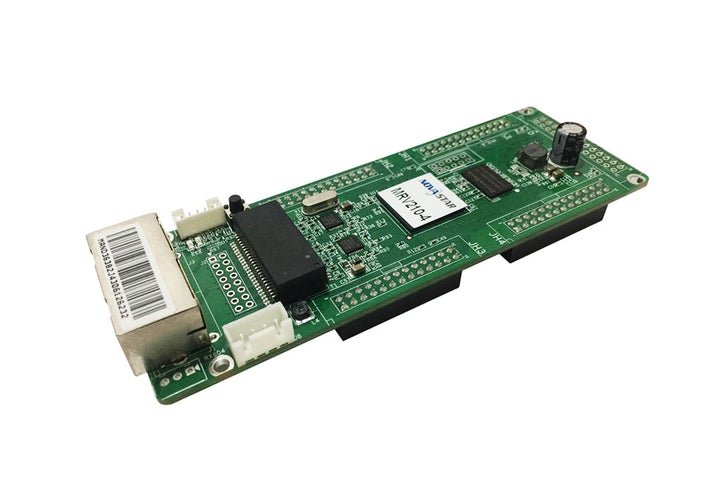
What is the NovaStar MRV210-3 receiving card?
The NovaStar MRV210-3 is the top-side female-header version of the MRV210 receiving-card family. It sits inside a compatible LED cabinet, takes the cabinet’s assigned image data from the sender or previous cabinet, and passes that data to the LED modules through four hub connections.
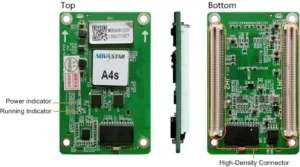
For a repair, the important difference is physical: the MRV210-3 has four female headers on the top side of the long board. The matching cabinet hardware needs pins in the corresponding place. A card that shares the MRV210 name and the same pixel capacity can still be the wrong spare when its headers point the other way or use the other gender.
MRV210-3 key features
- Top-side female cabinet match: the full `-3` suffix helps prevent a card that cannot mate with the cabinet’s hub board, even when the board dimensions look familiar.
- Configuration readback before service: a technician can retain the working cabinet’s scan, wiring and pixel map before the old card is removed, rather than rebuilding a screen from memory.
- Useful fault information: temperature and voltage monitoring can help separate a power or heat issue from a card or cable problem. A compatible cabinet LCD can display those values at the cabinet.
- A less abrupt loss of image: a pre-stored image can be selected for startup, a missing video source or a disconnected Ethernet cable. It will not fix the fault, but it can avoid leaving one cabinet as a black rectangle during checks.
- Backup that follows the existing wiring: loop backup works only where the sender and cabinet chain were wired with main and backup links. Replacing one card preserves that design; it does not add redundancy to a single-path wall.
NovaStar MRV210-3 specifications
These values answer the first fit questions. They should be checked alongside the connector layout and cabinet configuration, not used as a reason to substitute a nearby suffix.
| Receiving-card load | Up to 256 × 256 pixels per card |
|---|---|
| Hub arrangement | Four female headers on the top side |
| Parallel module data | 16 RGBR′ groups at 1/32 scan; 20 RGB groups at 1/16 scan; 24 RGB groups at 1/4 scan |
| Serial data | Up to 64 groups |
| Input and power | DC 3.3–5.5 V; 0.5 A rated current; 2.5 W rated power |
| Board size | 138.9 × 47.9 × 17.5 mm |
The 256 × 256 figure belongs to the card as a whole, not to each of the four hubs. The hub count helps route the cabinet’s modules; it does not turn one receiving card into four separate 256 × 256 controllers.
Will an MRV210-3 fit your LED cabinet?
An MRV210-3 is a good replacement only when the old board and cabinet hardware show the same top-side female arrangement. Before ordering, photograph both sides of the installed card and the part it mates with. The photo should show the entire label, the header side and whether the cabinet presents the pins that the card’s female headers need.
- Read the complete old-card label: confirm MRV210-3, not only MRV210.
- Check the mating hardware: confirm four female headers on the top side and inspect the matching pins for bent, missing or damaged positions.
- Keep the working cabinet data: use NovaLCT to read and save the receiving-card configuration before disconnecting the old board.
- Prove one cabinet: install one replacement, restore the known-good configuration, and inspect the entire cabinet before fitting additional cards.
That small test avoids a costly mistake. If the replacement has a complete but repeated image, horizontal stripes or modules in the wrong order, stop before swapping more cards. Check the hub connection and restore the correct cabinet configuration first; a bigger capacity rating will not correct a mechanical or mapping mismatch.
When replacing several cabinets, leave one known-good original card in place until the first replacement has been tested. It gives the technician a direct visual and configuration reference instead of turning a simple repair into a whole-wall diagnostic.
MRV210-3 replacement setup with NovaLCT
NovaLCT is relevant here because it preserves the cabinet data that makes a matching board display the right image. The receiving-card configuration stores details such as the cabinet’s module layout, scan and pixel map. Firmware is different: it is the program that runs on the card itself. A saved configuration does not replace firmware, and a firmware file does not recreate the cabinet map.
For a working wall, the simple sequence is: read the current card in NovaLCT, save its configuration, replace one board, send the saved configuration to that cabinet and check the picture. If the old card has failed completely and no file was saved, get the original file from the cabinet maker or a known matching cabinet. Do not send a file from a merely similar panel across the entire wall.
There is no benefit in updating every replacement to the newest program by default. The correct decision depends on the installed PCB, module driver and the version that is already known to work in that cabinet. Keep a copy of the working file and program information before changing either one.
MRV210-3 datasheet, firmware and NovaLCT
Use the MRV210-3 datasheet for board size, card-wide load and data-mode checks. Use NovaLCT to read and save an existing cabinet configuration before a repair. The firmware notes are useful only after the hardware has been matched; they are not a substitute for the cabinet’s original configuration.
Keep both the program information and the saved cabinet file with the cabinet record. This is the practical way to make a later repair quicker, especially when several cabinets use similar-looking MRV210 boards with different connector arrangements.
MRV210-3 vs MRV210-1, -2 and -4
The four named versions share the MRV210 family specifications. What changes is the location and gender of the hub headers, which decides how the board seats in a specific cabinet.
| Model | Hub header position | What to verify |
|---|---|---|
| MRV210-3 | Female, top side | Use only when the cabinet presents the matching pins above the board. |
| MRV210-1 | Male, top side | Same side, but the connector gender is different. |
| MRV210-2 | Male, bottom side | Different header side and connector gender. |
| MRV210-4 | Female, bottom side | Same gender, but the header side can still prevent installation. |
NovaStar MRV210-3 FAQ
What makes MRV210-3 different from MRV210-1?
MRV210-3 uses female headers on the top side. MRV210-1 uses male headers on the top side. That change in connector gender decides whether each card can mate with the cabinet hardware.
Is 256 × 256 the capacity of every MRV210-3 hub?
No. It is the documented maximum for the receiving card as a whole. The four hubs are part of the same cabinet data path.
Can an MRV210-3 replace another MRV210 suffix?
Only if the cabinet maker verifies connector side, gender, hub pinout, module data mode, power and configuration-file path. Matching family name alone is not enough.
What should I save before replacing an MRV210-3?
Save the working receiving-card configuration in NovaLCT, record the full card label and retain the working firmware information. Test one cabinet before changing several cards.
Why is a replacement card connected but the cabinet image is wrong?
First check the exact suffix and the hub mating. Then restore the correct cabinet configuration and inspect the module scan/data arrangement. A connected card can still have the wrong pixel map.
Should I update MRV210-3 firmware before every replacement?
No. Update only after verifying that the package applies to the PCB and module driver in the cabinet. A newer version cannot repair an incorrect cabinet configuration.
Can I request an MRV210-3 quantity and volume-pricing quote?
Yes. Send front and rear card photos, a photo of the mating hub board, cabinet pixel size and the quantity required. We can check the top-side female form before quoting.
Reviews
There are no reviews yet.