
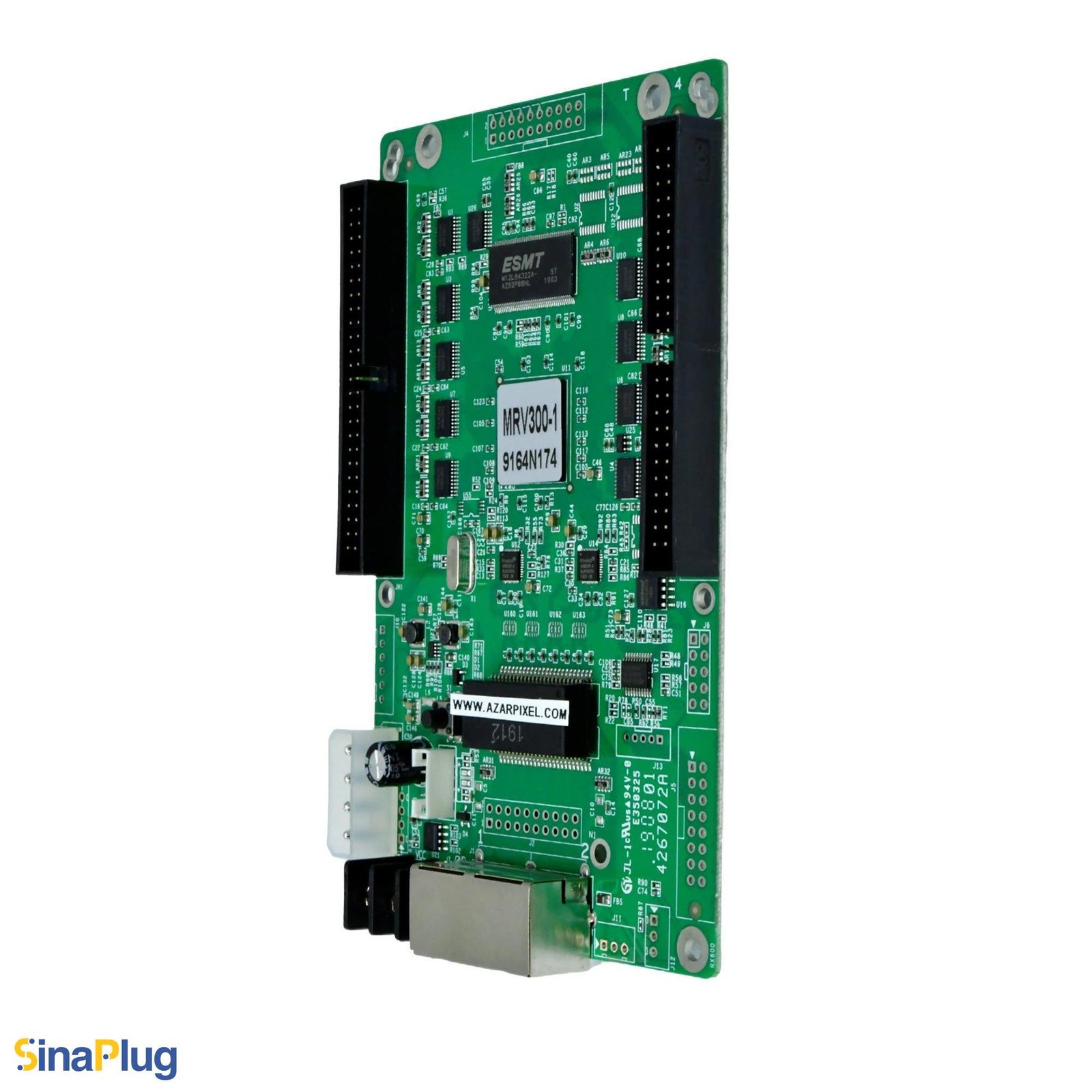
What is the NovaStar MRV300-1 receiving card?
The NovaStar MRV300-1 is the standard hardware variant in the older MRV300 receiving-card range. Its defining detail is simple but important: the two connectors are male and sit on the top side of the board. Most MRV300-1 orders are for a failed card in an existing cabinet, not for a new receiving-card design.
It sends the cabinet’s configured data through a matching hub board in 16-group RGBR, 20-group RGB or 64-group serial mode. A replacement has to preserve that original signal route. The printed suffix, connector position and saved cabinet file matter as much as the 256 × 226-pixel figure.
MRV300-1 key features
Top-side male hardware for the original cabinet connection
The -1 suffix identifies the standard male-top arrangement in NovaStar’s specific-model list. It is a physical match, not a performance upgrade. A card with the same family name but connectors on the opposite side or with the opposite gender may not mate with the cabinet’s hub board.
Three documented output arrangements
The card can be configured for 16-group RGBR parallel data, 20-group RGB parallel data or 64-group serial data. That gives older modules and LED-bar designs their intended data path. It also explains why a card can power up and communicate while the picture still looks wrong after an unchecked replacement.
Useful checks while a cabinet is open
MRV300-1 supports configuration readback, temperature, supply-voltage and Ethernet-status checks, plus a pre-stored picture. Those functions give a technician a way to preserve the working cabinet record and narrow a cable, power or configuration issue before changing several parts at once.
NovaStar MRV300-1 specifications
These values are shared MRV300 V2.1.1 facts. The first row is the item that distinguishes MRV300-1 from the other named hardware variants.
| Model identity | Standard model; male connector on top |
|---|---|
| Parallel data modes | 16-group RGBR or 20-group RGB |
| Serial data mode | 64 groups |
| Maximum resolution | 256 × 226 pixels |
| Input voltage | 3.3 V minimum, 5.0 V typical, 5.5 V maximum |
| Input current | 0.33 A minimum, 0.50 A typical, 0.55 A maximum |
| Operating environment | −20°C to +70°C; 10% to 90% RH |
| Thickness | About 1.6 mm board thickness; about 18.5 mm overall |
How to confirm an MRV300-1 before ordering
Start with the label on the removed card. It should read MRV300-1, not only MRV300. Then look at the two hub connectors from the component side: on a -1 card they are male and on the top side. Finally, compare the header to the mating hub board or cable inside the cabinet. All three checks should agree before a spare is ordered.
A row of pins on the wrong side is not a minor installation detail. It can conflict with a standoff, cable route or mating socket even when every electrical number in a listing appears familiar. When the original label is missing, send clear front-and-back card photos and a photo of the cabinet hub board through our MRV300-1 compatibility request before buying a substitute.
MRV300-1 50-pin hub-board and output-mode match
The MRV300-1 uses the MRV300 family’s two 50-pin cabinet interface. It is not a direct eight-port HUB75E card, so a matching Ethernet jack and a similar pixel capacity are not enough evidence of fit. The hub board and the existing module wiring decide which data arrangement the cabinet needs.
| What you can verify in the cabinet | What to preserve | What can go wrong if it is guessed |
|---|---|---|
| Hub or module record says RGBR | 16-group RGBR parallel arrangement | Rows can be addressed in the wrong order if an RGB file is substituted. |
| Hub or module record says RGB | 20-group RGB parallel arrangement | A similar-looking cabinet can show shifted or incomplete image data. |
| LED-bar wiring is documented | 64-group serial arrangement | The bar order can be wrong even though the card is detected. |
| No readable card or cabinet record | Pause and collect photos, hub markings and the saved configuration | Ordering from capacity alone can turn a single-card repair into a cabinet rework. |
MRV300-1 replacement and NovaLCT configuration restore
Before removing a working card, use NovaLCT to read and save the cabinet configuration. That file holds the scan, module wiring and output arrangement used by that cabinet. It is different from firmware: firmware runs the receiving card, while the cabinet file tells the card how this particular screen is built.
Install one confirmed MRV300-1 first. Restore the saved configuration to that one cabinet, then check image order, brightness and colour with a known signal. A real-world service report shows that an apparently matching MRV300-1 can communicate yet display random colour or motion until the correct receive-card setup is restored. Once the first cabinet is clean, continue with the remaining cards.
MRV300-1 vs MRV300-2, MRV300-3 and MRV300-4
The four suffixes describe connector placement and gender. They share the legacy MRV300 operating family, but they are not drop-in replacements for each other unless the mating hardware is also changed and tested.
| Model | Official physical description | Buy it when |
|---|---|---|
| MRV300-1 | Male connector on top | The existing card and hub board use the top-side male layout. |
| MRV300-2 | Male connector on bottom | The cabinet expects the same gender below the board. |
| MRV300-3 | Female connector on top | The cabinet has top-side female mating hardware. |
| MRV300-4 | Female connector on bottom | The cabinet has bottom-side female mating hardware. |
MRV300-1 datasheet, firmware and NovaLCT
The MRV300-1 documentation confirms the hardware suffix and family operating values. Preserve the working cabinet file before a replacement; do not update legacy firmware merely because a newer file exists. An exact public MRV300-1 firmware package is not available from the verified sources, so the download center is a place to confirm an exact match, not a guessed update link.
NovaStar MRV300-1 FAQ
What is the difference between MRV300 and MRV300-1?
MRV300 is the original base card with its own specification. MRV300-1 is the named standard hardware variant with male connectors on top. Use the exact printed label and cabinet connection to choose between them.
Does MRV300-1 have male connectors on the top or bottom?
NovaStar’s specific-model list identifies MRV300-1 as the male-connector-on-top version.
Can MRV300-2 replace MRV300-1?
Not as a like-for-like spare. MRV300-2 puts its male connector on the bottom, so its mating arrangement and clearance differ from MRV300-1.
What is the MRV300-1 maximum resolution?
The MRV300 V2.1.1 specification lists 256 by 226 pixels. Confirm the output arrangement and cabinet hub board as well as the pixel number.
Does MRV300-1 use HUB75E connectors?
No. It uses the MRV300 family’s two 50-pin cabinet interface. Confirm the hub board and original module wiring before ordering.
What should I save before changing an MRV300-1?
Use NovaLCT to read and save the working cabinet configuration. Keep it with the card photos and cabinet record so the first replacement can be restored and tested safely.
Why can a matching MRV300-1 still show a bad image after replacement?
The new card may need the original cabinet configuration. A wrong scan, wiring or output arrangement can produce shifted data or wrong colours even when the hardware is detected.
Does MRV300-1 support a stored image?
It supports a pre-stored picture in a compatible cabinet. Set and test it while the display is working; it does not replace a correct video source and configuration.
Where can I download MRV300-1 firmware?
An exact public MRV300-1 firmware package is not available from the verified sources. Keep a known-good installation unchanged unless an exact package matches the installed hardware and cabinet requirements.
What do you need to confirm an MRV300-1 order?
Send the printed card label, front-and-back photos, a hub-board or cabinet connection photo, the saved configuration if available, and the required quantity through our compatibility request form.
Reviews
There are no reviews yet.