
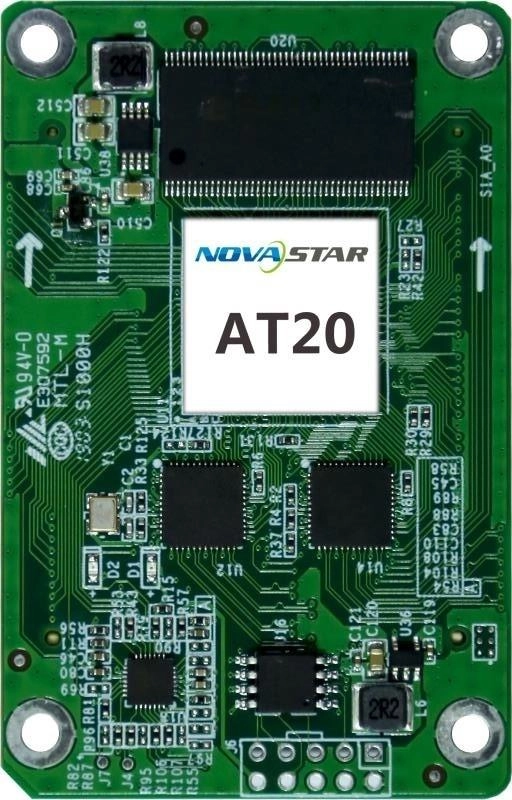
What is the NovaStar AT20 receiving card?
The NovaStar AT20 is the receiving card inside a compatible LED cabinet. It takes the image data already mapped by the controller and passes the assigned pixel data to that cabinet’s LED modules through the matching high-density hub-board connection. It is not the controller, and it cannot make an arbitrary LED module or cabinet layout work on its own.
For an existing AT20 screen, a replacement card must match the original cabinet’s hub board, module wiring and saved configuration. Check those first, then confirm capacity.
AT20 key features
Correct a matched cabinet, not a random panel
With the compatible NovaStar tools, AT20 supports pixel-level brightness and chroma calibration, seam correction and individual RGB gamma adjustment. These controls can help a matched cabinet blend back into a wall when a module or card has been serviced. They do not turn a different module batch, scan setting or pixel map into the original cabinet.
Find the cabinet before pulling it apart
Mapping can show the receiving-card number and Ethernet-port information on the screen. The card can also monitor temperature and voltage in a compatible system. That gives a technician a way to identify the cabinet named in software before following cables through an entire wall.
Keep a picture on screen while the signal path is checked
A compatible cabinet can use a pre-stored image at startup, when the Ethernet line is disconnected or when the normal video source disappears. The AT20 also supports loop and dual-card backup when the cabinet, hub board and cable path were built for those options. Replacing one card does not add redundancy to a cabinet that was never wired for it.
Rotation and 3D rely on more than the receiving card
The AT20 supports 90-degree image rotation, and it can work in a 3D system with a sending device that supports 3D. Treat both as complete-system decisions: the controller, cabinet mapping and display hardware must be prepared for the mode before an event day.
NovaStar AT20 specifications
These are the figures that help confirm the installed board and plan a replacement. The capacity section below explains why the current 256 x 256 value should not be mixed with older AT20 listings.
| Product role | LED receiving card for a matching cabinet and hub-board interface |
|---|---|
| Maximum load | 256 × 256 pixels |
| Module data | Up to 24 parallel RGB groups or 64 serial groups, expandable to 128 |
| Input voltage | DC 3.3 V to 5.5 V |
| Rated power | 2.5 W |
| Dimensions | 70.0 × 45.0 × 9.0 mm |
| Operating environment | −20°C to +70°C; 10% to 90% RH, non-condensing |
| Certifications | RoHS and EMC Class B |
AT20 capacity: why current specifications say 256 × 256, not 320 × 256
Both numbers appear online because the AT20 documentation changed. NovaStar’s V1.3.0 change history says that the published loading capacity was changed from 320 by 256 pixels to 256 by 256 pixels. For a current cabinet plan or spare-part decision, use the later 256 by 256 figure shown in the current V1.3.1 specifications.
| What you may find | How to treat it | Buying decision |
|---|---|---|
| Older 320 × 256 listing | An earlier published value, not the current planning value. | Do not use it to assign modules or select a replacement. |
| Current 256 × 256 specification | The limit in AT20 Specifications V1.3.1. | Use it as the starting ceiling for the existing cabinet. |
| 24 parallel RGB groups | A separate limit on the module data paths the card can feed. | Confirm the hub board and module wiring as well as the pixel total. |
Pixels and RGB groups answer different questions. A cabinet can be under the pixel ceiling yet still require more parallel module data paths than the AT20 provides. Before ordering for a custom or rebuilt cabinet, count the cabinet pixels, identify the module driver and scan arrangement, then confirm the data groups at the hub board. A headline capacity alone is not a wiring diagram.
AT20 replacement: protect the cabinet files before changing the card
Before removing a working AT20, use NovaLCT to read back the receiving-card program and the cabinet configuration. Save both files with the cabinet record. The program tells the card how to work with the matched electronics; the cabinet configuration holds the scan, wiring and pixel map. One file cannot stand in for the other.
Then confirm the AT20 label, hub-board part number, connector position, module driver IC and scan arrangement. Test the saved configuration on one cabinet before sending it across a whole wall.
If no working original card or known-good cabinet file remains, obtain the cabinet configuration from the display manufacturer or original installer. A file from a screen with a similar pixel pitch is not evidence that the modules and wiring are the same.
AT20 vs AT30 and AT32
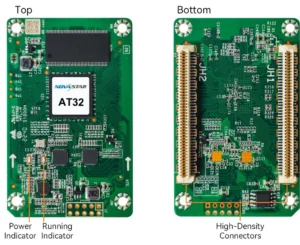
AT30 and AT32 have larger published limits, but a larger limit does not make either one a direct AT20 substitute. Choose a card family for a documented cabinet design; do not use a comparison table as permission to install a different board in an existing cabinet.
| Model | What the specification changes | Choose it when |
|---|---|---|
| AT20 | 256 × 256 maximum load and up to 24 parallel RGB groups. | You are repairing a cabinet already documented for an AT20 and have matching hardware and files. |
| AT30 | 512 × 256 maximum load and up to 32 parallel RGB groups. | A cabinet was designed and documented for AT30 hardware, not merely because its pixel count is larger. |
| AT32 | Its documented PWM limit changes with source bit depth: 512 × 384 at 8-bit or 512 × 192 at 10/12-bit; up to 32 parallel RGB groups. | A new or rebuilt cabinet needs that documented bit-depth path and the full hardware/configuration match is confirmed. |
If the existing AT20 is simply faulty, begin with an exact AT20 replacement. If the display needs a new capacity or image path, treat the change as a cabinet redesign and review the hub board, modules, configuration and controller system together.
AT20 datasheet, firmware and NovaLCT
Use the datasheet to confirm the current capacity and board limits, then use NovaLCT to preserve the working cabinet record before a card is removed. The verified AT20 firmware file is V4.6.2.0; apply it only after the card hardware and module driver ICs have been matched. A newer-looking file cannot correct the wrong cabinet configuration.
NovaStar AT20 FAQ
Why do some AT20 listings say 320 by 256 pixels?
NovaStar’s AT20 V1.3.0 change history says that the published loading capacity changed from 320 by 256 to 256 by 256 pixels. Use the current 256 by 256 value in AT20 Specifications V1.3.1 for a new plan or replacement decision.
What does an AT20 receiving card do?
It sits inside a compatible LED cabinet, receives the image data mapped by the controller and sends the assigned data to the cabinet’s LED modules through the matching hub-board connection.
What do the AT20’s 24 parallel RGB groups mean?
They describe the maximum number of parallel module data paths the card can feed. Confirm that limit with the hub board, module driver IC and scan arrangement as well as the cabinet pixel total.
Can AT30 or AT32 replace an AT20?
Not as an automatic swap. Their published capacities and parallel RGB-group limits differ, and the existing cabinet must also be checked for the board, hub interface, module path, firmware and configuration file.
What should I save before replacing an AT20?
In NovaLCT, read back and save the working receiving-card program and the cabinet configuration. Keep both files because the program and the cabinet’s scan, wiring and pixel map are different records.
Can I install a configuration from a similar LED cabinet?
Do not assume so. Similar resolution or pixel pitch does not prove the same module driver IC, scan, wiring or hub-board layout. Obtain the known-good cabinet configuration from the working screen, its manufacturer or its original installer.
Does AT20 support rotation or 3D?
It supports image rotation in 90-degree steps and can work in a 3D system with a sending device that supports 3D. The cabinet mapping and full control chain still have to be prepared for those modes.
Should I update an AT20 just because a firmware download is available?
No. Confirm the exact card hardware and module driver ICs first, and keep the known-good program and cabinet files before changing a working system.
Can I request volume pricing or Net 30 terms for AT20 spares?
Yes. Send the cabinet count and spare quantity for volume pricing or eligible Net 30 terms. Include the cabinet model if the order is a replacement.
How is AT20 warranty coverage tracked?
AT20 cards supplied through our authorized US NovaStar channel include three years of manufacturer coverage recorded against the card serial number.
Reviews
There are no reviews yet.