
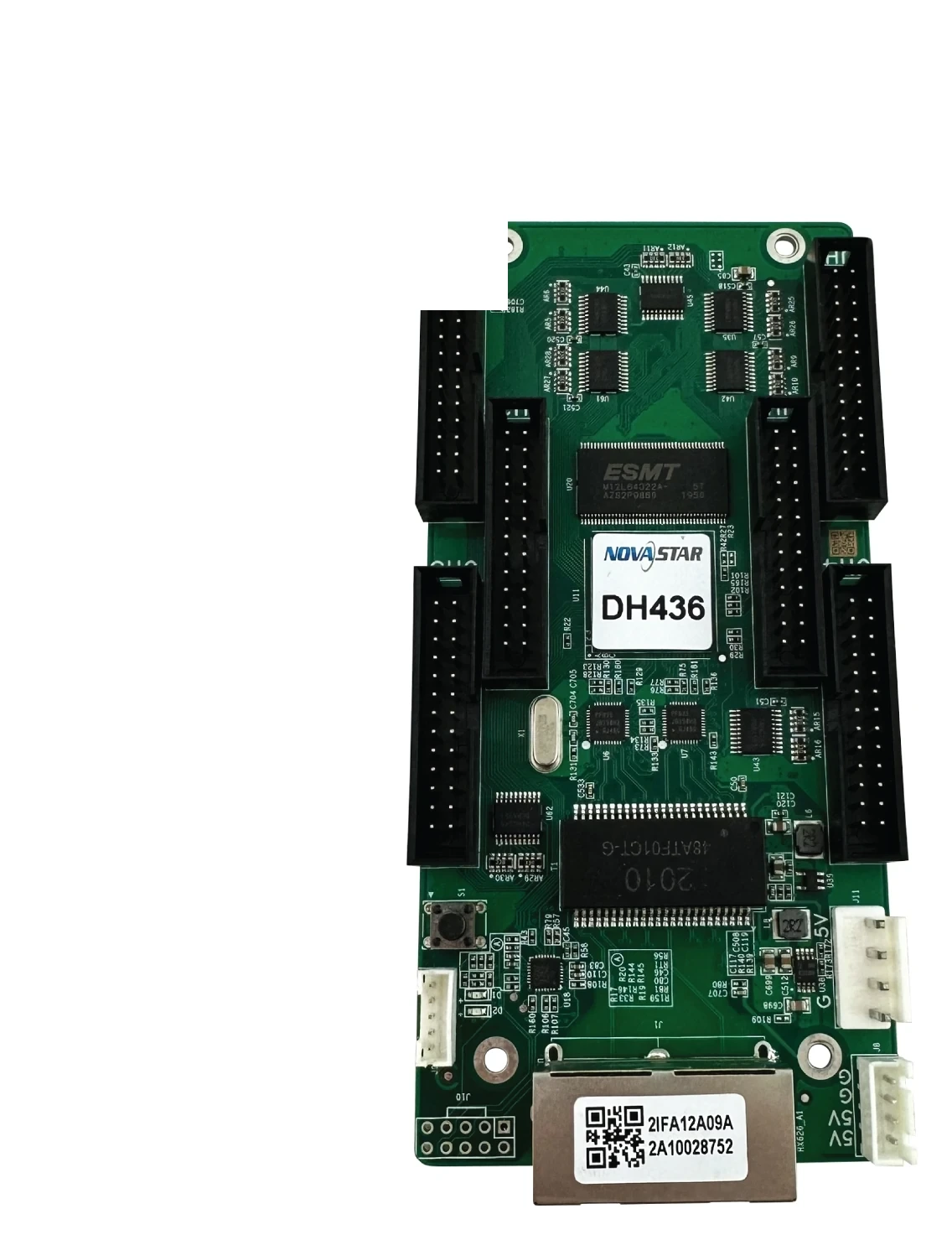
What is the NovaStar DH436 receiving card?
The NovaStar DH436 is a small-pitch LED receiving card for cabinets built around six HUB320 26-pin module connectors. It receives the controller’s assigned image data and sends it to the modules inside that cabinet. It is a sensible order when the cabinet already has a DH436 or its six-connector layout and saved configuration have been confirmed.
It should not be selected simply because another card is also rated 512 × 384. A cabinet can light up with the wrong receiving card yet show a scrambled module order, missing areas or an image that does not match the rest of the wall. For a replacement, match the full DH436 label, the six HUB320 ribbon locations, the module data type and the cabinet file before ordering.
For a new small-pitch cabinet, the DH436 is appropriate only when the cabinet maker confirms its six-HUB320 arrangement, driver IC and 24-group parallel data path. That is the difference between a clean one-card design and a board that needs to be changed after the modules are wired.
DH436 key features
A six-HUB320 layout for the cabinet it matches
The DH436 has six HUB320 connectors, not HUB75E outputs. That distinction tells an installer which module ribbons and cabinet board layout the card expects. When replacing an existing DH436, a confirmed like-for-like layout avoids turning a simple card swap into a rewiring job.
A smoother result on a fine-pitch wall
Brightness calibration, quick dark- or bright-line adjustment and independent RGB gamma adjustment address the faults that are easy to see at close viewing distance: a seam between cabinets, uneven low gray or a white balance shift after a module repair. They require compatible hardware, the right cabinet data and, for individual RGB gamma, a supported sending controller with NovaLCT V5.2.0 or later.
Faster fault isolation without changing good parts
Mapping can identify the card and Ethernet port on a cabinet. Temperature, voltage and bit-error checks can then help separate a cabinet fault from a cable or power problem. That is useful when one panel looks wrong in a large wall and an unnecessary module replacement would create a second problem.
Backup only where the screen was designed for it
The DH436 supports loop backup when the sending device and cabinet run have main and backup Ethernet paths. It also has dual program and configuration backup. These features protect a compatible installation; they do not make an existing single-path cable run redundant just because a new card is installed.
NovaStar DH436 specifications
The specification table identifies this board, but the driver-IC condition changes the real one-card limit. Read the capacity section with the exact module electronics before treating the headline number as an order quantity.
| Cabinet interface | 6 × HUB320 26-pin connectors |
|---|---|
| Module data | Up to 24 parallel RGB groups or 64 serial data groups |
| Maximum load, PWM driver ICs | 512 × 384 pixels at 60 Hz |
| Maximum load, common driver ICs | 384 × 256 pixels at 60 Hz |
| Input voltage / power | DC 3.8 V to 5.5 V / 2.5 W rated |
| Dimensions | 138.9 × 66.4 × 17.1 mm |
DH436 loading capacity for PWM and common driver ICs
The number most often quoted for DH436 is 512 × 384 at 60 Hz, but it applies to PWM driver ICs and requires NovaLCT V5.3.0 or later. A cabinet with common driver ICs is limited to 384 × 256 at 60 Hz. That is not a small footnote: it can decide whether one card is enough or whether the cabinet needs a second card or different electronics.
| Cabinet electronics | Maximum per DH436 | Order decision |
|---|---|---|
| PWM driver ICs | 512 × 384 at 60 Hz | Confirm NovaLCT V5.3.0+ and the 24-group module data path before relying on one card. |
| Common driver ICs | 384 × 256 at 60 Hz | A cabinet above this limit needs another card or a different cabinet design. |
The card’s 24 parallel-RGB-group ceiling is a second check. Two cabinets with the same total pixels may need different cards because their module data paths are different. If the cabinet is near the limit, confirm its scan, driver IC and configuration before buying.
DH436 HUB320 connectors and small-pitch cabinet fit
DH436 uses six HUB320 26-pin connectors. The connector type, ribbon locations and output order tell the modules which part of the image to display, so they are part of the purchase decision, not background engineering detail. A card can fit in the cabinet shell and still be wrong for the cabinet behind the modules.
Before ordering a spare, compare the DH436 label, all six connector positions, module ribbon order, board dimensions and power connection. If the old card cannot be read, keep clear cabinet-interior photos and the saved configuration file. Those two pieces of evidence are far more useful than selecting a replacement by pixel capacity alone.
Replacing a DH436 receiving card without changing the picture
Before removing a working DH436, use NovaLCT to save the receiving-card program and cabinet configuration parameters. The program tells the card how to work with the module electronics. The cabinet parameters hold the scan, wiring and pixel map. Keep both because one cannot replace the other.
Then confirm the six HUB320 ribbons and test the saved configuration on one cabinet before applying it across the wall. This avoids a common replacement failure: the cabinet powers on, but the image is scrambled, the brightness changes or the modules no longer line up with the rest of the screen.
If you are servicing an installed DH436 cabinet and those details match, order the same model. If you are changing the cabinet’s module type or load, choose another card only after its connector layout, loading condition and configuration path have been checked together.
DH436 firmware and NovaLCT resources
A direct DH436 PDF is not currently listed in our public download library, so this section does not send you to an unverified datasheet link. For a real replacement, start by saving the working program and cabinet parameters in NovaLCT. Firmware must match the DH436 board and module chips; a newer package is not automatically safer for a working screen.
NovaStar DH436 FAQ
What does the DH436 receiving card do?
It receives the controller’s assigned image data and sends it to the modules of a matching small-pitch cabinet through six HUB320 connectors.
Does DH436 use HUB320 connectors?
Yes. It has six 26-pin HUB320 connectors. Their locations and ribbon order must match the cabinet.
What is DH436 loading capacity?
At 60 Hz, it supports up to 512 × 384 with PWM driver ICs and 384 × 256 with common driver ICs. PWM operation at the larger limit requires NovaLCT V5.3.0 or later.
Can another receiving card replace DH436?
Not automatically. Match the DH436 label, six HUB320 locations, module ribbons, data groups, dimensions, power connection and saved cabinet parameters first.
What should I save before replacing a DH436?
Save both the working receiving-card program and cabinet parameters in NovaLCT. They preserve different parts of the cabinet setup.
Can DH436 help diagnose one faulty cabinet?
In a compatible system, Mapping plus temperature, voltage and Ethernet bit-error checks can help identify the affected cabinet or signal path before parts are swapped.
Does a replacement DH436 add loop backup?
No. Loop backup works only when the controller and cabinet run already have main and backup Ethernet paths wired.
Can I request DH436 volume pricing or Net 30 terms?
Yes. Send the cabinet count and spare quantity for volume pricing or eligible Net 30 terms. Include the cabinet model when the order is a replacement.
How is DH436 warranty coverage handled?
Cards supplied through our authorized US NovaStar channel include three years of serial-tracked manufacturer coverage.
Reviews
There are no reviews yet.