
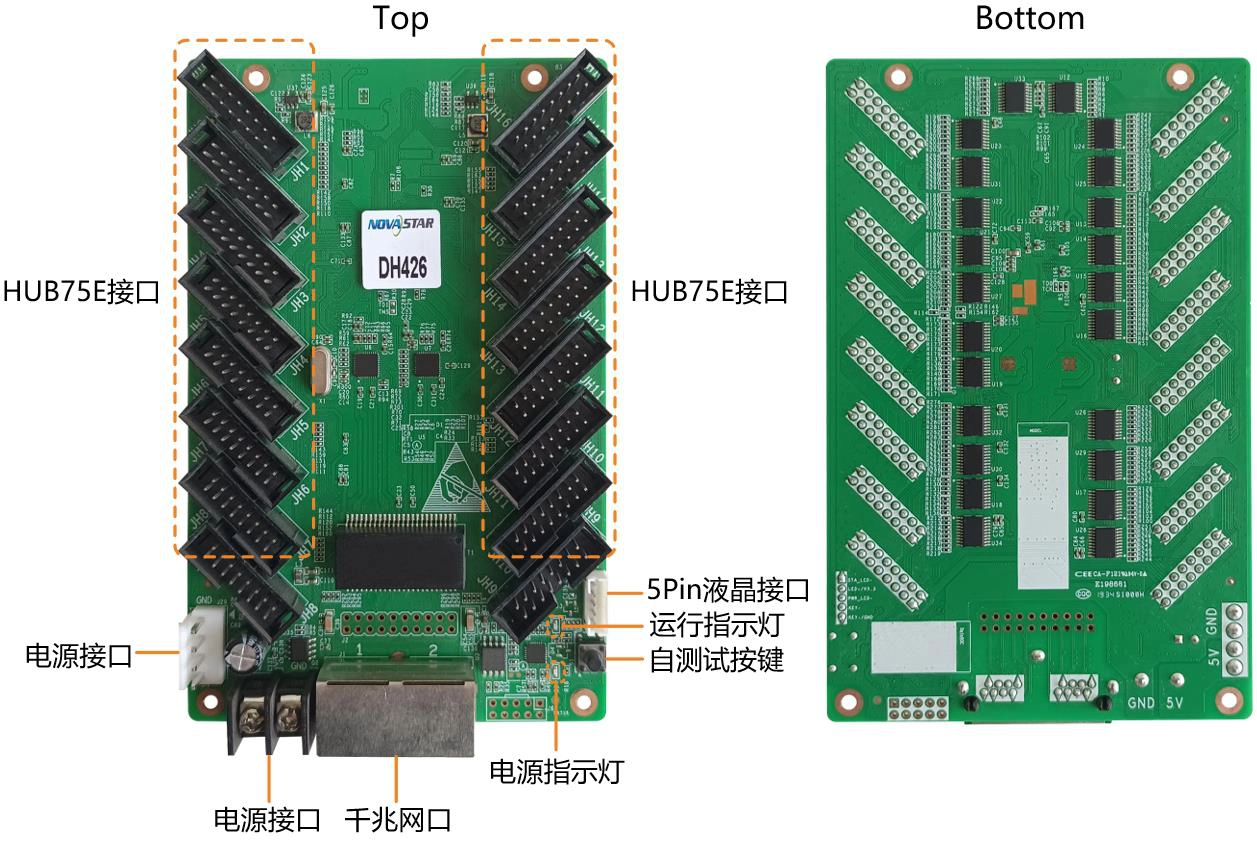
What is the NovaStar DH426 receiving card?
The NovaStar DH426 is a receiving card for LED cabinets that use its sixteen standard HUB75E module connectors. It takes the image data assigned by the controller and distributes it across the cabinet’s modules. It is most often the right order for an existing DH426 cabinet, where the ribbon locations, module data path and cabinet file already match the board.
Sixteen output connectors make it a different cabinet decision from an eight-output card. A similar-looking card may fit the cabinet physically but leave part of the image missing, reversed or scrambled if its module order is different. For a replacement, the DH426 label and the full ribbon layout matter more than a headline resolution number.
For a new cabinet, choose DH426 only when the cabinet maker has specified it with PWM driver ICs, a 16-HUB75E layout and no more than its documented per-card load. If the cabinet expects another connector plan or more module data groups, use the card designed for that cabinet instead of adapting the wiring after the fact.
DH426 key features
Sixteen module connections for the correct cabinet
The DH426’s sixteen HUB75E connectors feed the module ribbons inside a matching cabinet. That gives an installed DH426 cabinet a clear like-for-like replacement path. It does not make the board a substitute for every sixteen-output receiving card, because the cabinet’s ribbon order and configuration still decide what appears on each module.
Ways to find the problem before replacing parts
Mapping can show the receiving-card number and Ethernet-port information on a cabinet. Temperature, voltage and Ethernet bit-error checks can help a technician narrow a fault to one cabinet, cable or power route before replacing working modules. The documented bit-error and readback functions require NovaLCT V5.2.0 or later.
Picture corrections that show up on the wall
Brightness calibration, quick dark- or bright-line adjustment and individual RGB gamma adjustment can address visible unevenness after a module repair or at low grayscale. They depend on compatible cabinet data and, where stated, a compatible sending controller and NovaLCT; they cannot correct a wrong cable order or an incompatible module.
Backup behavior is a system choice
Loop backup can keep the image running when a main or backup Ethernet route fails, but only when the sending device and cabinet run were wired as a loop. The DH426 also has dual program backup. These safeguards protect a compatible installation; a spare card cannot create redundancy in a cable run that lacks the second path.
NovaStar DH426 specifications
These values identify the board and establish the first cabinet-fit check. The 512 × 384 figure is specifically documented for PWM driver ICs, so do not carry it over to a cabinet with another driver type.
| Cabinet interface | 16 × standard HUB75E connectors |
|---|---|
| Maximum resolution | 512 × 384 pixels at 60 Hz with PWM driver ICs |
| Module data | Up to 32 groups of parallel RGB data |
| Input voltage / power | DC 3.8 V to 5.5 V / 2.5 W rated |
| Dimensions | 145.6 × 91.5 × 18.3 mm |
| Operating environment | −20°C to +70°C; 10% to 90% RH, non-condensing |
DH426 HUB75E connectors and cabinet fit
The DH426 is not an integrated hub board. It is a receiving card with sixteen HUB75E connectors, and those connectors carry the cabinet’s module data. This matters when an old board fails: matching the number of ports alone is not enough if the ribbon positions, module chain order or mounting arrangement are different.
Before ordering a replacement, compare the full DH426 label, all sixteen ribbon locations, the board dimensions and the cabinet power connection. If the original card is no longer readable, send photos of both sides of the cabinet interior and keep a copy of the working configuration. That gives us something concrete to match instead of choosing a card by name or capacity alone.
DH426 loading capacity for PWM driver ICs
One DH426 supports up to 512 × 384 pixels at 60 Hz with PWM driver ICs. This is the number to use when deciding whether one card can serve the cabinet. It is not a generic capacity claim for common-driver modules or every scan configuration, because the official document only establishes this maximum for PWM driver ICs.
| Check before ordering | Why it matters | Result if it does not match |
|---|---|---|
| PWM driver ICs | The documented 512 × 384 maximum is conditional on PWM driver ICs. | Do not promise a one-card cabinet from this number alone. |
| 32 parallel RGB groups | The card’s module-data ceiling can rule out a cabinet even within the pixel limit. | The cabinet may need a different card or data layout. |
| 16 HUB75E ribbon layout | Load capacity does not confirm module routing. | A mismatched replacement can show a scrambled or incomplete image. |
If the cabinet is close to the stated load, confirm the exact driver IC, scan and configuration before buying. A second card or another cabinet design is cheaper to decide on before the modules are wired than after a wall is commissioned.
Replacing a DH426 receiving card without losing the cabinet setup
Before a working DH426 is removed, use NovaLCT to save the receiving-card program and cabinet configuration parameters. The program covers how the board works with the cabinet electronics. The cabinet parameters hold the scan, wiring and pixel map. Keep both: one file cannot reconstruct the other.
Next, compare the card label, all sixteen HUB75E ribbons, power connection and saved cabinet map. Apply the saved configuration to one replacement cabinet first. This protects the rest of the wall from a bad rollout where a new card lights up but has a mirrored image, an incorrect module order or a different brightness response.
If you are servicing a known DH426 cabinet and those details match, a like-for-like DH426 is the safe order. If you need a larger or differently wired cabinet, choose another card only after its connector layout, driver condition and configuration path have been checked together.
DH426 datasheet, firmware and NovaLCT
Use the DH426 datasheet to confirm the board, its sixteen HUB75E layout and the PWM capacity condition. Then save the working program and cabinet parameters in NovaLCT before a replacement is installed. No exact DH426 firmware package was verified for this page, so it does not point to a guessed file. A higher version is not automatically right for a cabinet that already works.
NovaStar DH426 FAQ
What does the DH426 receiving card do?
It receives the controller’s assigned image data and sends it to the LED modules in a matching cabinet through sixteen HUB75E connectors.
Does DH426 use HUB75E connectors?
Yes. The official V1.1.4 specification identifies sixteen standard HUB75E connectors. Their positions and ribbon order must match the cabinet.
What is DH426 loading capacity?
It supports up to 512 × 384 at 60 Hz with PWM driver ICs. Confirm the driver IC, scan, 32-group data path and cabinet wiring before treating one card as sufficient.
Can another receiving card replace DH426?
Not automatically. Match the DH426 label, sixteen HUB75E locations, module ribbons, dimensions, power connection and saved cabinet parameters before changing models.
What should I save before replacing a DH426?
Save both the working receiving-card program and cabinet configuration parameters in NovaLCT. They preserve different parts of the cabinet setup.
Can DH426 help locate a cabinet fault?
In a compatible system, Mapping plus temperature, voltage and Ethernet bit-error checks can help identify the affected cabinet or signal path before parts are swapped.
Does a replacement DH426 create loop backup?
No. Loop backup works only when the controller and cabinet run already have the main and backup Ethernet paths wired.
Can I request DH426 volume pricing or Net 30 terms?
Yes. Send the cabinet count and spare quantity for volume pricing or eligible Net 30 terms. Include the cabinet model when the order is a replacement.
How is DH426 warranty coverage handled?
Cards supplied through our authorized US NovaStar channel include three years of serial-tracked manufacturer coverage.
Reviews
There are no reviews yet.