
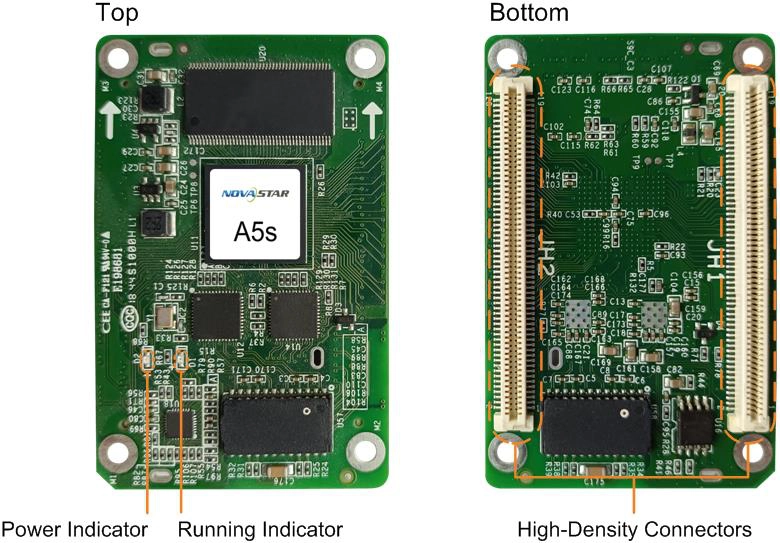
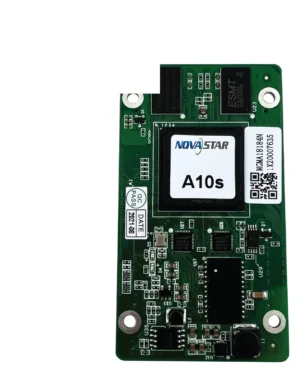
What is the NovaStar A5s receiving card?
The NovaStar A5s is the receiving card inside a compatible LED cabinet. It receives image data from the sender and gives the cabinet’s LED modules their assigned pixel signals. A5s, A5s Plus and A5s Plus-N are separate models, even when their names and board size look related.
For a replacement, start with the cabinet rather than the card outline. The exact card label, hub board, module driver IC, scan and saved configuration all need to match. A near match can fit physically while sending the wrong map to the modules.
A5s key features
A replacement module that blends into the wall
A module from a different production batch can leave one patch of a wall lighter or differently coloured than the cabinets around it. A5s supports pixel-level brightness and chroma calibration with NovaStar’s compatible calibration system, giving the cabinet a way to correct a visible mismatch when the required coefficients and calibration path are available.
Less visible cabinet joins
A dark stripe or bright line at a cabinet join is a different problem from a failed card. A5s supports adjustment for those seams, so an installer can target a join that is otherwise working normally. If the cabinet comes up mirrored or scrambled, inspect the scan and configuration instead; seam correction will not repair a wrong map.
3D when the full signal path supports it
The A5s can pass 3D output when the sending card also supports 3D. The source, sender and cabinet must use the same 3D setup; the receiving card cannot create 3D from a standard video signal by itself.
Faster fault finding on a wide wall
Mapping can show the receiving-card number and Ethernet-port information on the cabinet. On a wide wall, that gives the installer a clear location instead of tracing every cable to find a card that NovaLCT reports. It is a small feature with a direct payoff when a single cabinet needs attention.
NovaStar A5s specifications
Use these values with the cabinet drawing and module information. Pixel capacity is only one part of a like-for-like replacement check.
| Maximum load | Up to 320 × 256 at 60 Hz per card |
|---|---|
| Module data | Up to 32 parallel RGB groups or 64 serial groups, expandable to 128 |
| Input voltage | DC 3.8 V to 5.5 V; 5.0 V recommended |
| Rated power | 2.5 W |
| Dimensions | 70.0 × 45.0 × 8.3 mm |
| Fitted hub-board spacing | 5.0 mm connector spacing |
| Operating environment | −20°C to +70°C; 10% to 90% RH, non-condensing |
| Certifications | RoHS and EMC Class B |
A5s 320 × 256 load capacity and 32-group cabinet fit
An A5s can load up to 320 by 256 pixels at 60 Hz. The cabinet also has to stay within the 32 parallel RGB-group limit and match the A5s hub board, scan and stored configuration. If it exceeds the pixel or data-group limit, it needs another card or a different cabinet design.
| Cabinet check | A5s limit | What it changes |
|---|---|---|
| Pixel map | Up to 320 × 256 at 60 Hz | A larger map needs another receiving card or a different cabinet design. |
| Parallel RGB data | Up to 32 groups | Modules requiring more groups need a card and cabinet design that support them. |
| Serial data | 64 groups; expandable to 128 | Confirm how the existing hub board uses the serial path before changing cards. |
Two cabinets with the same resolution can still require different receiving cards. The module driver, scan and hub board decide what the card has to send, which is why an exact A5s label and its saved files are more reliable than a resolution match.
A5s vs A5s Plus replacement compatibility
Search results often group A5s and A5s Plus together, but an A5s Plus is not an automatic spare for an A5s cabinet. For a working wall, find the exact A5s first. If the cabinet maker has confirmed that the original card is unavailable and has proposed an A5s Plus, it needs to be treated as a cabinet-level change, not a board-size substitution.
| Model | Choose it when | Check before ordering |
|---|---|---|
| A5s | You need a verified replacement for a cabinet that already runs on A5s. | Match the exact label, hub board, module driver IC, scan and saved configuration. |
| A5s Plus | A new cabinet is designed around the Plus card, or the cabinet maker has verified a complete A5s-to-Plus conversion. | Confirm the hub board, module driver IC, scan, firmware and a tested cabinet file; do not carry the A5s file or 320 by 256 limit across as proof of compatibility. |
Before considering a different card, save the working A5s receiving-card program and cabinet parameters in NovaLCT. They give the cabinet maker the evidence needed to judge a conversion. They do not make a new card compatible by themselves.
A5s datasheet, firmware and NovaLCT downloads
Before removing a working A5s, use NovaLCT to save the receiving-card program and cabinet parameters. The configuration file stores the cabinet’s scan, wiring and pixel map, while firmware has to match the A5s board and module electronics. Keep both files, because one cannot replace the other.
The A5s datasheet confirms capacity, dimensions and the current specification revision. If the existing screen works, retain its known-good firmware instead of updating only because a newer package is available. Select a package only after the exact A5s PCB and module chips have been confirmed.
NovaStar A5s FAQ
What does the A5s receiving card do?
The A5s sits inside a compatible LED cabinet, receives image data from the sender and supplies the assigned pixel data to that cabinet’s LED modules.
What is the A5s load capacity?
The A5s supports up to 320 by 256 at 60 Hz per card. The cabinet must also fit its 32 parallel RGB data-group limit and matching scan, hub board and configuration.
Is A5s the same as A5s Plus?
No. They are separate receiving-card models. Confirm the full card label and cabinet documentation before using A5s Plus capacity, feature or file information for an A5s wall.
Can A5s Plus replace an A5s?
Not as an automatic swap. The hub board, module driver IC, scan, data groups and cabinet configuration must be confirmed before a different card family is fitted.
What should I save before replacing an A5s?
Save the working receiving-card program and cabinet parameters in NovaLCT. They preserve the A5s settings and the cabinet’s scan, wiring and pixel map.
Can I use A5s Plus firmware on an A5s?
No. Choose firmware for the exact A5s PCB and module electronics. A similar product name is not evidence that the firmware will operate correctly.
Does A5s support 3D?
It supports 3D output when the sending card supports 3D as well. The whole source-to-cabinet path must use the same 3D setup.
Can the A5s rotate a portrait LED display?
Yes. It supports image rotation in 90-degree steps when the cabinet’s module layout and saved configuration are prepared for that orientation.
Can I receive volume pricing on A5s spares and use Net 30?
Yes. Send the cabinet count and spare quantity for volume pricing or eligible Net 30 terms. Include the cabinet model if the order is a replacement.
How is an A5s warranty tracked?
A5s cards from our authorized US NovaStar channel have three years of manufacturer coverage recorded against the card serial number. Keep the purchase record with the cabinet files for future service.
Reviews
There are no reviews yet.