
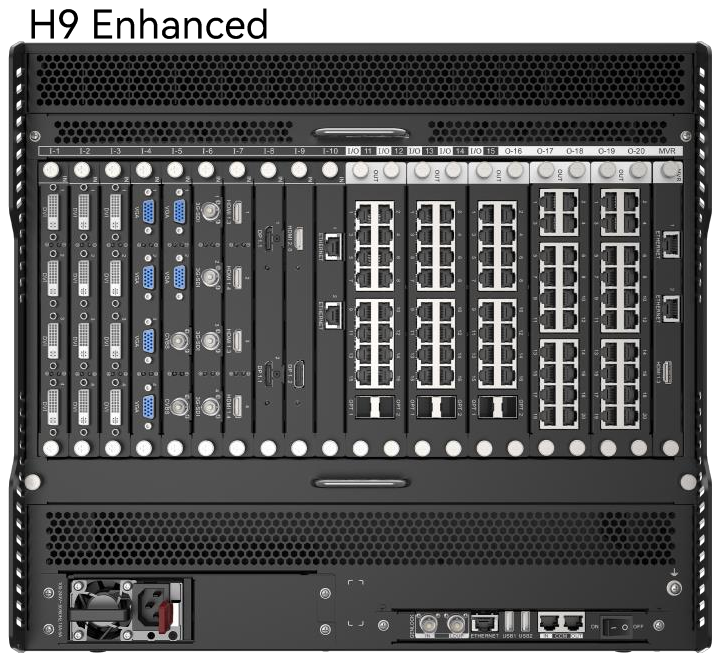
What is NovaStar H9 Enhanced video wall splicer?
The NovaStar H9 Enhanced video wall splicer is a 9U modular chassis for a command room, production suite or display installation where one system must feed a larger group of independently connected video displays. Installed input cards receive the sources. H9 Enhanced arranges those sources into the required layouts, then installed video output cards carry the finished views to their own displays.
The reason to choose H9 Enhanced is precise: it supports up to ten video output cards, 40 video-output channels and 160 video-output layers for separately fed displays. LED cabinets still use a separate route of up to five LED 4K sending cards and 80 layers. Choose it when the screen plan needs the extra video-display capacity, or when the selected fiber route needs the higher official H9 Enhanced capacity.
Request H9 Enhanced bulk pricing →
For confirmed multi-unit or project quantities. Direct checkout remains available when the required cards are already specified.
NovaStar H9 Enhanced video wall splicer key features: what makes it different?
- Keep more independent displays under one chassis: H9 Enhanced has room for up to ten video output cards and 40 video-output channels. That gives a command desk, production room or briefing center space for an expanded group of separately fed screens without splitting the planned display arrangement across another splicer.
- Keep complex video-display layouts intact: video-output-card builds can use up to 160 layers. An operator can keep a main program, camera group, data view and supporting windows in their intended positions across the display array.
- Keep the real source list available: up to 15 input cards and 60 input channels give the installation room for its planned computers, media servers, cameras and switcher feeds. The selected source cards still determine which connectors are present.
- Plan LED cabinets on their own route: H9 Enhanced keeps up to five LED 4K sending cards and 80 LED layers. The higher published fiber totals apply to the named fiber-card paths; they do not turn the ten video-output-card figure into ten LED cabinet cards.
- Specify continuity before the rack is live: H9 Enhanced ships with one power supply, with a redundant supply available as an option. Hot-swappable cards and saved layouts support regular operation, while the required power backup should be part of the initial system order.
NovaStar H9 Enhanced specifications
These are the fixed H9 Enhanced chassis limits. The two output-card families have different limits, so the table separates video-output expansion from the LED output-card configuration before showing the published LED capacity totals.
NovaStar H9 Enhanced video output cards and LED output cards
Start H9 Enhanced with the displays that must receive the finished picture. Separately connected video displays use video output cards. LED cabinets use LED output cards—called sending cards in NovaStar material—and follow a different five-card, 80-layer limit. Once the destination is clear, select the matching card family and source-card connectors.
Browse the H Series category for the matching source or output-card type. The card plan should be checked before the chassis is ordered, because a ten-card video-output design and a five-card LED-output design solve different display requirements.
NovaStar H9 Enhanced LED capacity by output card
NovaStar’s comparison table lists the following H9 Enhanced chassis totals for named LED sending-card paths. The 52M and 65M totals remain the same as H9; the higher 208M and 260M figures apply to the fiber paths. Select the path from the actual cabinet route and card mode, not from the ten-card video-output figure.
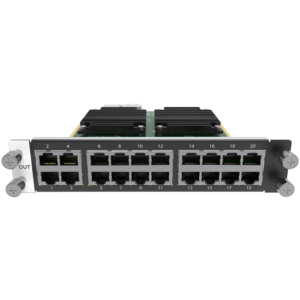
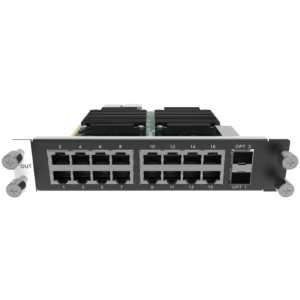
Compare the actual card details for the H_16xRJ45+2xFiber output card, H_20xRJ45 output card, H_4xFiber output card and H_4xFiber sending card (Enhanced). The chassis total is one planning check; the connector route, optical modules where used, receiver configuration and installed cabinet order must still match the wall.
NovaStar H9 Enhanced applications for demanding multi-screen rooms
H9 Enhanced earns its place in these fixed rooms when the finished design needs six to ten video output cards, more than 80 video-output layers, or the published higher fiber capacity:
Command and operations wall
Give an operator a main overview plus independently arranged alert, camera, map and status screens. H9 Enhanced is the right direction when the final display plan needs more separate video-output capacity than five cards can provide.
Broadcast monitoring and production control
Keep program, preview, camera and support views in a planned multi-screen arrangement. The 160-layer ceiling applies to video-output-card builds where several independent views must remain available together.
Executive briefing array
Move from a wide presentation surface to a live meeting, data panel and remote-site views without rebuilding the room. The model earns its place when the full set of separately fed screens needs the H9 Enhanced output-card capacity.
Large LED and display experience center
Use one control point for a product wall, side screens and live demonstration content. First decide which screens need video-output cards and which are LED-cabinet routes; then choose H9 Enhanced only when that finished count needs its expansion.
H9 Enhanced vs H9: when 10 video-output card slots matter
The comparison is about a real output shortfall, not a model-name upgrade. Standard H9 is enough when five video output cards and 80 video-output layers cover the display array. H9 Enhanced adds room for six to ten video output cards and up to 160 video-output layers, while both models keep the same 9U frame, input-card capacity and five-card LED 4K sending limit.
If the final system does not use that extra output capacity, NovaStar H9 is the simpler match. If the plan has already outgrown a 9U frame, compare NovaStar H15 Enhanced rather than buying H9 Enhanced only as an undefined future reserve.
NovaStar H9 Enhanced setup and receiving card compatibility
H9 Enhanced and NovaLCT work on different stages of the installation. H9 Enhanced places sources on the required displays. For LED cabinets, the selected sending card, cable or fiber route and receiving-card file map each cabinet to the correct part of that finished layout.
- Inside H9 Enhanced: install the selected cards, define the display layouts and place the source layers in the chassis interface.
- For the LED cabinet route: use NovaLCT for the screen configuration associated with the selected H Series sending card.
- Before commissioning: confirm that the selected card, cable or fiber route, cabinet order and NovaStar receiving cards configuration describe the same physical LED wall. A correct layout cannot repair a mismatched receiver file or an incorrect cabinet connection order.
NovaStar H9 Enhanced manual, datasheet and H Series firmware
The specifications PDF directly compares H9 and H9 Enhanced. The manual, firmware and release notes are published for the H Series family and are labelled that way below, so the scope of each resource is clear.
NovaStar H9 and H9 Enhanced specifications (PDF, V1.16)
Exact official comparison document for both 9U models: card limits, H9 Enhanced capacity, dimensions and electrical specifications.
NovaStar H Series user manual (PDF, V1.15.0)
H Series family manual for configuration and operating procedures; it is not an H9 Enhanced-only manual.
NovaStar H Series firmware (ZIP, V2.2.0.0)
Verified H Series family firmware package, not a file presented as H9 Enhanced-only firmware.
NovaStar H Series firmware release notes (TXT, V2.2.0.0)
Version changes and update notes for the same verified H Series family firmware package.
NovaStar H9 Enhanced FAQs
Is NovaStar H9 Enhanced a complete LED wall system?
No. H9 Enhanced is the rack-mounted chassis that organizes the system; by itself, it cannot receive a source or send a finished picture to an LED cabinet. The completed installation also needs the selected input cards, the selected output cards and the receiving-card configuration for the physical LED wall.
Does the H9 Enhanced price include input cards and output cards?
The H9 Enhanced is sold as the chassis. The cards are chosen separately so their connectors, output type and cabinet or display route match the installed system.
Does H9 Enhanced support ten LED 4K sending cards?
No. NovaStar’s H9/H9 Enhanced table lists up to ten video output cards and up to five LED 4K sending cards. The two output families solve different display tasks, so the relevant limit depends on the output-card plan.
What does H9 Enhanced add over standard H9?
H9 Enhanced doubles the maximum video-output-card capacity from five to ten and raises video-output layers from 80 to 160. Both models list 15 input cards, 60 input channels, five LED 4K sending cards and 80 LED layers. H9 Enhanced also has higher published H_4xFiber chassis capacity.
What is the maximum H9 Enhanced LED capacity?
It depends on the selected sending-card path. NovaStar lists 52 million pixels with H_16xRJ45+2xFiber, 65 million with H_20xRJ45, 208 million with H_4xFiber and 260 million with the enhanced H_4xFiber sending card. These are official chassis totals; confirm the selected card mode and actual cabinet port map before ordering.
What do 160 H9 Enhanced layers mean?
The 160-layer figure is the maximum for video-output-card configurations. Layers are picture areas placed across the planned screens, such as a main program, camera view, data panel and title area. LED 4K sending-card configurations list up to 80 layers.
Which H9 Enhanced cards should I order?
Start with the source types that must enter the chassis, then separate the finished display plan into video-output screens and LED cabinet routes. The input card, output-card family, available slots, cable or fiber path and cabinet receiver configuration must all describe the same physical system.
Does H9 Enhanced include redundant power?
The chassis comes with one power supply. NovaStar lists a redundant power supply as optional, so a permanent system that requires power-supply backup should specify it before ordering.
Where are receiving cards and cabinet mapping configured?
H9 Enhanced builds the source and screen layout. For the LED cabinet side, use NovaLCT to match the selected sending card and physical route with the cabinet receiving-card configuration and cabinet connection order.
Are the H9 Enhanced manual and firmware model-specific?
The H9 and H9 Enhanced specifications PDF is an exact joint model document. The manual, firmware ZIP and release notes above are verified H Series family resources, and their titles make that coverage clear.
Reviews
There are no reviews yet.