
If you are specifying a compact fixed wall, adding a unit to rental inventory or building a repeatable OEM package, the VX400 Pro and VX600 Pro can look almost interchangeable.
They are close siblings in the VX Pro family: both combine video processing and LED sending, accept the same general HDMI, SDI, optical and USB source types, provide six shared 2K layer resources and support 256 presets.
The reason to compare them is what happens around that shared workflow. A wall can fit under 2.6 million pixels and still be a poor match for a four-port controller if the cabinet rows split awkwardly or a side section needs its own output.
The VX600 Pro adds 3.9 million pixels instead of 2.6 million, six Gigabit Ethernet outputs instead of four, and documented Genlock support.
So the buying question is not simply which controller has the larger number. It is whether two more output paths and external timing support prevent a more expensive redesign later. Draw the cabinet map and confirm the timing requirement before you decide whether the extra capacity belongs in the system.
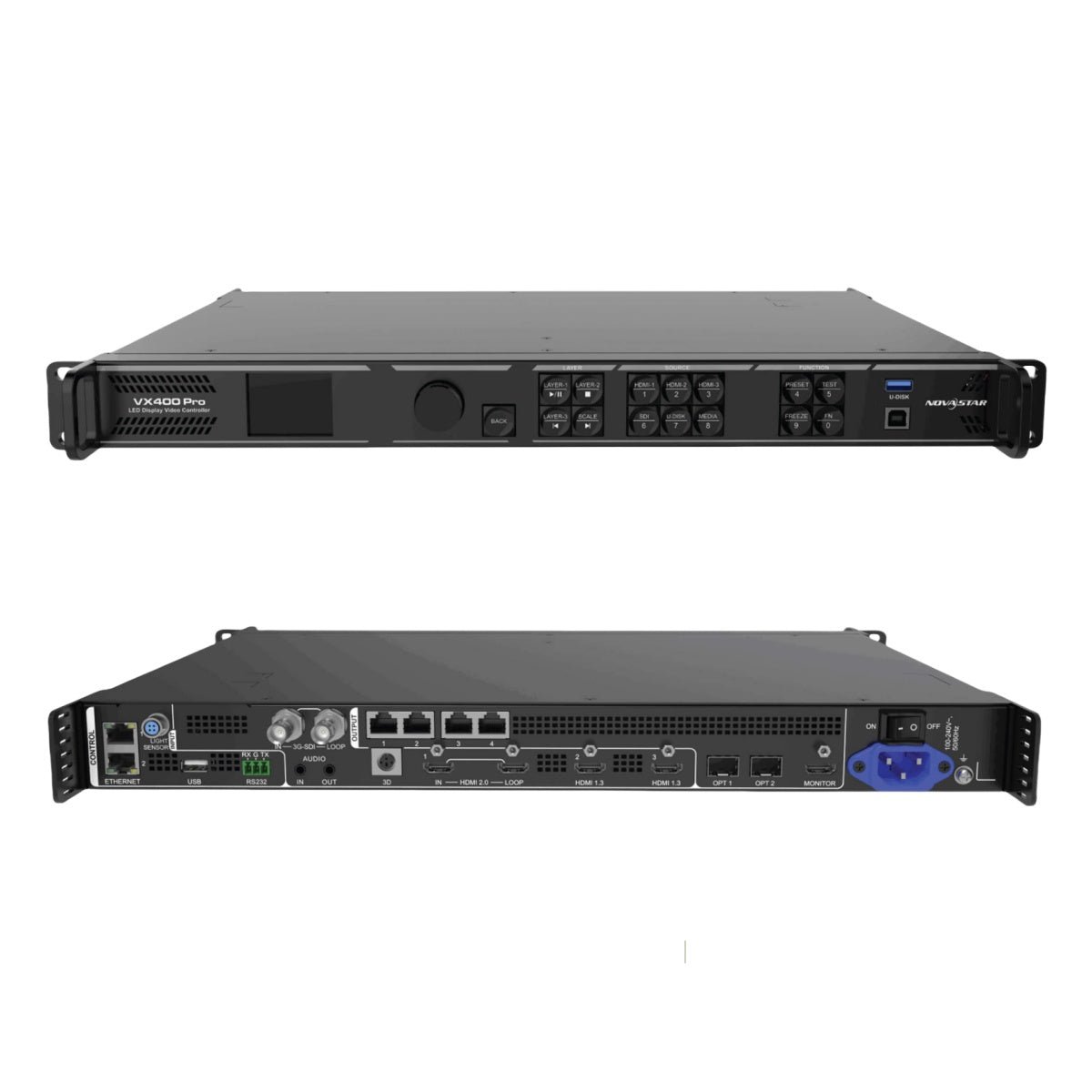
What Is the Difference Between NovaStar VX400 Pro and VX600 Pro?
The VX400 Pro and VX600 Pro share most of their operator workflow, which is why the upgrade can look larger on a specification sheet than it feels at the operator position.
The source connectors, layer resources and preset count are close enough that moving up to the VX600 Pro does not automatically give you a new class of image composition. The differences become important when you draw the LED cabinet map and connect the controller to the rest of a production system.
How much LED wall capacity and how many Ethernet outputs do you need?
The VX400 Pro is rated for up to 2.6 million pixels and has four Gigabit Ethernet outputs. The VX600 Pro is rated for up to 3.9 million pixels and has six Gigabit Ethernet outputs.
The pixel figures describe total loading. The Ethernet count determines how that loading is divided among cabinet groups. A wall under 2.6 million pixels may still need the VX600 Pro if its rows, columns or side sections do not divide cleanly across four outputs.
For example, a 2.3-million-pixel wall with four tidy cabinet chains is a good VX400 Pro candidate. A 2.3-million-pixel wall with a main screen, a narrow side screen and an uneven cabinet layout may be easier to commission on the VX600 Pro, even though the total resolution does not require 3.9 million pixels.
The opposite is also true. A VX600 Pro does not make an undersized wall sharper or brighter by itself. The receiving cards, LED modules, calibration and source quality still determine the displayed image. The extra outputs are valuable when they make the map and service plan cleaner.
Does the cabinet map fit four outputs cleanly?
This is the first question to answer before treating the VX600 Pro as an unnecessary upgrade.
Draw the actual cabinet rows and assign them to four outputs. Leave room for the port-level pixel limit, the source bit depth and the way technicians will reach the cabinets during service.
If the last row has to be split across an unusual path, or if a small side section has to share a long cabinet chain with the main wall, the map may be technically possible but operationally awkward.
Six outputs give the VX600 Pro two more places to start a cabinet chain. That can help with:
- A main wall plus a narrow side screen.
- Two physical wall sections separated by a stage opening.
- Cabinet rows that are easier to service when divided into shorter runs.
- Rental packages that change width from one show to the next.
- A wall that is below 2.6 million pixels today but is likely to add cabinets.
Do not confuse six outputs with six independent video canvases. The controller still sends one configured LED canvas. The extra ports change the physical distribution and the allowable output load, not the number of unrelated programs the controller can display.
Do you need Genlock for cameras or synchronized devices?
Genlock is a timing requirement, not a general picture-quality button. It matters when the LED wall must follow an external timing reference used by cameras, switchers, multiple processors or other devices in the production chain.
Current VX Pro materials document Genlock support on the VX600 Pro. The VX400 Pro documentation sets a different boundary around input-source synchronization and does not provide the same external Genlock path. If the project specification names black burst, tri-level sync or another external reference, the VX600 Pro is the model to evaluate first.
For a presentation wall driven by one laptop or media player, external Genlock may add no practical value. For a camera-facing wall, broadcast system or installation with several synchronized devices, leaving it out of the controller specification can create a problem that is difficult to solve after the rack is built.
Check the complete timing chain. The controller, source, receiving cards, camera settings and any switcher must support the chosen timing mode. Buying a VX600 Pro does not make an incompatible camera system synchronized automatically.
Are the input, layer and preset workflows otherwise similar?
Both models use the same general Pro input family:
- One HDMI 2.0 input with loop-through.
- Two HDMI 1.3 inputs.
- One 3G-SDI input with loop-through.
- One 10G optical input with self-adaptive behavior.
- One USB 3.0 input for playback and related operations.
- An HDMI monitoring output and 3.5 mm audio input/output.
Both also document six shared 2K x 1K layer resources. Those resources can be arranged for supported combinations such as one 4K resource with two 2K resources, but they are not six unrestricted full-size 4K windows. Both models also support 256 presets within the documented workflow.
That means the VX600 Pro is not the obvious choice because it has more layers or a newer input panel. It has the same broad source and composition workflow as the VX400 Pro. The decision turns back to total output capacity, physical port mapping, timing and planned service life.
What changes in optical backup and remote cabinet routing?
Both controllers provide two optical output paths alongside their Gigabit Ethernet outputs. The optical connectors do not create two extra LED walls. They carry or copy the Ethernet output groups according to the model’s documented routing and backup modes.
On the VX400 Pro, the main optical path can carry outputs 1-4, while the second optical path can copy or back up those same four output paths. The VX600 Pro has six Ethernet outputs, so its optical routing must be planned around a larger output group and the exact model-specific backup arrangement.
This matters when the controller sits far from the wall or when the rental rack uses fiber to reach a remote stage position. Confirm the optical converter, SFP module, fiber route and receiving-card configuration together. A fiber connector on the rear panel is not a promise that every optical arrangement is interchangeable between models.
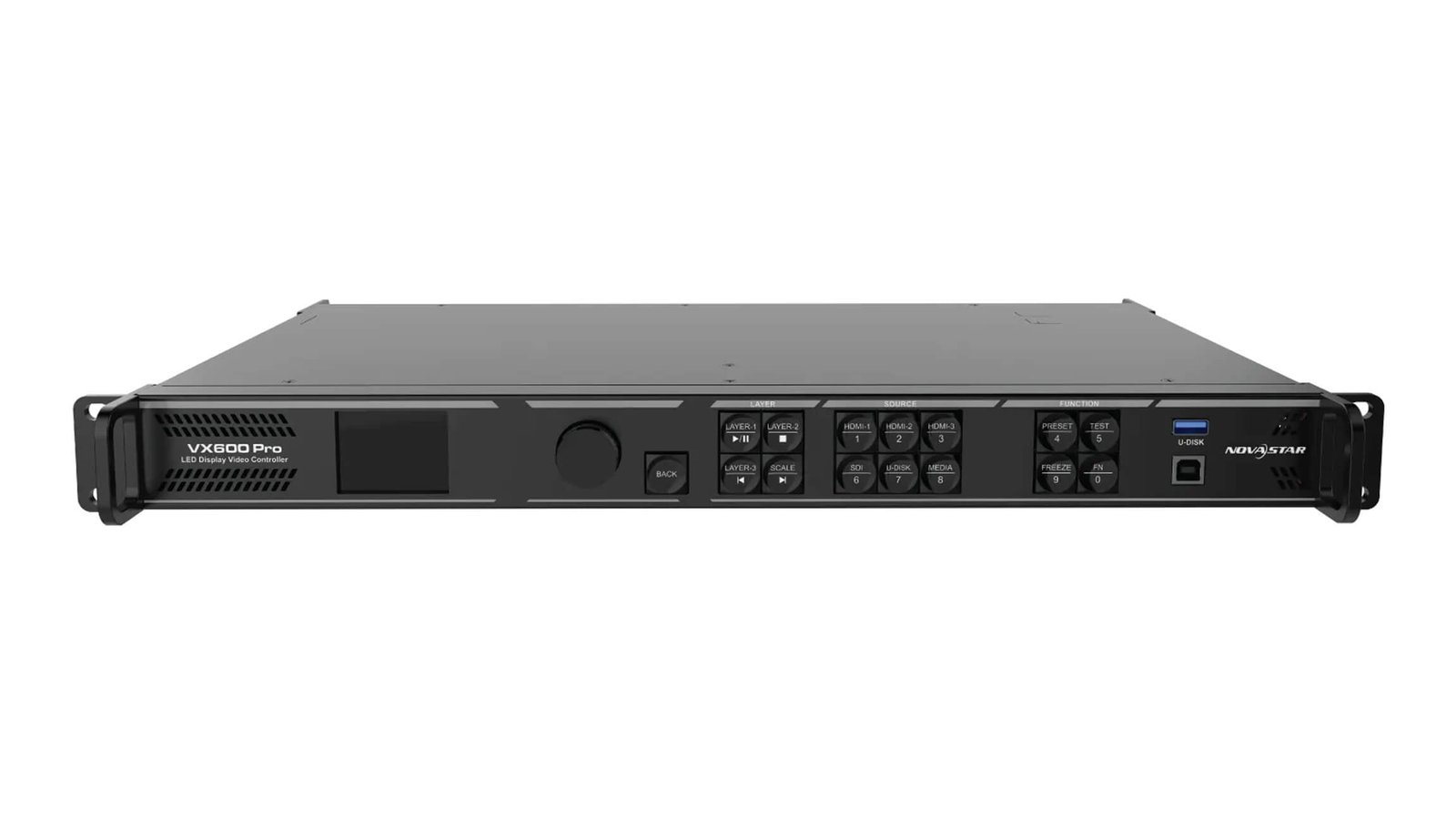
VX400 Pro vs VX600 Pro specification comparison
Use the table to separate the shared Pro workflow from the features that change the purchase. Exact input format, frame-rate, bit-depth and backup limits still need to be checked in the model-specific datasheet.
| Specification | NovaStar VX400 Pro | NovaStar VX600 Pro |
|---|---|---|
| Product role | All-in-one LED video processor and sending controller | All-in-one LED video processor and sending controller |
| Listed price | $1,291.00 | $1,444.00 |
| Price difference | Lower by $153.00 | $153.00 more |
| Maximum LED load | Up to 2.6M pixels | Up to 3.9M pixels |
| Maximum width | 10,240 pixels | 10,240 pixels |
| Maximum height | 8,192 pixels | 8,192 pixels |
| Gigabit Ethernet outputs | 4 | 6 |
| Optical output paths | 2; output and copy/backup path for the four Ethernet outputs | 2; route and backup according to the VX600 Pro specification |
| HDMI input | 1 x HDMI 2.0 IN/LOOP | 1 x HDMI 2.0 IN/LOOP |
| Other video inputs | 2 x HDMI 1.3; 1 x 3G-SDI IN/LOOP; 1 x 10G optical input | 2 x HDMI 1.3; 1 x 3G-SDI IN/LOOP; 1 x 10G optical input |
| USB | 1 x USB 3.0 | 1 x USB 3.0 |
| Layer resources | 6 shared 2K x 1K resources | 6 shared 2K x 1K resources |
| Presets | 256 | 256 |
| HDMI 2.0 source path | 4K-class input formats within the documented timing limits | 4K-class input formats within the documented timing limits |
| External Genlock | Not documented as the same external Genlock path | Supported in current VX Pro materials; verify the required connector and mode |
| Software family | NovaLCT, Unico and VICP where supported | NovaLCT, Unico and VICP where supported |
| Best fit | Fixed compact wall with a clean four-port map | Larger or changing wall map, external timing or a need for two more outputs |
The table shows why this is a close comparison. Moving from VX400 Pro to VX600 Pro does not buy more layer resources, a completely different input panel or a higher maximum width and height. It buys a larger total output class, two more Ethernet paths and a different synchronization option.
The pixel capacity must be checked at two levels: the complete wall and each output. A wall can be below 2.6 million pixels overall but still be inconvenient for four ports. A wall can also fit the total figure but overload one output if the cabinet assignment is not divided correctly.
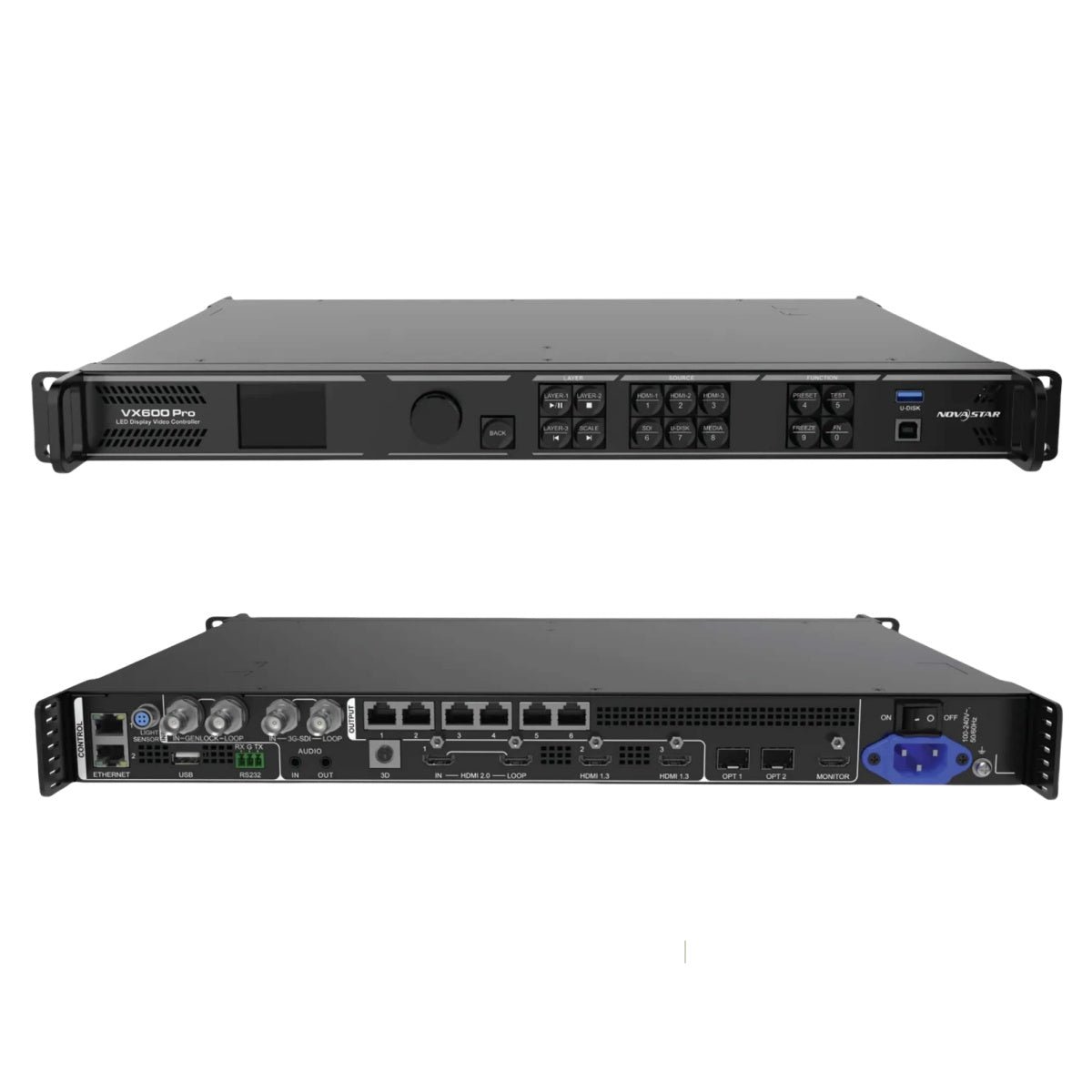
NovaStar VX400 Pro vs VX600 Pro: Which One Should You Choose?
Start with the cabinet map, then check external timing, expected growth and inventory policy. The VX600 Pro is worth considering when its two extra outputs or Genlock support solve a real system constraint. Otherwise, the VX400 Pro keeps the same core Pro workflow in a smaller output class.
Does the wall stay below 2.6 million pixels and fit four ports?
Choose the VX400 Pro when the complete wall is comfortably below 2.6 million pixels, every cabinet chain fits within its output limit and the four-port map is easy for a technician to understand and service.
This is a good fit for a fixed corporate wall, a compact worship screen, a small event package or an OEM design that will be repeated without changing the cabinet layout. The controller still gives you HDMI 2.0, 3G-SDI, USB playback, six shared layer resources and 256 presets.
Do not use the total pixel number alone. Check the real cabinet resolution, port assignment, receiving-card loading and source format before signing off the design.
Will two extra Ethernet outputs simplify the cabinet map?
Choose the VX600 Pro when four outputs force awkward cabinet rows, a side section has to share a long chain, or the wall needs more than four practical starting points.
The benefit is often visible during installation rather than during a product demonstration. Shorter and more logical cabinet runs can make a wall easier to label, test and repair. A rental technician can also adapt a six-port unit to more wall shapes without changing the controller package.
This does not mean that every six-port map is better. If the wall already divides cleanly across four outputs, the extra two ports may sit unused. A spare output is useful insurance only when the fleet or project has a reasonable chance of needing it.
Will the system use an external Genlock reference?
Choose the VX600 Pro when the camera, switcher or multi-device system requires an external timing reference and the complete signal chain has been validated for it.
For a single asynchronous source, Genlock may not affect the purchase. The VX400 Pro can still be the better-sized controller for a simple wall that does not need external timing. Do not pay for Genlock because it sounds like a general image-quality improvement; buy it when the system actually needs synchronized timing.
Is the LED wall likely to expand during the equipment lifecycle?
Choose the VX600 Pro when a modest expansion could exceed 2.6 million pixels or require a fifth Ethernet output. The extra $153 can be small compared with replacing the controller, rebuilding the rack or sending a second unit to a rental job.
Choose the VX400 Pro when the wall is fixed, the cabinet design is already approved and the equipment will remain a compact four-port package. Do not choose a larger controller in place of an expansion plan. Write down the largest wall the customer expects to build and calculate it before selecting the model.
Is the $153 upgrade worth it?
At the listed prices, the VX600 Pro costs $153.00 more than the VX400 Pro. That premium is easy to justify when it avoids a second controller, simplifies a cabinet map, supports a camera timing reference or gives a rental fleet a useful six-port standard.
The VX400 Pro is the better value when those conditions do not apply. It already provides the same broad input family, layer resources and preset count. Spending $153 for unused output capacity does not improve the image on a wall that is already correctly designed.
NovaStar VX400 Pro vs VX600 Pro project examples
The same source and LED module can lead to different controller choices depending on the physical wall and the customer’s operating plan.
Small fixed wall with one clean four-port map
A production company specifies a 1920 x 1080 or 2560 x 1440 wall for corporate presentations. The wall is below 2.6 million pixels, has four logical cabinet chains and uses one HDMI source with occasional USB playback.
Choose the VX400 Pro. The project uses the shared Pro workflow but does not need the VX600 Pro’s extra output paths or Genlock. The saved $153 can go toward a tested spare cable set, receiving-card backup or commissioning time.
A fifth cabinet chain is needed for the same wall
An LED manufacturer keeps the same total wall resolution but changes the cabinet orientation. Four ports now create a long chain on the main wall and leave a narrow side section difficult to route. The total pixel load still fits below 2.6 million.
Choose the VX600 Pro if the fifth and sixth outputs make the cabinet map cleaner. The reason is the physical topology, not a promise of better image quality. Document the output assignment and service labels in the OEM build record.
Camera-facing wall with an external timing reference
A production company uses cameras, a switcher and an LED wall in a live event. The video team already uses an external timing reference and wants the LED controller included in the same timing plan.
Evaluate the VX600 Pro first because its current product materials document Genlock support. Confirm the reference type, connector path, receiving-card behavior, camera settings and low-latency requirements in a full system test. If the show does not actually distribute an external reference, revisit whether that feature is needed.
Rental fleet with changing wall shapes
A rental company sends compact LED packages to conferences, concerts and retail events. Some jobs use four cabinet chains; others add a side screen or a wider stage backdrop. Operators want the same input and preset workflow on every compact rack.
The VX600 Pro may be the better fleet standard when the additional two outputs prevent frequent redesigns. The VX400 Pro remains sensible for a smaller fixed package or for jobs whose map never exceeds four outputs. A fleet should be standardized from real job history, not from the largest specification in the catalog.
OEM design with a strict cost and port limit
An LED manufacturer integrates a controller into a repeatable small-wall package. The cabinet map is fixed, the source chain is known and the customer does not request Genlock. Every unit must stay inside a tight bill of materials.
Choose the VX400 Pro. The VX600 Pro’s extra capacity is not useful if the product is deliberately limited to four outputs. Keep the six-port model as an upgrade option for customers whose wall shape or timing plan changes.
NovaStar VX400 Pro and VX600 Pro software, manuals and datasheets
Use the NovaStar VX400 Pro product page and VX600 Pro product page for current product records, pricing and order details.
For technical checks, use the VX400 Pro datasheet and VX400 Pro user manual, or the VX600 Pro datasheet and VX600 Pro user manual. The model-specific documents are important for output routing, synchronization, input format limits and firmware behavior.
Both controllers use the broader NovaLCT software workflow for receiving-card and LED cabinet configuration. Use Unico and the supported VICP workflow for controller operation where the installed firmware requires it. Save the cabinet file, output map, source timing and working presets before changing the controller or updating firmware.
If the wall will exceed 3.9 million pixels or need ten output paths, compare the VX1000 Pro instead. If you are comparing the older standard VX400 with the Pro platform, see the NovaStar VX400 vs VX1000 comparison for a different capacity and lifecycle decision.
NovaStar VX400 Pro vs VX600 Pro FAQs
What is the main difference between VX400 Pro and VX600 Pro?
The VX400 Pro supports up to 2.6 million pixels through four Gigabit Ethernet outputs. The VX600 Pro supports up to 3.9 million pixels through six outputs and adds the external Genlock path documented for the model. Their main input family, layer resources and preset workflow are otherwise similar.
Is VX600 Pro faster or does it automatically improve image quality?
No. The extra output capacity and Genlock support do not automatically make a correctly configured wall look sharper or brighter. Image quality depends on the source, receiving cards, LED modules, calibration and configuration. The VX600 Pro is useful when its extra outputs or timing support solve a system requirement.
How many pixels can VX400 Pro control?
The VX400 Pro is rated for up to 2.6 million pixels, with a documented maximum width of 10,240 pixels and maximum height of 8,192 pixels. The actual design must also satisfy per-port loading and source-format limits.
Can VX400 Pro drive a wall larger than 2.6 million pixels?
Do not specify it beyond the documented 2.6-million-pixel limit. If the wall needs more capacity, evaluate the VX600 Pro or VX1000 Pro after checking the cabinet map and source requirements.
How many Ethernet ports does VX600 Pro have?
The VX600 Pro has six Gigabit Ethernet outputs. It also has two optical output paths. The optical paths should be planned according to the model’s routing and backup documentation; they are not extra independent canvases.
Does VX400 Pro have Genlock?
The current VX400 Pro materials do not document the same external Genlock path as the VX600 Pro. They describe input-source synchronization behavior instead. If an external timing reference is required, verify the exact model revision and evaluate the VX600 Pro.
Does VX600 Pro support Genlock?
Yes, Genlock is documented for the VX600 Pro in current VX Pro materials. Confirm the required connector, reference type and operating conditions in the VX600 Pro manual before ordering for a camera or broadcast system.
Do both models have the same HDMI, SDI and USB inputs?
They share the same broad input family: HDMI 2.0, HDMI 1.3, 3G-SDI, 10G optical input and USB 3.0. Connector-specific resolution, refresh-rate and bit-depth limits still apply.
Do both models have six layers and 256 presets?
Yes, current Pro-series materials document six shared 2K x 1K layer resources and 256 presets for both models. The resources are shared and have their own supported combinations; they are not six unrestricted full-size 4K windows.
Can VX600 Pro replace two VX400 Pro units?
Not automatically. A VX600 Pro has more total pixel capacity and two more Ethernet outputs, but it does not create two independent controller canvases. Check whether the wall needs separate sources, separate control or separate backup behavior before replacing two units with one.
Is VX600 Pro worth the extra $153?
It is worth it when the two extra outputs, 3.9-million-pixel capacity or Genlock support prevent a redesign or meet a real show requirement. If four outputs already fit the wall and no external timing is needed, VX400 Pro is the better-sized purchase.
Which one is better for a rental company?
VX600 Pro is a stronger compact-fleet standard when wall shapes change often, side screens are common or Genlock appears in the job list. VX400 Pro is better for fixed four-port packages and rental kits whose cabinet map stays within that boundary.
Conclusion
Choose the VX400 Pro when the wall is a fixed, compact design that fits cleanly across four outputs and does not require external Genlock. It gives you the VX Pro input, layer and preset workflow without paying for output capacity you will not use.
Choose the VX600 Pro when a fifth or sixth output makes the cabinet map easier, the wall may grow past 2.6 million pixels, or the production system needs the documented Genlock path. At a $153 price difference, the upgrade can be inexpensive insurance when those requirements are real.
Before ordering, draw the cabinet map, check the per-port load, confirm the source timing and ask whether the system has an external timing reference. Those four checks will tell you more than the model number alone.