
If you already use the VX600 Pro and a larger LED-wall job has arrived, compare the VX1000 Pro first. The two models handle the same general source types, use the same six shared 2K layer resources and follow the same current VX Pro software path. The real question is whether your wall needs the extra output and pixel capacity.
Start with the LED wall and cabinet map, not the word “Pro.” A VX600 Pro can be the right choice for a large physical wall if its pixel count and six output paths fit. A smaller fine-pitch wall can need the VX1000 Pro because its pixel count or cabinet map crosses the 3.9-million-pixel boundary.
If two screens need separate sources and separate operators, two VX600 Pro units may be more useful than one larger controller. That is a different purchase from building one coordinated canvas, especially for a production or rental team.
The VX1000 Pro adds output and capacity headroom, not a completely different input or layer workflow. So calculate the complete canvas, cabinet map and expansion plan first; then decide whether the additional headroom justifies the price.
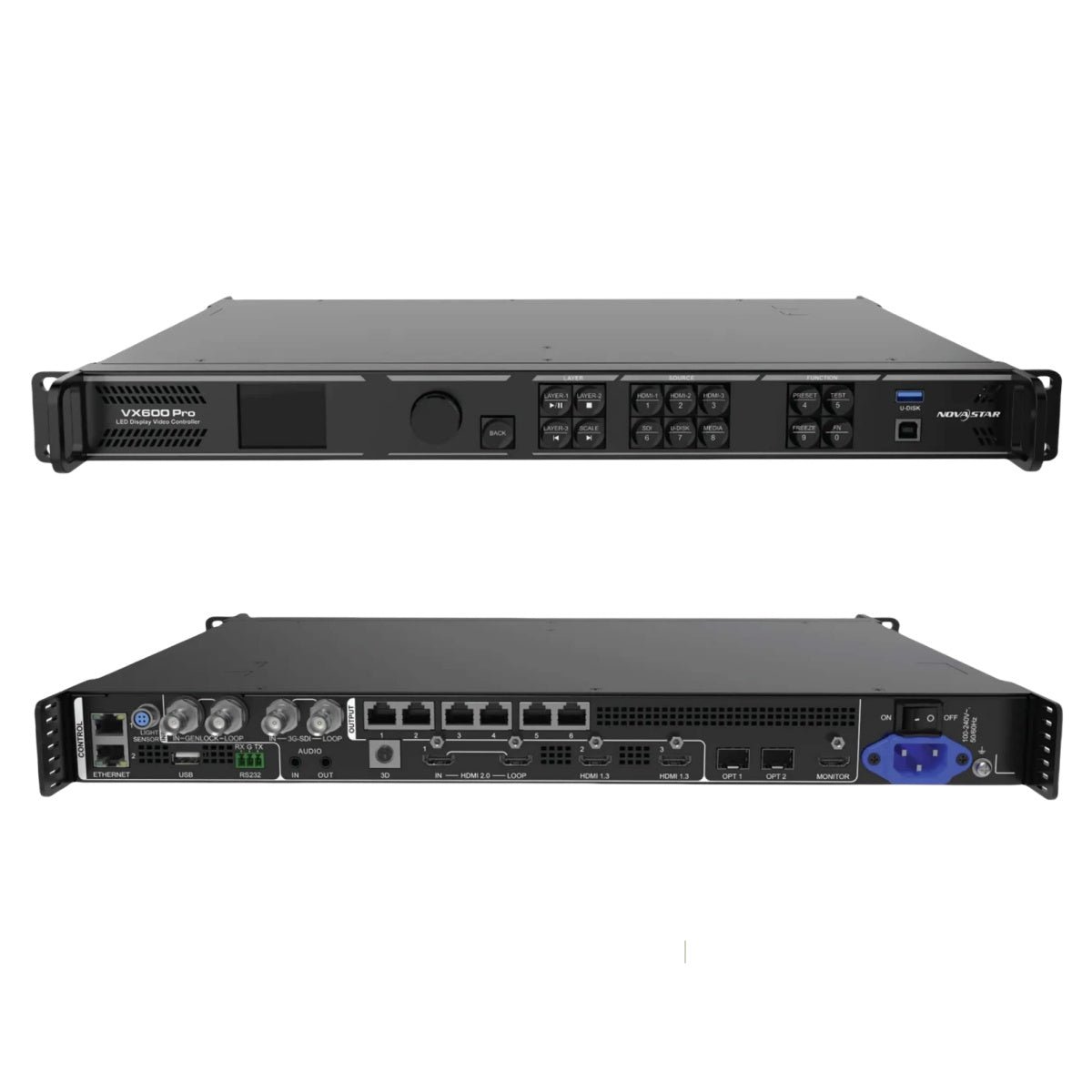
What Is the Difference Between NovaStar VX600 Pro and VX1000 Pro?
These two controllers sit next to each other in the VX Pro family, which is why an existing VX600 Pro workflow can usually be carried into a VX1000 Pro project. Both combine video processing and LED sending in one rack unit. Both accept HDMI 2.0, HDMI 1.3, 3G-SDI, 10G optical and USB sources. Both provide six shared 2K x 1K layer resources and 256 presets.
The main difference is on the LED output side:
- VX600 Pro: up to 3.9 million pixels through six Gigabit Ethernet outputs.
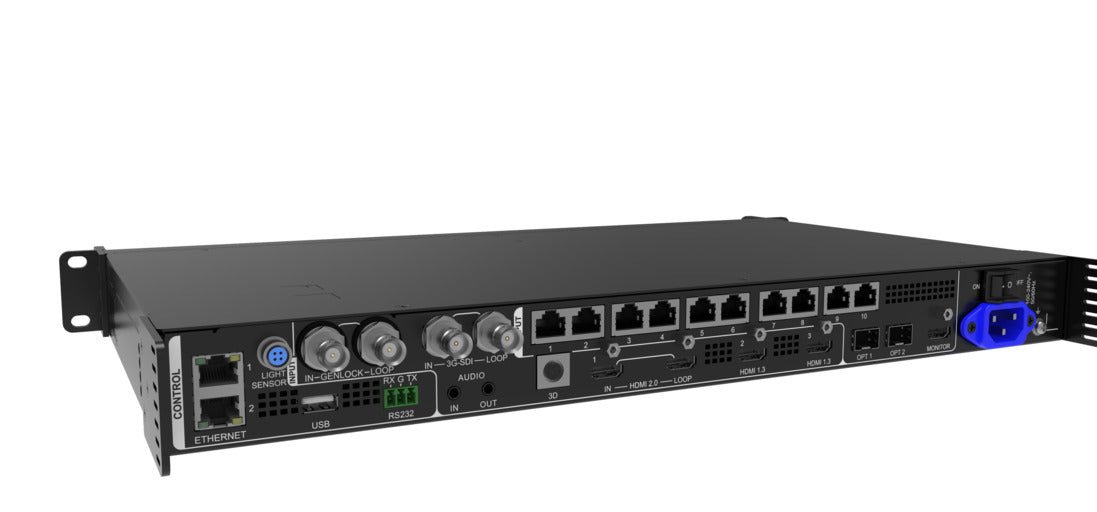
- VX1000 Pro: up to 6.5 million pixels through ten Gigabit Ethernet outputs.
Both have the same documented maximum width of 10,240 pixels and maximum height of 8,192 pixels. The VX1000 Pro is not wider because the model number is larger. It gives the cabinet map more output paths and a higher total pixel ceiling.
Is 3.9 million pixels enough for the complete LED canvas?
Start with the actual pixel calculation, not the physical size of the wall. A large outdoor wall with a wide pixel pitch may stay below 3.9 million pixels. A much smaller fine-pitch wall can exceed it quickly.
For example, a 3840 x 960 canvas uses about 3.69 million pixels before any additional screen section is added. That can fit within the VX600 Pro’s total class, subject to the output and source conditions.
A 4096 x 1200 canvas uses about 4.92 million pixels, so the VX1000 Pro becomes the more appropriate starting point even if the wall does not look dramatically larger in the room.
The total number is only the first check. The wall must also fit the per-port load, the selected source format, the receiving-card configuration and the physical cabinet map. A project that sits exactly at 3.9 million pixels leaves little room for a side screen, a reconfigured row or a change in source mode.
Choose the VX600 Pro when the wall is comfortably below 3.9 million pixels and the design has been calculated with operating room. Choose the VX1000 Pro when the complete canvas, including planned sections and expansion, moves beyond that boundary.
Will six Ethernet outputs fit the cabinet map?
Six and ten Ethernet outputs are not just two versions of the same number. They determine how the cabinet data is divided and how much flexibility the technician has when the wall is assembled.
Six outputs can be enough for:
- One rectangular main wall with six logical cabinet chains.
- A fixed fine-pitch wall whose total pixel load is below 3.9 million.
- A compact rental package with a known cabinet layout.
- A single physical screen whose rows are easy to distribute.
Ten outputs become useful when the map includes a main wall and side sections, several physically separated areas, unusually long rows or a cabinet arrangement that would overload or complicate six ports. The extra outputs can also make it easier to assign shorter runs that are easier to label and service.
The VX1000 Pro does not create ten independent video programs. It still sends the configured LED canvas from one controller. The extra ports change the distribution of that canvas, the total output capacity and the backup plan.
Before ordering, draw the cabinet map and write the output number beside every chain. If the same wall can be mapped cleanly on six ports, the VX600 Pro may be enough. If the six-port version forces a near-limit chain, a second controller or an awkward side-screen route, the VX1000 Pro’s additional ports can reduce the system’s complexity.
Do both models use the same inputs and layers?
For most buyers, yes. Both models share the current VX Pro source family:
- One HDMI 2.0 input with loop-through.
- Two HDMI 1.3 inputs.
- One 3G-SDI input with loop-through.
- One self-adaptive 10G optical input/output path.
- One USB 3.0 port for media playback and related operations.
- One HDMI 1.3 monitoring output.
- Independent 3.5 mm audio input and output.
Both also provide six shared 2K x 1K layer resources. A 4K x 2K layer uses four resources, a 4K x 1K layer uses two and a 2K x 1K layer uses one. “Six layers” therefore does not mean six unrestricted full-size 4K windows on either model.
This is important when reading a comparison table. The VX1000 Pro is not a meaningful upgrade because it accepts a newer HDMI standard than the VX600 Pro or because it has more layer resources. It does not. The upgrade is about how much finished LED canvas and how many output paths the controller can manage.
What do the optical ports and backup paths change?
Both models have two optical paths, but they group the Ethernet outputs differently.
On the VX600 Pro, OPT 1 can send the data assigned to Ethernet ports 1-6, while OPT 2 copies or backs up those same six outputs. On the VX1000 Pro, the corresponding group covers Ethernet ports 1-10.
That can matter in a rack where the processor sits at front of house and the LED wall is reached through fiber. The optical route, converter, SFP module, fiber type and receiving-card path must be selected as one system. A larger controller does not make an optical link compatible by itself.
The two optical connectors are also not two independent full LED canvases. They are part of the sending, conversion and backup architecture. If a customer needs two separately operated screens, ask whether the system requires two independent controllers rather than assuming one VX1000 Pro can serve as two VX600 Pro units.
Does Genlock decide between them?
No. Genlock should not be presented as the main difference in this comparison. Current documentation provides synchronization options on both models, including an input source or external Genlock path for the supported workflow.
The practical question is how the controller will run. In video-controller mode, low-latency behavior is different from ByPass mode. In ByPass mode, video processing is unavailable and low latency and Genlock cannot be enabled together. A camera-facing wall therefore needs a complete test of source timing, operating mode, receiving cards and cabinet topology.
If the system uses one laptop or media server without an external timing reference, Genlock may not affect the model choice at all. If several processors, cameras or switchers must share timing, verify both models against the actual reference chain rather than treating the VX1000 Pro as the only synchronized option.
VX600 Pro vs VX1000 Pro specification comparison
The table separates the shared processing workflow from the features that change the system size. Always check the exact input format, bit-depth and port-loading conditions in the model-specific document.
| Specification | NovaStar VX600 Pro | NovaStar VX1000 Pro |
|---|---|---|
| Product role | All-in-one LED video processor and sending controller | All-in-one LED video processor and sending controller |
| Listed price | $1,444.00 | $2,067.00 |
| Price difference | Lower by $623.00 | $623.00 more |
| Maximum LED load | Up to 3.9M pixels | Up to 6.5M pixels |
| Maximum width | 10,240 pixels | 10,240 pixels |
| Maximum height | 8,192 pixels | 8,192 pixels |
| Gigabit Ethernet outputs | 6 | 10 |
| Optical output grouping | OPT 1 sends ports 1-6; OPT 2 copies or backs up ports 1-6 | OPT 1 sends ports 1-10; OPT 2 copies or backs up ports 1-10 |
| HDMI input | 1 x HDMI 2.0 IN/LOOP | 1 x HDMI 2.0 IN/LOOP |
| Other video inputs | 2 x HDMI 1.3; 1 x 3G-SDI IN/LOOP; 1 x 10G OPT 1; 1 x USB 3.0 | 2 x HDMI 1.3; 1 x 3G-SDI IN/LOOP; 1 x 10G OPT 1; 1 x USB 3.0 |
| Monitoring | 1 x HDMI 1.3 | 1 x HDMI 1.3 |
| Audio | Independent 3.5 mm input and output | Independent 3.5 mm input and output |
| Layer resources | 6 shared 2K x 1K resources | 6 shared 2K x 1K resources |
| Presets | Up to 256 | Up to 256 |
| Source path | HDMI 2.0 4K-class input within documented limits; 3G-SDI and USB | HDMI 2.0 4K-class input within documented limits; 3G-SDI and USB |
| Synchronization | Input-source synchronization and external Genlock where documented | Input-source synchronization and external Genlock where documented |
| Low latency | 0 frames in ByPass under documented conditions; different video-controller latency | 0 frames in ByPass under documented conditions; different video-controller latency |
| Free topology | Supported receiving cards required; circumscribed rectangle must fit | Supported receiving cards required; circumscribed rectangle must fit |
| Software | NovaLCT, Unico, VICP and front panel where supported | NovaLCT, Unico, VICP and front panel where supported |
| Best fit | Up to 3.9M pixels and six practical output paths | Up to 6.5M pixels, ten output paths or larger expansion headroom |
The table makes the buying logic clearer: moving to VX1000 Pro does not change the source panel or create more composition resources. It gives the LED side more room. If your source list and layer layout already work on VX600 Pro, the upgrade is justified by the wall and its lifecycle rather than by day-to-day switching features.
Do not use the maximum width as a substitute for capacity. Both models list 10,240 pixels as the maximum width. A very wide but short wall may fit the width rule while still exceeding the total pixel load or creating a difficult port map. Calculate width, height, total pixels and each cabinet chain together.
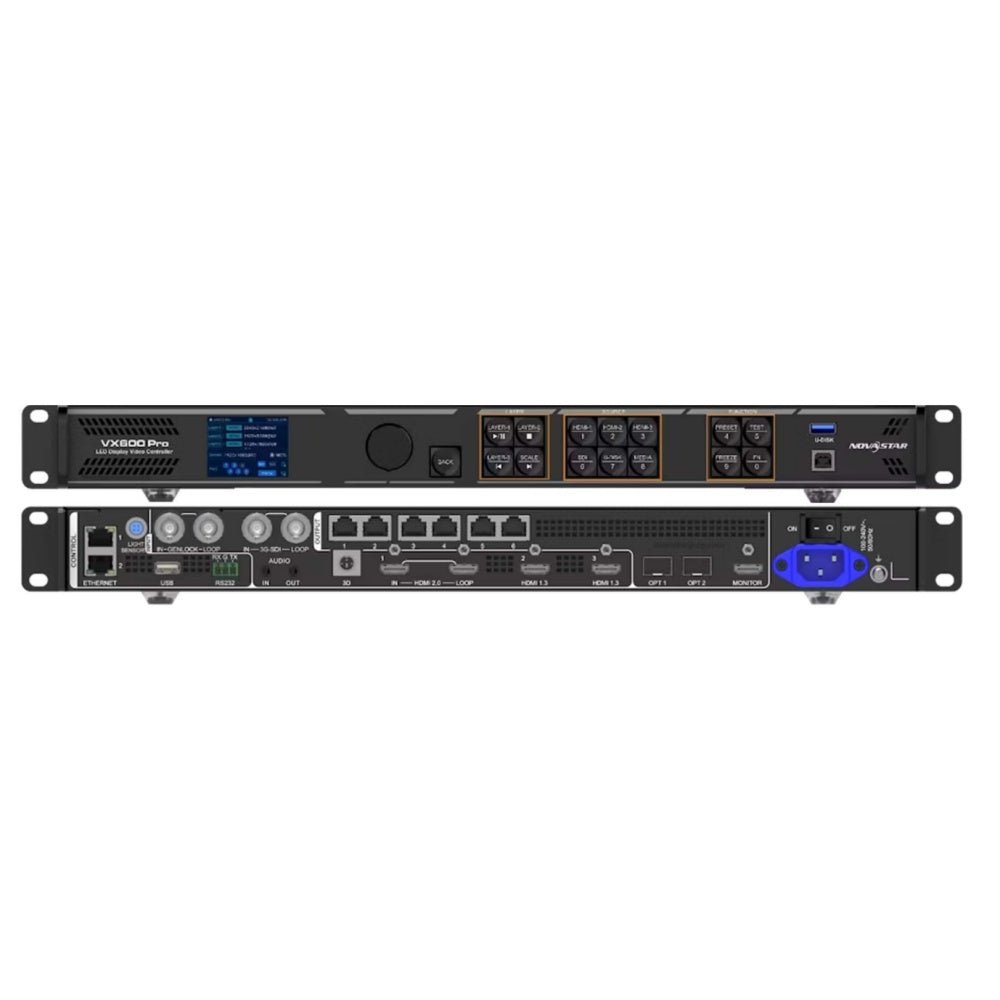
NovaStar VX600 Pro vs VX1000 Pro: Which One Should You Choose?
Choose from four measurements: the complete canvas, the cabinet map, the expansion plan and the way the screens will be operated. Price matters, but a $623 saving is not a saving if it forces a second controller or a redesign six months later.
Does the wall stay comfortably below 3.9 million pixels?
Choose the VX600 Pro when the final LED canvas stays comfortably below 3.9 million pixels, each output assignment is valid and the project does not depend on future cabinets that would cross the limit.
This can include a large-looking outdoor wall with a relatively coarse pixel pitch, a fixed corporate backdrop or a compact rental package whose cabinet layout is already standardized. The VX600 Pro still provides the current HDMI 2.0, SDI, USB, layer and preset workflow.
“Comfortably below” matters. A design that lands just under 3.9 million pixels may lose its margin when the customer adds a side strip, changes the cabinet orientation or requests a different source mode. Leave room for the real installation rather than designing against the headline number.
Will the wall need more than six practical output paths?
Choose the VX1000 Pro when the map needs seven to ten output paths or when six outputs would force a separate processor, a long cabinet chain or a difficult physical split.
Examples include a main wall with two side sections, a backdrop divided around a stage opening, or a fine-pitch wall where the total pixel load is manageable but the cabinet groups are numerous. Ten ports can make the data layout easier to document and service.
The VX1000 Pro is not automatically better when the wall fits six ports. Unused Ethernet outputs do not increase brightness, refresh rate or detail. The value is in the room they provide to the actual cabinet map.
Is the LED wall fine-pitch or unusually wide?
Do not choose from the wall’s dimensions alone. Pixel pitch determines how quickly a physical area turns into a pixel load.
A 20-meter outdoor banner can fit the VX600 Pro if it is short and uses a larger pixel pitch. A much smaller fine-pitch studio wall can require the VX1000 Pro because it contains more pixels per square meter. The same distinction applies to an ultra-wide wall: its width may fit both models, while its total pixels or port distribution may not.
For an LED manufacturer, this calculation should be part of the standard bill of materials. For a production company, it should be part of the project specification. For a rental company, it should be recorded with each cabinet package so dispatch staff know which processor is compatible.
Are you expanding an existing VX600 Pro system?
If you already own VX600 Pro units, compare two very different upgrades:
- Add another VX600 Pro and operate two screens or two source paths independently.
- Buy one VX1000 Pro and combine a larger LED canvas into one controller project.
Choose another VX600 Pro when the customer needs separate content, separate operators, separate physical venues or independent backup. Two controllers can be easier to dispatch as two standard packages, even if their combined pixel capacity appears similar to one VX1000 Pro.
Choose the VX1000 Pro when the project is one coordinated wall that needs more than six outputs, more than 3.9 million pixels or a single combined map. One chassis can simplify source routing and preset management when the wall is meant to behave as one screen.
Do not compare the two options only by adding 3.9M + 3.9M. Two independent controllers do not automatically create one seamless 7.8-million-pixel canvas, and one VX1000 Pro does not automatically provide two independent control surfaces.
Is the $623 upgrade worth it for rental inventory?
LED Control Depot lists the VX600 Pro at $1,444.00 and the VX1000 Pro at $2,067.00. The extra $623.00 is worth considering when larger jobs regularly exceed six ports, when dispatch teams need one controller to cover a wider range of cabinet packages, or when a second smaller processor would be more expensive to transport and operate.
The VX600 Pro is the better inventory choice when most jobs fit its six-port package and crews already know the workflow. A rental company should not put every compact rack on the larger model merely because the larger controller can handle more pixels. Track the jobs that exceed 3.9M or six outputs, then decide whether that frequency supports the premium.
Do you need VX2000 Pro instead?
Move to the VX2000 Pro when the design exceeds 6.5 million pixels, needs twenty Ethernet outputs, twelve shared 2K layer resources, DisplayPort 1.2 or 12G-SDI. The VX1000 Pro is not the default answer for every large LED wall.
This step matters for fine-pitch walls with multiple sections and for production systems that need a more extensive input panel. A controller that is already at its ceiling is not a good long-term choice just because it is one model above the current unit.
NovaStar VX600 Pro vs VX1000 Pro project examples
These examples use the same shared source workflow but lead to different purchases because the wall and the operating model change.
Fixed 3.2M fine-pitch wall with six clean outputs
An LED manufacturer builds a fixed 3.2-million-pixel wall. The cabinet rows divide naturally across six outputs, the source is HDMI 2.0, and the customer needs the normal six-resource layer workflow and preset recall.
Choose the VX600 Pro. The wall is physically substantial but stays within its documented capacity and port count. The VX1000 Pro would add four unused Ethernet outputs without changing the source or layer workflow.
4.8M wall with two side sections
A production company specifies a 4.8-million-pixel stage wall with a central backdrop and two narrow side sections. The source list is ordinary HDMI, SDI and USB, but the cabinet map needs more than six practical output groups.
Choose the VX1000 Pro. The extra capacity and four additional Ethernet outputs can keep the three physical sections in one controller project. A second VX600 Pro may work, but it would create a different operating and backup design.
Two independent screens at two stage positions
A rental company supplies one screen at the stage and another at a confidence-monitor position. The screens use different content and may be operated by different technicians. Their combined pixel count would fit inside a VX1000 Pro.
Use two VX600 Pro units when independent source selection, control and dispatch are more important than combining the screens into one canvas. A single VX1000 Pro is not automatically a replacement for two controllers just because its total pixel capacity is larger than one VX600 Pro.
Existing VX600 Pro fleet with occasional larger jobs
A rental fleet owns several VX600 Pro units. Most jobs stay under 3.9 million pixels, but a few annual productions need a 5-million-pixel wall and more than six output paths. The company is deciding between buying one VX1000 Pro or adding another VX600 Pro.
Buy a VX1000 Pro when those larger jobs are frequent enough to justify a dedicated larger package and the wall must run as one coordinated system. Add another VX600 Pro when the larger jobs can be split into independently operated sections or when two standard compact kits have more rental value across the rest of the year.
Fine-pitch wall above 6.5M pixels
A studio wall exceeds 6.5 million pixels and needs DP 1.2 for the graphics workstation. The source panel and layer count are now part of the requirement, not just the output size.
Skip the VX600 Pro and VX1000 Pro comparison as the final decision. Evaluate the VX2000 Pro, whose 13-million-pixel class, twenty Ethernet outputs, DisplayPort and 12G-SDI inputs address the larger system directly.
NovaStar VX600 Pro and VX1000 Pro software, manuals and datasheets
Use the NovaStar VX600 Pro product page and VX1000 Pro product page for current product records, prices and order details.
For technical selection, check the VX600 Pro datasheet and VX600 Pro user manual, or the VX1000 Pro datasheet and VX1000 Pro user manual. Use the correct document when checking output routing, optical backup, input limits, latency and synchronization.
Both controllers use the current NovaLCT workflow for receiving-card and cabinet configuration. Use Unico for the VX Pro processor project and VICP where the installed firmware supports the mobile control path. Export the controller project, cabinet file and working presets before changing firmware or replacing a processor.
Do not assume that an older V-Can project transfers directly to either current Pro model. A recent operator discussion raised exactly this migration issue: the Pro workflow is associated with Unico, so the software plan should be part of the rental or replacement order.
If the project is below 2.6 million pixels and four ports are enough, compare the VX400 Pro. For a closer look at the smaller six-port decision, read the VX400 Pro vs VX600 Pro comparison.
NovaStar VX600 Pro vs VX1000 Pro FAQs
What is the main difference between VX600 Pro and VX1000 Pro?
The VX600 Pro supports up to 3.9 million pixels through six Gigabit Ethernet outputs. The VX1000 Pro supports up to 6.5 million pixels through ten outputs. They share the same broad input family, six shared 2K layer resources and 256 presets.
Is VX1000 Pro better for image quality?
Not automatically. A larger pixel and output capacity does not improve a correctly configured wall by itself. Image quality still depends on the source, receiving cards, LED modules, calibration, scan settings and processing configuration.
How many pixels can VX600 Pro control?
The VX600 Pro is rated for up to 3.9 million pixels, with a maximum width of 10,240 pixels and maximum height of 8,192 pixels. The actual wall must also fit the per-port and source-format conditions.
How many Ethernet ports does VX1000 Pro have?
The VX1000 Pro has 10 Gigabit Ethernet outputs and two optical paths. OPT 1 can carry the output group for ports 1-10, while OPT 2 copies or backs up that group according to the documented configuration.
Do both models have the same HDMI 2.0, SDI and USB inputs?
Yes, both use the same broad current VX Pro input family: HDMI 2.0, two HDMI 1.3 inputs, 3G-SDI, 10G optical and USB 3.0. Connector-specific resolution, refresh rate and bit-depth limits still apply.
Do both models have six layers and 256 presets?
Yes. Both document six shared 2K x 1K layer resources and up to 256 presets. A 4K x 2K layer uses four resources, so the layer count must be calculated from the actual layout.
Does VX1000 Pro have Genlock?
Yes, the current VX1000 Pro workflow documents synchronization through an input source or external Genlock source. VX600 Pro also documents external Genlock. The required operating mode and the rest of the timing chain must be tested together.
Can VX600 Pro and VX1000 Pro use the same receiving cards?
They can use compatible NovaStar receiving-card configurations within the supported workflow, but the exact card model, cabinet file, topology and firmware still need to be confirmed. Free topology has specific receiving-card requirements.
Should I add a second VX600 Pro or buy one VX1000 Pro?
Add a second VX600 Pro when you need two independent screens, sources, operators or rental packages. Buy one VX1000 Pro when the project is one combined wall that needs more than six outputs or more than 3.9 million pixels.
Is VX1000 Pro worth the extra $623?
It is worth the premium when the wall needs the extra four outputs, crosses 3.9 million pixels, or is expected to expand. If the six-port map and current wall fit comfortably, VX600 Pro is the better-sized purchase.
When should I choose VX2000 Pro instead?
Choose VX2000 Pro when the design exceeds 6.5 million pixels or needs the larger model’s twenty Ethernet outputs, twelve layer resources, DisplayPort 1.2 or 12G-SDI. Do not force a near-limit VX1000 Pro into a project that already needs those features.
Which model is better for rental companies?
VX600 Pro is the better compact standard when most jobs fit six outputs and the fleet values interchangeable smaller packages. VX1000 Pro is the better larger-package standard when jobs regularly exceed 3.9 million pixels or need ten practical output paths. Some fleets should carry both rather than make one model serve every job.
Conclusion
Choose the VX600 Pro when the wall stays comfortably below 3.9 million pixels, six Ethernet outputs fit the cabinet map and the current VX Pro input and layer workflow already meets the show plan.
Choose the VX1000 Pro when the wall exceeds 3.9 million pixels, the map needs seven to ten outputs, or future expansion makes the smaller ceiling too restrictive. The extra $623 buys output and lifecycle headroom, not a completely different source or layer engine.
If you are deciding between one VX1000 Pro and two VX600 Pro units, first decide whether the screens should operate as one canvas or as independent systems. That answer is often more important than the headline pixel capacity.