
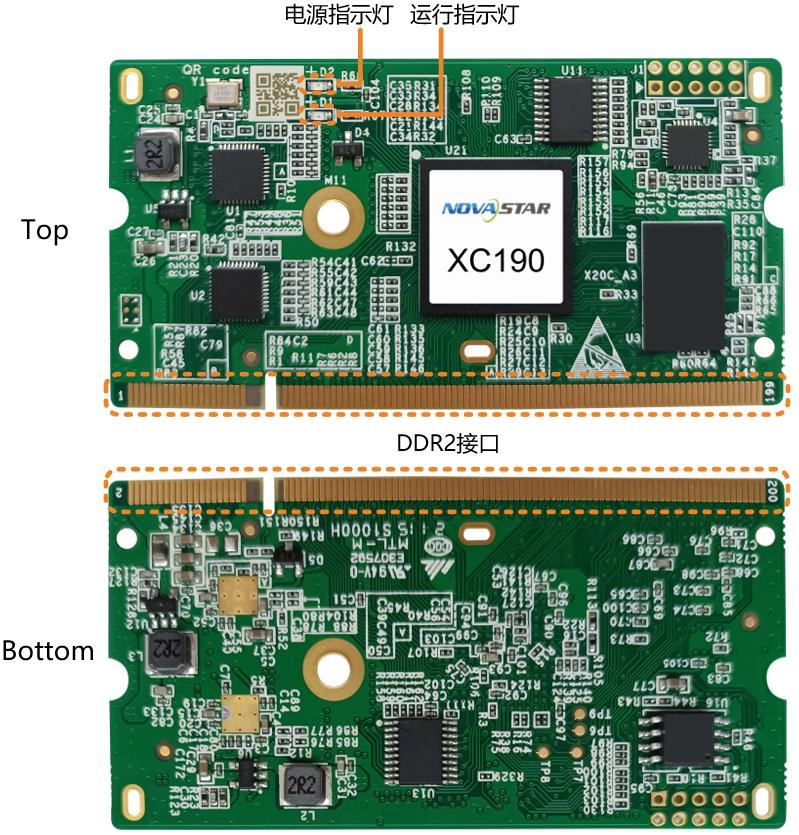
What is the NovaStar XC190 receiving card?
The NovaStar XC190 is a high-end compact receiving card for LED cabinets that need more than a basic data handoff. It receives the prepared image from the controller, drives the modules through the cabinet’s hub board, and adds room for higher pixel loads, picture-quality control and service checks.
One XC190 supports up to 512 × 512 pixels at 60 Hz with supported PWM driver ICs. It uses a DDR2 cabinet connection and can work with parallel RGB or serial data paths. That makes it a strong choice for a new cabinet designed around XC190, or for an existing wall that already identifies XC190 as the correct spare. The driver IC, hub board, module wiring and saved configuration still decide the final fit.
XC190 key features
- High compact-card capacity: up to 512 × 512 @ 60 Hz for supported PWM driver ICs, useful when one cabinet carries a larger or finer-pitch canvas.
- Image Booster and picture controls: driver-dependent low-gray correction, color management, calibration and individual RGB gamma can help the wall look more even on camera and at low brightness.
- Creative display support: 90-degree rotation is built in, while arbitrary-angle rotation needs an MCTRL R5 and SmartLCT as part of the complete system.
- Service and recovery tools: stored images, mapping, temperature/voltage/bit-error checks, configuration readback and calibration backup help an operator find and recover a cabinet fault.
- Redundancy options: dual-card, loop, dual-power and dual-program backup are available only when the cabinet and hub board are wired for them.
NovaStar XC190 specifications
These are the useful first checks for a cabinet or replacement order. Feature results still depend on the driver IC, sending card, module memory and cabinet wiring.
| Check | XC190 value | Why it matters before ordering |
|---|---|---|
| Maximum resolution | 512 × 512 @ 60 Hz for PWM driver ICs | Confirm the driver IC and the whole cabinet map before quoting one-card coverage. |
| Cabinet communication | DDR2 connector | Match the hub board and mating connector; capacity does not fix a physical mismatch. |
| Data paths | 32 parallel RGB or 64 serial groups, expandable to 128 serial groups | The module ribbons, scan design and driver choice determine the usable route. |
| Input voltage | DC 3.8–5.5 V | Check the cabinet rail before connecting a new card. |
| Rated current / power | 0.6 A / 3.0 W | Leave the power supply and cabinet wiring within their own limits. |
| Board size / weight | 67.6 × 35.0 × 5.2 mm / 7.2 g | Useful for clearance, but connector and mounting fit remain decisive. |
| Operating environment | −20°C to +70°C; 10–90% RH, non-condensing | Check airflow, enclosure temperature and moisture exposure. |
Is XC190 the right receiving card for your cabinet?
XC190 fits when the cabinet is designed around its DDR2 connection, hub board, module data path and supported driver IC. For an existing wall, start with the label on the installed card and a clear photo of the hub board and module ribbons. For a new wall, ask the cabinet maker to confirm the card model in the module configuration before the cabinet is built.
The 512 × 512 headline is useful, but it does not make XC190 a universal upgrade. A different card can have the same outline and still use another voltage range, connector, firmware or map. If your wall is already stable, read and save its configuration in NovaLCT before changing the receiver.
XC190 capacity, driver ICs and data groups
The documented 512 × 512 @ 60 Hz limit applies to PWM driver ICs. The 32 parallel RGB and 64 serial group figures describe the data routes available to the cabinet, with serial data expandable to 128 when the module design supports the extension. They are not interchangeable ways to calculate every cabinet.
Use the module’s driver and decoding information, ribbon order and saved cabinet map to choose the route. If the modules use a different driver condition, treat the published ceiling as a starting check, not a promise. This is the point at which the cabinet maker’s module file is more useful than a reseller’s largest number.
XC190 Image Booster, calibration and RGB gamma
XC190 is aimed at walls where picture quality matters as much as pixel count. Image Booster can help with color management and low-gray problems such as brightness spikes, dips, color cast and mottling, but the visible result depends on the driver IC. Pixel-level brightness/chroma calibration and separate red, green and blue gamma controls can then help a replacement cabinet match the wall around it.
Keep the calibration coefficients with the cabinet configuration. Modules with Flash memory can restore coefficients after a replacement, and XC190 can keep application and factory copies of calibration data. These safeguards reduce the chance that one repaired cabinet comes back noticeably brighter or shifts white balance, but they still require compatible modules and a correct configuration.
XC190 rotation, HDR, 3D and low-latency conditions
Use 90-degree rotation when the cabinet layout needs a quarter-turn image. Arbitrary-angle rotation is a complete control-chain feature: it requires the XC190, an MCTRL R5 sending controller and SmartLCT. The receiving card alone cannot turn any cabinet into a freely rotated screen.
XC190 can support HDR10/HLG and 3D when the sending side supports the same format. The documented low-latency result is up to one frame only with driver ICs that have built-in RAM. Confirm those dependencies before promising a camera-facing, HDR or low-latency result to a client.
XC190 monitoring, mapping and backup
XC190 can show a stored image at startup, after an Ethernet cable is disconnected or when the video source disappears. Mapping can show the receiving-card number and Ethernet-port information on the cabinet, turning a cabinet in a large wall into a named location for service. Temperature, voltage and Ethernet bit-error checks help narrow down whether the fault points to power, cabling or the card.
Loop backup, dual-card backup, dual-power detection and dual program/configuration backup are useful in a high-availability wall only when the hub board, spare receiver, cables and power supplies are designed for them. Confirm that architecture before paying for redundancy; one XC190 cannot add a second physical path by itself.
XC190 setup with NovaLCT and configuration files
Before removing a working XC190, use NovaLCT V5.2.0 or later to read back and save the receiving-card program and configuration parameters. NovaLCT V5.4.0 or later is required for the documented Image Booster and smart-module functions. Keep the saved cabinet map with the module and wiring notes; the configuration file is not the same as firmware.
Install the replacement in one cabinet first. Restore the known-good file, check normal brightness and color against neighboring cabinets, test the Ethernet route and then confirm any calibration, rotation or backup feature. Only after that cabinet is stable should you repeat the process across the wall.
Smart-module and LVDS modes use dedicated firmware conditions. Do not update a working card with a package found under a similar model name. Confirm the exact PCB, driver and required feature first.
XC190 vs XC160 and XC100
Choose between these compact cards by cabinet interface and the result you need, not by the size of a feature list. XC190 is the higher-capacity, picture-control option; XC160 and XC100 belong to different documented cabinet paths and are not automatic substitutes.
| Model | Consider it when | Do not assume |
|---|---|---|
| XC190 | The cabinet specifies DDR2 and needs the 512 × 512 PWM ceiling, picture controls or conditional rotation/backup. | That every module gets Image Booster, low latency or arbitrary rotation without its driver and control-chain conditions. |
| XC160 | The cabinet is specified for XC160’s DDR2 path and up to 256 × 256 load. | That a similar connector or smaller load makes it an XC190 spare. |
| XC100 | The installed cabinet is built around XC100’s own legacy DDR3 interface. | That XC100 and XC190 can share a cabinet file or hub board. |
XC190 datasheet, firmware and NovaLCT
Use the verified datasheet for the capacity, driver and feature conditions. Use NovaLCT to preserve a working cabinet before a replacement or firmware change. No exact XC190 firmware package is verified in our library, so the firmware card goes to NovaStar’s official download center rather than to an unconfirmed ZIP.
NovaStar XC190 FAQ
What is the XC190 maximum resolution?
For supported PWM driver ICs, NovaStar documents up to 512 × 512 pixels at 60 Hz for one XC190. Check the actual driver, module map and data path before treating it as a cabinet quote.
Does XC190 use a DDR2 connector?
Yes. The cabinet hub board and mating DDR2 connection must match. A similar compact outline or a higher load number does not prove compatibility.
Does every XC190 support Image Booster?
The visible effect depends on the driver IC, and NovaLCT V5.4.0 or later is required for the documented Image Booster path. Confirm the driver and software condition first.
Can XC190 rotate an LED cabinet at any angle?
Arbitrary-angle rotation requires the XC190 with an MCTRL R5 and SmartLCT. The card alone cannot provide that complete rotation workflow.
Does XC190 provide low latency?
The documented up-to-one-frame result applies when the modules use driver ICs with built-in RAM. Confirm that driver condition before promising a low-latency camera or live-event result.
What should I save before replacing an XC190?
Use NovaLCT to read back and save the receiving-card program, configuration parameters and calibration data where supported. Test one restored cabinet before updating the wall.
Is an XC190 firmware package available here?
The verified resource here is the XC190 datasheet. No exact firmware ZIP is currently verified in our library; use NovaStar’s official download center or contact us after confirming the PCB and driver requirements.
Can one XC190 add redundancy to any cabinet?
No. Loop, dual-card, dual-power and dual-program backup require the matching hub board, spare card, cabling and power design.
Reviews
There are no reviews yet.