
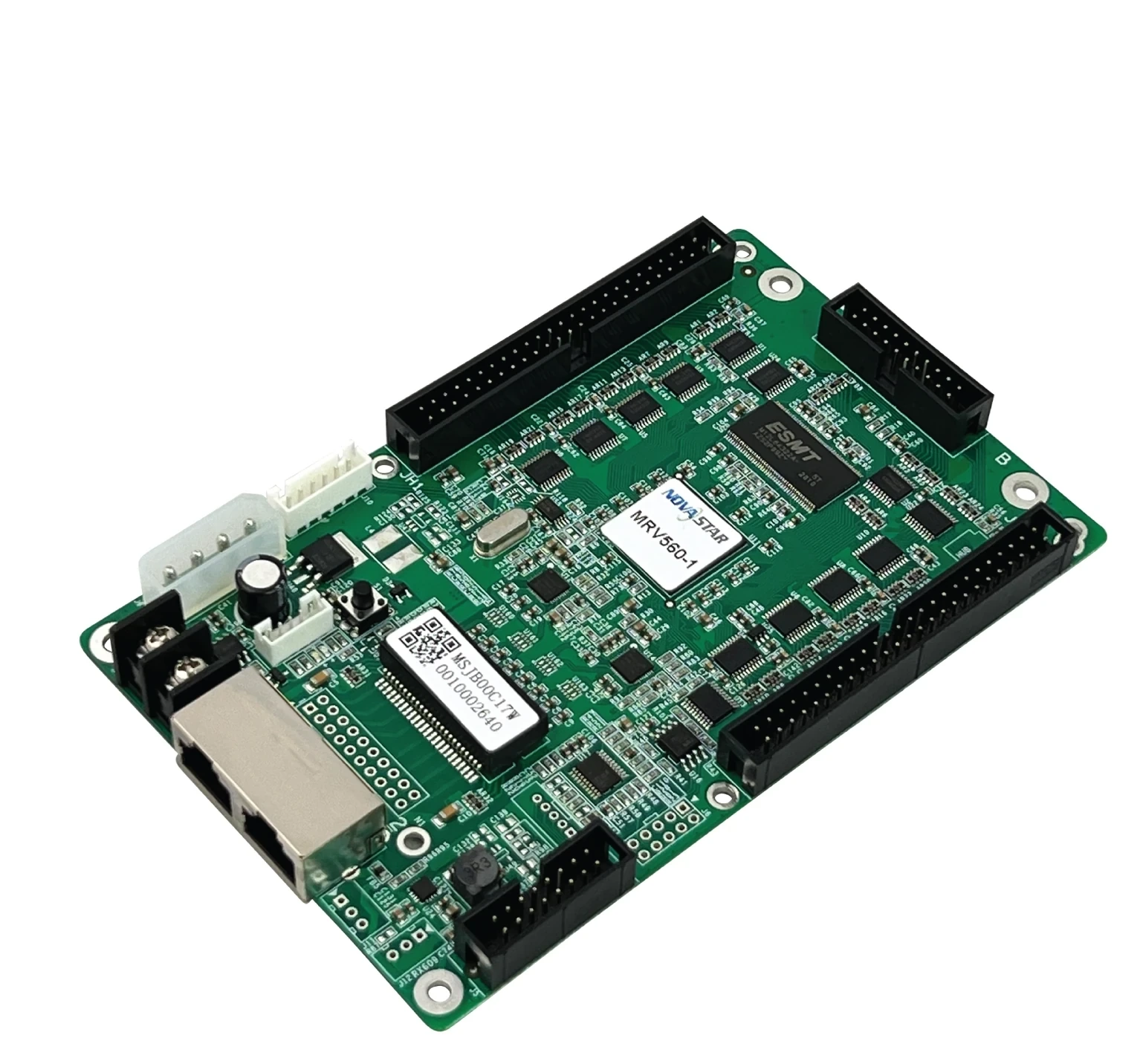
What is the NovaStar MRV560-1 receiving card?
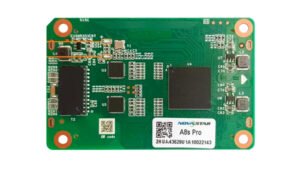
The NovaStar MRV560-1 is the receiving card inside an LED cabinet that was built around the MRV560 family. It takes the mapped signal from the controller path and sends the cabinet’s matching data to its LED modules. The -1 suffix matters: NovaStar identifies it as the version with a male connector on the top of the card.
It is the sensible choice when the installed card, cabinet connector position, two 50-pin interfaces and saved configuration all point to MRV560-1. A receiving card with the same 256 × 226 maximum or another top-side connector is not automatically a replacement. The board still has to mate with the cabinet hardware and speak the module data format the cabinet was built for.
MRV560-1 key features
- Top-side male connector layout: this is the first physical check for an installed-cabinet replacement. The position and gender of the mating connection can stop a near-match from fitting before configuration ever begins.
- Two 50-pin output interfaces: the card supports 16-group RGBR, 20-group RGB or 64-group serial data paths. Those are part of the cabinet’s module and hub design, not three ways to increase the capacity of a different cabinet.
- MOM storage for module information and calibration coefficients: where the cabinet uses this function, it helps preserve the information behind a uniform-looking wall after a compatible part is serviced.
- Configuration readback and a stored picture: save the working cabinet before removing it; a stored picture can keep a cabinet from becoming a black rectangle when its normal source path disappears.
- Monitoring-card connection: when the cabinet includes the supporting monitoring hardware, temperature, voltage and Ethernet status can help narrow a fault before parts are swapped.
NovaStar MRV560-1 specifications
Use these values to confirm a known MRV560-1 cabinet. They are a fit check, not a substitute for matching the old card, hub path and saved configuration.
| Check | MRV560-1 value | Why it matters before ordering |
|---|---|---|
| Variant and connector | Standard MRV560 model; male connector on top | Match the complete suffix and where the cabinet’s mating connector sits. A different suffix can be mechanically wrong even when the card family name matches. |
| Cabinet interfaces | Two 50P interfaces | Confirm the existing hub/ribbon path; a 60P family such as MRV420-1 is not a connector-for-connector substitute. |
| Documented card-wide load | Up to 256 × 226 pixels | Use it only as the total ceiling for the approved cabinet map, not as a per-output allowance. |
| Output modes | 16 RGBR parallel; 20 RGB parallel; 64 serial groups | The module design determines which signal map belongs in the cabinet. Keep the original approved file with the card. |
| Power and environment | DC 3.3–5.5 V; 0.50 A typical; −20 to +70 °C; 10–90% RH | Check the cabinet rail and the installed environment rather than assuming every receiver uses the same supply range. |
| Compliance | RoHS; CE-EMC Class B | Useful for component documentation; confirm requirements for the finished cabinet and location separately. |
MRV560-1 top-side male connector and 50P cabinet fit
Start at the old card, not at the new card’s capacity number. Photograph the printed MRV560-1 label, then compare the top-side male connector, the two 50-pin interfaces, mounting points, hub board and ribbon directions. This takes a few minutes with one cabinet open and can prevent ordering a board that cannot mate with the cabinet.
Next, keep a record of the exact cabinet location. One wall may contain different wiring revisions even when the cabinets look alike from the front. If the original card is still working, read it before removal; if it has already failed, use the cabinet maker’s file or a known-good card from the same cabinet revision instead of guessing from the screen size.
MRV560-1 output modes for an existing LED cabinet
MRV560-1 can operate with 16 groups of RGBR parallel data, 20 groups of RGB parallel data or 64 groups of serial data. On a serial-data cabinet, the document describes each of the 64 data cables driving one LED bar independently. That is useful only when the cabinet’s modules and 50P wiring were designed for that path.
In practical terms, do not choose a mode because it sounds larger. The hub board, module driver and ribbon layout decide which map belongs to the cabinet. Sending a program meant for another output arrangement can leave rows out of order, colors wrong or part of the cabinet dark. Preserve the original map, then test one cabinet before copying any setting across the wall.
MRV560-1 MOM data and cabinet recovery
Before removing a working card, use NovaLCT to read and save the receiving-card configuration. Keep that file with the cabinet number, together with photos of the label and ribbon order. The configuration carries the cabinet’s scan and pixel map; it tells the replacement how this particular set of modules is wired.
The MRV560 document also names a MOM interface that can store calibration coefficients and LED-module information. That is not a promise that any replacement will restore a wall on its own. It means the cabinet may have more useful information to preserve than its screen size. Restore the saved configuration to one matching cabinet, inspect the image at normal brightness and only then repeat the process elsewhere.
MRV560-1 stored image and monitoring-card support
A stored picture is a small but useful service feature. When a cabinet starts up, loses its Ethernet path or has no normal video signal, it can display the saved image instead of standing out as a black rectangle. It gives an operator a clearer signal that the cabinet still has power and is running; it does not correct a wrong configuration or a failed module.
MRV560-1 can also connect to a monitoring card. With the compatible cabinet hardware in place, that path can report temperature, supply voltage and Ethernet communication status. Use those readings to decide whether to inspect power, a cable or the receiver first. They are helpful clues, not a replacement for checking the cabinet’s actual wiring and module connections.
MRV560-1 vs MRV420-1 for a replacement
Both names end in -1, and both are documented as top-side male variants, but they belong to different cabinet interface families. MRV560-1 uses two 50P interfaces and has its own RGBR, RGB and serial paths. MRV420-1 uses a different 60P arrangement and a different output profile. The suffix describes physical orientation inside each family; it does not make the two cards interchangeable.
Choose MRV560-1 when the installed board label and 50P cabinet hardware match it. For a cabinet carrying MRV420-1, use the like-for-like card unless its manufacturer has approved a complete hub-board, module-map and configuration conversion. A receiver that fits one connector count cannot safely be selected from resolution alone.
MRV560-1 datasheet, firmware and NovaLCT
Use the MRV560-1 datasheet page or direct MRV560-1 Datasheet PDF to check the 50P interfaces, output modes, electrical limits and suffix list. For an existing cabinet, save its configuration in NovaLCT before changing hardware.
Firmware and cabinet configuration are different files. Firmware has to suit the card PCB and module driver; the cabinet configuration holds the scan, wiring and pixel map. No exact MRV560-1 firmware package has been independently verified for this store, so a plausible ZIP is not presented as a download. Keep the known-good program and use the NovaStar download center to verify a precise package before updating a working screen.
NovaStar MRV560-1 FAQ
What does the MRV560-1 do?
It is the board inside a matching LED cabinet that receives mapped screen data and sends the correct cabinet signal to its LED modules.
What does the MRV560-1 suffix mean?
NovaStar identifies MRV560-1 as the standard model with a male connector on the top. The other suffixes change connector gender and position.
What is the MRV560-1 maximum resolution?
The document lists a card-wide maximum of 256 × 226 pixels. The approved cabinet map and module design still have to match that figure.
Can I use MRV560-1 in any cabinet with a 50-pin connector?
No. Match the board label, top-side connector arrangement, both 50P paths, module wiring and saved configuration. A similar connector does not prove matching pinout or data mode.
What are the MRV560-1 output modes?
The official document lists 16-group RGBR parallel data, 20-group RGB parallel data and 64-group serial data. The cabinet’s original module and hub design determines which one applies.
What should I save before replacing MRV560-1?
Save the working receiving-card configuration in NovaLCT, photograph the label and ribbon order, and keep the records with the cabinet location. MOM-supported module information may also matter for the matching cabinet.
Can the stored image fix a wrong cabinet map?
No. It can provide a saved display image when the normal signal path is absent, but it cannot correct the scan, wiring or pixel map in an incorrect configuration.
Can MRV560-1 replace MRV420-1?
Do not assume so. Even though both are top-side male variants, the cards use different cabinet interface families and output profiles. Use the original model unless a complete conversion is approved.
Should I install new firmware during a normal replacement?
Not automatically. Keep the known-good program and update only after an exact firmware package is verified for the card PCB and module driver.
Reviews
There are no reviews yet.