
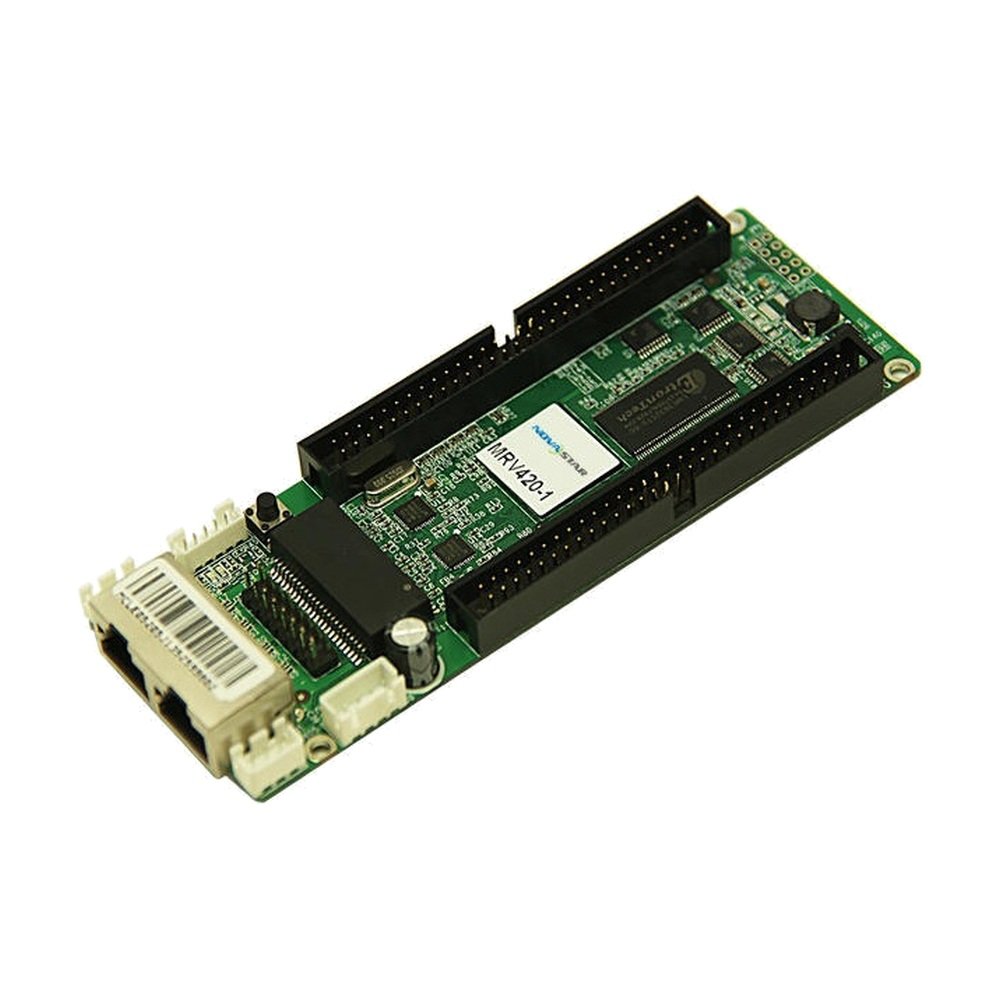
What is the NovaStar MRV420-1 receiving card?
NovaStar MRV420-1 is a receiving card for an LED cabinet that already uses the MRV420-1 layout. It receives the image data entering that cabinet and passes the matching signals to its LED modules. Its reason to buy is simple: the failed board is marked MRV420-1 and its cabinet needs the same top-side male connection.
The name after the dash is not a revision label. It describes a physical arrangement. A nearby MRV420 model may have similar electronics, yet put the mating connector on the other side or use a different gender. That is enough to turn a routine spare-card swap into a board that cannot seat on the cabinet hub connection.
MRV420-1 key features
- Top-side male connection: the defining MRV420-1 detail. It must line up with the hub board and the cabinet’s internal clearance.
- 256 × 226 pixels across one card: one total loading reference for the installed cabinet, not one limit for every module connection.
- Original cabinet data path: the card supports the MRV420 family’s documented parallel and serial output modes, but the modules and hub board decide which one belongs in the cabinet.
- Configuration readback and fault checks: NovaLCT can preserve the card settings, while temperature, supply-voltage and Ethernet-status checks help isolate a fault before a good part is replaced.
- CE-EMC Class B and RoHS documentation: helpful when a legacy parts list requires the same documented MRV420 family.
NovaStar MRV420-1 specifications
These values are useful for checking an existing cabinet. The printed suffix and the real mating connection remain the first order checks.
| Check | MRV420-1 documented value | Order consequence |
|---|---|---|
| Product type | LED receiving card | It is the cabinet-side board, not a sender or video processor. |
| Specific model | Standard model, male connector on top | The new board must mate with the cabinet in the same direction as the failed one. |
| Maximum load | 256 × 226 pixels per card | Use it as a whole-card check; it cannot prove module wiring compatibility. |
| Output modes | 24 or 28 parallel RGB groups; 64 serial-data groups | Retain the original module/hub arrangement instead of treating the modes as an upgrade choice. |
| Input and environment | DC 3.3–5.5 V; -20 to +70 °C; 10–90% RH | Confirm the cabinet rail and fix a wet or overheated enclosure before assuming the receiver failed. |
MRV420-1 top-side male connector and cabinet fit
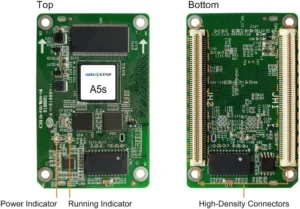
MRV420-1 uses the male connection on the top of the board. Before ordering, compare that detail with the old card and with the cabinet’s mating hub connection. Look at the full label, connector side, gender, mounting holes and ribbon route together. A similar board that has its connection on the bottom may be electrically related, but it is not a safe spare for this cabinet.
The practical test is whether the board can seat flat without forcing a ribbon, crossing a cable or fouling the cabinet door. That is why a clear photo of the old board in its cabinet is more useful than a resolution number alone. If the label is worn, use the connection position and the hub-board mating part to identify the correct suffix before the wall is opened.
MRV420-1 load capacity and the original cabinet data path
The published MRV420-1 load is 256 × 226 pixels for one entire card. The module connections divide that canvas among the cabinet; they do not each carry a separate 256 × 226 allowance. A 256 × 226 cabinet is at the documented ceiling, while a 128 × 226 cabinet remains below it.
The same official document lists 24-group and 28-group parallel RGB modes plus 64-group serial data. Those terms identify the original module connection method. They do not mean a replacement can be selected by the highest group count. Keep the existing hub board, module wiring and approved data path intact during a like-for-like repair. For a different cabinet design, use the module maker’s approved current card rather than trying to re-purpose this legacy spare.
MRV420-1 replacement files before a cabinet goes offline
If the installed MRV420-1 still communicates, read it in NovaLCT before removing it. Save the receiving-card program and the cabinet configuration, label the files with the cabinet position, and photograph the board and ribbon positions. This turns a repair into one controlled cabinet test instead of a screen-wide reconfiguration.
The two saved files do different work. The program tells the receiving card how to operate with the module driver and decoding signals; the cabinet configuration holds the scan, wiring and pixel map for that physical cabinet. A board can be healthy and still display shifted rows, wrong colors or a scrambled image when either record is wrong.
For a dead board, restore a verified file from the same cabinet type or obtain it from the display maker. Do not copy a file from another LED wall just because it also contains MRV420-1 cards. Test the replacement in one cabinet before sending anything across the rest of the wall.
MRV420-1 vs MRV420-2 and other legacy replacements
MRV420-2 is the closest search alternative, but it uses a male connector on the bottom. If the old label says MRV420-1 and the cabinet needs the top-side male layout, choose MRV420-1. If it says -2, use the bottom-side version instead. That distinction matters more than their shared family capacity.
The MRV420 family page shows all four official physical variants. Other legacy MRV cards may be related in age or compliance documentation, but a higher capacity or newer date does not make them plug-in replacements. A different receiving-card family needs the cabinet maker’s approved hub, module and configuration path.
MRV420-1 datasheet, firmware and NovaLCT
The MRV420-1 datasheet page and direct MRV420-1 Datasheet PDF contain the official suffix list, load, output modes and electrical limits. Use the document to verify the card in hand, not to substitute a different model by appearance.
NovaLCT reads and restores the cabinet settings you saved. Firmware is separate and must match the receiving-card PCB and the module driver/decoding combination. No exact MRV420-1 firmware package was independently verified for this store, so a guessed ZIP is not offered. Keep a working system on its known-good program and check the NovaStar download center before any firmware change.
NovaStar MRV420-1 FAQ
What does the MRV420-1 do?
MRV420-1 sits inside an LED cabinet. It receives screen data from the control path and sends the right data to the modules connected through that cabinet.
What makes MRV420-1 different from MRV420-2?
MRV420-1 has the male connector on top. MRV420-2 places the male connector on the bottom, so the two versions fit different cabinet mating layouts.
Can I use MRV420-2 if MRV420-1 is unavailable?
Not as a routine spare. The connector side changes how the board seats on the hub connection and routes inside the cabinet.
Is 256 × 226 the capacity of each MRV420-1 output?
No. It is the documented load for the entire card. All module connections share the same total.
Why did the replacement cabinet become scrambled?
Check the board suffix and the ribbon positions, then restore the verified configuration from that cabinet. A good board can show a wrong image with the wrong cabinet map.
What should I save before replacing an MRV420-1?
Save the working receiving-card program and cabinet configuration in NovaLCT. Also photograph the full label, connector side and ribbon layout.
Does MRV420-1 firmware replace the cabinet configuration file?
No. Firmware/program and the cabinet configuration have different purposes. Keep both records from a working cabinet.
Should I update MRV420-1 firmware during a normal swap?
Not automatically. Use a verified package only when it matches the board and module hardware and addresses a confirmed requirement.
Reviews
There are no reviews yet.