
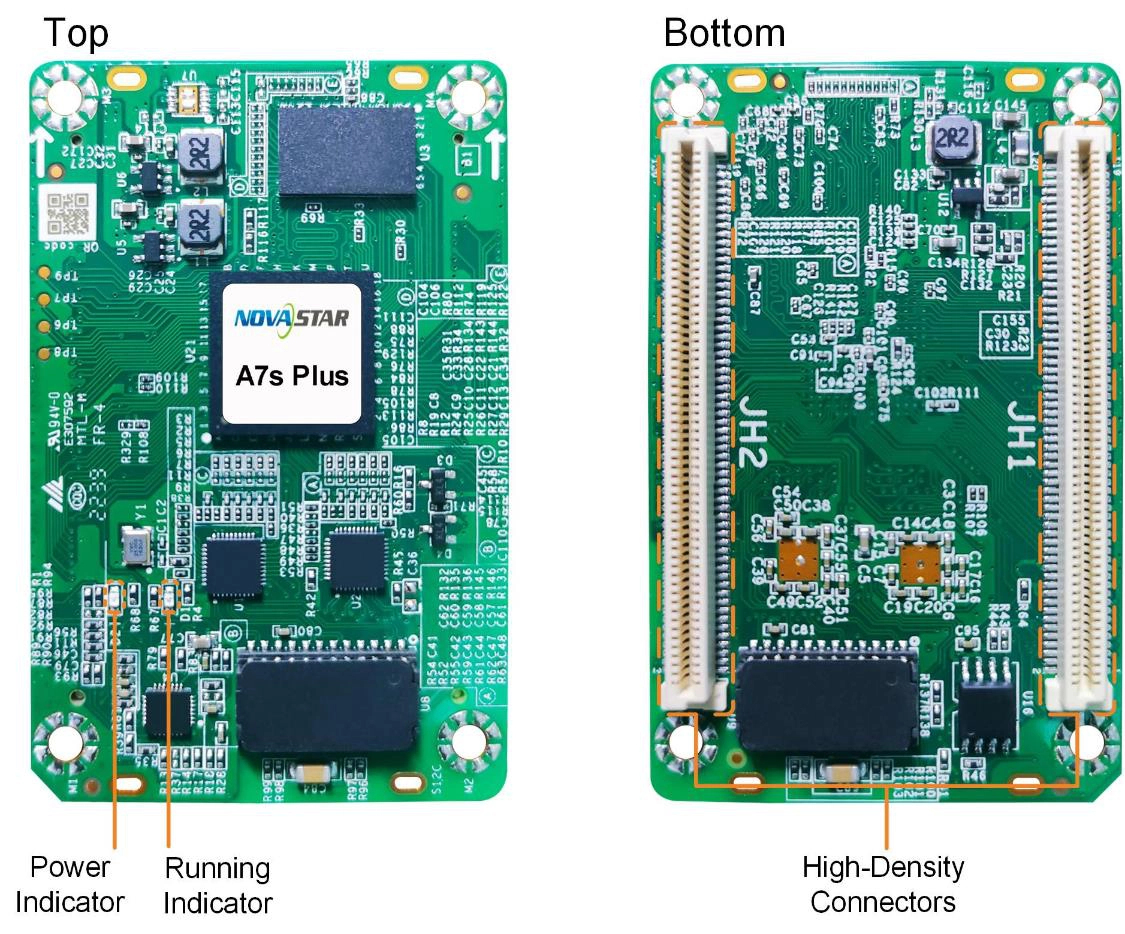
What is the NovaStar A7s Plus receiving card?
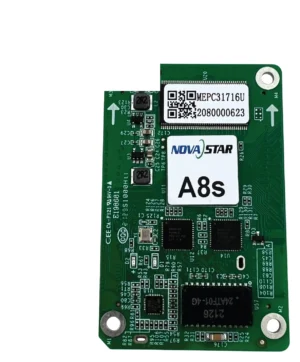
The NovaStar A7s Plus is the small receiving card inside a compatible LED cabinet. The sender maps image data to the cabinet, and the A7s Plus turns that data into the signals its LED modules use. It is a different model from the older A7s, so the two cards should not be treated as interchangeable simply because their names are similar.
It belongs in a cabinet whose hub board, module wiring, driver ICs and saved configuration were designed for A7s Plus. Its two important buying checks are whether one card can carry the planned cabinet and whether a later cabinet or module can be blended into the original wall.
A7s Plus key features
Smoother dark fades on a compatible wall
A dim LED wall can reveal stepping in a gradient or a dirty-looking fade long before it looks wrong at full brightness. A7s Plus 18bit+ increases the available grayscale steps fourfold, so a compatible screen has more room to hold a smooth dark image. It is useful for a wall that regularly runs dim, not a substitute for matching modules and calibration.
A way to reduce visible batch differences
A7s Plus supports multi-batch adjustment with the compatible NovaStar correction path. It is useful when a later cabinet or replacement module does not quite match the original wall; the next section explains what that correction can and cannot solve.
Faster cabinet identification during service
On a long wall, cabinet position matters more than a receiving-card serial number. Mapping can show the controller, Ethernet port and card number on the cabinet, which makes the affected cabinet easier to find. The card can also hold an image for start-up, loss of video or a disconnected Ethernet line, so a compatible cabinet need not become a black rectangle while the upstream signal is being checked.
Portrait cabinets without changing module wiring
The A7s Plus can rotate the display image in 90-degree steps for a cabinet layout designed in portrait. Rotation changes what the cabinet displays; it does not make an incompatible hub board, module scan or card file compatible. Confirm those parts as one cabinet package before moving a landscape design upright.
NovaStar A7s Plus specifications
These are the checks that decide whether the card belongs in the cabinet. The capacity figures need the driver-IC condition explained in the next section.
| Module data | Up to 32 parallel RGB groups or 64 serial groups, expandable to 128 |
|---|---|
| Input voltage | DC 3.8 V to 5.5 V; 5.0 V recommended |
| Rated current / power | 0.6 A / 3.0 W |
| Dimensions | 70.0 × 45.0 × 8.3 mm |
| Fitted hub-board spacing | 5.0 mm connector spacing |
| Operating environment | −20°C to +70°C; 10% to 90% RH, non-condensing |
| Certifications | RoHS and EMC Class B |
A7s Plus for mixed cabinet batches and replacement modules
An LED wall often changes over time. A spare cabinet may come from a later production run, or one damaged module may be replaced after the original batch is no longer available. Even when every pixel works, that new area can look warmer, cooler, brighter or slightly different in low gray. This is the real situation A7s Plus multi-batch adjustment is meant to address.
It is a correction step, not a substitute for a matching cabinet. First confirm the module type, scan and receiving-card configuration. Then preserve and apply the available calibration data. Multi-batch adjustment can reduce the remaining visible difference between production runs; it cannot repair a wrong map, a mismatched module, lost coefficients or a damaged LED.
For an expanded lobby wall, a rental fleet assembled from more than one cabinet run, or a single replacement cabinet that lands in the middle of a clean white image, that distinction matters. The A7s Plus gives the technician a supported way to refine a matched system instead of accepting the new cabinet as an obvious patch.
A7s Plus load capacity for PWM and common driver ICs
The A7s Plus does not have one unconditional maximum resolution. Start with the driver IC in the cabinet: PWM driver ICs support up to 512 by 512 at 60 Hz, while common driver ICs support up to 512 by 384 at 60 Hz. A 512 by 512 common-driver cabinet therefore needs a second card or a different cabinet design; quoting the PWM number would understate the card count.
| Cabinet electronics | Maximum per A7s Plus at 60 Hz | Buying consequence |
|---|---|---|
| PWM driver ICs | 512 × 512 | A 512 by 512 cabinet can fit one card after scan and data-group checks. |
| Common driver ICs | 512 × 384 | A 512-wide cabinet taller than 384 pixels needs a second card or another cabinet layout. |
Resolution is the first filter, not the whole fit test. A cabinet near either ceiling still has to match the A7s Plus hub board, scan method, data-group count and saved configuration. Leave room for those conditions instead of designing a cabinet around the largest headline number.
A7s Plus datasheet, firmware and NovaLCT downloads
Start with the A7s Plus datasheet to check the load condition and board dimensions. If you are replacing a card in a working cabinet, use NovaLCT before the old card is removed: save its receiving-card program and cabinet parameters. The program tells the card how to work with the matched electronics; the cabinet file records the cabinet’s scan, wiring and pixel map. You need both.
Choose firmware only after the card PCB and module chips have been confirmed. A newer file is not automatically a better choice for a screen that already works. Test a changed card or file on one cabinet before applying it to the rest of the wall.
NovaStar A7s Plus FAQ
What does the A7s Plus receiving card do?
The A7s Plus sits in a compatible LED cabinet, receives image data from the controller and delivers the assigned pixel data to that cabinet’s modules.
What is the A7s Plus loading capacity?
At 60 Hz, PWM driver ICs support up to 512 by 512 per card. Common driver ICs support up to 512 by 384. The cabinet’s scan, hub board and data groups must also match.
Can one A7s Plus run a 512 by 512 cabinet?
It can when that cabinet uses PWM driver ICs and the scan and data groups match. A common-driver 512 by 512 cabinet exceeds the documented 512 by 384 maximum and needs another card or a different cabinet layout.
Is A7s Plus a direct replacement for the original A7s?
Do not assume so. Confirm the complete card label, hub board, module driver IC, scan, data groups and working cabinet configuration before changing models.
What should I save before replacing an A7s Plus?
Save the working receiving-card program and cabinet parameters in NovaLCT. Those files preserve the cabinet map and settings that the replacement card needs.
Can I use a newer A7s Plus firmware package on a working wall?
Only when the exact card PCB and module-chip combination have been checked. A newer file alone is not a reason to disturb a working configuration.
Does A7s Plus support 90-degree portrait rotation?
Yes. It supports image rotation in 90-degree steps, provided the cabinet’s module layout, scan and configuration are planned for that orientation.
Can A7s Plus work in a VMP system?
NovaStar lists A7s Plus as a supported card. Confirm the controller, firmware and cabinet files for the exact VMP feature you intend to use.
Can I get A7s Plus volume pricing or Net 30 terms?
Yes. Send the cabinet count and spare quantity for volume pricing or eligible Net 30 terms. Include the cabinet model if the order is a replacement.
Is A7s Plus covered by a 3-year manufacturer warranty?
Yes. A7s Plus cards supplied through our authorized US NovaStar channel include three years of serial-tracked manufacturer coverage.
Reviews
There are no reviews yet.