
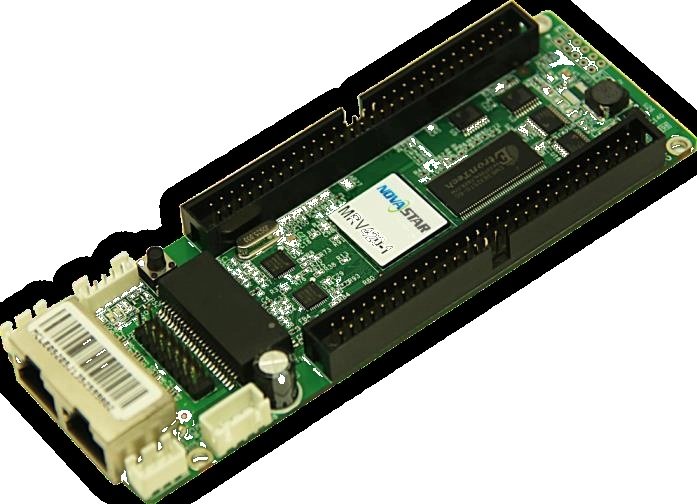
What is the NovaStar MRV420-2 receiving card?
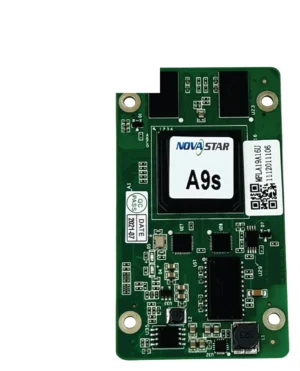
NovaStar MRV420-2 is the bottom-side-male version of the legacy MRV420 receiving-card family. It belongs inside a cabinet that was built for that exact connection: it takes the incoming screen data and sends the correct signals to that cabinet’s LED modules. Buy it when the failed card carries the MRV420-2 label and the cabinet hub connection meets the board from below.
MRV420-1 and MRV420-2 share family specifications, but they do not put the mating connection in the same place. A bottom-side connector can determine where the ribbon leaves the board, whether the hub connector seats flat and whether there is room around a cabinet bracket. Match the physical route before you compare any capacity figure.
MRV420-2 key features
- Male connector on the bottom: the feature that identifies MRV420-2 and determines whether it can engage the installed hub connection.
- 256 × 226 pixels per complete card: a whole-card load check for the existing cabinet, not four separate output limits.
- Documented module data modes: 24 or 28 parallel RGB groups and 64 serial-data groups support different original cabinet designs; use the one already specified for the modules.
- Configuration readback and cabinet diagnostics: the card supports readback plus temperature, supply-voltage and Ethernet-status checks to help protect a working configuration and locate a real fault.
- CE-EMC Class B and RoHS documentation: retain the correct family paperwork when a legacy cabinet record calls for it.
NovaStar MRV420-2 specifications
Use these official values to check a like-for-like replacement. They are not a substitute for reading the complete suffix on the board in the cabinet.
| Check | MRV420-2 value | What the buyer should do |
|---|---|---|
| Specific model | Male connector on bottom | Confirm the hub-board mating point and cable route before opening a failed cabinet. |
| Maximum load | 256 × 226 pixels per card | Check the entire cabinet canvas, not the number of module connections. |
| Data modes | 24/28 parallel RGB groups; 64 serial-data groups | Retain the cabinet’s original module and hub-board path; mode count does not make a different board fit. |
| Power | DC 3.3–5.5 V; 0.33–0.55 A | Check the cabinet power rail before blaming a newly installed card. |
| Environment and document | -20 to +70 °C; 10–90% RH; CE-EMC Class B/RoHS | Keep the specified card document; solve water, heat and grounding faults at cabinet level. |
MRV420-2 bottom-side male connector and cabinet clearance
The bottom-side male connector is the MRV420-2 purchase gate. Inspect the failed card while it is still mounted: identify the full label, find where the mating hub connection touches the board, and follow the ribbon path past nearby brackets and power wiring. A substitute that has the same pixel rating but moves that connection to the top can require a cable bend the cabinet was never designed to make.
Order MRV420-2 only when the old board and hub connection share that bottom-side male arrangement. If you have an MRV420-1 label or a top-side mating point, use MRV420-1 instead. If the label is not readable, compare both sides of the failed card to the hub board before selecting either suffix.
MRV420-2 capacity and the cabinet path you should not redesign
One MRV420-2 is documented for 256 × 226 pixels in total. That figure is shared across the board; it is not a separate allowance for each connected module. It answers one narrow question: does the existing cabinet stay inside the published receiving-card load?
It cannot answer whether a new receiver will work with the old LED modules. The official 24-group, 28-group and 64-group data modes describe the cabinet connection method, and the existing hub board and module scan choose the one in use. Retain that path during a replacement. If a cabinet needs a different interface or a new design, start with the module maker’s approved current receiver rather than trying to retrofit an MRV420-2 spare.
MRV420-2 replacement with the original cabinet files
Before removing a card that still communicates, open NovaLCT and save its receiving-card program and cabinet configuration. Record the cabinet location and photograph the bottom-side connection before disconnecting it. Those small records preserve the one screen map that is already known to work.
The program governs the receiver’s operation with the module driver and decoding signals. The cabinet configuration carries the scan, wiring and pixel map. A replacement can power up normally while showing a black, mirrored or garbled cabinet if either record is missing or belongs to a different module layout.
Install and restore one MRV420-2 first. Confirm it returns to the right part of the image before sending a file to any other cabinet. If the old card is dead, use a verified file from the same cabinet type or request the original file from the display maker.
MRV420-2 vs MRV420-1: when the connector side decides
MRV420-2 has a male connector on the bottom. MRV420-1 has the male connector on top. Their shared MRV420 family capacity does not remove that physical difference. Choose the suffix printed on the old card and confirmed by the hub-board mating direction.
The MRV420 family page covers the other female top/bottom variants. Do not replace an existing MRV420-2 with a newer or higher-capacity card just because it looks compatible on a datasheet. A new receiver needs its own approved hub layout, module relationship and cabinet configuration.
MRV420-2 datasheet, firmware and NovaLCT
The MRV420-2 datasheet page and direct MRV420-2 Datasheet PDF give the official suffix list, capacity, data modes and electrical values. Use them to identify the cabinet you own, not as a reason to alter it.
NovaLCT reads and restores the saved cabinet settings. Firmware is different: it must match the receiver PCB and the module driver/decoding combination. No exact MRV420-2 package was independently verified for this store, so no guessed ZIP is linked. Preserve a working card’s program and check the NovaStar download center before changing firmware.
NovaStar MRV420-2 FAQ
What does MRV420-2 do?
It is the receiving card inside an LED cabinet that sends the mapped image data to the modules connected to that cabinet.
What is the difference between MRV420-2 and MRV420-1?
MRV420-2 has a bottom-side male connector. MRV420-1 has a top-side male connector, so the two boards match different cabinet mating layouts.
Can I use MRV420-1 instead of an MRV420-2?
Not as an ordinary replacement. The connector position changes the hub-board fit and ribbon route inside the cabinet.
Is 256 × 226 the limit of each output?
No. It is the published maximum for the complete MRV420-2 card.
Why does a replacement card show the wrong image?
Check the exact suffix, the physical connection and the cabinet configuration. A correct card can look faulty when the restored file belongs to another module layout.
What should be saved before an MRV420-2 replacement?
Save the receiving-card program and cabinet configuration in NovaLCT, and photograph the full label and bottom-side connection.
Does MRV420-2 firmware replace a cabinet configuration?
No. Firmware/program and the cabinet configuration do different things. Keep both from a working cabinet.
Should I update firmware while replacing this card?
Only when a verified exact package matches the board and module hardware and solves a known requirement. Do not update a working wall merely because a newer file exists.
Reviews
There are no reviews yet.