
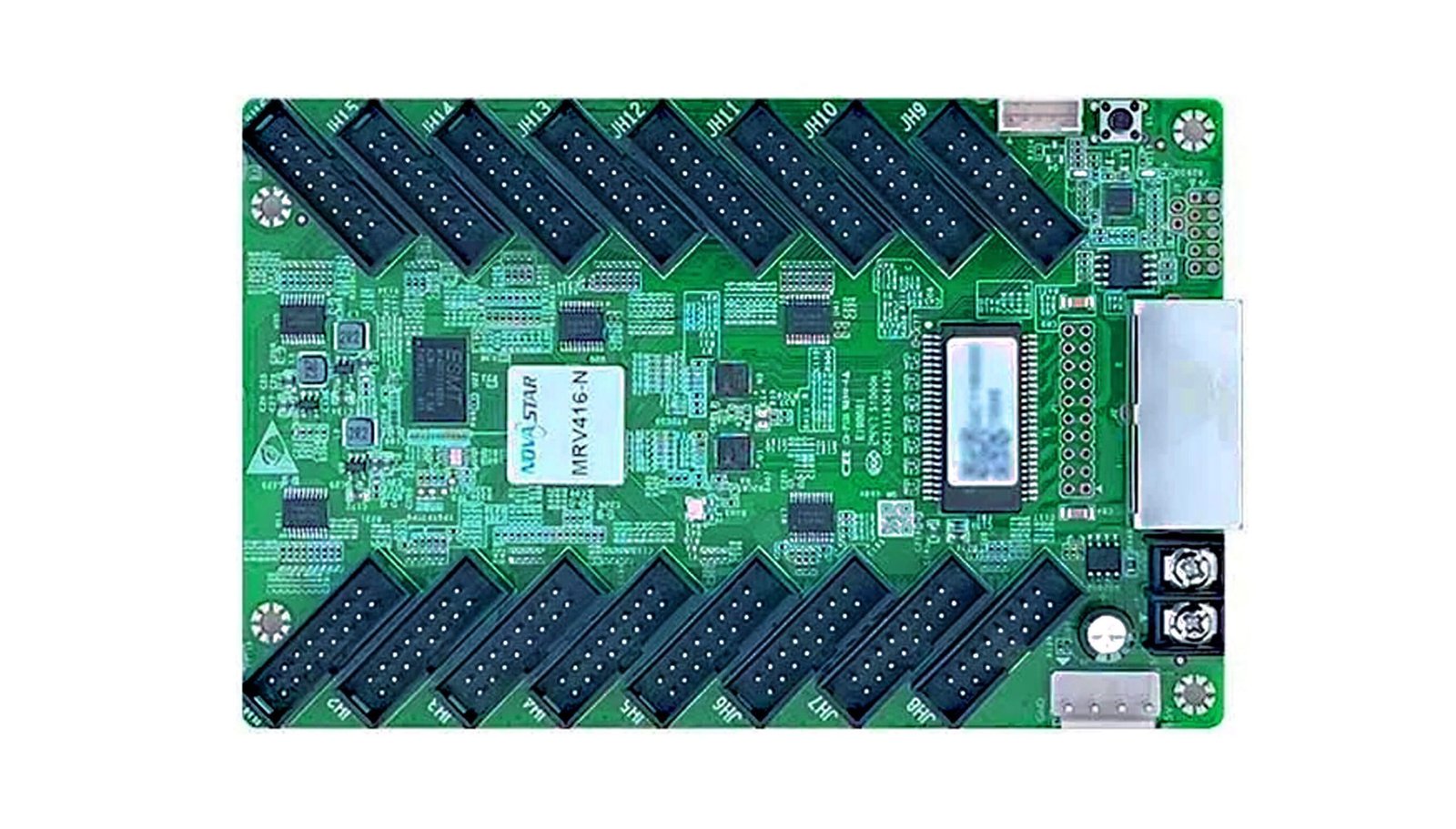
What is the NovaStar MRV416-N receiving card?
The NovaStar MRV416-N is a current 16-output receiving card for LED cabinets using standard HUB75E module ribbons. It sits inside one cabinet, receives mapped data from the controller or the cabinet before it, and sends the right signals to the modules connected to that cabinet. It suits a new cabinet specified for MRV416-N or a like-for-like replacement where the existing board carries the same complete model name.
Its larger 512 × 512 figure has two conditions that belong in the first buying check: it is a whole-card limit at 60 Hz, with an 8-bit video source and PWM driver ICs. A common-driver cabinet is limited to 512 × 384 under the same 8-bit condition. Confirm the module driver before deciding one card is enough.
MRV416-N key features
- 16 HUB75E outputs and 32 RGB groups: the card can serve a dense ribbon layout, but the whole cabinet still shares one card-wide pixel budget.
- 8-bit capacity with a clear driver split: PWM modules can reach 512 × 512 at 60 Hz, while common-driver modules stop at 512 × 384. That is a card-count decision, not a marketing footnote.
- Tools for a screen that gives itself away: 18bit+, colour management, calibration, gamma and seam adjustment can help with rough low-grayscale steps, batch mismatch or an obvious bright cabinet joint when the connected system supports the feature.
- Conditional one-frame latency and rotation: low latency needs modules with driver ICs that include built-in RAM; rotation is available in 90-degree steps. Neither is a reason to buy the card until the module and source path have been checked.
- Clearer cabinet service: Mapping 1.1, stored-image options, voltage/temperature monitoring, Ethernet fault records and readback help a technician find one cabinet and protect its working settings.
NovaStar MRV416-N specifications
These values decide card count, cabinet fit and feature eligibility. The finished module map remains the final authority.
| Check | MRV416-N value | Buying consequence |
|---|---|---|
| PWM-driver capacity | 512 × 512 at 60 Hz, 8-bit source | A 512 × 512 PWM cabinet can use one card only when the approved module map also fits. |
| Common-driver capacity | 512 × 384 at 60 Hz, 8-bit source | A 512 × 512 common-driver cabinet needs a different approved card plan. |
| Module interface | 16 standard HUB75E; up to 32 parallel RGB groups | Match the hub board, ribbon order and data groups rather than counting connectors alone. |
| Low latency | One frame at the receiving-card end, with built-in-RAM driver ICs | A card alone cannot add this to modules without the required driver hardware. |
| Power and size | DC 3.8–5.5 V; 0.5 A; 2.5 W; 145.6 × 91.5 × 19.3 mm | Check the rail, mounting points and door clearance before a replacement order. |
Can one MRV416-N run a 512 × 512 LED cabinet?
One MRV416-N can run a 512 × 512 cabinet at 60 Hz only when the source is 8-bit and the modules use PWM driver ICs. That canvas contains 262,144 pixels, exactly the documented PWM ceiling for one card. The sixteen connectors distribute that image to the modules; they do not create sixteen separate capacity limits.
Use a common-driver module and the one-card ceiling drops to 512 × 384. The same 512 × 512 cabinet then exceeds the published limit, so it needs another approved card arrangement. If the build sheet does not name the driver IC, ask for it before ordering; the card count cannot be chosen from resolution alone.
Custom scan, folded ribbons and the cabinet’s final wiring map can lower a practical limit. Leave design margin instead of treating a maximum specification as spare capacity.
MRV416-N colour, low-latency and rotation conditions
Low brightness exposes the things a smooth image normally hides: coarse steps in a dark gradient, a colour cast, or a bright line where two cabinet batches meet. MRV416-N supports 18bit+, colour management, calibration, multi-batch adjustment, individual RGB gamma and seam adjustment so the system has a focused correction path for those faults. Some functions need NovaLCT, calibration data or a controller that supports the feature, so they should be specified as a complete system rather than promised by the card alone.
Low latency is more specific. It is disabled by default and reaches one frame at the receiving-card end only with modules whose driver IC has built-in RAM. Use it for a confirmed live-camera or interactive display requirement, not as a generic upgrade claim.
Image rotation works in 0°, 90°, 180° and 270° steps. It can simplify a cabinet that must be mounted sideways, but it does not correct an incorrectly wired or incorrectly mapped screen.
MRV416-N cabinet fit and saved configuration
MRV416-N belongs in a cabinet laid out for its 16 HUB75E outputs, power connection and board footprint. Before replacing an old card, match the complete label, hub board, module ribbons, DC rail and mounting layout. A close-looking MRV416, MRV412-N or other receiving card may still use a different approved configuration.
Save a healthy cabinet’s receiving-card program and RCFGX file in NovaLCT before the old card is removed. The program is the card’s operating software; the RCFGX describes the module driver, scan, wiring and pixel map in that one cabinet. A similar-screen file can make a good new card show chequered, mirrored or half-coloured modules.
Mapping and the stored-image option are useful on a large wall. Mapping identifies the controller, port and card position on the cabinet. A stored image can keep a cabinet from becoming a black rectangle while its normal source path is being investigated.
MRV416-N vs MRV416 and MRV412-N
MRV416 and MRV416-N both have sixteen HUB75E outputs, but they are separate officially documented models. Standard MRV416 reaches 512 × 384 at 60 Hz with PWM driver ICs and 384 × 384 with common drivers; MRV416-N reaches 512 × 512 only under its PWM and 8-bit condition. If the old board is marked MRV416, use the standard card unless a tested cabinet conversion has been approved.
MRV412-N is the relevant alternative for a cabinet designed around twelve rather than sixteen module ribbons. If your cabinet has the exact MRV416-N label and a 16-output HUB75E layout, choose MRV416-N. If it has another model, match the original card and its cabinet file first; more headline capacity cannot repair a mismatched hub board.
MRV416-N datasheet, firmware and NovaLCT
The MRV416-N datasheet page and direct MRV416-N Datasheet PDF set out the current capacity, dimensions and feature conditions. Use them for a new cabinet or any proposed move from another card model.
NovaLCT reads and restores a cabinet configuration. Firmware has a different purpose: it must match the card PCB and module driver/decoding ICs. NovaStar’s official listing identifies MRV416-N V4.9.2.0, but no exact direct package was independently verified for this store, so no guessed ZIP is linked. Use the NovaStar download center to confirm the package before updating a working screen.
NovaStar MRV416-N FAQ
What does the MRV416-N do?
It sits inside an LED cabinet, receives image data from the NovaStar control path and sends the right data to the modules connected through its HUB75E outputs.
Can one MRV416-N run 512 × 512?
Yes, at 60 Hz only with an 8-bit source and PWM driver ICs, provided the approved cabinet map also fits within the card’s whole-card limit.
What is the common-driver limit?
NovaStar documents 512 × 384 at 60 Hz with common driver ICs and an 8-bit source. A 512 × 512 common-driver cabinet needs another approved plan.
Does MRV416-N have one-frame low latency with every LED module?
No. The feature requires modules whose driver IC has built-in RAM and is disabled by default.
Can I use MRV416-N in place of standard MRV416?
Do not assume so. The cards have separate official documents. Match the printed model, hub board, module driver, cabinet file and tested firmware path.
What should I save before replacing the card?
Save both the receiving-card program and the cabinet RCFGX file from a healthy cabinet in NovaLCT. Photograph the model label and module ribbon order as well.
Why does a new card show a scrambled or half-coloured cabinet?
Check the ribbon order and the exact RCFGX before blaming the card. The wrong module scan or pixel map can produce that symptom on a healthy receiver.
Should I download the newest MRV416-N firmware?
Only when an exact package matches the PCB and module driver combination and solves a known need. Keep the current working program before updating.
Can you check a multi-card order?
Yes. Send the cabinet resolution, module driver type, card count and a clear photo of the existing receiving card or hub connection, and we can check the purchase before you open the wall.
Reviews
There are no reviews yet.