
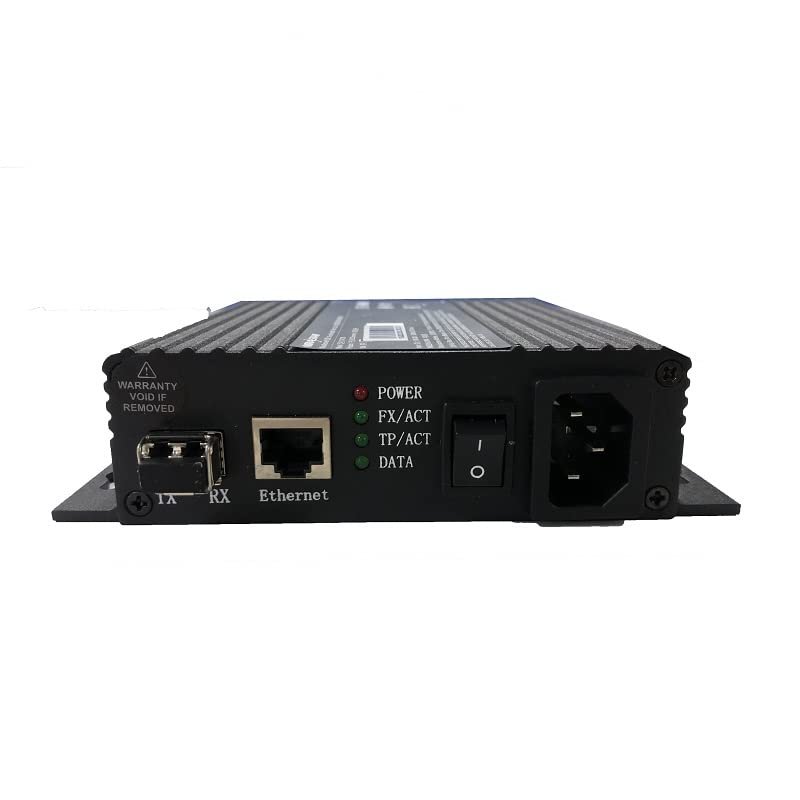
What is the NovaStar CVT310?
If your screen sits beyond the reach of a network cable, the NovaStar CVT310 is the small multimode fiber converter that carries one Ethernet run from your LED controller out to it, up to 550 m away. One RJ45 port in, one duplex fiber out, and the same box does the reverse at the far end.
You need it because a copper run stops at 100 m and a lot of screens sit just past that line: the far end of a concourse, the other side of a warehouse, a display across a car park. For those jobs it is the cheapest way over the gap.
The one thing to hold in mind is that you get a single Ethernet port. A CVT310 carries a single controller output, which is one chain of receiving cards, so a wall fed by four ports needs four separate CVT310 links rather than one.
CVT310 key features
550 m on one pair of multimode fibers
Your awkward runs sit just past the copper limit, where a mid-span cabinet is too much building work for one cable. A CVT310 link covers up to 550 m at 850 nm on multimode twin-core fiber with LC connectors. NovaStar raised that figure to 550 m in the V2.3.4 revision, so older listings quoting less are out of date.
Nothing to configure before it passes data
You do not want software on site: that is the converter that fails at 7am when nobody has the laptop. NovaStar states the CVT310 is ready to use once connected, with no drivers required. With power at both ends, your link is either up on the indicators or you have a cabling problem.
Class B, so it suits a room with people in it
You rarely think about radio interference until your install goes into a shop, a classroom or a lobby. The CVT310 is tested to the FCC limits for a Class B digital device, which is the residential-installation class. The larger CVT10 is a Class A device, and NovaStar notes it is likely to cause interference in a residential area.
Small, cool and happy in a hot ceiling void
Your remote end is rarely air conditioned, and a converter above a ceiling tile or inside a signage cabinet sits in whatever heat the building gives it. The CVT310 draws 3.5 W, weighs 0.53 kg and is rated from −20°C to +70°C. That upper figure is 15 degrees above what the CVT10 family allows.
NovaStar CVT310 specifications
Two rows decide this for you: the optical row has to match the fiber already on your site, and the port row has to match the number of controller outputs your screen actually uses.
| Ethernet port | 1 × Gigabit RJ45 |
|---|---|
| Optical port | 1 × multiple-mode twin-core LC, with the optical module installed at the factory and hot pluggable |
| Optical rate and wavelength | 1.25 Gb/s at 850 nm |
| Optical distance | Up to 550 m |
| Indicators | POWER, FX/ACT for the fiber link, TP/ACT for the copper link, DATA flashing when the Ethernet port is passing traffic |
| Setup | None. Ready to use once connected, with no drivers required |
| Power | AC 100 V to 240 V, 50/60 Hz, 0.35 A; rated current 0.7 A |
| Rated power consumption | 3.5 W |
| Operating environment | −20°C to +70°C, 10% to 90% RH, non-condensing |
| Dimensions and net weight | 149.0 × 135.0 × 38.0 mm, 0.53 kg |
| Certifications | CE, RoHS, PSE, FCC, IC, NTRA; FCC Class B |
| Supplied in the box | Power cord and certificate of approval. Fiber, patch leads and mounting are separate |
You want the four indicators in mind before the site visit rather than after it. FX/ACT lit with TP/ACT dark points at the copper end; both lit with DATA dark points upstream of the converter entirely.
Why a CVT310 link takes two units
You need two because there is no NovaStar controller port for a single CVT310 to plug into. Its optical port is specified at 1.25 Gb/s, while the optical ports on the controllers that have them — MCTRL4K, VX1000, MCTRL660 Pro and MCTRL R5 — are all specified at 10G. Ports published at different rates do not form a link.
So a CVT310 pairs with another CVT310. One sits beside your controller and takes an Ethernet output onto the fiber; the other sits at the screen and hands it back to a receiving-card chain. Both ends need mains power, which matters when your remote position is a pole or a ceiling void.
Budget two units per Ethernet run, and one spare per site. At this price a shelf spare costs you less than a second visit, and either end can take it because the two units are the same part.
CVT310 pairs or one CVT10: which way is cheaper
Your budget says CVT310 pairs almost every time; the fiber plan usually says otherwise. Each CVT310 link eats a fiber pair, two mains outlets and two boxes, and those are what you run out of first.
| Ethernet runs the screen needs | CVT310 pairs | One pair of CVT10-M | What decides it |
|---|---|---|---|
| 1 run | 2 units, $294, 1 fiber pair | 2 units, $2,300, 1 fiber pair | The CVT310, with nothing to weigh up |
| 4 runs | 8 units, $1,176, 4 fiber pairs | 2 units, $2,300, 1 fiber pair | How many spare strands the duct has |
| 10 runs | 20 units, $2,940, 10 fiber pairs | 2 units, $2,300, 1 fiber pair | The CVT10-M, on cost and on cable count |
That last column is the real decision, because the money is close. Below roughly eight runs the CVT310 is the cheaper hardware, but only when you have fiber to spare and somewhere to plug twenty power supplies in.
If your route has one or two spare strands and your screen needs more than a couple of ports, choose the CVT10-M. Ten ports over one fiber pair is the whole reason that model exists.
Where a CVT310 is used on an LED display system
You reach for a CVT310 when you have one Ethernet run, one screen, and a distance copper cannot quite make. That is the whole pattern, and it turns up more often than the big multi-port jobs do.
The unit count is the part you have to keep straight. A CVT310 link is two boxes and two mains outlets, so your far end has to have power as well as fiber.
If your wall needs more than one Ethernet run, price a CVT10-M pair against the CVT310 pairs before you order; past roughly eight runs the ten-port model wins on both cost and cable count.
CVT310 or CVT320: which one matches the fiber
Your fiber picks for you: the CVT310 is the multimode build at 850 nm for 550 m, and the CVT320 is the single-mode build at 1310 nm for 20 km. Outside the optical module it is the same box, identical down to the enclosure and the 3.5 W draw.
| CVT310 | CVT320 | |
|---|---|---|
| Fiber | Multiple-mode twin-core, LC | Single-mode twin-core, LC |
| Wavelength and rate | 850 nm, 1.25 Gb/s | 1310 nm, 1.25 Gb/s |
| Distance | 550 m | 20 km |
| Ethernet | 1 × Gigabit | 1 × Gigabit |
| Price | $147 | $176 |
- Order the CVT310 when the run stays inside one building or campus and the installed fiber is multimode.
- Order the CVT320 when the fiber is single-mode, or when the route leaves the site. The $29 difference is not worth a second trip if the mode turns out to be wrong.
- Both ends of one link carry the same model. A CVT310 and a CVT320 facing each other will not pass data.
NovaStar CVT310 manual, datasheet and specifications
You have no software to install and no configuration file to keep, so the specification sheet is the only document your CVT310 order needs. The fiber type, the wavelength and the 550 m all come off it when you quote the cabling.
NovaStar CVT310 FAQ
Do I need one CVT310 or two?
You need two CVT310 units for one link, one at each end. Its optical port runs at 1.25 Gb/s and NovaStar’s controller optical ports run at 10G, so a single unit has nothing to pair with at your rack.
How far will a CVT310 reach?
Your CVT310 link will reach up to 550 m on multimode twin-core fiber at 850 nm. That figure comes from the V2.3.4 revision onward; earlier documents and many resale listings still quote a shorter distance.
How many Ethernet ports does it have?
You get one Ethernet port. A CVT310 link carries a single controller output, so if your screen uses four Ethernet ports you need four links rather than one.
Does the CVT310 need software or a driver?
No, the CVT310 needs neither. NovaStar states it is ready to use once connected, with no drivers required. There is nothing for you to configure and nothing stored inside it.
Can a CVT310 talk to a CVT320?
No, a CVT310 cannot talk to a CVT320. The CVT310 is multimode at 850 nm and the CVT320 is single-mode at 1310 nm, so both ends of your link have to be the same model.
Will a CVT310 connect to a CVT10?
No, a CVT310 will not connect to a CVT10. The CVT10 runs 10G optics, and the two rates do not meet, so you stay with one family for the whole link.
What do the indicator lights mean?
Your four indicators read like this: POWER shows the supply is healthy, FX/ACT that the fiber connection is good, TP/ACT that the Ethernet connection is good, and DATA flashes while the Ethernet port is passing traffic.
Can it sit in a hot ceiling or signage cabinet?
Yes, your ceiling void or signage cabinet is fine within −20°C to +70°C and 10% to 90% RH, non-condensing. It draws 3.5 W, so it adds very little heat of its own.
What warranty covers a CVT310?
Your CVT310 warranty is three years of serial-tracked manufacturer coverage, because these units come to you through our authorized US NovaStar channel.
Can I get volume pricing or Net 30 terms?
Yes, you can get volume pricing, and this is a model where quantities add up quickly because every link takes two. Send us the count and we will price it. Purchase orders and Net 30 terms may be available for approved schools, government buyers, venues and established integrators.
How do I order CVT310 units?
You order CVT310 units in twos per link, plus any spares, because the listed price is for one unit. Orders placed before 3 PM ET on in-stock items ship the same business day. Contact us to confirm current availability.
Reviews
There are no reviews yet.