
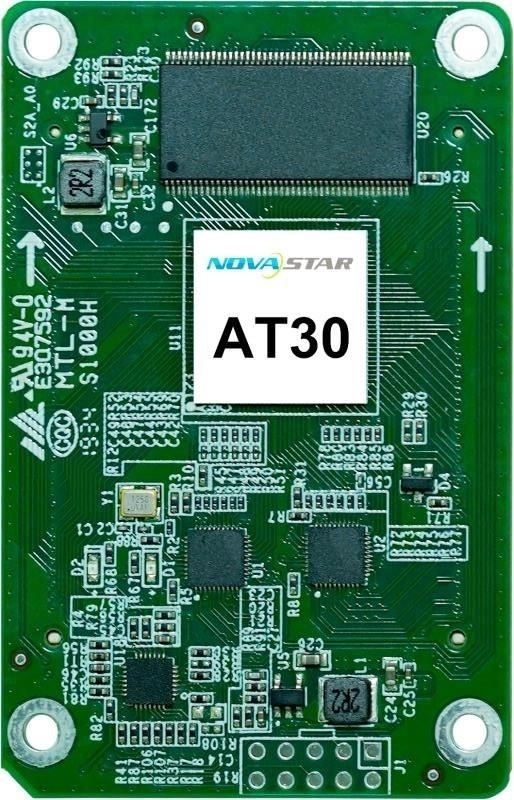
What is the NovaStar AT30 receiving card?
The NovaStar AT30 is a receiving card fitted inside a compatible LED cabinet. After the controller maps the image, the AT30 passes that cabinet’s assigned data through the matching high-density hub-board connection to its LED modules. It is a cabinet component, not a video processor or a universal module adapter.
Use AT30 when the cabinet itself was built and documented for it. Its 512 by 256 capacity and 32 parallel RGB data paths can support a larger cabinet plan than AT20, but an existing screen still needs the correct board outline, hub connection, module data path and saved configuration.
AT30 key features
A service path for the cabinet already on the wall
AT30 supports configuration and firmware readback, so a working cabinet can be documented before a repair. Mapping can show the receiving-card number and Ethernet-port information on the screen, which helps identify the cabinet named in NovaLCT without tracing every cable by hand.
Display correction that starts with the right cabinet data
With compatible NovaStar tools, AT30 supports pixel-level brightness and chroma calibration, seam adjustment and individual RGB gamma adjustment. Those controls can help a matched repaired cabinet return to a consistent screen. They cannot compensate for an incorrect scan map, an unrelated module type or a configuration copied from a merely similar wall.
A picture and backup route, when the cabinet was designed for them
A pre-stored image can be used when the normal video path is not available. AT30 also documents loop backup and dual-card backup for matching hardware and cabling. These are valuable resilience options in a designed system, but installing one AT30 does not add extra cards, backup lines or a second power supply to an existing cabinet.
Rotation and 3D stay whole-system choices
The card supports 90-degree image rotation, and it can work with 3D output when the sending device supports 3D. The right source, cabinet mapping and display hardware must be in place first; neither mode is simply enabled by changing the receiving card.
NovaStar AT30 specifications
Use these values to identify the cabinet component and check its initial limits. The next section explains why the pixel ceiling is only one half of the AT30 cabinet decision.
| Product role | LED receiving card for a matching cabinet and high-density hub-board interface |
|---|---|
| Maximum load | 512 × 256 pixels |
| Module data | Up to 32 parallel RGB groups or 64 serial groups, expandable to 128 |
| Input voltage | DC 3.3 V to 5.5 V |
| Rated power | 2.5 W |
| Dimensions | 70.0 × 45.0 × 9.0 mm |
| Operating environment | −20°C to +70°C; 10% to 90% RH, non-condensing |
| Certifications | RoHS and EMC Class B |
AT30 512 × 256 capacity and 32-RGB-group cabinet planning
The AT30 specification gives a maximum load of 512 by 256 pixels and up to 32 parallel RGB groups. Those limits work together, but they measure different things. Pixels describe the image area assigned to the card; RGB groups describe the parallel data paths needed by the modules and hub board.
| Check | What it answers | Why it changes an order |
|---|---|---|
| Cabinet pixel total | Whether the cabinet sits within the published 512 × 256 ceiling. | A card that is over its documented load is not a safe cabinet plan. |
| Parallel RGB groups | Whether the AT30 can feed the module data paths the hub board exposes. | A pixel count can look acceptable while the wiring requires more data groups than the card supplies. |
| Installed hub board and scan | Whether those limits belong to the actual modules in the cabinet. | Matching capacity figures does not prove a different card or cabinet file will communicate correctly. |
The AT30’s exact V1.0.3 document does not publish a separate 8-bit, 10-bit or 12-bit capacity table. Do not borrow AT32’s bit-depth conditions and apply them to AT30. If a new system needs a bit-depth-specific limit, select a complete card-and-cabinet design whose own documentation states that limit.
AT30 calibration after a module or card repair
A newly fitted module can be electrically healthy and still look brighter, darker or slightly different from the cabinets around it. AT30 has calibration and seam-adjustment functions for a compatible NovaStar control path, so the service process can work from the known cabinet rather than guessing settings from the visible error.
There is an important condition behind that promise. Automatic module calibration depends on a module with Flash memory, and the smart-module functions described by NovaStar need the dedicated firmware. The card cannot recreate missing coefficients or determine an unknown module’s scan and wiring by itself. Save the working cabinet record first, then repair and verify one cabinet before changing the rest of the wall.
AT30 vs AT20 and AT32
These three cards are not a one-click upgrade series. Their published capacity and data-group limits differ, and AT32 adds a documented source-bit-depth condition. Start with the cabinet you have, then choose a different model only when the full board, hub, module and configuration path has been verified.
| Model | What the documentation changes | When it fits |
|---|---|---|
| AT20 | 256 × 256 maximum load and up to 24 parallel RGB groups. | Maintain a cabinet that is already identified as AT20 hardware. |
| AT30 | 512 × 256 maximum load and up to 32 parallel RGB groups. | Maintain or build a cabinet documented for AT30 board and hub hardware. |
| AT32 | For PWM driver ICs, 512 × 384 at 8-bit or 512 × 192 at 10/12-bit; up to 32 parallel RGB groups. | Plan a documented AT32 cabinet when its bit-depth-specific limits and complete hardware path fit the screen. |
If only one AT30 has failed, a matching AT30 spare is usually the first question. If the reason for changing card families is a new display requirement, treat it as a cabinet-system decision rather than a capacity shortcut.
AT30 datasheet, firmware and NovaLCT
Before a repair, keep three records together: a photo of the installed AT30 and hub board, the receiving-card program read back from the working cabinet, and its cabinet configuration. The datasheet helps confirm the board limits; NovaLCT preserves the cabinet information; the verified V4.6.0.0 package is for the exact AT30 hardware, not a general way to make another card fit.
NovaStar AT30 FAQ
What does the AT30 receiving card do?
The AT30 sits inside a compatible LED cabinet. It receives the image data mapped by the controller and sends the assigned data to the cabinet’s LED modules through the matching hub-board connection.
What is the AT30 maximum loading capacity?
The AT30 V1.0.3 specifications list a maximum loading capacity of 512 by 256 pixels. Confirm the cabinet’s module data groups and hub-board wiring as well as the pixel total.
Does AT30 have a different 10-bit or 12-bit capacity?
The AT30 specification does not publish separate 8-bit, 10-bit or 12-bit capacity values. Do not apply the AT32 bit-depth table to an AT30 cabinet.
What do the 32 parallel RGB groups mean?
They describe the maximum number of parallel module data paths the card can feed. The number must match the hub board, module driver IC and scan arrangement.
Can an AT32 replace an AT30?
Not automatically. AT32 has its own documented capacity conditions, and a safe change requires the board, hub interface, modules, configuration and controller path to be checked together.
Can AT30 help after an LED module is replaced?
It supports calibration and seam-adjustment functions in a compatible NovaStar system. A module with Flash memory can support automatic coefficient handling under the documented conditions, but the cabinet configuration still needs to match.
What should I read back before replacing an AT30?
Use NovaLCT to save the receiving-card program and cabinet configuration from a working cabinet. Keep them with a photo of the installed AT30 and hub board.
Should I update AT30 firmware because a package is available?
Only after confirming the exact AT30 hardware and matching module electronics. Keep known-good program and configuration files before changing a working screen.
Can I buy a planned AT30 spare lot for an installed wall?
Yes. Send the cabinet count and spare quantity for volume pricing or eligible Net 30 terms. Include the cabinet model if the order is a replacement.
What does AT30 warranty coverage look like?
Each supplied AT30 is recorded by serial number, which ties the manufacturer’s three-year coverage to the individual cabinet spare rather than an untraceable generic card.
Reviews
There are no reviews yet.