
Whether you are a production company specifying a controller for a broadcast or live event, a rental company adding VX1000 units and matching spares to its inventory, or an LED manufacturer integrating controllers into an OEM or large-scale display project, you may see the VX1000 and VX1000 Pro in the same quote.
They are compared because they sit in the same VX controller range and cover the same broad LED-wall class: up to 6.5 million pixels through ten Gigabit Ethernet outputs. That makes the Pro a natural model to evaluate alongside the VX1000 for a new wall of similar size or a planned upgrade.
If you are replacing a VX1000 in an installed rack, do not assume that the Pro is a drop-in spare. Confirm the inputs, wiring, receiving cards, cabinet files, software workflow and saved layouts before treating it as a replacement.
The two controllers receive video sources, process and scale images, arrange layers, and send the final canvas to LED receiving cards. That all-in-one design is why you will find them in installed LED screens, rental walls, staging systems and corporate events: the operator can connect sources, build the screen layout and distribute the result without adding a separate scaler for every basic change.
Their shared output class makes the comparison look simple, but capacity alone cannot settle the choice. You also need to look at the source format, layer and preset requirements, recovery process, installed hardware and expected service life before treating the Pro as an automatic upgrade.
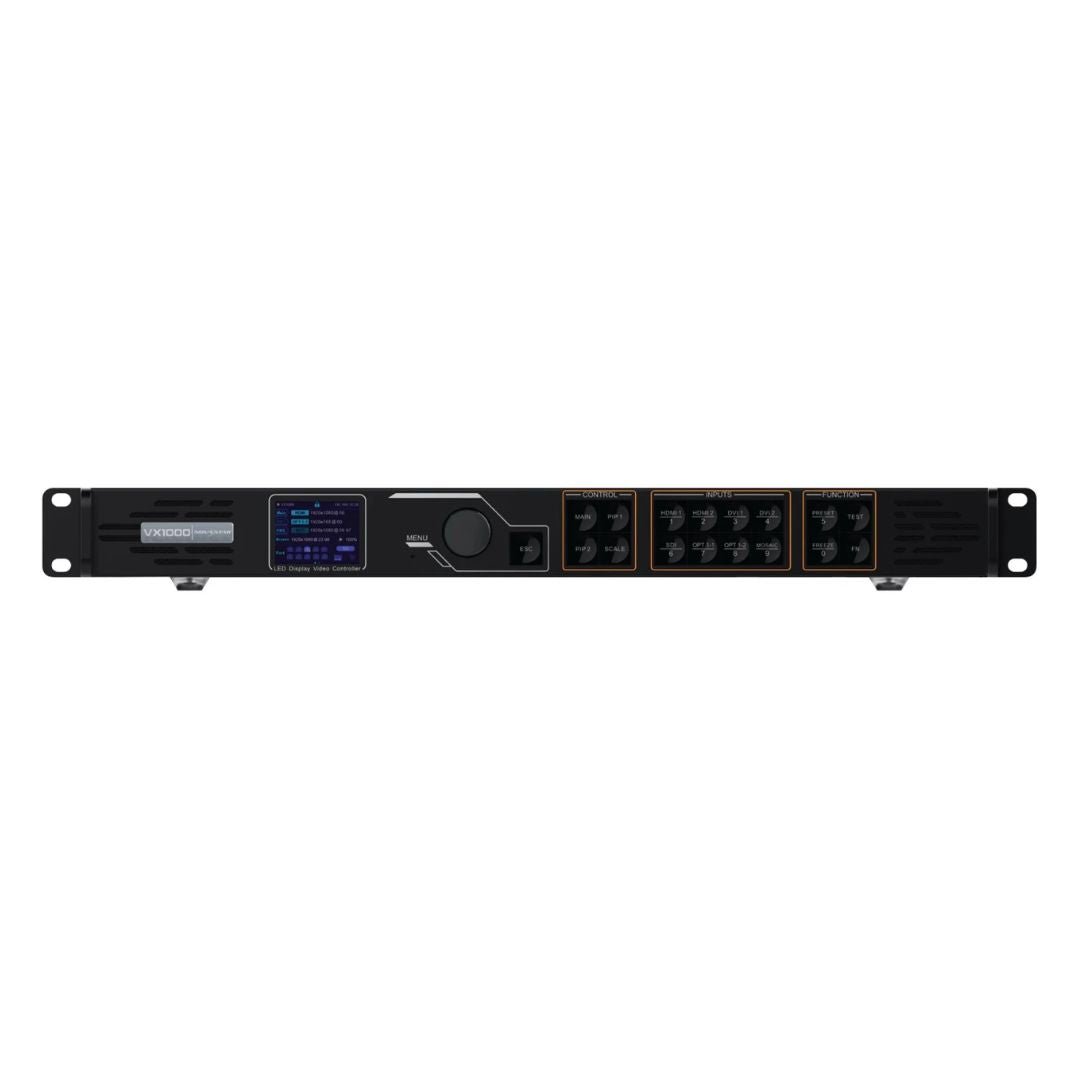
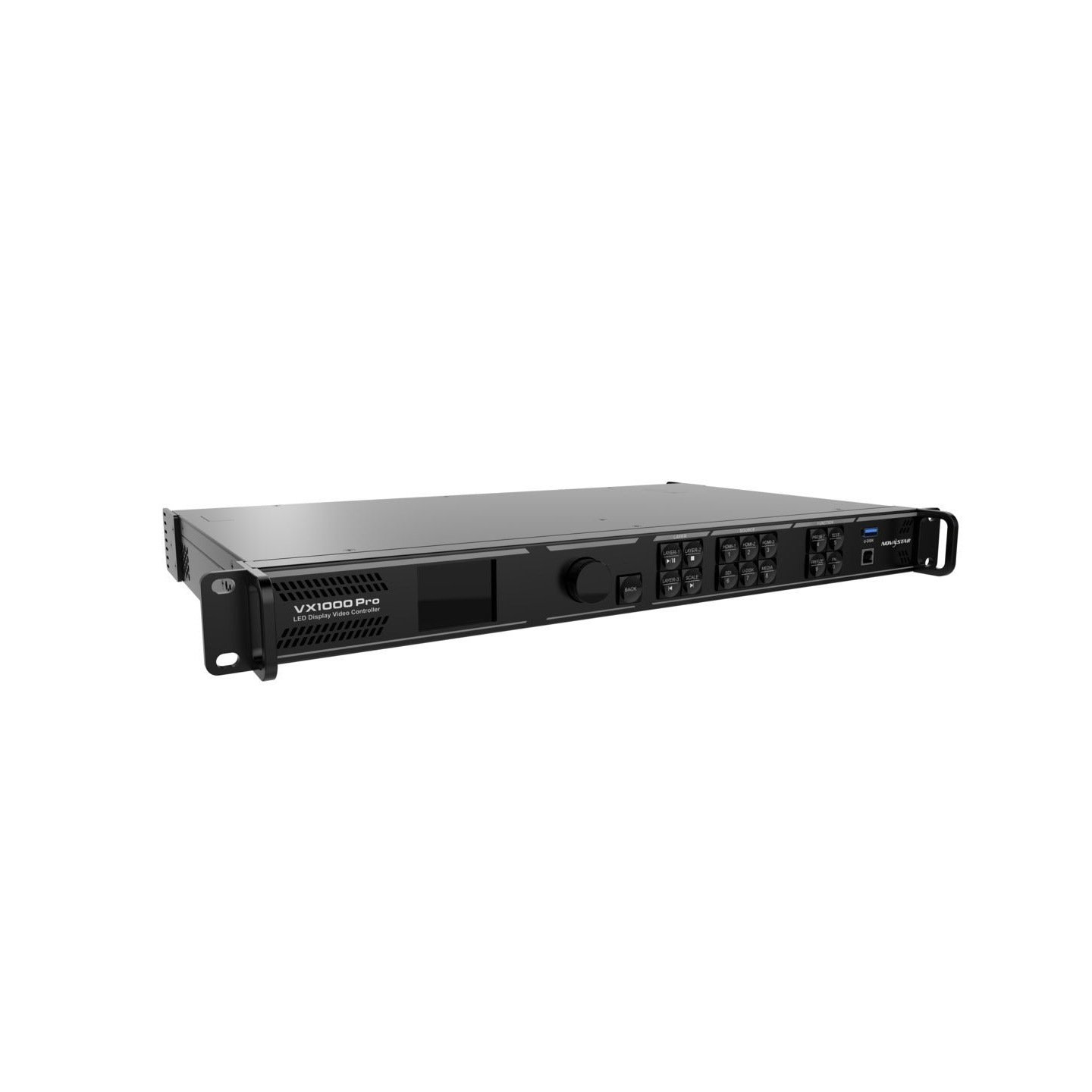
What Are the Differences Between NovaStar VX1000 and VX1000 Pro?
Because the wall capacity and main output arrangement are close, you will often see these models side by side when you compare or replace a controller. The differences become clearer when you look at the sources you need to connect, the layouts you need to build and how your team will operate the system during an event.
Hardware Architecture and Processing Power
The NovaStar VX1000 and VX1000 Pro belong to the same all-in-one controller class. The Pro changes what happens before the signal reaches the LED outputs: it adds newer input handling, more layer resources and more operating features, rather than increasing the maximum wall size.
The VX1000 is a practical fit for standard source chains and straightforward screen layouts. The VX1000 Pro adds more processing headroom for 4K sources, multi-window compositions, preset-heavy shows and recovery during live operation.
Input and Output Connectivity
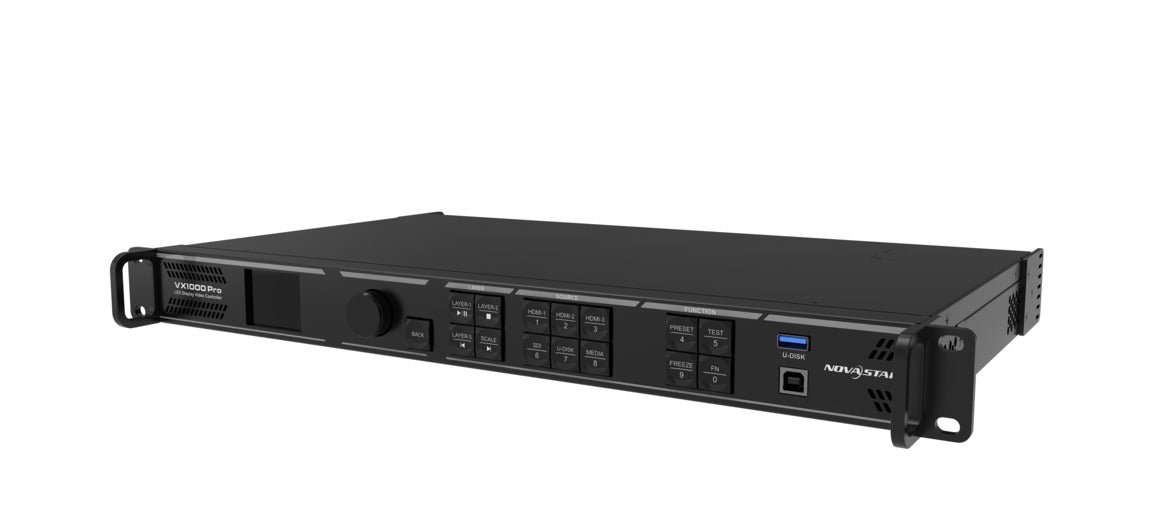
The two controllers use the same main LED output path, but their input panels serve different source environments. VX1000 is built around HDMI 1.4, DVI and 3G-SDI. VX1000 Pro adds HDMI 2.0, HDMI 1.3, 10G optical input and USB 3.0 playback.
For a production company, that means a media server or switcher can feed a 4K60 source directly into the Pro instead of being limited to 4K30 or adding another converter.
For a rental company, HDMI 2.0 and USB playback make it easier to accept changing client sources or keep a holding video ready when the main source is unavailable.
For an LED manufacturer, the newer input path gives an OEM system more room to support current laptops, playback servers and event equipment.
Layer Management and Creative Flexibility
VX1000 provides one main layer and two PIP layers. VX1000 Pro provides six 2K layer resources, which gives an operator more room for cameras, playback, branding, timers and lower-thirds on the same LED wall.
In practical terms, VX1000 is the simpler legacy-compatible controller, while VX1000 Pro is the more flexible choice for new 4K, rental, staging and multi-source systems. The correct model still depends on the existing rack, source chain, layout and lifecycle requirements.
| Difference | VX1000 | VX1000 Pro |
|---|---|---|
| Maximum pixel capacity | Up to 6.5M pixels | Up to 6.5M pixels |
| Input generation | HDMI 1.4, DVI, 3G-SDI | HDMI 2.0, HDMI 1.3, 3G-SDI, 10G fiber and USB 3.0 |
| Layer resources | Main layer + two PIP layers | Six 2K layer resources |
| Presets | 10 | 256 with layout preview |
| Latency and recovery | 20 lines in ByPass, three backup paths | 0 frame in ByPass, five restore points, five backup paths |
| Product lifecycle | NRND | Current VX Pro platform |
The Pro is not automatically better in every processing function. Both models support SuperView III output scaling, Genlock output synchronization and pixel-level brightness and color calibration. Those shared functions should not be counted as Pro-only advantages; the Pro case comes from its input, layer, recovery and operating differences.
VX1000 and VX1000 Pro Specifications
The output ceiling is only one part of the comparison. Use this table to check the input, layer, control and recovery limits before choosing a controller.
| Specification | VX1000 | VX1000 Pro |
|---|---|---|
| Platform status | NRND | Current VX Pro platform |
| Listed price | $2,067.00 | $2,067.00 |
| Maximum pixel load | Up to 6.5M pixels | Up to 6.5M pixels |
| Ethernet outputs | 10x Gigabit Ethernet | 10x Gigabit Ethernet |
| Maximum output width | 10,240 px | 10,240 px |
| Maximum output height | 8,192 px | 8,192 px |
| 10G optical outputs | 2 | 2 |
| Monitoring output | HDMI 1.3 | HDMI 1.3 |
| Primary inputs | 2x HDMI 1.4, 2x DVI, 1x 3G-SDI, optical input | 1x HDMI 2.0, 2x HDMI 1.3, 1x 3G-SDI, 10G fiber, USB 3.0 |
| Maximum input | 3840×2160 at 30 Hz or 3840×1080 at 60 Hz | 4096×2160 at 60 Hz |
| HDCP | 1.4 | 1.4 and 2.2 |
| Layers | Main layer + 2 PIP layers | 6x 2Kx1K layer resources |
| Presets | 10 | 256 with layout preview |
| USB playback | No | Yes |
| Audio | Via multifunction card on Ethernet port 1 or 2 | 3.5 mm audio input and output |
| Low-latency ByPass | 20 lines | 0 frame |
| OSD | No | Yes |
| EDID import/export | No | Yes |
| Restore points | No | Up to 5 restore points |
| Free topology | No | Yes, with supported receiving cards |
| Backup | Device, Ethernet port and source | Device, source, Ethernet, OPT/Ethernet and dual receiving card |
| Cascade | Up to 4 units | Up to 5 devices |
| 3D | EMT200 | EMT200 Pro or third-party emitter |
| Control software | NovaLCT, V-Can | NovaLCT, Unico, VICP |
| Dimensions | 483.6×351.2×50.1 mm | 482.6×302.2×50.1 mm |
| Net weight | 4.0 kg | 3.9 kg |
If your LED wall is too large for the VX1000, it is also too large for the VX1000 Pro. Move up to the VX2000 Pro class instead.
Free topology matters only when the LED wall has an irregular cabinet map. For a standard rectangle with aligned rows, it should not decide between the VX1000 and VX1000 Pro.
If the wall has curved sections, offset rows or another non-rectangular layout, the VX1000 Pro is the safer model to evaluate when the receiving cards support free topology. It gives you more freedom to map the cabinets to the actual shape of the wall.
The VX1000 can still fit when its low-latency mode is required and the cabinet rows meet the documented top-aligned condition. If the wall cannot meet that condition, do not choose the VX1000 for a low-latency design without confirming a workable configuration. Check the receiving-card model and cabinet layout before ordering either controller.
Planning a 3D LED wall? Start by recalculating the wall load. When Side-by-Side or Top-and-Bottom 3D content is enabled, the available output capacity is cut in half. A wall that fits within the normal 6.5-million-pixel limit may therefore be too large for either controller in 3D mode.
Choose the VX1000 when you are extending an existing VX1000 3D system, the wall fits within the reduced 3D capacity and the EMT200 workflow already matches your equipment. Choose the VX1000 Pro for a new 3D system when you need the EMT200 Pro or a supported third-party emitter, along with its newer input and operating features.
If the wall still exceeds the reduced capacity after the 3D calculation, neither model is the right choice. Check the VX2000 Pro instead, and confirm the receiving cards, emitter and exact 3D mode before ordering.
That leaves three practical questions: what source do you need to connect, how many visual elements must appear at once, and how much setup work should the operator be able to save and recover?
NovaStar VX1000 vs VX1000 Pro: Which One Should You Choose?
Choosing VX1000 or VX1000 Pro depends on more than pixel capacity. Check the existing LED wall, source formats, layer plan, operator workflow, lifecycle and price before selecting a controller.
If the wall stays below 3.9 million pixels and six Ethernet outputs are enough, check the VX600 Pro before buying a VX1000 Pro. It keeps the Pro features relevant here, including 4K60 input, six 2K layer resources and 256 presets, but it has less output capacity.
Use the conditions below as a starting point. They do not produce one universal winner because the same controller can be right for one part of a project and wrong for another.
| Project condition | Better starting point | Main reason |
|---|---|---|
| Matching an installed VX1000 or keeping an interchangeable spare | VX1000 | Same model, wiring and operating workflow |
| 4K60, HDCP 2.2, USB playback or several live windows | VX1000 Pro | Newer inputs, more layer resources and more operating tools |
| Simple 1080p wall with a short service life | VX1000 | The older feature set may be sufficient when lifecycle is limited |
| New long-life installation | VX1000 Pro | Current platform and more room for future source and layout changes |
| Irregular cabinet map with supported free-topology receiving cards | VX1000 Pro | More flexible cabinet mapping |
| Low-latency mode with top-aligned cabinet rows and an existing EMT200 workflow | VX1000 | The project matches the documented operating conditions |
| Wall above 6.5 million pixels | VX2000 Pro | The VX1000 and VX1000 Pro share the same 6.5-million-pixel class |
Use the table to narrow the options, then confirm the source list and cabinet map. An existing VX1000 system may still need the Pro if its sources or layouts have changed. A new, simple, short-term system may not need every Pro feature.
Existing VX1000 system or new LED wall?
If you are replacing a VX1000 in an installed rack, the VX1000 is the straightforward choice when you need a like-for-like replacement, a matching spare or an interchangeable rental-fleet unit. In that situation, keeping the same model can save time during setup and troubleshooting.
An existing rack does not automatically rule out the Pro. Consider the VX1000 Pro when the wall now needs 4K60, more windows, more presets, USB fallback playback or easier recovery. Before changing models, confirm the input wiring, receiving cards, cabinet files, software workflow and saved layouts.
If this is a new LED wall, make the choice from the source chain and show requirements instead of using “new” as an automatic reason to buy the Pro. A 4K60 source, several live windows or changing event layouts point toward the VX1000 Pro. A fixed 1080p wall with a short service life may not need those features, although the VX1000’s NRND status makes the Pro the safer starting point for a new long-life installation.
What source chain will you use?
If your source chain is HDMI 1.4, DVI, 3G-SDI or compatible optical input, the VX1000 can cover it, but its 8-bit input is limited to 3840×2160 at 30 Hz or 3840×1080 at 60 Hz. That is enough for many existing 1080p systems, but not for a standard 4K60 feed from a media server, switcher or workstation. The VX1000 Pro adds HDMI 2.0, accepts 4096×2160 at 60 Hz and supports HDCP 2.2 for protected 4K sources. If your source list includes 4K60, choose the Pro before you build the rest of the system around the older input stage.
Check the bit depth as well as the frame rate. VX1000 HDMI 1.4 input is 8-bit RGB 4:4:4. VX1000 Pro HDMI 2.0 supports 8-bit, 10-bit and 12-bit signals, but 4096×2160 at 60 Hz is available at 8-bit; 10-bit and 12-bit 4K input have lower maximum frame rates.
The Pro’s single-port loading limit is also specified at 650,000 pixels for an 8-bit source. So 4K60 capability does not remove the need to check total pixel load and port distribution.
The Pro also has USB 3.0 playback. You can use it for a holding slide, logo loop or video clip when the main source is not ready.
The Pro specification also lists high-refresh input support up to 240 Hz for supported HDMI inputs. Treat that as a source-compatibility detail, not as a promise that every resolution and bit-depth combination runs at 240 Hz.
How many layers and presets do you need?
The VX1000 gives you one main layer and two PIP layers. That covers a full-screen laptop, one camera window and one extra graphic.
The VX1000 Pro gives you six 2K×1K layer resources. That is useful when the screen needs several elements at the same time:
- background playback
- live camera
- sponsor logo
- lower-third graphic
- confidence or utility feed
- emergency holding image
A 4K×2K layer uses four resources. A 4K×1K layer uses two. A 2K×1K layer uses one. So a full background, camera, sponsor logo, lower third and confidence feed can be built from the same six-resource pool.
One VX1000 limit is easy to miss. When the main layer uses a mosaic source, the PIP layers cannot be opened. If you need a wide stitched source and a camera or logo window at the same time, use the VX1000 Pro.
How important are recovery and backup?
The VX1000 stores ten user presets. That is enough for a fixed room with only a few layouts.
The VX1000 Pro stores 256 presets and shows a layout preview. This helps when a rental or touring operator has several looks ready before the event starts.
The Pro also has restore points. If a configuration change breaks the setup, you can roll back instead of rebuilding the layout from memory. USB playback gives you another fallback for a holding slide, logo loop or emergency clip.
EDID import/export, OSD tools, remote control and additional backup paths reduce the amount of setup you need to rebuild on site.
The VX1000 Pro also adds OSD tools for static or scrolling text, images, weather and clock information. That can be useful for a conference, worship or venue screen that needs persistent information on the LED wall without adding another graphics layer upstream.
How will your team operate and maintain the controller?
For a fixed installation configured by the same technician, NovaLCT and V-Can may be all the team needs.
Rental and production crews working across venues may value the VX1000 Pro’s Unico and VICP control options, 256 presets and recovery tools because the operator can recall more show layouts and make changes without rebuilding the screen from scratch.
LED manufacturers should also decide which software path their integrators and end users will support before standardizing a model in an OEM project.
Are both models available?
Both models are currently listed by LED Control Depot. The VX1000 is NRND, or not recommended for new design. It can still be the right choice for an existing VX1000 fleet, a matching spare or a short-life system that already uses its workflow.
The VX1000 Pro is the current VX Pro platform and is the safer starting point for a new long-life installation. Check the product pages and confirm stock before you quote or place an order.
The VX1000 still fits these orders:
- You already own a VX1000 fleet.
- You need the spare to behave exactly like the installed unit.
- The system is simple, 1080p and has a short remaining service life.
Those are compatibility reasons. They are different from choosing the VX1000 for a new system simply because it carries the same 6.5-million-pixel rating.
Price
At LED Control Depot, both models are listed at $2,067.00.
| Model | Listed price |
|---|---|
| NovaStar VX1000 | $2,067.00 |
| NovaStar VX1000 Pro | $2,067.00 |
Price checked August 9, 2026. Re-check before publishing or quoting.
Because both models carry the same listed price here, price does not give you a reason to choose the VX1000 for a new installation. The VX1000 Pro adds input, layer, preset and recovery features without a higher product price.
The VX1000 can still be the better choice when you are matching an installed fleet, keeping a spare interchangeable with existing units or avoiding changes to a proven rack and operating workflow. That is a compatibility decision, not a price advantage.
Common mistakes when choosing between VX1000 and VX1000 Pro
Even after you compare the wall size, source chain and operating workflow, a few common assumptions can still lead you to the wrong model. Check these points before you place the order.
Treating 4K input as 4K60 input
The VX1000 can accept 3840×2160 at 30 Hz. That is a 4K signal, but it is not 4K at 60 Hz. If the switcher, media server or camera setup requires 4K60, use the VX1000 Pro.
Treating the Pro as a higher-capacity controller
The VX1000 Pro does not increase the maximum LED-wall capacity. Both models are rated for up to 6.5 million pixels through ten Gigabit Ethernet outputs. If the wall is larger than that, move up to the VX2000 Pro instead of assuming the VX1000 Pro will provide more output capacity.
Assuming the two models use the same operating software
Both models use NovaLCT for the LED wall and receiving-card configuration. The VX1000 uses V-Can for controller operation. The VX1000 Pro adds Unico and VICP. If you mix the two models in a fleet, confirm how the operators will manage both software paths before the first show.
NovaStar VX1000 vs VX1000 Pro Project Examples
The right choice becomes clearer when you place each controller in a real customer workflow. A production company may care about source formats and live camera timing, a rental company may care about fast changeovers and interchangeable inventory, and an LED manufacturer may care about repeatable integration across many projects. These examples show where the comparison changes from one type of buyer to another.
Replacing a VX1000 in a fixed installation
If the site already runs VX1000 units, stay with the VX1000 when you need a matching spare. The technician can keep the same controller model, cabinet setup and operating process.
If one unit has failed and you do not need a matching spare, the Pro gives you the newer input and operating features.
New corporate, worship or education LED wall
If your room is small, stable and 1080p, either controller can work.
For a new room, the Pro leaves more options open later. A laptop may become 4K. A presentation wall may start hosting hybrid events. A one-window layout may turn into several windows.
New rental and staging stock
For new rental stock, use the VX1000 Pro. Rental shows change from week to week, so presets, preview, USB fallback playback, restore points and 4K60 input can save setup time.
Use the VX1000 only when the rental fleet is already standardized on VX1000 units and every unit needs to stay interchangeable.
Camera and broadcast installation
Both models offer Genlock output sync, so Genlock alone does not decide the model.
Choose the Pro when the event also needs 4K input, zero-frame latency in ByPass, restore points or additional backup paths. Then check the rest of the camera chain, including receiving-card refresh rate, scan settings, camera shutter and source timing.
NovaStar VX1000 and VX1000 Pro Software, Manuals and Datasheets
Use NovaLCT with either model to configure the receiving cards and cabinets.
For the VX1000, use V-Can to run the controller, layers and presets. For the VX1000 Pro, use Unico for desktop and web control, plus the VICP mobile app.
Neither model uses VMP. VMP is for COEX/MX controllers, not the VX1000 family.
If you are replacing a controller, export the working NovaLCT configuration and save the cabinet files first. That gives you the data you need if the receiving-card setup has to be restored.
Check the NovaStar VX1000 product page or the NovaStar VX1000 Pro product page for current pricing and order details. Compare the VX2000 Pro when you need the next output class.
For technical checks, use the VX1000 datasheet and VX1000 user manual. The Pro documents are on the VX1000 Pro datasheet and VX1000 Pro user manual pages.
FAQs
Is the VX1000 Pro more powerful than the VX1000?
Yes, on everything except pixel capacity. Both handle up to 6.5 million pixels. The Pro is ahead on input generation, layer resources, presets and recovery tools.
Do the VX1000 and VX1000 Pro have the same pixel capacity?
Yes. Both are rated up to 6.5 million pixels, with a maximum output canvas of 10,240×8,192 pixels.
Is the VX1000 discontinued?
It is NRND, or not recommended for new design. Existing systems can keep using it, but a new project should start with the VX1000 Pro.
Can a VX1000 be upgraded to VX1000 Pro by firmware?
No. The Pro has different hardware, including HDMI 2.0, USB 3.0, dedicated 3D connection, independent audio jacks and a different layer engine.
Can the VX1000 take a 4K60 source?
No. The VX1000 handles 3840×2160 at 30 Hz or 3840×1080 at 60 Hz. Use the VX1000 Pro for 4096×2160 at 60 Hz.
Does the VX1000 Pro work with existing NovaStar receiving cards?
Yes for standard sending and configuration with compatible NovaStar receiving cards. Free topology has its own receiving-card requirements, so confirm the card model before planning an irregular layout.
Can VX1000 and VX1000 Pro units be cascaded together?
Do not assume a mixed cascade will behave like a single-model system. The VX1000 and VX1000 Pro have different cascade limits and software paths. Keep a cascaded system on one model unless NovaStar has approved the exact design.
Does the VX1000 Pro support more layers?
Yes. The VX1000 has one main layer plus two PIP layers. The Pro has six 2K×1K resources that you can combine as 4K×2K, 4K×1K or 2K×1K layouts.
Is the VX1000 Pro better for rental LED screens?
Yes, unless the rental inventory must stay on one model. The Pro’s presets, USB playback and restore points reduce setup time when every show arrives with a different source list.
Should I replace a working VX1000?
Not automatically. Keep it if the wall is stable and the controller still drives it without errors. Replace it when the source list, layer layout, service life or fleet plan changes.
Which model should I choose for a 4K LED wall?
Choose the VX1000 Pro for 4K60 input. If the wall exceeds 6.5 million pixels, move up to the VX2000 Pro.
Is the VX1000 still worth buying in 2026?
Yes, for fleet matching, spare stock or short-life 1080p systems. For a new LED wall, start with the VX1000 Pro.
Is the VX1000 Pro worth the extra cost?
Not on the current listing. Both models were listed at $2,067.00 on August 9, 2026, so the Pro’s extra input and operating features did not add to the listed price.
Which software does each model use?
Use NovaLCT with either model for screen configuration. Use V-Can to operate the VX1000. Use Unico and VICP to operate the VX1000 Pro.
When should I choose VX2000 Pro instead?
Choose the VX2000 Pro when the wall goes past the VX1000 Pro’s 6.5 million pixels. The VX2000 Pro is rated to 13 million.
Should I choose the VX600 Pro instead?
Choose the VX600 Pro when the wall stays below 3.9 million pixels and six Ethernet outputs are enough. It still gives you 4K60 input, six 2K layer resources and 256 presets. Choose the VX1000 Pro when you need ten outputs or more than 3.9 million pixels.
What should I confirm before ordering?
Before you order, confirm the wall resolution, cabinet count, receiving-card model, source resolution, source refresh rate, required inputs and whether the wall needs more than three layers.
Conclusion
The VX1000 is the better fit when compatibility is the priority: a like-for-like replacement, an interchangeable spare, a simple short-life 1080p system or a low-latency setup that matches its documented cabinet and EMT200 conditions.
The VX1000 Pro is the better fit when the project needs 4K60, more simultaneous layers, 256 presets, restore points, USB playback, a more flexible source panel or a current platform for a long-life installation. A rental or staging team will usually value those operating features even when the wall stays below 6.5 million pixels.
If the wall is above 6.5 million pixels, compare the VX2000 Pro. If it stays below 3.9 million pixels and six outputs are enough, compare the VX600 Pro before choosing a VX1000 Pro.
Both VX1000 models were listed at $2,067.00, with a 3-year serial-tracked manufacturer warranty. Confirm current availability, shipping and volume pricing before you quote the system.