
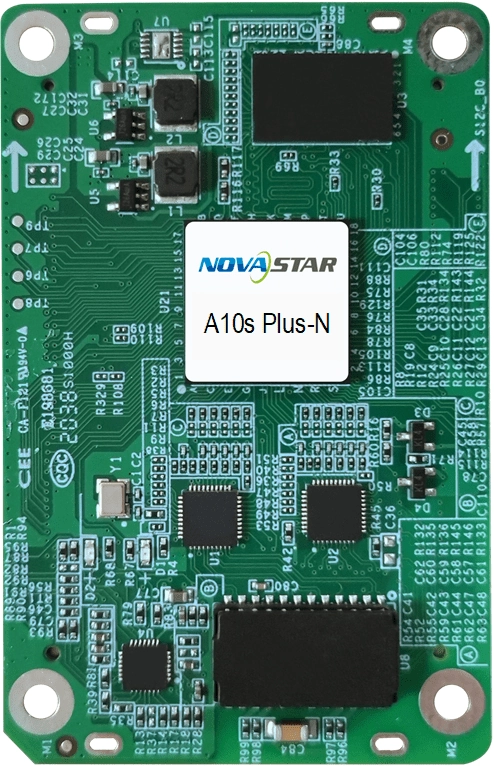
What is the NovaStar A10s Plus-N receiving card?
The NovaStar A10s Plus-N is a 70 mm receiving card installed inside a compatible LED cabinet. It takes the controller’s assigned image data and turns it into the signals for that cabinet’s LED modules. That makes it part of the cabinet package, alongside the hub board, module driver IC and saved configuration.
For a new cabinet, it is a fit when the display needs controlled dark tones at low brightness, accurate calibration, HDR or a high-bit-depth source. Those results depend on the LED modules, cabinet files and upstream controller being matched to the card.
It is not a universal replacement for any NovaStar card with a similar name. The hub-board connector layout, input voltage, module driver IC, scan method and saved cabinet configuration must all match. If you are repairing an older wall that already uses the 80 mm A10s Plus, read the comparison below before ordering.
A10s Plus-N key features
Keep dark content smooth at low brightness
22bit+ and Precise Grayscale keep dark gradients smooth and reduce mottling or color shifts at low brightness. That matters on indoor fine-pitch walls, where viewers sit close enough to see uneven shadow detail. The result still depends on the LED module’s driver IC.
A more even wall when cabinet batches differ
Pixel-level calibration corrects differences between LEDs. Seam correction targets bright or dark cabinet joins, while Multi-batch Adjustment helps a replacement cabinet match an older production run.
Find one cabinet fault before replacing parts
Backup program, parameter and calibration data can help restore a cabinet after a bad update or file change. Temperature, voltage and Ethernet bit-error monitoring then help separate a card fault from a power or cable problem before parts are swapped.
Support portrait and creative LED layouts
The card supports 0°, 90°, 180° and 270° rotation for standard portrait layouts. Free-angle rotation is available only when the wall uses an MCTRL R5 and SmartLCT.
HDR and low latency depend on the whole system
The A10s Plus-N supports HDR10 and HLG when the controller, source and LED modules also support HDR. With PWM driver ICs, low latency can reduce delay at the receiving-card end to one frame. Confirm the controller, software version and module electronics before planning either feature into the screen.
NovaStar A10s Plus-N specifications
Use this table to check the cabinet’s power, physical fit and source requirements. The capacity rows assume PWM driver ICs, as in NovaStar’s current V1.1.5 specification.
| Maximum load at 8-bit | 512×512 pixels at 60 Hz with PWM driver ICs |
|---|---|
| Maximum load at 10/12-bit | 512×384 pixels at 60 Hz with PWM driver ICs |
| Data groups | Up to 32 parallel RGB groups or 64 serial groups; serial mode can expand to 128 groups |
| Input voltage | DC 3.8 V to 5.5 V; 5.0 V recommended |
| Rated current / power | 0.6 A / 3.0 W |
| Dimensions | 70.0 × 45.0 × 8.3 mm |
| Hub-board spacing | 5.0 mm after the high-density connectors mate; a 5.0 mm copper pillar is recommended |
| Net weight | 22.3 g |
| Static protection | 2 kV; use ESD-safe handling during installation |
| Operating environment | −20°C to +70°C; 10% to 90% RH, non-condensing |
| Storage environment | −40°C to +85°C; 0% to 95% RH, non-condensing |
| Certifications | RoHS and EMC Class B |
A10s Plus-N load capacity for 8-bit, 10-bit and 12-bit sources
The card’s maximum width stays at 512 pixels, but the maximum height changes with the source bit depth. At 8-bit, one A10s Plus-N can cover a 512×512 cabinet. At 10-bit or 12-bit, the documented ceiling becomes 512×384.
| Planned cabinet | 8-bit source | 10/12-bit source | Decision |
|---|---|---|---|
| 512×512 | Within the documented limit | Too tall for one card | Use 8-bit, split the cabinet across cards, or redesign the module load |
| 512×384 | Within the documented limit | Within the documented limit | Fits either documented bit-depth condition |
| 384×384 | Within the documented limit | Within the documented limit | Leaves margin for the module and data-group layout |
Check these dimensions before only adding up pixels. A 500×400 cabinet has fewer pixels than 512×512, yet it still exceeds the 384-pixel height limit at 10-bit or 12-bit. Irregular module wiring, folded layouts and skipped pixels can lower the practical ceiling further, so validate the actual module map rather than quoting only the total pixel count.
If 3D output is enabled, NovaStar’s V4.8.2.0 firmware notes state that the load capacity is halved. Plan that mode separately instead of treating it as a normal 2D load.
A10s Plus-N setup: validate one cabinet before the full wall
- Save a known-good cabinet first. Use NovaLCT to read back the receiving-card parameters, firmware and calibration data. Keep the cabinet’s
.rcfgxor supported NCP file with the wall records. - Match the hardware, not only the model family. Confirm the A10s Plus-N label, 70 mm hub-board layout, DC 3.8–5.5 V rail, driver IC, decoding IC, scan type and data-group wiring.
- Install with the cabinet powered off. Use ESD protection, align both high-density connectors and press the card evenly from the long sides near the center. Do not force one connector down first.
- Prove one cabinet. Send the known-good configuration to a single replacement card, then check module mapping, color, temperature, voltage and Ethernet errors before copying the setup to other cabinets.
- Enable special features last. Confirm normal 2D output before adding HDR, high bit depth, low latency or rotation. Free-angle rotation requires SmartLCT and MCTRL R5.
Do not install firmware only because the package number looks newer. A10s Plus-N V4.8.2.0 contains different program groups for specific driver and decoding chips. Read the release notes, select the matching group and keep the known-good program available for rollback.
A10s Plus-N vs A10s Plus for your LED cabinet
The two cards share several image-quality features, but they are not drop-in replacements. Choose A10s Plus-N when a new cabinet is designed for its 70 mm board, mounting points and 3.8–5.5 V input range. Keep the original A10s Plus when servicing an 80 mm cabinet built around that card or a power rail below 3.8 V.
| Check | A10s Plus-N | A10s Plus | Why it matters |
|---|---|---|---|
| Best fit | New cabinet designed around the 70 mm card | Existing cabinet designed around the original 80 mm card | Start with the cabinet hardware before comparing software features |
| Board size | 70.0 × 45.0 × 8.3 mm | 80.0 × 45.0 × 8.0 mm | The hub board and mounting points must fit the exact card |
| Input voltage | DC 3.8–5.5 V | DC 3.3–5.5 V | An older cabinet with a low rail may accept Plus but fall outside Plus-N’s range |
| Published bit-depth load | 512×512 at 8-bit; 512×384 at 10/12-bit | Older document states 512×512 without the same split | Plus-N gives a clearer capacity rule for high-bit-depth designs |
Before ordering, compare the old card label, hub-board layout, mounting points and cabinet voltage. If the cabinet was built for the 80 mm A10s Plus, keep the same model unless the cabinet maker has approved and tested a complete hub-board conversion. For a new cabinet, confirm the A10s Plus-N hardware and configuration together before the design is released for production.
A10s Plus-N datasheet, firmware and software
Check the specifications first, then use the firmware release notes to confirm the module’s driver and decoding chips before downloading the program package.
Use NovaLCT for normal receiving-card configuration, readback, monitoring and firmware updates. Use SmartLCT only for MCTRL R5 free-angle rotation.
NovaStar A10s Plus-N FAQ
Is the A10s Plus-N the same as the A10s Plus?
No. The Plus-N is 70 mm long and accepts DC 3.8–5.5 V; the older Plus is 80 mm long and accepts DC 3.3–5.5 V. Their hub-board fit and electrical limits differ, so they are not automatic replacements for each other.
How many pixels can one A10s Plus-N drive?
With PWM driver ICs, one card supports up to 512×512 pixels at 60 Hz for an 8-bit source, or 512×384 at 60 Hz for a 10-bit or 12-bit source. The actual module map must also fit the available data groups and scan design.
Does the A10s Plus-N support HDR?
Yes, it supports HDR10 and HLG. The controller, source and LED module electronics must all support HDR; the receiving card alone cannot turn an SDR system into HDR.
Can the A10s Plus-N rotate an LED image?
It supports rotation in 90° steps. Rotation at any angle requires the NovaStar MCTRL R5 controller and SmartLCT software.
Which software configures the A10s Plus-N?
NovaLCT handles standard cabinet configuration, parameter readback, monitoring and firmware updates. SmartLCT is used only for MCTRL R5 free-angle rotation.
Should I update A10s Plus-N firmware during a card replacement?
Not automatically. Save the working firmware and cabinet file first. Use V4.8.2.0 only when its release notes list the module’s driver and decoding chips, then test the selected program group in one cabinet before updating the wall.
What should I send for a compatibility check?
Send clear photos of the old receiving card and hub board, the LED module label, driver IC and scan type, the cabinet resolution, source bit depth and the saved .rcfgx or NCP file. Those details are more useful than the card name alone.
What warranty comes with the A10s Plus-N?
A serial-tracked 3-year manufacturer warranty is included when the card is bought through our authorized US NovaStar channel.
Can I request volume pricing for a full wall or spare-card order?
Yes. Send the cabinet count, number of spares and expected order date. We can quote the order as a project instead of applying the single-card price to every unit.
Are NET 30 terms available?
NET 30 is available to qualified business accounts. Ask for terms with the quote so the account review can be completed before the order is released.
Reviews
There are no reviews yet.