
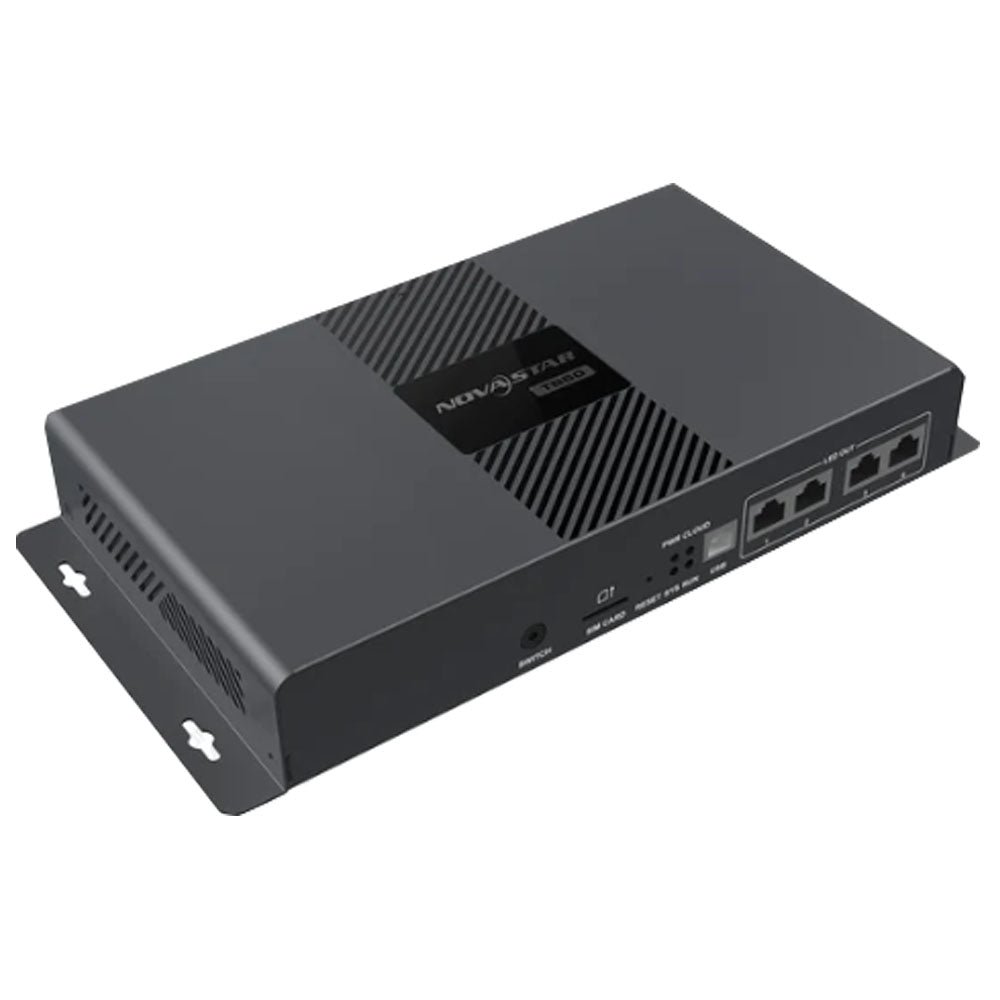
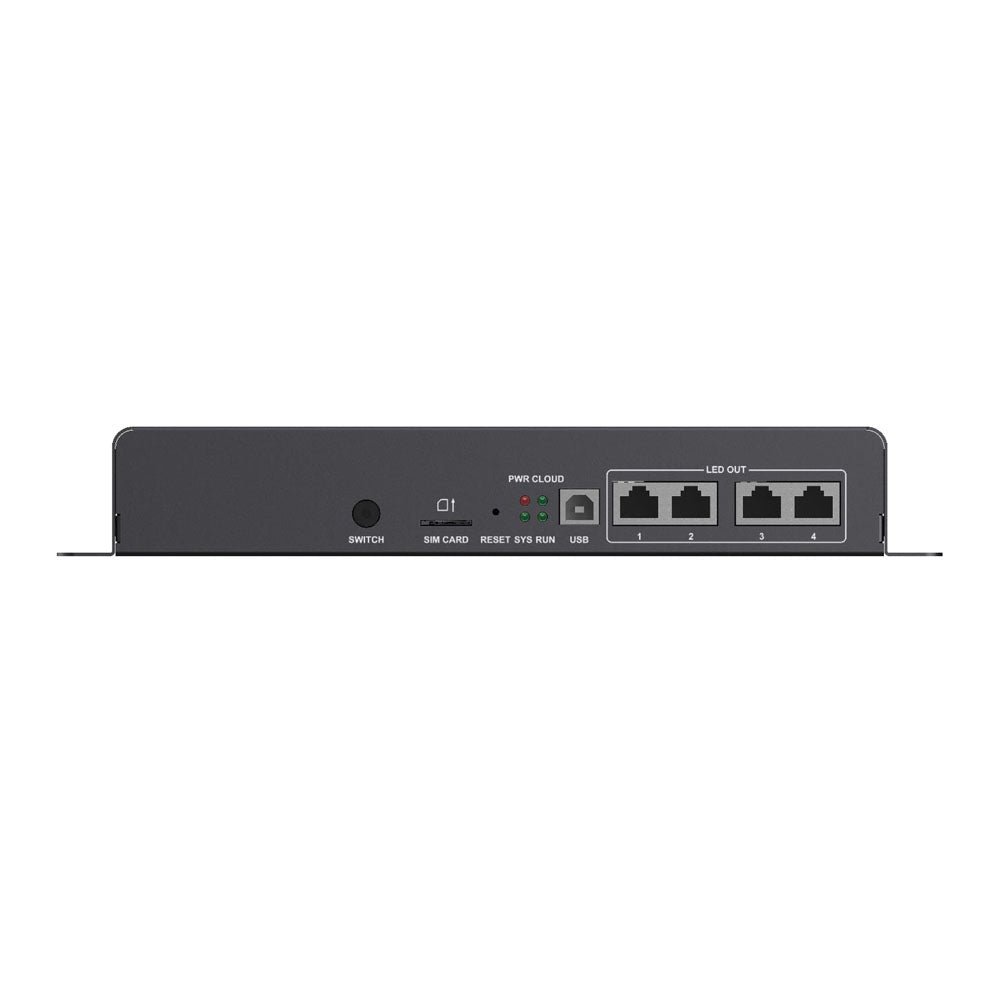
What is the NovaStar TB50?
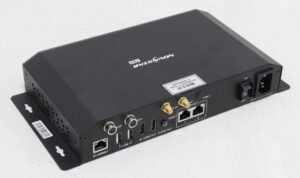
The NovaStar TB50 is a Taurus-series multimedia player: one box that stores your content, plays it, and drives the LED screen itself, so there is no separate player and no separate sending card sitting between them. It carries up to 1,300,000 pixels across two network outputs.
You would put one behind a screen that has to keep running when nobody is watching it — a storefront window, a lamp-post display, a menu board, a lobby wall. Your content lands in its 32 GB of internal storage, and after that your screen plays on its own whether or not anything else is switched on.
It also takes a live picture over HDMI, and a button on the front switches between the two. That is the whole reason to choose this model over the cheaper boxes in the family, and it is worth being sure you need it.
NovaStar TB50 key features
Your screen still shows something when the player trips over
A black rectangle above a shop door is worse than a wrong picture, and the TB50 gives you three fallbacks that cover the usual ways content disappears. You load a still image that appears at power-up, a second one that appears if the schedule is lost, and a third one that appears only when a web page or a live stream in your playlist stops answering.
The last of those needs player software V4.7.7 or newer and an image no larger than 1920×1080. Set all three before you leave site.
Change what plays from a phone, standing in front of the screen
The TB50 puts out its own wireless hotspot, so you do not need the building network, an IP address or a laptop to change a picture. The network name is the model plus the last eight digits of the serial number, and the password is printed on the label.
Connect to it with the ViPlex Handy app and you can swap content, set brightness or reboot the screen from the pavement. The hotspot and a normal wireless connection can both be on at once, so this still works after the box is on the building network.
A second cable route to the screen
Two Gigabit outputs leave the TB50, and by default both carry picture, which is how you spread one large screen across the pair. You can also set one as the main route and the other as a spare.
Cut the working cable then and the screen keeps its picture. You lose the redundancy the moment you use both ports for capacity, so decide which of the two you want before you plan the cable runs.
NovaStar TB50 specifications
Two rows decide most orders: the pixel figure tells you whether one box covers your screen, and the power row tells you what has to be waiting at the mounting position.
| Pixel capacity | 1,300,000 pixels; maximum 4096 wide and 4096 high |
|---|---|
| Long thin screens | Up to 23,040 pixels wide and 4096 high, within the same 1,300,000 total |
| Screen outputs | 2x Gigabit RJ45, both live by default, or one main and one spare |
| Live picture input | 1x HDMI 1.3, up to 1920×1200 at 60 Hz, HDCP 1.4 and 1.3, no interlaced sources |
| Loop-through output | 1x HDMI 1.3, up to 1920×1200 at 60 Hz |
| Sensor sockets | 2x, for a light sensor or a temperature and humidity sensor |
| Processor and memory | Quad-core ARM A55 at 1.8 GHz, 1 GB RAM, Android 11 |
| Internal storage | 32 GB |
| Video it can play at once | 1x 4K, or 2x 1080p, or 5x 720p, or 6x 480p, or 6x 360p |
| Wireless | 2.4 GHz; hotspot and network connection can run together |
| Mobile data | 4G module and SIM slot supported; the module is not in the box |
| Power in | 100–240 V, 50/60 Hz, 0.6 A, with an on/off switch; 18 W maximum draw |
| Size and weight | 274.3 mm × 139.0 mm × 40.0 mm; 1,234.0 g |
| Operating range | −20°C to +60°C, 0% to 80% RH, non-condensing; IP20, indoor or inside an enclosure |
| Approvals listed | UL, FCC, IC, CE, UKCA, CB, PSE, KC, MIC, RCM, CQC and others |
| In the box | Wireless antenna, mains lead, QR card, certificate |
Figures come from NovaStar’s TB50 Multimedia Player Specifications V1.2.4, dated 31 July 2026. Earlier copies of that document, including the one most sellers still quote, predate the ultra-long screen figures.
Do you need the HDMI input, or is the built-in player enough?
You need the HDMI input only when the picture comes from something live: a camera, a laptop at a lectern, a set-top box, a TV channel. Everything that can be prepared in advance — adverts, menus, opening hours, a video loop — sits on the TB50’s own storage and needs nothing plugged in.
The button on the front panel picks between the two, and a green light means the live source is on air. Nothing is mixed: one or the other is on the screen.
What arrives over HDMI has to stay inside 1920×1200 at 60 Hz, and the TB50 will shrink it to fill your screen. Interlaced sources are not accepted, which rules out some older broadcast gear and cheap capture boxes. Set a custom timing on the source instead if it can produce one, anywhere between 800 and 4096 wide and 600 and 4096 high.
If nothing in your project is ever live, the TB30 gives you the same pixel count without the two HDMI sockets, and costs less.
How big a screen will one TB50 drive?
One TB50 drives 1,300,000 pixels, which is a 1440×900 screen with room to spare, or a 2560×480 band across a shopfront, or roughly 32 cabinets of 200×200. The shape matters as much as the total: nothing may exceed 4096 pixels in either direction.
Long thin screens get their own allowance. A lamp-post banner or a ticker can run to 23,040 pixels wide by 4096 high, as long as the pixels you actually light still come in under that total.
Go over any of those and you are buying a second box and splitting the screen, not upgrading a setting. Your step up inside the family is the TB60, at 2,300,000 pixels over four outputs instead of two.
One setting catches people out after the cabinets are already mapped. The picture the TB50 generates internally has to be larger than the screen you configured, not equal to it and not smaller, or part of the wall stays dark. Set that resolution in ViPlex Express before you hand the site over.
Getting content onto the screen without carrying a laptop
A USB drive in the front socket is the simplest way to change what a TB50 is showing, and the box can be set up so that no password is needed to do it. That is the setting to switch on when a shop manager, not you, will be changing the pictures.
Three limits decide whether a drive will work. The drive has to be formatted FAT32 or NTFS, it has to be between 2 GB and 128 GB, and no single file on it may reach 4 GB. That last one is the one people hit, because a long video exported at a high bit rate passes 4 GB quickly.
The same socket takes firmware updates and extends storage when 32 GB is not enough for a long rotation.
For everything else there is ViPlex Express on a Windows PC over the network, the ViPlex Handy app over the hotspot, or VNNOX from anywhere with an internet connection. Version 4.1.1 of the Windows software will also generate artwork from a written description, with a daily allowance of credits on a free account, which is worth knowing if nobody on site makes content.
Running two or more screens in step
Several TB50s will play the same content in step, so your row of pillars or pair of gateposts changes picture together. NovaStar does this by aligning the clocks and then giving every player the same schedule, rather than by cabling the screens to each other.
Three rules decide whether it will actually work on your site, and all three are easy to breach by accident.
| Same generation only | The TB50 keeps step with the T30, T50, T60, TB30, TB40 and TB60. NovaStar states that players from different generations must not be mixed in one synchronized group. |
|---|---|
| One item per page | Each page of the schedule holds a single image or video, and the properties have to match on every player. Video tops out at 1920×1080. |
| Half the decoding | Switching synchronization on halves how many videos a TB50 can run at once, so two 1080p streams become one. |
| Clock source | Network time over your LAN is the recommended route. Satellite time needs the 4G module fitted; radio time needs the RF module. Neither module ships with the player. |
Read the first row as a purchasing rule. If a customer already runs first-generation Taurus boxes on the same site and wants everything in step, those older units have to be replaced rather than joined.
TB50, TB30, TB40 or TB60 — which one to order
All four are the same generation and run the same software, so your choice comes down to three things: whether you need a live input, how many pixels you are lighting, and what power and space you have at the mounting position.
| Model | TB30 · TB40 · TB50 · TB60 |
|---|---|
| Pixel capacity | 1,300,000 · 1,300,000 · 1,300,000 · 2,300,000 |
| Screen outputs | 2 · 2 · 2 · 4 |
| Live HDMI input | no · yes · yes · yes |
| Power in | mains · DC 12 V · mains · mains |
| Weight | 1,228.9 g · 459.7 g · 1,234.0 g · 1,230.4 g |
| UL on the datasheet | yes · no · yes · yes |
| Price | $304 · $269 · $488 · $528 |
Order the TB50 if your screen needs a live input and the installation will be inspected: it is the mains-powered box of the pair that carries HDMI, and UL appears on its approvals list.
Order the TB40 if the same job has only 12 V available or no room for a 1.2 kg box — it does everything the TB50 does at 460 g, at $269 against $488, but its datasheet does not list UL.
Order the TB30 if no live source will ever be plugged in, and the TB60 once your screen outgrows one box or needs four cable routes.
TB50 datasheet, ViPlex Express and firmware
Nothing about your screen lives inside the player, so a replacement TB50 needs no file taken off the old one. You reconnect the cabinets, load the layout again and publish the content, and the screen is back.
Firmware is the exception worth knowing before you buy secondhand. If yours is still running software older than V2.3.0 it cannot jump straight to V3.0.0 or later; you have to bring it to V2.3.0 from a local file first. Anything newer than V2.3.0 updates in one step over the internet.
NovaStar TB50 FAQ
Does the TB50 need a separate sending card?
No. Playback and screen driving are in the same box, so the network cables run from the TB50 straight to the receiving cards in your cabinets.
What is the difference between the TB50 and the TB40?
Power, size and approvals. Both carry 1,300,000 pixels with an HDMI input; the TB50 runs on mains power with a switch and weighs 1,234.0 g, while the TB40 runs on 12 V DC and weighs 459.7 g. UL is on the TB50 datasheet and not on the TB40 datasheet.
Can the TB50 play 4K video?
Yes, one stream at a time, and material between 2K and 4K is converted up to 4K first. Drop to 1080p and it will run two streams at once, or five at 720p.
Will it keep playing if the internet goes down?
Yes. Content is stored on the player, so a schedule already published keeps running with no connection at all. Only live web pages and streams in a playlist stop, and you can set a still image to cover exactly that case.
Can I mount a TB50 outdoors?
No, not on its own. It is rated IP20, which means it needs to sit inside the screen’s own enclosure, a cabinet or a weatherproof box, in air between −20°C and +60°C.
Does it come with a 4G module?
No. The SIM slot and the antenna connector are on the chassis, but the module is bought separately. Wired network first, wireless second and mobile data last is the order the player tries.
My PC cannot find the player. What is wrong?
The player leaves the factory on the fixed address 192.168.0.10, so a PC on a different subnet will not see it. Recent players paired with ViPlex Express V4.1.0 or newer fix this themselves on first connection by moving the player onto your subnet.
Can I add a brightness sensor?
Yes. Two sensor sockets take a light sensor such as the NS060-5A, or a temperature and humidity sensor, so the screen dims itself at night instead of holding one level all day.
What warranty covers a TB50?
Three years of serial-tracked manufacturer coverage, because these players come through our authorized US NovaStar channel.
Can I get volume pricing or Net 30 terms?
Yes. Send the model and the quantity for volume pricing. Purchase orders and Net 30 terms may be available for approved schools, government buyers, venues and established integrators.
How do I order a TB50?
Pricing here is per player. Orders placed before 3 PM ET on in-stock items ship the same business day from Florida. Contact us to confirm current availability.
Reviews
There are no reviews yet.