
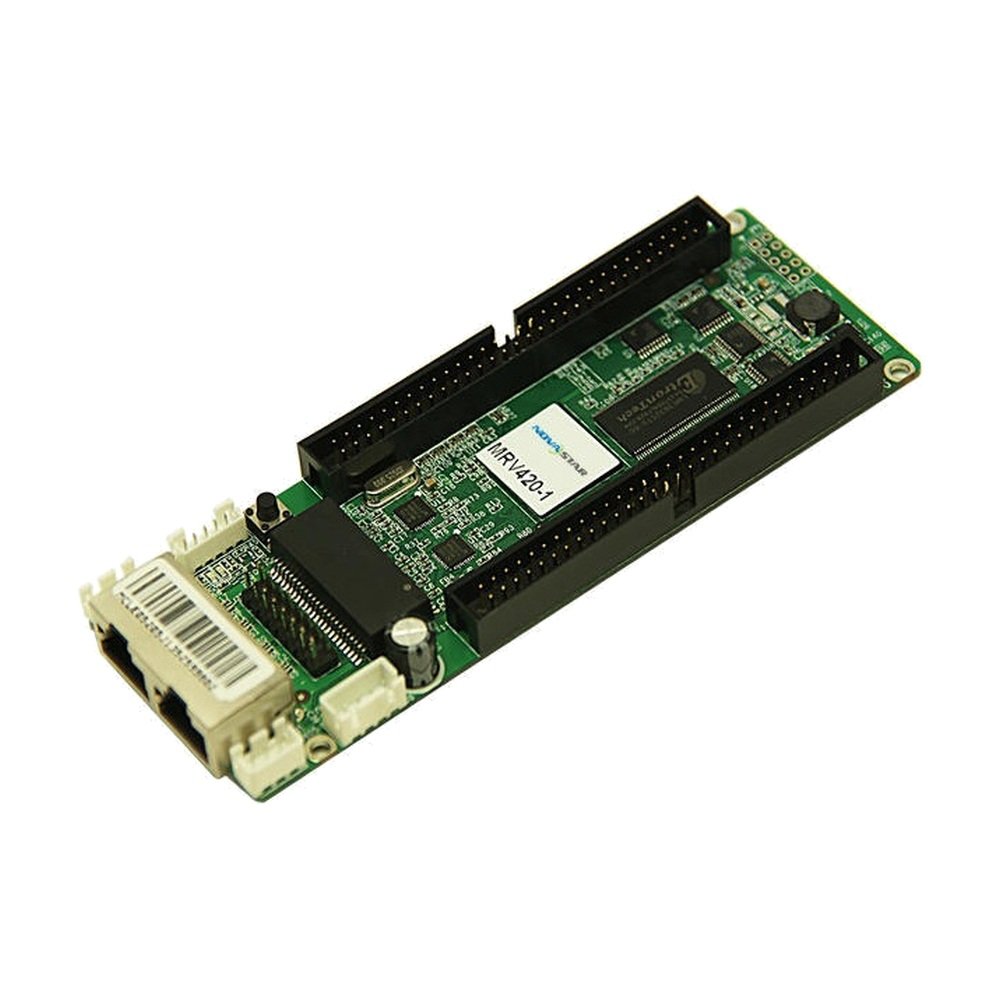
What is the NovaStar MRV420 receiving card?
NovaStar MRV420 is a legacy receiving-card family for LED cabinets that were originally built around MRV420 hardware. The board sits inside the cabinet, receives the screen data from the controller or the cabinet before it, and passes the matching signals to the LED modules. It is mainly a replacement purchase: the right MRV420 is the one that matches the failed board, the cabinet connection and the saved cabinet settings.
MRV420 is the EMC version of the older MRV220. That can matter when an existing parts list calls for its CE-EMC Class B documentation, but it does not make every MRV-series receiver interchangeable. A board with the wrong connector position may not mate with the hub board at all; a board with the right shape but the wrong cabinet file can still show a scrambled image.
MRV420 key features
- Four physical variants: the suffix changes the connector gender and its position. That is the first check on an installed-wall replacement.
- 256 × 226 pixels across one complete card: use it as the cabinet’s total receiving-card budget, not as a separate limit for each module connection.
- 24-group, 28-group or 64-group output modes: the cabinet’s original module and hub-board design chooses the mode; the list is not a reason to swap in a different receiver.
- Readback and fault checks: configuration readback, temperature, power-voltage and Ethernet-status checks give a technician a way to preserve a working cabinet and narrow a fault before changing more parts.
- CE-EMC Class B and RoHS documentation: useful when the existing cabinet record or procurement requirement calls for the documented MRV420 family.
NovaStar MRV420 specifications
These are the figures that change cabinet fit and a replacement order. The complete cabinet design still decides the final card and configuration.
| Check | MRV420 documented value | Why it matters before ordering |
|---|---|---|
| Product role | LED receiving card | It belongs inside the LED cabinet. It is not a video processor, sender or source switcher. |
| Maximum load | 256 × 226 pixels per card | The total cabinet canvas must fit one card; do not multiply the figure by the number of outputs. |
| Output data modes | 24 or 28 parallel RGB groups; 64 serial-data groups | The installed module, scan and hub board choose the correct path. Match the original cabinet rather than choosing from the largest number. |
| Power | DC 3.3–5.5 V; 0.33–0.55 A | Confirm the cabinet rail, particularly when older cabinets have been repaired with mixed parts. |
| Operating range | -20 to +70 °C; 10–90% RH | The rating supports normal cabinet service; it does not solve water ingress, poor ventilation or a failing power supply. |
| Compliance document | EU CE-EMC Class B; RoHS | Keep it with the purchase record when the original cabinet specification requires the same receiving-card documentation. |
MRV420-1 or MRV420-2: which connector side fits the cabinet?
The base MRV420 name covers four physical versions. NovaStar identifies MRV420-1 as a top-side male connector and MRV420-2 as a bottom-side male connector; MRV420-3 is top female and MRV420-4 is bottom female. The electronics belong to the same family, but the mating part, ribbon route and cabinet clearance depend on that physical detail.
| Printed model | Connector arrangement | Order decision |
|---|---|---|
| MRV420-1 | Male connector on top | Choose only when the failed board and cabinet mating connection match this top-side male layout. |
| MRV420-2 | Male connector on bottom | Choose only when the cabinet needs the bottom-side male layout. |
| MRV420-3 / MRV420-4 | Top / bottom female connector | Match the full label and confirm availability before choosing a substitute. |
Read the complete suffix printed on the old board, then photograph the connection side and the cabinet’s mating part before ordering. Do not choose a different version because the board outline looks close. The wrong connector position can leave a ribbon twisted, miss the hub-board pins or stop the cabinet door from closing.
MRV420 load capacity and existing cabinet data modes
The MRV420 has one published load of 256 × 226 pixels for the entire card. A 256 × 226 cabinet reaches that limit; a smaller 128 × 226 cabinet remains within it. The card’s output interfaces share this total, so four connections do not create four independent 256 × 226 budgets.
The 24-group, 28-group and 64-group entries describe the way this card can speak to the cabinet’s original modules. They are not a speed ranking or an upgrade menu. In particular, the 28-group mode needs serial-data decoding when the module scan is above 1/8. If your old cabinet already works, retain its approved module and hub-board path instead of changing the mode during an ordinary replacement.
Use the capacity figure to check the existing cabinet, not to redesign one from scratch. If the cabinet needs a different module interface, a larger canvas or modern image-processing features, an approved newer receiving-card and cabinet design is a better route than forcing MRV420 into a role it was not built for.
MRV420 replacement and saved cabinet configuration
When the old card still communicates, read it in NovaLCT before it is removed. Save the working receiving-card program and cabinet configuration, note the cabinet location, and photograph the full label and ribbon positions. That gives the new board a known screen map instead of leaving the installer to rebuild one cabinet from memory.
The card program and cabinet configuration solve different problems. The program matches the receiving card to the module’s driver and decoding signals; the configuration stores the scan, wiring and pixel arrangement of that physical cabinet. A healthy replacement with only one of the two can still produce a black, mirrored or scrambled cabinet.
For a card that has already failed, use the saved file from the same cabinet position or get the correct cabinet file from the display maker. A file from another wall that happens to use an MRV420 can change the picture without proving the new card is bad.
MRV420 versus MRV410 and newer receiving cards
MRV410 is another older NovaStar EMC receiving-card family, so the two products appear together in some replacement searches. They are not automatic substitutes. Match the model printed on the original card, its connector layout, hub-board interface and working configuration before changing families.
Keep MRV420 when you are repairing a cabinet already built for an MRV420 suffix or when its parts record calls for that documentation. For a new cabinet, start with the module maker’s current approved receiving-card list. A current card may offer a different load or image feature, but none of that helps if its connectors and cabinet file do not match the screen you own.
MRV420 datasheet, firmware and NovaLCT
The MRV420 datasheet page and direct MRV420 Datasheet PDF confirm the suffixes, capacity, data modes and electrical limits. Use them when you need to verify an existing cabinet or quote the original receiving-card requirement.
NovaLCT is for reading and restoring the cabinet’s known configuration. Firmware is a separate file that must match the receiving-card board and module driver/decoding combination. Public listings mention MRV420 V4.5.0.0, but an exact package was not independently verified for this store, so no guessed download is linked. Keep the known-good program on a working wall and check the NovaStar download center before changing firmware.
NovaStar MRV420 FAQ
What does the MRV420 do?
MRV420 sits inside an LED cabinet. It receives mapped data from the controller path and sends the matching signals to the LED modules inside that cabinet.
Is MRV420 a 420,000-pixel receiving card?
No. NovaStar documents a maximum load of 256 × 226 pixels for one complete MRV420 card, which equals 57,856 pixels. Do not rely on generic reseller capacity claims that conflict with the official specification.
What is the difference between MRV420-1 and MRV420-2?
MRV420-1 has a top-side male connector and MRV420-2 has a bottom-side male connector. Match the printed suffix and the cabinet’s mating connection.
Can I use MRV420-1 instead of MRV420-2?
Not unless the cabinet connection has been deliberately converted and tested. The connector side changes the way the card mates with the hub board and fits inside the cabinet.
Does 256 × 226 apply to every MRV420 output?
No. It is the maximum load for the whole card. All module connections share that one limit.
What should I save before replacing an MRV420?
Save the working receiving-card program and cabinet configuration in NovaLCT, then photograph the full card label and ribbon positions. Keep the files with the cabinet location.
Why can a new MRV420 show a scrambled cabinet?
The board may be healthy but have the wrong ribbon order, data mode or cabinet configuration. Restore the verified file from that exact cabinet before treating it as a bad part.
Does MRV420 Class B certify the finished LED wall?
No. The MRV420 document covers the receiving card. The cabinet, power supplies, wiring, grounding and installation also affect the completed system.
Should I update MRV420 firmware during a replacement?
Not automatically. Keep the known-good program unless an exact firmware package matches the board and module-driver combination and solves a confirmed need.
Reviews
There are no reviews yet.