
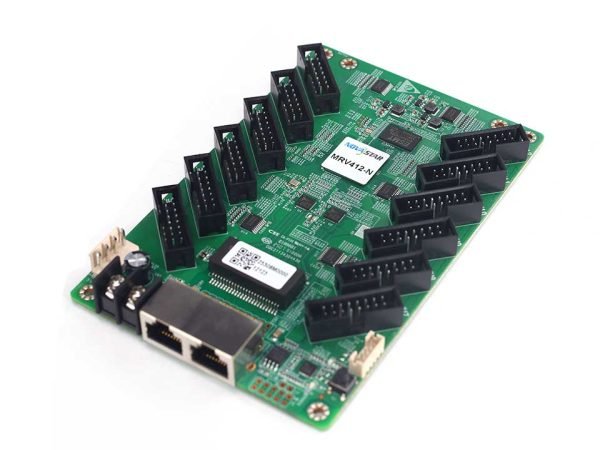
What is the NovaStar MRV412-N receiving card?
The NovaStar MRV412-N is a 12-output receiving card for an LED cabinet that was built around the N-series board, or for a new cabinet whose module maker has approved it. It receives the mapped picture from the controller, then sends the right data through twelve HUB75E connections to the LED modules. Its useful advantage is not simply “newer”: it gives the cabinet specific image, monitoring and low-latency options when the rest of the hardware supports them.
Buy it for an exact MRV412-N replacement, or after the cabinet’s driver IC, scan, power rail and module wiring have been checked. The standard MRV412 has its own documentation. Similar size and twelve outputs do not prove that one board can replace the other without a tested cabinet configuration.
MRV412-N key features
- 12 HUB75E outputs and 24 RGB groups: suitable for a cabinet with many module ribbons when the hub wiring and data-group requirement match the design.
- 8-bit load planning: the card reaches 512 × 512 at 60 Hz with PWM driver ICs, or 512 × 384 with common driver ICs, when the video source is 8-bit.
- One-frame receiving-side latency: available only when the LED modules use driver ICs with built-in RAM. The setting is off by default and it is not a promise for every cabinet.
- Image control with conditions: 18bit+, color management, calibration and seam adjustment can address low-gray banding, batch mismatch or a bright join; 3D and RGB gamma also need supporting control software or hardware.
- Practical fault tracing: Mapping, stored image, voltage/temperature status, Ethernet bit-error checks and cable-disconnection counts help locate a cabinet and narrow a signal problem before parts are swapped.
NovaStar MRV412-N specifications
These figures are the cabinet-fit facts that change a purchase decision. Module driver, bit depth and physical wiring still decide whether the listed maximum can be used.
| Check | MRV412-N value | Why it matters |
|---|---|---|
| PWM capacity | 512 × 512 at 60 Hz, 8-bit source | Treat it as a full-card maximum only when both the source depth and module drivers fit. |
| Common-driver capacity | 512 × 384 at 60 Hz, 8-bit source | A common-driver cabinet at 512 × 512 needs a different card-count plan. |
| Module connections | 12 HUB75E connectors; up to 24 parallel RGB groups | Match ribbon count, order and data groups to the cabinet before fitting the board. |
| Low latency | One frame at the receiving-card end with built-in-RAM driver ICs | Check the module driver before buying for a live-camera latency requirement. |
| Input and size | DC 3.8–5.5 V; 0.5 A; 2.5 W; 145.6 × 91.5 × 19.3 mm | The cabinet rail, mount and enclosure clearance must match the specific board. |
| Rotation | 0°, 90°, 180° or 270° | It suits a planned sideways cabinet layout, not arbitrary-angle scenic panels. |
MRV412-N capacity with an 8-bit source
The quoted maximum capacities apply when the video source is 8-bit. With PWM driver ICs, one MRV412-N can load up to 512 × 512 at 60 Hz. With common driver ICs, its documented limit is 512 × 384 at 60 Hz. The driver choice changes the answer before the cabinet is wired.
Those figures cover the complete receiving card. The twelve HUB75E outputs divide that one card budget among the connected modules; each connector does not receive its own 512 × 512 allowance. A 256 × 512 PWM cabinet totals 131,072 pixels and stays within the PWM limit. A 512 × 512 common-driver cabinet does not fit one card, even though the number appears in many product listings.
Confirm the driver IC from the module label or cabinet build record, then calculate the finished cabinet canvas. Include the scan and actual ribbon arrangement. A spare card selected from the right model but the wrong capacity condition can produce a cabinet that lights up yet cannot carry the intended layout.
MRV412-N low latency, rotation and color control
Low latency is useful when an LED wall is showing a live camera feed and the system has a real timing requirement. On the MRV412-N, enabling the feature can reduce receiving-card-end latency to one frame only with modules that use driver ICs with built-in RAM. It is disabled by default. Check the module part number first; the receiving card cannot add RAM to a module that does not have it.
For a dim indoor wall, 18bit+ can preserve smoother steps near black. Pixel calibration and multi-batch adjustment can help cabinets from different module runs sit closer in brightness and color. Individual RGB gamma needs NovaLCT and a controller that supports it. These are tools for a particular screen condition, not blanket claims that a board will make any LED wall look better.
The MRV412-N rotates an image in 90-degree steps. It can support a cabinet mounted sideways or upside down when the screen layout is designed for those angles. It does not provide free-angle rotation. 3D likewise requires a controller with 3D support, so choose the full control chain before promising that feature to a client.
MRV412-N monitoring and signal-loss checks
When a large LED wall has one bad cabinet, the fastest repair starts by identifying exactly which cabinet it is. Mapping 1.1 can display the controller number, Ethernet port and receiving-card number on the modules. That turns a board in the middle of a wall into a named location, not a cable-tracing exercise.
A stored image can be assigned for startup, a disconnected Ethernet cable or missing video source. The cabinet does not have to remain a black rectangle while the source path is checked. Temperature and voltage monitoring, Ethernet bit-error detection and the count of cable disconnections then help separate an intermittent lead, a cabinet power issue and a card fault.
Loop backup protects an appropriately wired primary-and-backup network path. When a cable fault occurs, the screen can continue to display through the remaining path. It is not enabled by simply buying the card: the controller, Ethernet runs and cabinet connections must be planned as a loop.
MRV412-N setup and replacement files
Before removing a working MRV412-N, read it in NovaLCT. Save its firmware program and its cabinet configuration file, record the cabinet position, and photograph the board label and module-ribbon order. The program tells the card how to work with the drivers. The cabinet file contains the scan, wiring and pixel map. Both records are needed for a controlled replacement.
Install one board, restore the verified configuration and test that cabinet before copying settings to the wall. Use a simple test image to check color order, image position and module rows. If the cabinet is dark, check its power and Ethernet path first. If it is mirrored or scrambled, recheck ribbon order and the cabinet file before changing firmware.
A firmware update is not a routine upgrade. NovaStar lists an MRV412-N V4.9.2.0 package in its official receiving-card download center, but the correct package still depends on the PCB and module-driver combination. Keep the known-good program available for rollback and update a single cabinet before touching a working wall.
MRV412-N vs MRV412 for an LED cabinet
The N suffix is a model decision, not decoration. MRV412-N adds documented one-frame low-latency conditions and Ethernet cable-disconnection detection, while the standard MRV412 has a different official document and software history. Both have twelve HUB75E outputs, but that shared outline is not evidence of an interchangeable cabinet fit.
If the existing board is labelled MRV412-N, buy the same N model unless the cabinet maker has approved a different card. If the label is MRV412, keep the standard model. For a new cabinet, pick the approved board after confirming the module driver, scan, ribbon order, power rail and intended source depth. A card’s “newer” label cannot solve a mismatch in the cabinet hardware.
MRV412-N datasheet, firmware and NovaLCT
The MRV412-N datasheet page and direct MRV412-N Datasheet PDF contain the exact 8-bit load conditions, physical dimensions and feature limits. Use them before a new cabinet build or a non-like-for-like replacement.
Use NovaLCT to read a working card and restore its cabinet files. The official MRV412-N V4.9.2.0 listing is real, but an unverified mirror or a different driver group is not a safe firmware source. Check the NovaStar download center for the current package, then match it to the PCB and module driver before any update.
NovaStar MRV412-N FAQ
What does the MRV412-N do?
It sits inside an LED cabinet, receives the mapped picture from a NovaStar control path and sends the correct data to the cabinet’s LED modules.
Is 512 × 512 available at every source bit depth?
No. NovaStar documents 512 × 512 at 60 Hz with PWM driver ICs when the video source is 8-bit. Confirm source depth and driver type first.
Does each HUB75E output have a 512 × 512 limit?
No. The quoted figure is the maximum for one complete MRV412-N card. The twelve outputs share it.
Can MRV412-N reduce live-camera delay?
It can reduce receiving-card-end latency to one frame only when the modules use driver ICs with built-in RAM. The setting is disabled by default.
Can MRV412-N rotate an image at any angle?
No. It supports 0°, 90°, 180° and 270°. Use it for a planned right-angle cabinet layout.
Can I replace MRV412 with MRV412-N?
Do not assume so. They are separate models. Match the label, module driver, scan, ribbons, power rail and approved cabinet configuration.
What should I save before replacing an MRV412-N?
Read and save the working card’s program and cabinet configuration in NovaLCT. Record the cabinet location and ribbon order as well.
Should I install MRV412-N V4.9.2.0 firmware immediately?
No. Confirm the exact PCB and module-driver match, retain the known-good program, and test one cabinet before updating a working LED wall.
Reviews
There are no reviews yet.