
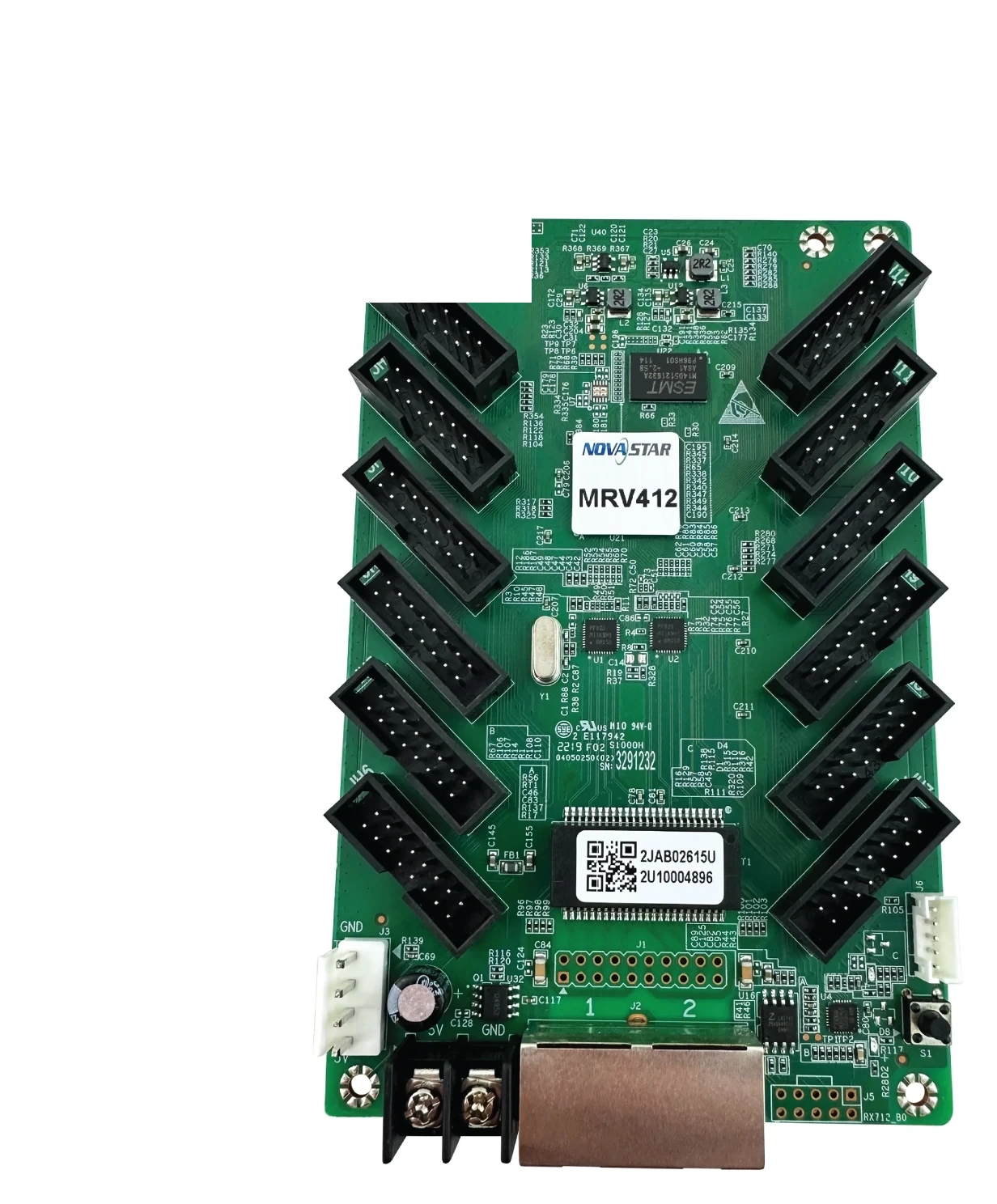
What is the NovaStar MRV412 receiving card?
The NovaStar MRV412 is a 12-output receiving card for LED cabinets that use standard HUB75E module ribbons. It receives the mapped image from the controller or the cabinet before it, then sends the right data to the modules in that cabinet. It suits a new cabinet built around its 12 connectors or an existing wall that already has an MRV412 and needs a like-for-like spare.
Its headline 512 × 512 figure needs one important condition: it applies at 60 Hz with PWM driver ICs. A cabinet using common driver ICs is limited to 512 × 384 at 60 Hz. That one distinction often decides whether a cabinet needs one card or two, so the module driver belongs in the buying check before the pixel count.
MRV412 key features
- 12 HUB75E outputs and 24 RGB groups: the card can feed a cabinet with many module ribbons, as long as the module arrangement and hub wiring match the card’s output plan.
- Conditional high load: one MRV412 can reach 512 × 512 at 60 Hz with PWM modules, while common-driver modules use the lower 512 × 384 limit.
- Low-brightness and seam correction tools: 18bit+, individual RGB gamma, calibration and dark or bright line adjustment can address a visible screen issue when the connected controller, NovaLCT and calibration data support the feature.
- Cabinet identification and fault clues: Mapping 1.1, voltage and temperature monitoring, Ethernet bit-error detection and the cabinet LCD connection make it easier to find one card in a large wall.
- Readback and backup: the firmware program and configuration parameters can be read from a working card before a replacement, and the card supports program and configuration backups.
NovaStar MRV412 specifications
These figures answer the cabinet-fit questions. They do not replace the module maker’s scan, driver and wiring information.
| Check | MRV412 value | Buying consequence |
|---|---|---|
| Maximum load | 512 × 512 at 60 Hz, PWM driver ICs | Use this only after confirming the module uses PWM drivers. |
| Common-driver load | 512 × 384 at 60 Hz | A common-driver cabinet may need a second card even when its pixel count looks close to 512 × 512. |
| Module connections | 12 standard HUB75E; up to 24 parallel RGB groups | Count ribbons and data groups with the cabinet layout, not from a product photo alone. |
| Input power | DC 3.8–5.5 V; 0.5 A; 2.5 W | Confirm the cabinet rail before a replacement card is connected. |
| Board size | 145.6 × 91.5 × 19.1 mm | Mounting points and door clearance still have to match the specific cabinet. |
| Certifications | RoHS; EMC Class A | Confirm any project-specific compliance requirement for the completed cabinet and installation. |
MRV412 load capacity for PWM and common driver ICs
512 × 512 is the limit for the complete MRV412 card, not for each of the twelve HUB75E connectors. Twelve outputs let the cabinet distribute its module ribbons; they do not turn one card into twelve separate 512 × 512 receivers.
For example, a 256 × 512 PWM cabinet totals 131,072 pixels and stays within the PWM limit. A 512 × 512 PWM cabinet reaches the documented maximum. A common-driver cabinet at that same 512 × 512 size is too large for one MRV412, because its documented limit is 512 × 384. Confirm the driver IC from the cabinet build sheet or module label before placing a one-card order.
Scan pattern, folded ribbon routing and a custom pixel map can add further conditions. Plan from the final cabinet canvas and approved module file. A card that is just large enough on paper leaves no room for a different module layout or a corrected cabinet map.
MRV412 image quality and cabinet service features
The MRV412’s display tools matter when they solve a visible problem. 18bit+ can preserve smoother steps near black on a dimmed LED wall. Pixel-level calibration and multi-batch adjustment can bring cabinets from different production batches closer together. If a cabinet seam looks visibly bright or dark after repair, the supported line-adjustment function gives a technician a focused correction path instead of hiding the mismatch with a global brightness change.
Those tools are not automatic. Individual RGB gamma works with NovaLCT and a controller that supports it. 3D needs a compatible controller. Rotation is in fixed 90-degree steps, so it belongs to a cabinet layout that has already been designed for it. Confirm the full signal chain before buying the card for one of those results.
Service functions can save time during a fault. Mapping 1.1 can show the controller, Ethernet port and receiving-card number on the cabinets, so a technician can identify the cabinet in the middle of a wall without tracing every cable. A stored image can be set for startup, an Ethernet disconnect or missing video, which avoids leaving one cabinet as a black rectangle while the source path is being checked.
MRV412 12-HUB75E connector and cabinet fit
MRV412 has twelve standard HUB75E connectors, two Gigabit Ethernet ports and separate power, LCD and test connections. A 12-ribbon cabinet can suit that layout, but the connector count alone does not prove a physical match. The hub-board pinout, module driver, ribbon direction, mounting holes and cabinet voltage must agree with the original design.
Open one working cabinet before ordering a replacement. Photograph the MRV412 label, count the module ribbons, note their order, and compare the board’s mounting points and power connector. If the card replaces a failed unit, save the configuration first. An otherwise correct card can show mirrored panels, swapped colors or repeated rows when the hub ribbon order or cabinet file is wrong.
MRV412 replacement with NovaLCT
Read the working MRV412 in NovaLCT before removing it whenever communication is still possible. Save both the receiving-card program and its cabinet configuration file, then label them with the cabinet location. The program controls how the card works with the module drivers; the cabinet file holds the scan, wiring and pixel map. Keep both.
Fit the new card, restore the verified configuration, and test one cabinet before sending anything across the rest of the LED wall. Start with a test image that makes a wrong color, mirrored panel or missing row easy to see. If that cabinet remains blank, inspect power and Ethernet first. The MRV412 can report voltage, temperature and Ethernet communication information, which helps distinguish a cable or supply fault from a bad receiving card.
When the old card is fully dead and there is no saved file, obtain the exact configuration from the cabinet or display maker. Do not use a file from a merely similar screen as a shortcut; the wrong scan or wiring map can make a good card appear defective.
MRV412 vs MRV412-N for an LED cabinet
MRV412 and MRV412-N are separate model pages and separate official documents. Both names appear in 12-output receiving-card searches, which can make the N model look like an automatic newer replacement. NovaStar’s documents do not establish that either one drops into the other’s cabinet.
If the failed board is marked MRV412, keep the standard MRV412 unless the cabinet maker confirms a tested change. If the original board says MRV412-N, use the N model’s documentation and exact firmware path. For a new cabinet, choose the card the module maker has approved after confirming driver IC, scan, ribbon layout, power rail and software. A newer suffix cannot correct a mismatch in those five parts.
MRV412 datasheet, firmware and NovaLCT
The MRV412 datasheet page covers the official specification and direct document. Use the MRV412 Datasheet PDF for the full connector, pin and feature conditions before a cabinet build or a non-like-for-like replacement.
NovaLCT is the configuration tool for reading and restoring a working cabinet. Firmware needs a different level of care: a package has to match the card and module-driver combination. No exact public MRV412 firmware ZIP is linked here because an unverified update can cause more trouble than the known-good program already in the wall. Use the NovaStar download center to confirm a package before updating.
NovaStar MRV412 FAQ
What does the MRV412 do?
It sits inside an LED cabinet, receives mapped screen data from the NovaStar control path and sends the right signals to that cabinet’s LED modules.
Does 512 × 512 apply to every MRV412 output?
No. It is the maximum for one complete MRV412 card at 60 Hz with PWM driver ICs. The twelve HUB75E outputs share that total.
What is the MRV412 limit with common driver ICs?
NovaStar documents 512 × 384 at 60 Hz with common driver ICs. Confirm the module driver before deciding one card is enough.
Can MRV412 improve a dark line between cabinets?
It supports quick dark or bright line adjustment. The cabinet must have the correct configuration and the visible seam still needs to be diagnosed before adjustment.
Can I install MRV412-N in place of MRV412?
Do not treat it as an automatic replacement. Match the printed model, module driver, connector layout, power rail, cabinet file and approved software path.
What should I save before an MRV412 replacement?
Use NovaLCT to read and save the receiving-card program and cabinet configuration file. Photograph the label and module ribbon order too.
Why is one replacement cabinet black or scrambled?
Check the power rail, Ethernet path, ribbon order and restored cabinet file. A wrong map can create a bad image even when the new card is healthy.
Should I update MRV412 firmware during routine service?
Only when a verified package matches the card and module-driver combination and addresses a specific need. Keep the known-good program before any update.
Reviews
There are no reviews yet.