
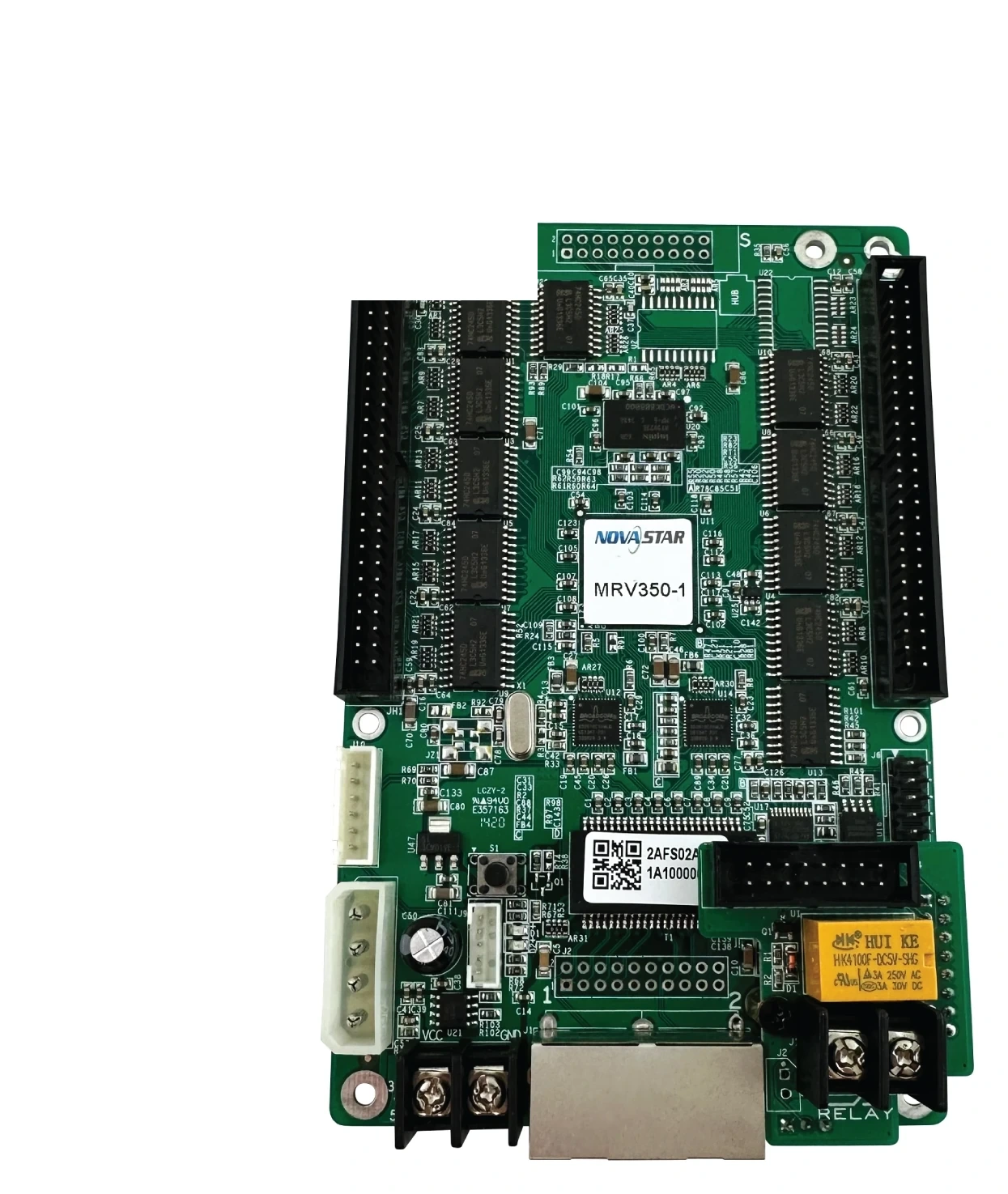
What is the NovaStar MRV350-1 receiving card?
The NovaStar MRV350-1 is a receiving card that lives inside a compatible LED cabinet. It takes the mapped screen data from the controller or the cabinet before it, then sends the right data to that cabinet’s LED modules. Its role is not to process video; it is to make one cabinet behave as part of the finished screen.
The MRV350 family is unusual because it includes one relay control and a monitor-card connection. Those features matter only when the cabinet was built to use them. For a repair, the safe question is therefore not simply “does this card have enough pixels?” It is whether the old card says MRV350-1, whether its top-side male connection and cabinet wiring match, and whether the working configuration can be saved before the swap.
MRV350-1 key features
- One relay control: gives a compatible cabinet control path a way to connect, disconnect or use a configured automatic threshold in NovaLCT. It is a reason to choose the exact model when the old cabinet already relies on that wiring.
- Top-side male connector: the “-1” is a physical variant, not a newer firmware label. Matching the connector position before purchase helps prevent discovering a board-fit problem after the display is open.
- Configuration readback and program copy: a healthy cabinet can provide the settings needed to return a replacement to the same module order, scan and pixel map.
- Temperature, voltage and Ethernet-status checks: these give an installer clues about a power, cable or card fault before another part is ordered.
- Stored-image support and pixel calibration: help the cabinet retain a controlled appearance during an expected signal interruption and restore the established brightness/color behavior when the correct cabinet data is used.
NovaStar MRV350-1 specifications
These official V2.0.0 values are the first fit check. The cabinet’s module type, wiring, connector position and saved configuration still decide whether the card is a suitable replacement.
| Maximum load | 256 × 226 pixels per receiving card |
|---|---|
| Parallel data modes | 16 RGBR groups or 20 RGB groups |
| Serial data mode | Up to 64 groups |
| MRV350-1 variant | Standard version; male connector on the top |
| Input / rated power | DC 3.3–5.5 V; 0.5 A; 2.5 W |
| Operating environment | −20°C to +75°C; 0% to 95% RH, non-condensing |
MRV350-1 relay control and cabinet power paths
The relay is the main reason an MRV350-1 should not be replaced by a card chosen only by its shape or capacity. In a compatible cabinet, NovaLCT can set the receiving-card relay to connected, disconnected or automatic. The automatic setting uses configured temperature thresholds, which can be useful where the cabinet designer has connected that relay to an appropriate external control circuit.
That does not mean every MRV350-1 cabinet can remotely control its power. The card has the relay feature; the cabinet still needs the matching wiring, external hardware and installation design. Before ordering a spare, compare the old card’s label and both sides of the board, then note what is connected to the relay area. If there is no compatible relay/control path in the cabinet, this feature is simply not part of that installation’s day-to-day operation.
For an existing wall that does use it, keeping the same function avoids a subtle downgrade: the picture might return after a different card is fitted, while the original control behavior no longer has the hardware it expects.
MRV350-1 connector position and replacement fit
MRV350-1, -2, -3 and -4 refer to different physical connector arrangements. The MRV350-1 is the male-connector-on-top version. That makes the suffix a cabinet-fit check, not an optional detail in the product name.
Start with the full label on the failed card. Next, compare the top and bottom connector orientation, the relay/monitor leads, the module data ribbons and the board mounting points. A neighboring MRV350 version can have the same family name and headline load while still failing to mate with the cabinet as intended. Matching the exact replacement keeps the existing hub board and ribbon route meaningful rather than forcing a hardware experiment during a repair.
If the old card is missing or unreadable, send clear photos of both sides, the cabinet’s module-ribbon layout and any leads connected near the relay area through our compatibility support form. That gives us something concrete to check before a part is ordered.
MRV350-1 status checks before replacing a card
A dark or distorted cabinet is not always a bad receiving card. Check whether the cabinet has power, whether the Ethernet path is live, and whether the module ribbons are firmly seated. The MRV350 family can report supply voltage, temperature and Ethernet communication status when used with compatible system hardware. Those readings help narrow the fault instead of replacing a card because it is the easiest part to name.
When the cabinet still communicates, save the configuration before disconnecting anything. A replacement with the wrong scan, module wiring or pixel map can power up and still show a repeated block, a scrambled module order or only part of the intended image. That is a configuration problem until proven otherwise.
The card also supports a stored image. On a compatible setup, it can be selected for startup, missing video or a broken Ethernet path rather than leaving one cabinet as an unexpected black rectangle. Treat that as a planned-screen behavior, not a substitute for fixing a failed source or cable.
MRV350-1 setup with NovaLCT and the original cabinet file
For a like-for-like replacement, begin with the working cabinet, not with a firmware update. Use NovaLCT to read and save the receiving-card configuration and program while the original card is still available. Keep that file with a photo of the board label and the cabinet location.
The cabinet configuration records how the modules are scanned, wired and mapped. It is different from firmware: firmware is the program that must suit the receiving-card hardware and module electronics; the configuration tells that hardware how this particular cabinet is assembled. One cannot replace the other.
Fit the new MRV350-1, restore the verified cabinet configuration, then test one cabinet before applying any change across the screen. If a stable installation needs a firmware change, use only an exact verified package for its card and electronics. A newer file is not automatically a better choice for a working wall.
MRV350-1 datasheet, firmware and NovaLCT
Use the datasheet to confirm the model’s physical and electrical limits. Use NovaLCT to preserve and restore the cabinet-specific setup. Keep a known-good firmware and configuration set before changing a stable screen.
NovaStar MRV350-1 FAQ
What does the MRV350-1 receiving card do?
It receives the mapped image data inside a compatible LED cabinet and sends the correct data to that cabinet’s LED modules.
What makes MRV350-1 different from a basic receiving card?
It includes one relay control and a monitor-card connection in addition to its receiving-card functions. Those features matter only when the cabinet has the compatible wiring and external hardware.
Can an MRV350-1 control every cabinet power supply?
No. The card provides relay control, but the cabinet must be designed with a compatible relay/control path. Check the existing wiring before relying on that feature.
What does the “-1” mean on MRV350-1?
It identifies the standard MRV350 variant with a male connector on the top. The other suffixes use different connector sex or placement, so match the complete label and board layout.
What is the maximum MRV350-1 load?
The official maximum is 256 × 226 pixels per card. The module type, wiring and data mode still need to fit within the cabinet design.
What should I save before replacing an MRV350-1?
Use NovaLCT to save the working receiving-card program and cabinet configuration, and take photos of the board label, ribbons and relay-area connections.
Why can a replacement card show a scrambled or repeated image?
It may have the wrong cabinet configuration. Restore the file from the same cabinet design before assuming the new hardware is faulty.
Should I update MRV350-1 firmware during a replacement?
Not automatically. First restore the known-good configuration. Update only when an exact verified firmware package is appropriate for the card and module electronics.
Reviews
There are no reviews yet.