
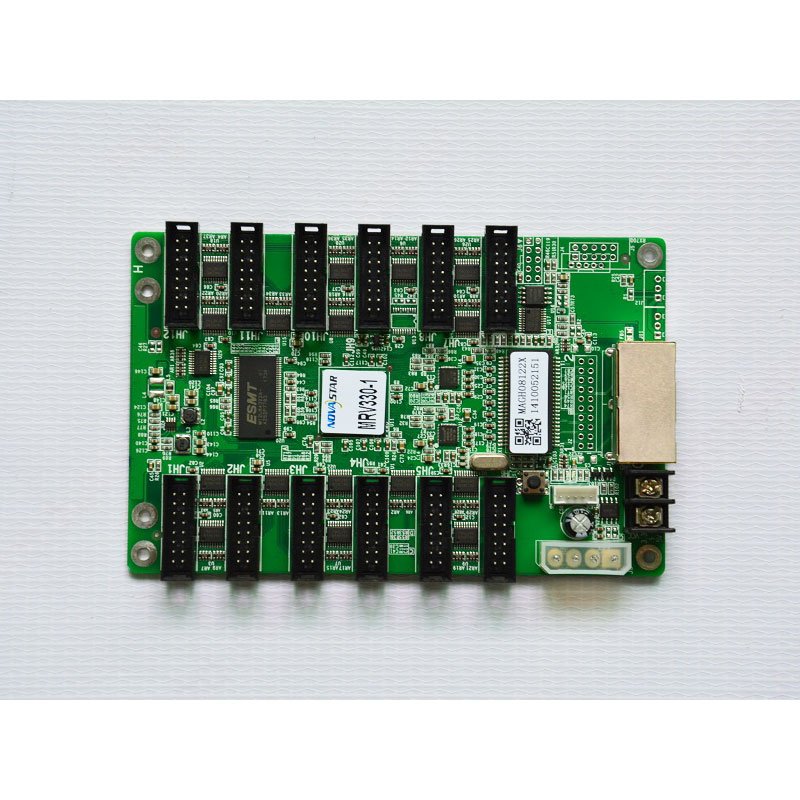
What is the NovaStar MRV330 receiving card?
The NovaStar MRV330 is a legacy LED receiving card for a cabinet whose module ribbons connect straight to the card. It receives the mapped image from the controller or the previous cabinet and sends the right pixel data to the modules inside that cabinet. Its twelve built-in HUB75 connectors are the reason many older cabinet designs use it without a separate hub board.
Most buyers arrive here because an installed board says MRV330-1, not because they are designing a new LED wall from scratch. In that situation, the safest choice starts with the printed model and connector direction. A card with the same pixel figure can still be wrong if its connectors face the wrong way, its hub layout does not match the ribbons, or its saved cabinet configuration belongs to a different module.
MRV330 key features
- Twelve integrated HUB75 outputs: the module cables can land on the receiving card itself. That reduces one board and one set of cabinet interconnects, but it makes the exact connector layout part of the replacement decision.
- 24 groups of RGB data: this is the module-data boundary behind the connector count. Check it against the cabinet drawing or the working card before assuming that twelve physical sockets will support any twelve modules.
- Configuration readback: a working card can provide the existing configuration before it is removed. Saving that information gives the replacement the cabinet’s established scan and wiring map instead of asking an installer to recreate it from memory.
- Basic cabinet checks: the card supports temperature, supply-voltage and Ethernet-communication status monitoring. These checks help separate a power, network or cabinet issue before a good receiving card is replaced unnecessarily.
- Stored image and pixel calibration support: the card can retain an image for a lost source path and works with the cabinet’s calibration data. Neither setting corrects a mismatched module or an incorrect configuration file, so hardware fit still comes first.
NovaStar MRV330 specifications
These official values identify the card and set the first cabinet-fit boundary. They are not a promise that every HUB75 module layout can use the full load.
| Card role | LED receiving card with integrated module outputs |
|---|---|
| Maximum card load | 256 × 226 pixels |
| Module outputs | 12 standard 16-pin HUB75 connectors |
| Parallel RGB data | 24 groups |
| Input voltage | DC 3.3 V to 5.5 V |
| Typical current | 0.50 A |
| Operating environment | −20°C to +70°C; 10% to 90% RH, non-condensing |
MRV330-1, MRV330-2, MRV330-3 and MRV330-4 connector direction
The MRV330 family name does not settle the physical fit. NovaStar’s model list distinguishes the versions by where the module connector is placed, so a buyer replacing an installed card should match the full suffix before looking at capacity or price.
| Printed model | Module connector position | Why check it |
|---|---|---|
| MRV330-1 | Male connector on top | Matches cabinets whose ribbon and clearance are above the board. |
| MRV330-2 | Male connector on bottom | The same wiring route can fail if the connector faces into the cabinet frame. |
| MRV330-3 | Female connector on top | Confirm both the mating ribbon end and top-side clearance. |
| MRV330-4 | Female connector on bottom | Check that the original cable path and mounting space are retained. |
Take one clear photo of the old card with the cabinet open. The board label, the ribbon ends and the direction they leave the card usually answer this question more reliably than an old purchase order.
How the MRV330 connects 12 LED modules without a hub board
In a cabinet with a separate hub board, the receiving card connects to that board and the board fans out to the modules. With the MRV330, the twelve module ribbons connect to its own HUB75 sockets. This can make a compact cabinet easier to service because the data path is visible in one place.
It does not mean that any twelve HUB75 ribbons can be plugged in at random. The order of the outputs, module scan, cabinet wiring and saved configuration must agree. If a replacement is installed with a different connector direction or an unrelated configuration file, the screen may light but show a scrambled image or leave part of the cabinet dark.
MRV330 capacity across 12 HUB75 outputs
The 256 × 226 figure belongs to the complete MRV330 card, not to each of its twelve connectors. Think of it as one image-data budget that the cabinet shares across all connected modules. A cabinet using many small modules may use most of the sockets while staying below the total pixel boundary; a different module arrangement may reach the boundary sooner.
Before ordering a spare for a working screen, count modules and compare their pixel dimensions with the old configuration. For a new cabinet, leave room below the stated maximum until the module supplier confirms the scan type, driver IC and data-group requirement. The 24-group RGB limit can rule out a design even where the total pixel count looks acceptable.
MRV330 replacement and saved configuration
Save the working setup before disconnecting a card that still communicates. In NovaLCT, read and retain the receiving-card settings and the cabinet configuration for that exact screen. The card settings help restore how the receiving card drives the module; the cabinet configuration preserves how the modules and cabinets are mapped together. Keep both files with the cabinet location and board photo.
Do not upgrade firmware simply because a package appears newer. Firmware must match the board revision and the module electronics, while the saved configuration must match the cabinet itself. If the old screen is stable, the sensible repair path is like-for-like hardware, its known-good configuration and a brief test of all modules before the cabinet is closed.
When to keep the MRV330 and when to choose another receiving card
Keep the MRV330 path when the existing cabinet was built around its twelve standard HUB75 outputs, the correct connector-direction suffix is available and the original configuration can be saved. That route preserves the physical cable path rather than turning a repair into a cabinet redesign.
If you are building a new cabinet, need a different module interface, or cannot match the old board’s wiring and files, choose a current card only after the cabinet maker confirms the complete module and hub interface. A nearby model such as MRV336 may look similar from a port count alone, but that is not evidence of a drop-in replacement. For an uncertain installed card, send the label, both sides of the board and a photo of the module ribbons through our compatibility support form before placing the order.
MRV330 datasheet, firmware and NovaLCT
Use the datasheet to verify the board’s interfaces and electrical limits, then save the working cabinet files with NovaLCT before a swap. NovaStar firmware is hardware-specific; if no exact package has been confirmed for the board in hand, keep the known-good version and use the official download center to check the matching revision rather than loading a file from a different MRV model.
NovaStar MRV330 FAQ
What does the MRV330 receiving card do?
It sits inside an LED cabinet, receives the controller’s mapped data and sends it to the cabinet’s LED modules through its twelve integrated HUB75 connectors.
Does “without a hub board” mean the MRV330 has no module outputs?
No. It means the fan-out function is built into the card. The MRV330 has twelve standard 16-pin HUB75 outputs for the module ribbons.
What is the difference between MRV330-1 and MRV330-2?
The official model list places the male connector on top for -1 and on the bottom for -2. Match the printed suffix and the ribbon direction in your cabinet.
Is 256 × 226 the capacity of one MRV330 output?
No. It is the documented maximum for one complete MRV330 card. Its twelve outputs share that card-wide data budget.
What should I save before replacing an MRV330?
Use NovaLCT to read and save the working receiving-card settings and the cabinet configuration, then save a board-label and wiring photo with those files.
Can I use a different receiving card with the same HUB75 connector?
Not safely by connector type alone. The module scan, driver IC, data groups, connector direction, power and configuration must all match the existing cabinet.
Should I update firmware before installing an MRV330 spare?
Only after confirming the exact board and module electronics. A stable screen is usually best restored with its known-good configuration and compatible firmware, not an unverified newer file.
Can you help identify my MRV330 version?
Yes. Send a clear photo of both sides of the card, the printed suffix, module-ribbon direction and the cabinet model through our compatibility support form.
Reviews
There are no reviews yet.