
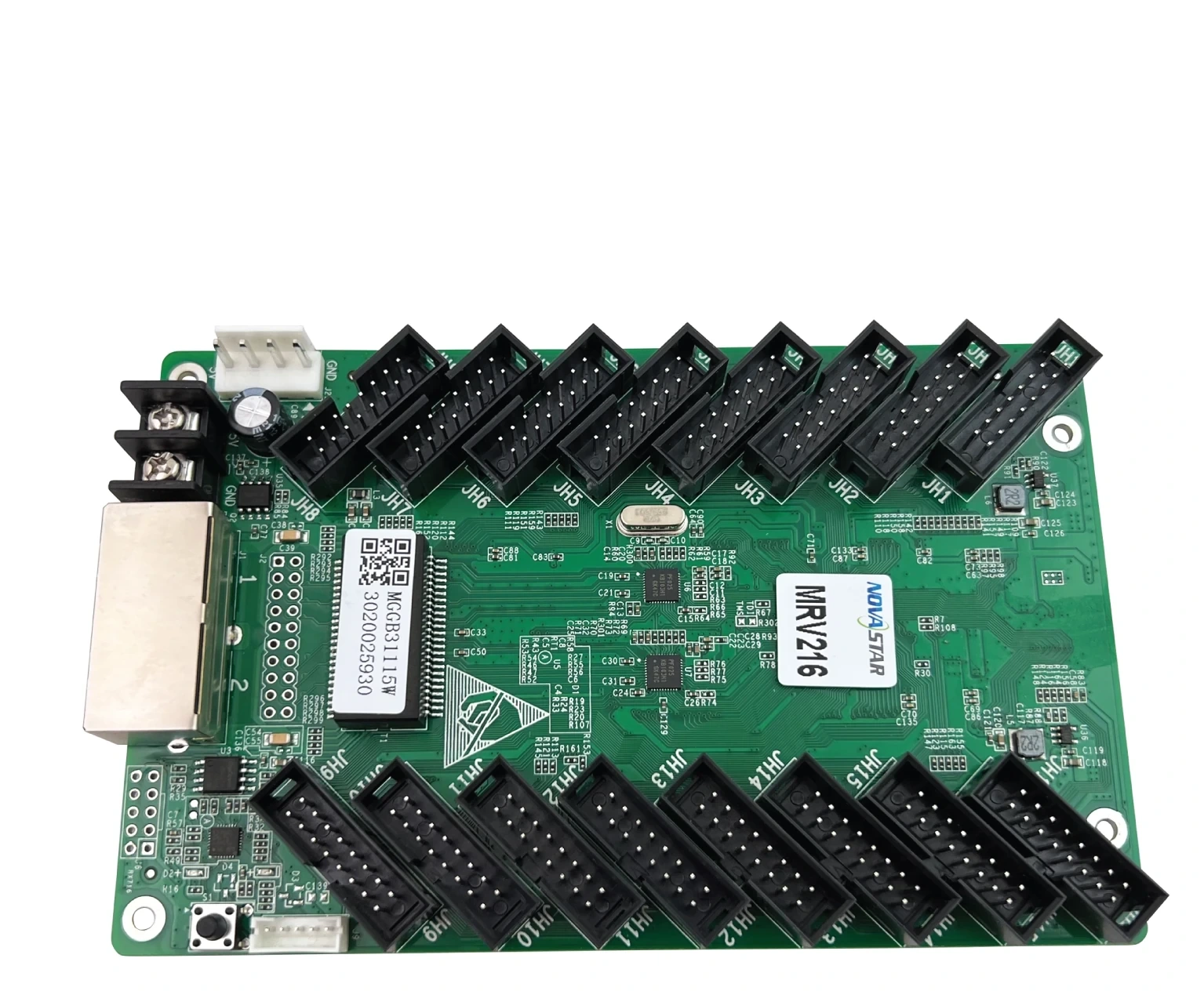
What is the NovaStar MRV216 receiving card?
The NovaStar MRV216 is the receiving card inside an LED cabinet with a high number of HUB75E module connections. It accepts the cabinet’s assigned image data from the controller or the previous cabinet, then sends the right pixel signals to the connected LED modules. It is most useful in a repair, expansion or cabinet build where the module layout calls for its 16 HUB75E connectors and the card count has been planned around the actual driver IC.
A failed card is only one part of the decision. The replacement also has to match the cabinet’s hub-board arrangement, module wiring and saved configuration. Get those right first, and the repaired cabinet can return to the wall looking and behaving like its neighbours rather than becoming the one panel everyone notices.
MRV216 key features
Correct a visible cabinet seam, not just a failed part
The MRV216 supports brightness calibration and immediate adjustment of dark or bright lines caused where modules and cabinets meet. That matters after a repair: a cabinet can light up and still stand out from the rest of the screen. With the matching calibration data and compatible NovaStar tools, the card gives the technician a way to restore a more even image.
Find the affected cabinet before opening the wall
Mapping can show the receiving-card number and Ethernet-port information on the cabinets. Temperature, voltage and Ethernet bit errors can also be checked through the card. On a long LED wall, those details help narrow a problem to a cable run or cabinet position before panels are removed at random.
Protect an image path designed for backup
The MRV216 supports loop backup when the controller and cabling have been built as a main-and-backup path. It also keeps two program copies on the card and allows firmware readback. These are recovery tools for a compatible system; replacing one receiving card does not add backup wiring to a cabinet that was never designed for it.
3D and RGB gamma adjustment need matching control equipment
The card can participate in 3D output with a sending card that supports 3D. Individual red, green and blue gamma adjustment likewise requires NovaLCT 5.2.0 or later and a sending card that supports the function. For a rental or production screen, confirm the whole control path before promising those image controls to an operator.
NovaStar MRV216 specifications
The two load rows below are the important ones for card count. The same cabinet resolution can need different treatment when it uses common-driver rather than PWM driver ICs.
| Maximum load with PWM ICs | 512 × 384 pixels at 60 Hz |
|---|---|
| Maximum load with common ICs | 384 × 384 pixels at 60 Hz |
| Software condition | NovaLCT V5.3.0 or later for the documented maximum load |
| Module connections | 16 × HUB75E |
| Parallel module data | Up to 32 RGB groups |
| Input voltage | DC 3.8 V to 5.5 V |
| Rated current / power | 0.5 A / 2.5 W |
| Dimensions | 145.6 × 91.5 × 18.4 mm |
| Operating environment | −20°C to +70°C; 10% to 90% RH, non-condensing |
MRV216 load capacity and 16-HUB75E cabinet fit
Start with the module driver IC, then calculate the card count. A PWM cabinet can use the documented 512 by 384 maximum at 60 Hz. A common-driver cabinet reaches 384 by 384 at 60 Hz. If the finished cabinet exceeds the applicable row, add another card or redesign the module assignment. A larger headline number from another receiving card does not make it compatible with this cabinet.
| Check before ordering | Why it changes the decision | Useful evidence |
|---|---|---|
| PWM or common-driver IC | It changes the documented maximum from 512 × 384 to 384 × 384. | Module or cabinet specification, not a visual guess. |
| 16 HUB75E module path | The card must mate with the cabinet’s hub-board and ribbon layout. | Hub-board part number and a clear front-and-back photo. |
| 32 RGB groups | Pixel count alone cannot prove the module data path fits. | Cabinet drawing or module-maker data. |
| NovaLCT version | The published maximum requires NovaLCT V5.3.0 or later. | Configuration computer and current cabinet record. |
This is why a resolution-only replacement often goes wrong. Two cabinets may have the same physical dimensions but use different driver electronics, cable paths or hub boards. A complete cabinet match avoids buying a card that can power on but cannot display the image correctly.
MRV216 repair, calibration and backup paths
Before removing a working MRV216, use NovaLCT to read back the receiving-card program and the cabinet configuration. Keep both files with the cabinet record. The program tells the card how to work with the electronics; the configuration describes the scan, wiring and pixel map. One file does not replace the other.
After the physical match is confirmed, restore and inspect one cabinet before changing the rest of the wall. If it is scrambled, mirrored or noticeably brighter, stop and review the configuration and calibration data before trying a different card. If the screen has a loop-backup path, check that both its main and backup Ethernet routes were connected as designed; the card cannot repair a missing cable path on its own.
MRV216 replacement compatibility
An exact MRV216 spare is normally the lowest-risk option for a working MRV216 cabinet. Before ordering, compare the printed model, 16-HUB75E interface, board size, power connection and saved files. If the old card has already failed, a photo of the card and hub board, the cabinet model and the number of replacements needed are more useful than the wall’s pixel pitch alone.
When a different receiving-card model is being considered, treat it as a cabinet review rather than a quick upgrade. The connector layout, module data groups, driver IC, controller support and configuration files all have to remain compatible. Send those details through our receiving-card compatibility request before committing to a multi-card order.
MRV216 vs MRV266 and MRV416
These models should not be ranked only by their maximum capacity. The cabinet interface and the established configuration come first. The table keeps the comparison focused on what a buyer should confirm rather than suggesting a card-family upgrade that may not physically fit.
| Model | Use it when | Before changing cards |
|---|---|---|
| MRV216 | You are repairing or building a cabinet designed around 16 HUB75E connections and the MRV216 load conditions. | Confirm PWM/common-driver IC type, 32-group data path and saved files. |
| MRV266 | You are reviewing a cabinet that is specifically marked or documented for MRV266. | Do not move an MRV216 configuration over until hub board, modules, card outline and manufacturer files are verified. |
| MRV416 | You are reviewing a cabinet designed for MRV416 and its own documented fit. | A similar capacity row does not prove compatible connectors, data path or cabinet configuration. |
MRV216 datasheet, firmware and NovaLCT
The MRV216 datasheet is the source for load conditions, dimensions and interface facts. NovaLCT is used to read back and restore a working cabinet record. We have not verified a public file that can safely be labelled as exact MRV216 firmware, so the current official download center is provided only as a hardware-match route, not as a blanket update recommendation.
NovaStar MRV216 FAQ
What does the MRV216 receiving card do?
The MRV216 sits inside a compatible LED cabinet. It receives the image data assigned by the controller and sends the cabinet’s pixel data to the LED modules through 16 HUB75E connections.
What is the MRV216 maximum load?
With PWM driver ICs, the documented maximum is 512 by 384 pixels at 60 Hz. With common-driver ICs, it is 384 by 384 pixels at 60 Hz. NovaLCT V5.3.0 or later is required for the published maximum.
Why does the driver IC change the MRV216 card count?
The official capacity differs between PWM and common-driver ICs. Confirm the module driver IC before treating the 512 by 384 figure as a usable planning limit.
Can an MRV216 replace another receiving card?
Not automatically. Compare the model label, 16-HUB75E interface, board fit, module data path, power connection and saved configuration before changing card families.
Does MRV216 support loop backup?
It supports loop backup when the controller and Ethernet cables are installed as a main-and-backup path. A replacement card does not create redundancy without that designed wiring.
What should I save before replacing an MRV216?
Use NovaLCT to save the receiving-card program and cabinet configuration from a working cabinet. Keep both because they serve different purposes in restoring the screen.
Does MRV216 support 3D output?
It can support 3D output with a sending card that supports 3D. Confirm the controller and entire display path before relying on 3D for an event or installation.
Can the MRV216 help find a faulty cabinet?
Mapping can display the card number and Ethernet-port information. The card can also report temperature, voltage and Ethernet bit errors, which helps narrow the inspection to a cabinet or cable path.
Where can I get MRV216 firmware?
No current public file has been verified as an exact MRV216 firmware package. Keep the working program first and check NovaStar’s official download center only after the card hardware and module chips are confirmed.
What should I send for an MRV216 compatibility check?
Send clear photos of the old card and hub board, the cabinet model, module driver IC if known, the number of cards needed and any saved configuration through our compatibility request form.
Reviews
There are no reviews yet.