
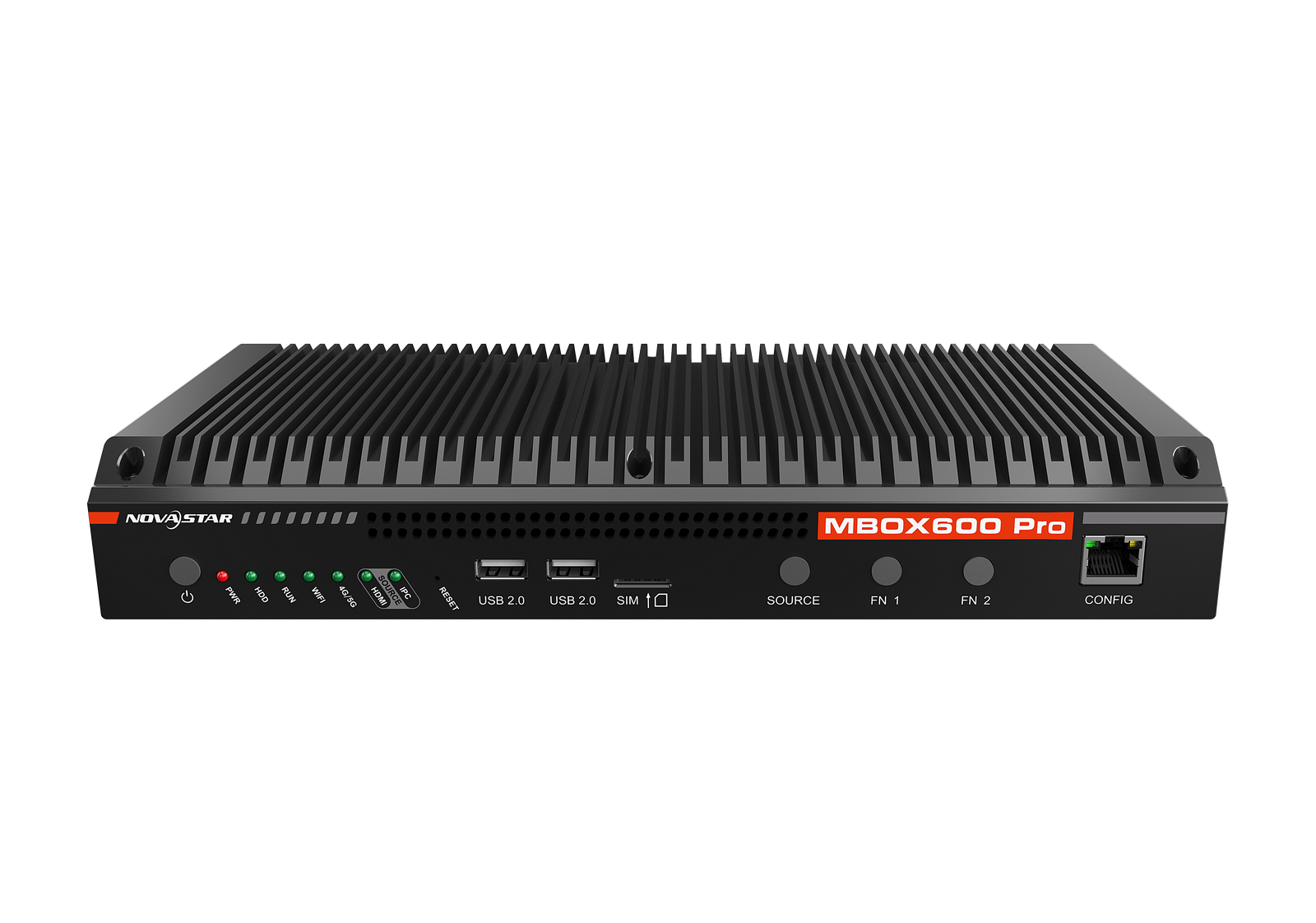
What is the NovaStar MBOX600 Pro?
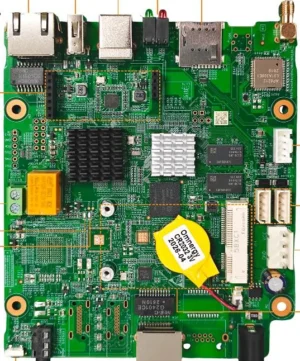
The NovaStar MBOX600 Pro is an industrial computer and an LED screen driver in the same box: an Intel N97 processor running Windows or Linux, with four Gigabit outputs that drive up to 2,600,000 pixels of screen. It is managed through a web page rather than a desktop application.
Order one when your screen has to be watched and reported on, not just played to. Outdoor advertising sites, transport displays, and any estate where somebody upstream wants status data from every screen in a standard format.
You would choose it over a player because you can run your own software on it. A scheduling client, a data feed, a proof-of-play agent, a piece of code somebody in your business wrote: all of them install here, on a normal operating system, next to the screen driving.
NovaStar MBOX600 Pro key features
Your own software runs on it
This is a four-core Intel machine with a solid-state drive and a real operating system. Anything you would install on a small Windows or Linux PC installs here. No media player will do that at any price.
The screen driving happens underneath. Your application never has to know anything about cabinets, cable runs or receiving cards.
Screens you never visit can report on themselves
The controller speaks SNMP, the same language your network monitoring already uses. Screen status joins the alerts you get from your switches and servers, instead of sitting in yet another dashboard.
On an unattended advertising site that is the difference between an alert at 6am and a phone call from your client at 9. A black screen you already know about costs a visit. One you hear about second-hand costs the account.
It can reach a network that does not exist yet
Two Gigabit network ports are fitted, one for communication and one for remote management. Wireless and a SIM slot sit alongside them. The mobile module is bought separately, so add it to the order if the site has no cable.
On a roadside site with no wired connection, that is what makes remote management possible at all.
NovaStar MBOX600 Pro specifications
Check the memory and storage rows against whatever you have been quoted. NovaStar builds this model in more than one configuration, and the difference does not show on the outside of the box.
| Screen capacity | 2,600,000 pixels across four Gigabit outputs, scaled or unscaled |
|---|---|
| Output sizing range | 64 to 4096 pixels wide, 64 to 1920 pixels high |
| Live picture input | 1x HDMI 1.3, 800×600 to 2048×1152 at 60 Hz, HDCP 1.4, no interlaced sources |
| Monitor output | 1x HDMI 1.3 |
| Computer | Intel N97, 4 cores and 4 threads, up to 3.6 GHz, 12 W thermal design power |
| Memory and storage | 4 GB or 8 GB of RAM; a 128 GB or 256 GB solid-state drive |
| Operating system | Windows 10, Windows 11 or Linux, depending on the build ordered |
| Network ports | 2x Gigabit, one for communication and one for remote management; a separate debug port on the front |
| Peripheral ports | 2x USB 2.0 and 2x USB 3.0 |
| Sensor sockets | 2x, for light sensors |
| Wireless and mobile | Wi-Fi fitted; SIM slot and antenna present, mobile module bought separately |
| Monitoring | SNMP reporting, managed through a web application |
| Power in | DC 12 V 3 A from the supplied adapter; 34 W rated |
| Size and weight | 319.0 mm × 135.3 mm × 45.5 mm; 1,778.0 g |
| Wall fixing | Two screws of at least M4×12, into a surface rated for 10 kg |
| Operating range | −20°C to +60°C, 0% to 80% RH, non-condensing |
| Approvals listed | UL, CE, RoHS, FCC, IC, RCM, SRRC, CB; Class A equipment |
| In the carton | 2 antennas, power adapter, mains lead, mounting brackets and screws, certificate |
Figures come from NovaStar’s MBOX600 Pro Industrial Controller Specifications V1.0.2, dated 2 September 2024.
Which build ships, and how to specify it
NovaStar prints the build into the model code, so the part number tells you what is inside. Two figures move: the memory and the drive.
Every version listed for the American market is the larger one, at 8 GB of memory and a 256 GB drive. The smaller build, 4 GB and 128 GB, appears only against the Chinese-standard listing.
The operating system is the choice you actually make. Windows 10, Windows 11 and Linux all appear on the American-standard list. Settle it early, because the software you plan to run decides the answer, and a rebuild after delivery is not a five-minute job.
Tell us which operating system your application needs when you ask for a quote, and we will confirm the exact build, its memory and its drive in writing before anything is invoiced.
Connectors on the panel that are not live yet
Five things on this chassis are present in the metal and marked by NovaStar as coming in a future update. Better to know now than after you have drawn them into a design and had to rework it.
The two relay contacts are the ones people notice. They are specified at 30 V DC and 3 A and are meant for switching the power to connected equipment, and the datasheet marks them as not yet implemented.
A serial port and a general input and output connector carry the same note, and so do the two custom buttons on the front. If your plan has the controller cutting power to the cabinets overnight, fit a multifunction card on the screen side instead. Treat these as a bonus if they arrive.
Everything else on the panel works as printed: the network ports, the USB sockets, the HDMI in and out, the two sensor sockets and the four screen outputs.
This controller, or a Taurus player?
A Taurus player and this controller both put stored content on your screen with nothing else in the rack. What separates them is what else you can make them do.
| Route | MBOX600 Pro · TB60 player |
|---|---|
| Operating system | Windows or Linux · Android |
| Runs your own software | yes · no |
| Standard network monitoring | SNMP · NovaStar cloud platform |
| Screen capacity | 2,600,000 · 2,300,000 |
| Screen outputs | 4 · 4 |
| Weight | 1,778.0 g · 1,230.4 g |
| Price | quoted per project · $528 |
Order the MBOX600 Pro when the screen has to run software you choose, or report into monitoring you already operate. Those two are the whole case for it.
Order the TB60 when the job is publishing content to a screen and watching it from NovaStar’s own platform. It costs a fraction as much and does that job as well.
MBOX600 Pro datasheet, manual and release notes
Read the user manual before you commit to running your own application on it. The web management interface and the operating system are two separate layers, and the manual sets out which one does what.
Note the equipment class while you are specifying. NovaStar marks this as Class A, meaning it is built for commercial and industrial settings. In a residential building it may interfere with radio reception, and sorting that out falls to the operator.
NovaStar MBOX600 Pro FAQ
Is the MBOX600 Pro a media player?
No. It is an industrial computer with LED screen driving built in, running Windows or Linux rather than Android, and managed through a web page. That is why your own software can run on it.
How much memory and storage does it come with?
Every version listed for the American market has 8 GB of memory and a 256 GB drive. The 4 GB and 128 GB build appears only against the Chinese-standard listing. Tell us which operating system you need and we will confirm the exact build before invoicing.
Do the relay contacts work?
No, not yet. NovaStar marks the two relays, the serial port, the general input and output connector and the two custom buttons as coming in a future update. Use a multifunction card on the screen side if you need scheduled power switching now.
How big a screen will it drive?
2,600,000 pixels across four Gigabit outputs, with the picture between 64 and 4096 pixels wide and 64 and 1920 high.
Which operating systems are available?
Windows 10, Windows 11 and Linux all appear on NovaStar’s American-standard list. Choose according to the application you intend to run, and specify it when you ask for a quote.
Can it be monitored from our existing systems?
Yes. It supports SNMP, so screen status can join the same alerting as your switches and servers rather than living in a separate dashboard.
Does it take a live HDMI source?
Yes, one input from 800×600 up to 2048×1152 at 60 Hz, with a front-panel button to switch between it and the internal source. Interlaced sources are not accepted.
Can it be used in a residential building?
It is Class A equipment, built for commercial and industrial settings. NovaStar notes that in a domestic environment it may cause radio interference, and that dealing with that falls to the operator.
What warranty covers an MBOX600 Pro?
Three years of serial-tracked manufacturer coverage, because these controllers come through our authorized US NovaStar channel.
Can I get volume pricing or Net 30 terms?
Yes. Send the model and the quantity and we will quote. Purchase orders and Net 30 terms may be available for approved schools, government buyers, venues and established integrators.
How do I order an MBOX600 Pro?
This controller is quoted per project rather than listed at a fixed price. Send the quantity, the operating system you need and your screen resolution. We ship from Florida.
Reviews
There are no reviews yet.