
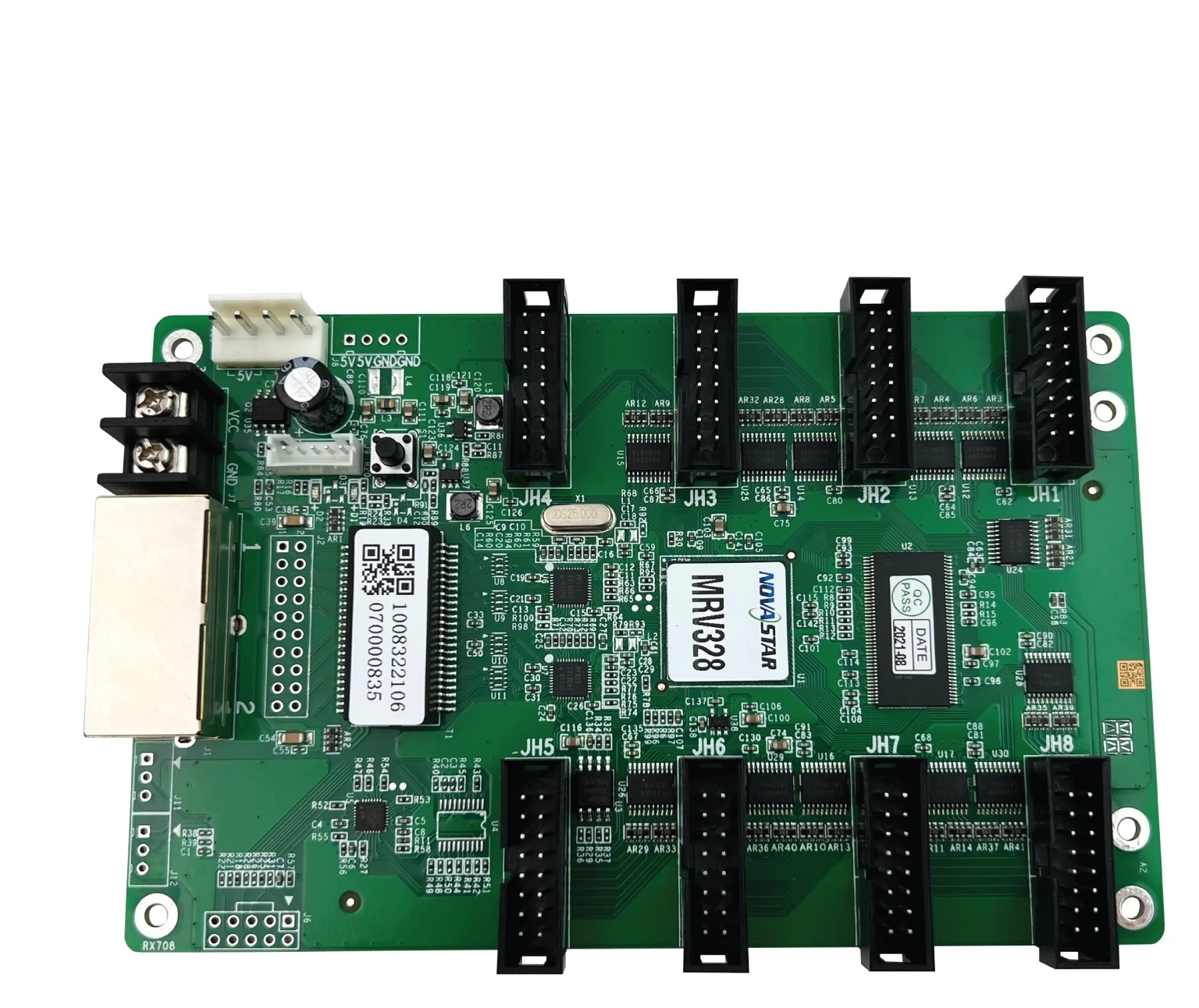
What is the NovaStar MRV328 receiving card?
The NovaStar MRV328 is a full-size LED receiving card for a compatible cabinet built around standard HUB75E module connections. It receives the image data sent down the Ethernet chain, then passes the assigned pixel data to the cabinet’s LED modules. It is not a sending card or a video processor; it is the board that makes one cabinet display its part of the finished image.
That role makes the MRV328 a cabinet-match purchase, especially on an existing wall. Its eight HUB75E ports, support for up to 1/32 scan and 16 parallel RGB groups describe the kind of module wiring it can serve. A card with a higher pixel number can still be the wrong spare if its hub layout, scan or configuration does not match the cabinet in front of you.
MRV328 key features
Cleaner seams after a module repair
When one replacement module is brighter, cooler or warmer than the cabinets around it, the wall can show a visible patch even though every LED works. The MRV328 supports pixel-level brightness and chroma calibration, plus dark- and bright-line adjustment. With the right calibration data and configuration, those tools give a matched cabinet a way to blend back into the image instead of leaving a distracting seam.
A practical first check at the cabinet
The card can monitor its temperature and voltage, and its Ethernet bit-error function can help separate a cable issue from a card or module issue. It also supports a stored image during start-up, video loss or a disconnected Ethernet line. These features do not repair the upstream signal, but they make a failed cabinet easier to diagnose before parts are replaced at random.
Backup only when the whole signal route is designed for it
MRV328 supports loop backup when the sender and cabinet chain are wired as a primary and backup path. The benefit is simple: a fault at one point in the line does not have to stop the rest of the planned loop. A spare card alone does not create that protection; the cabinet wiring and controller path have to be in place first.
3D is a system feature, not a card-only feature
The MRV328 can display 3D content when the sending card also supports 3D. If 3D is part of the intended wall, verify the source, sender and cabinet configuration together rather than expecting the receiving card to add the workflow by itself.
NovaStar MRV328 specifications
These values identify the card and set the first cabinet-fit boundary. The next section explains how the scan and RGB-group limits change that initial capacity figure.
| Maximum load | 256 × 256 pixels at 60 Hz with PWM driver ICs |
|---|---|
| Scan support | Up to 1/32 scan |
| Module interface | 8 standard HUB75E connectors; up to 16 parallel RGB groups |
| Ethernet | 2 × Gigabit Ethernet ports; either port can be used as input or output |
| Input voltage | DC 3.8 V to 5.5 V |
| Rated current / power | 0.5 A / 2.5 W |
| Dimensions | 145.6 × 95.5 × 18.3 mm |
| Operating environment | −20°C to +70°C; 10% to 90% RH, non-condensing |
| Certification | RoHS and EMC Class A |
MRV328 1/32 scan, 16 RGB groups and 256 × 256 cabinet capacity
The 256 × 256 figure is a maximum for PWM driver ICs, not a universal answer for every cabinet that happens to have fewer pixels. Start with the cabinet’s scan and its 16-group RGB data requirement. Then confirm that each module output has the correct wiring order. This avoids choosing a card by the total pixel count while overlooking the module data path.
| Cabinet check | What the MRV328 figure tells you | Next decision |
|---|---|---|
| 256 × 256 PWM cabinet | At the documented one-card resolution ceiling. | Confirm the 1/32-or-lower scan, 16-group limit and the cabinet wiring before treating it as a one-card design. |
| 320 × 160 cabinet | Its total pixel count is below the headline limit. | It can still need a different plan if the scan, RGB-group count or hub wiring does not match. |
| 256 × 320 cabinet | It exceeds the documented 256-pixel height on one card. | Use more than one receiving card or redesign the cabinet data layout; do not rely on the total-pixel calculation alone. |
NovaStar does not publish a separate 10-bit or 12-bit capacity rule for MRV328 in the current specifications. Do not borrow one from a newer Armor or COEX card. If a source workflow needs a specific bit depth, confirm the whole cabinet and control path before the card count is finalized.
MRV328 installation: eight HUB75E ports and a first-cabinet test
Install the MRV328 as part of the cabinet, not as an isolated board. The eight HUB75E connectors go to the modules according to the cabinet maker’s data map. The two Gigabit Ethernet ports carry the controller feed and the next cabinet in the chain; either port can act as the input or output.
A port photograph is not a substitute for the cabinet wiring map. The module order determines how the image is scanned across the panel, so a cable in the wrong position can produce a scrambled picture even when the card itself is healthy.
- With power off, confirm the MRV328 label, 3.8–5.5 V supply, module connector orientation and cabinet wiring diagram.
- Seat every HUB75E ribbon as the cabinet map specifies, then connect the Ethernet chain and power path.
- Apply the known-good cabinet configuration to one card first. Check a normal image before copying the same setup to more cabinets.
- With the Ethernet cable disconnected, press the self-test button twice to display the card’s test pattern. A visible pattern helps isolate the local power, card and module path; it does not prove that the cabinet file or incoming video is correct.
If the test pattern works but the live picture is scrambled, mirrored or incomplete, stop swapping cards. Recheck the original configuration, module data order and Ethernet mapping first. Those are more common causes of a wrong-looking image than a failed receiver on a newly replaced cabinet.
Replacing an MRV328 without losing the cabinet map
Before removing a working MRV328, use NovaLCT to read back the receiving-card configuration parameters and save them with the cabinet records. For firmware-program readback and Ethernet bit-error checks, NovaStar specifies NovaLCT V5.2.0 or later. Keep the saved configuration with a photo of the card label, the module label and the cabinet location.
The configuration holds the scan, module wiring and pixel map that make this cabinet display correctly. Firmware is the program running on the receiving card. They serve different purposes, so one cannot replace the other. A configuration from a similar-looking screen can send data in the wrong order, while a newer firmware package can be intended for a different driver-IC combination.
For a replacement, start with an exact MRV328 and the saved configuration. If the exact card is unavailable, do not select a different model from its resolution alone. Compare the HUB75E count, physical board fit, power rail, scan, RGB groups and the cabinet’s proven configuration as one package.
MRV328 datasheet, firmware and NovaLCT
Use the datasheet to verify the hardware boundary, then use NovaLCT for the cabinet readback and configuration work. NovaStar’s official download center lists an MRV328 firmware entry as V4.5.4.0. Match the existing card and module electronics before using it; a version number alone is not a reason to update a stable wall.
NovaStar MRV328 FAQ
What does the MRV328 receiving card do?
It sits inside a compatible LED cabinet, receives mapped image data from the controller chain and sends the correct pixel data to the modules connected to that cabinet.
How many pixels can one MRV328 load?
NovaStar documents up to 256 by 256 pixels at 60 Hz with PWM driver ICs. The 1/32 scan limit, 16 parallel RGB groups and cabinet wiring still have to fit.
How many module ports does an MRV328 have?
It has eight standard HUB75E connectors. They must follow the cabinet maker’s module data map; eight connectors do not make every eight-module cabinet automatically compatible.
Can either MRV328 Ethernet port be used as the input?
Yes. NovaStar documents either Gigabit Ethernet port as an input or output, allowing the card to sit in the controller-to-cabinet chain. Follow the planned chain and loop wiring for the actual wall.
How do I test an MRV328 after the Ethernet cable is disconnected?
Press the self-test button twice to show a test pattern, then press it again to switch the pattern. This checks the local card-and-module response; it does not validate the incoming video or cabinet configuration.
What should I save before replacing an MRV328?
Save the working receiving-card configuration in NovaLCT, along with the card and module labels. Firmware program readback is also available with NovaLCT V5.2.0 or later.
Can I load an MRV328 configuration from another screen?
Only when the module, scan, wiring and cabinet layout are truly the same. A similar resolution is not enough proof, because the saved configuration carries the panel’s data order and pixel map.
Should I update MRV328 firmware before installing a replacement?
Not automatically. NovaStar’s download center lists MRV328 V4.5.4.0, but the package must match the card and module electronics. Keep the proven configuration and confirm the hardware before changing a stable wall.
Does MRV328 support 3D?
It supports 3D output when the sending card supports the same feature. Confirm the entire source-to-screen path before specifying the wall for 3D content.
Can I request MRV328 project pricing or a spare-card quote?
Yes. Send the cabinet count, required spare quantity, card and module labels, delivery date and a photo of the hub wiring. We can confirm the matching path before quoting the order.
Reviews
There are no reviews yet.