
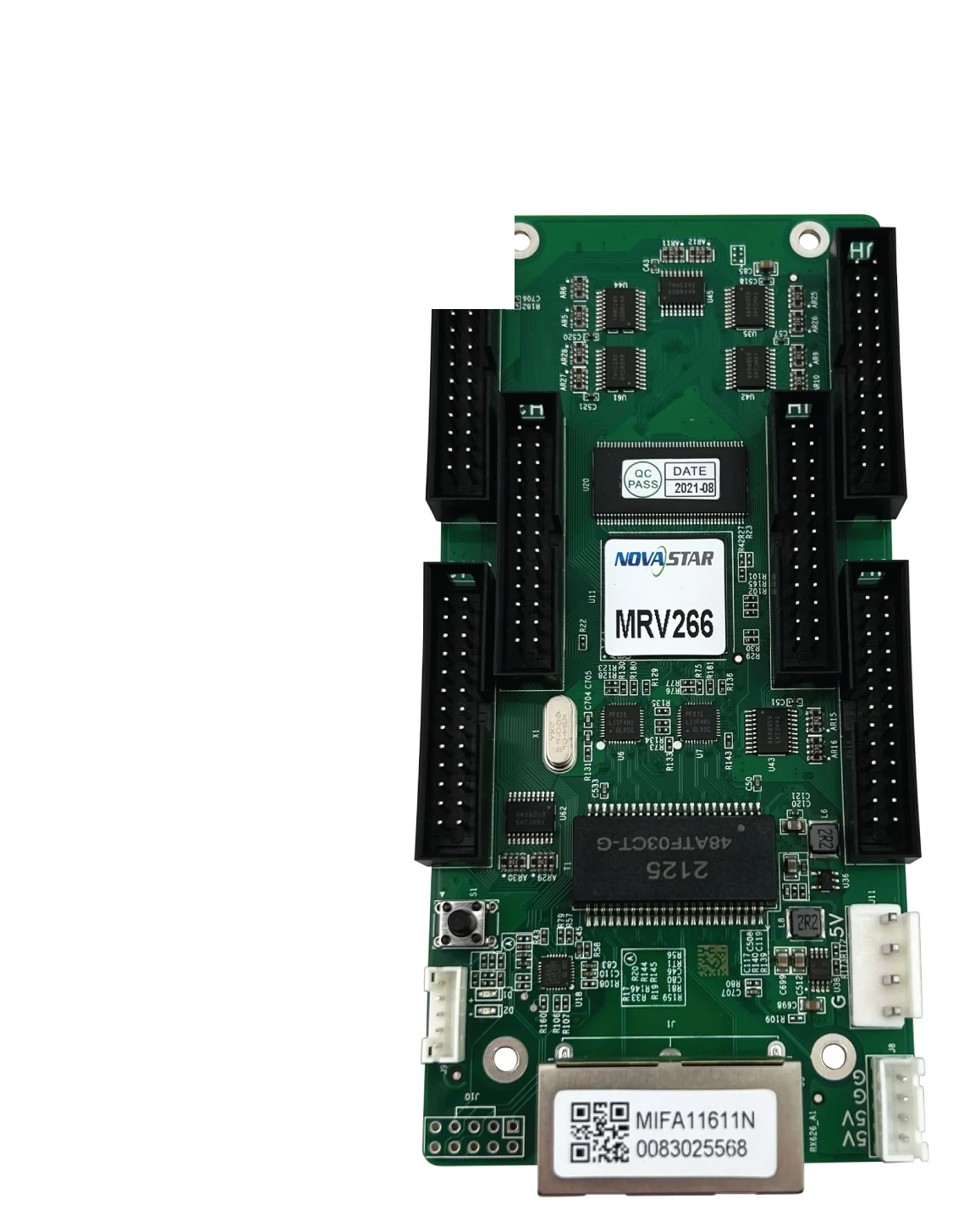
What is the NovaStar MRV266 receiving card?
The NovaStar MRV266 is a receiving card for fine-pitch LED cabinets that use six HUB320 26-pin module connections. It receives the portion of the image assigned by the controller and sends it to the cabinet’s modules. For a replacement buyer, the six HUB320 connections are more important than the card’s name or headline pixel count: they determine whether the card can join the cabinet’s module path at all.
The MRV266 suits a cabinet already designed around its small-pitch interface, or a new cabinet that has been planned around the same card, hub board and modules. It is not a universal receiving-card upgrade. A card with a similar maximum resolution can still use the wrong connector type, board outline or configuration for the cabinet.
MRV266 key features
Restore an even fine-pitch image after a repair
Fine-pitch LED walls make small brightness and colour differences easy to see. The MRV266 supports brightness calibration, quick dark-or-bright-line adjustment and individual RGB gamma adjustment with compatible NovaStar equipment. Those controls give a technician a way to bring a repaired cabinet back into the wall more cleanly; they do not make a mismatched module or incorrect cabinet map disappear.
Find the cabinet before a small fault spreads through the service call
Mapping can show the card number and Ethernet-port information on a cabinet. The MRV266 can also report card temperature, voltage and Ethernet bit errors, while a compatible cabinet LCD can show operating information. This changes a long-wall service call from cable tracing by guesswork into a more focused check of one cabinet or signal route.
Keep recovery data with the cabinet
The card supports readback of its firmware program and configuration parameters, dual stored program copies, and a factory copy of configuration parameters. These functions are most useful when the known-good files are saved before a fault or update. They are a recovery path, not a reason to load a file from a similar-looking screen.
Use 3D and loop backup only with the rest of the system
The MRV266 can take part in 3D output with a sending card that supports 3D. It can also support loop backup when the controller and Ethernet routing have been installed as a main-and-backup loop. Both depend on the wider screen design; installing this card alone does not add either capability.
NovaStar MRV266 specifications
These figures are from NovaStar MRV266 Receiving Card Specifications V1.1.3. Together, they identify a fine-pitch HUB320 cabinet and provide the first reliable card-count check.
| Published maximum load | 512 × 384 pixels at 60 Hz with PWM driver ICs |
|---|---|
| Software condition | NovaLCT V5.3.0 or later for the published maximum |
| Module connections | 6 × HUB320, 26-pin |
| Parallel module data | Up to 24 RGB groups |
| Input voltage | DC 3.8 V to 5.5 V |
| Rated current / power | 0.5 A / 2.5 W |
| Dimensions | 138.9 × 66.4 × 17.1 mm |
| Operating environment | −20°C to +70°C; 10% to 90% RH, non-condensing |
| Certification | RoHS |
MRV266 512 × 384 capacity and six-HUB320 cabinet fit
Current official V1.1.3 documentation lists the MRV266 at up to 512 by 384 pixels at 60 Hz with PWM driver ICs. Some old reseller listings still show 512 by 256. Do not plan from that copied lower number or mix it with another card’s limits. Confirm the cabinet’s PWM driver IC, then use the V1.1.3 figure as the first card-count ceiling.
Capacity is only half of the fit. The MRV266 uses six 26-pin HUB320 connectors and supports up to 24 parallel RGB groups. A HUB75E receiving card may appear to offer a comparable number of pixels, yet it cannot simply take over a HUB320 cabinet. The hub board, ribbon layout and module data path must all agree with the MRV266 before it is ordered.
| Before ordering | What to check | Why it matters |
|---|---|---|
| Driver IC | PWM driver IC, confirmed from the module or cabinet record | The 512 × 384 @ 60 Hz maximum is specifically published for PWM ICs. |
| Hub board | Six HUB320 26-pin connections and connector positions | Physical card fit does not prove it can connect to the modules. |
| Data path | Up to 24 parallel RGB groups | Pixel count cannot reveal whether the module signals match. |
| Configuration computer | NovaLCT V5.3.0 or later and a saved working record | It supports the published load and gives the replacement a reliable restore path. |
MRV266 cabinet LCD, mapping and service checks
When one cabinet is dark, too bright or intermittently loses data, start by identifying it. Mapping can show the card and port location on the display. The MRV266’s monitoring data can then point toward a voltage, temperature or Ethernet error instead of treating every cabinet as a likely culprit. If the cabinet has its matching LCD module, it can provide operating information at the cabinet itself.
Once the correct cabinet is isolated, save its files before replacing anything. Restore the matched configuration to one card, inspect the image, then continue only when the cabinet has the correct module order, brightness and colour. That sequence is slower than sending a generic file to every cabinet, but it prevents a single bad repair from creating a wall-wide configuration problem.
MRV266 replacement compatibility and saved files
For an existing MRV266 cabinet, begin with the exact printed MRV266 model and the six-HUB320 hub board. Before the old card is removed, use NovaLCT to read back both the receiving-card program and cabinet configuration. The program tells the card how to work with its electronics; the configuration stores the cabinet’s scan, wiring and pixel map. Keep both with the cabinet record.
If the original card has already failed, collect the old card photo, hub-board photo, cabinet model, module information and required quantity before looking for a substitute. Send those details in a MRV266 compatibility request. They are the evidence needed to confirm a replacement, while resolution or pixel pitch alone is not.
MRV266 vs MRV216 and other receiving cards
The main divide is the cabinet interface. MRV266 is a six-HUB320 fine-pitch card; MRV216 uses 16 HUB75E connections. The different connector families mean that neither card should be treated as a plug-in upgrade for the other, even when their capacity figures look familiar.
| Model | Choose it when | Do not assume |
|---|---|---|
| MRV266 | The cabinet is built around six 26-pin HUB320 module connections and the documented PWM load. | That a HUB75E card can mate with its hub board or reuse its cabinet file. |
| MRV216 | The cabinet is built around 16 HUB75E connections and the MRV216 data path. | That its similar service features make it a physical MRV266 replacement. |
| Another receiving-card family | A complete cabinet redesign has been specified around that family. | That a capacity number alone proves module, hub board or configuration compatibility. |
MRV266 datasheet, firmware and NovaLCT
Use the MRV266 datasheet for the official load condition, interface and dimensions. NovaLCT is where a working cabinet’s program and configuration are saved and restored. No exact public MRV266 firmware package was verified during this review, so the official download center is a hardware-match route rather than a link to a guessed update.
NovaStar MRV266 FAQ
What does the MRV266 receiving card do?
The MRV266 receives the image data assigned to a compatible LED cabinet and sends it to the modules through six 26-pin HUB320 connections.
What is the MRV266 maximum load?
NovaStar’s current V1.1.3 specification lists up to 512 by 384 pixels at 60 Hz with PWM driver ICs, with NovaLCT V5.3.0 or later.
Why do some MRV266 listings show 512 by 256?
Older reseller listings have copied that lower figure. Use the official V1.1.3 MRV266 specifications and confirm that the cabinet uses PWM driver ICs before planning from 512 by 384.
Can an MRV216 replace an MRV266?
Not as a direct swap. MRV266 uses six HUB320 26-pin connections, while MRV216 uses a different HUB75E interface. Confirm the hub board, modules and cabinet record before changing card families.
What should I save before replacing an MRV266?
Save the working receiving-card program and cabinet configuration with NovaLCT. The files preserve different parts of the cabinet’s operation, so keep both.
Can MRV266 help identify a fault?
It supports mapping, temperature and voltage monitoring, and Ethernet bit-error detection. Those checks can help identify the affected cabinet or signal path before parts are replaced.
Does MRV266 support 3D?
It can support 3D output with a sending card that supports 3D. Confirm the controller and display path before using it for a production requirement.
Does a new MRV266 add loop backup?
No. Loop backup requires the controller and main-and-backup Ethernet routing to be installed as a loop. A single replacement card cannot create the missing path.
Where can I download MRV266 firmware?
No exact public package has been verified for MRV266. Save the known-good files first, then use NovaStar’s official download center only after the hardware and module chips are confirmed.
What information helps confirm an MRV266 replacement?
Send an old-card photo, hub-board photo, cabinet model, module details if known, needed quantity and any saved configuration through our compatibility request form.
Reviews
There are no reviews yet.