
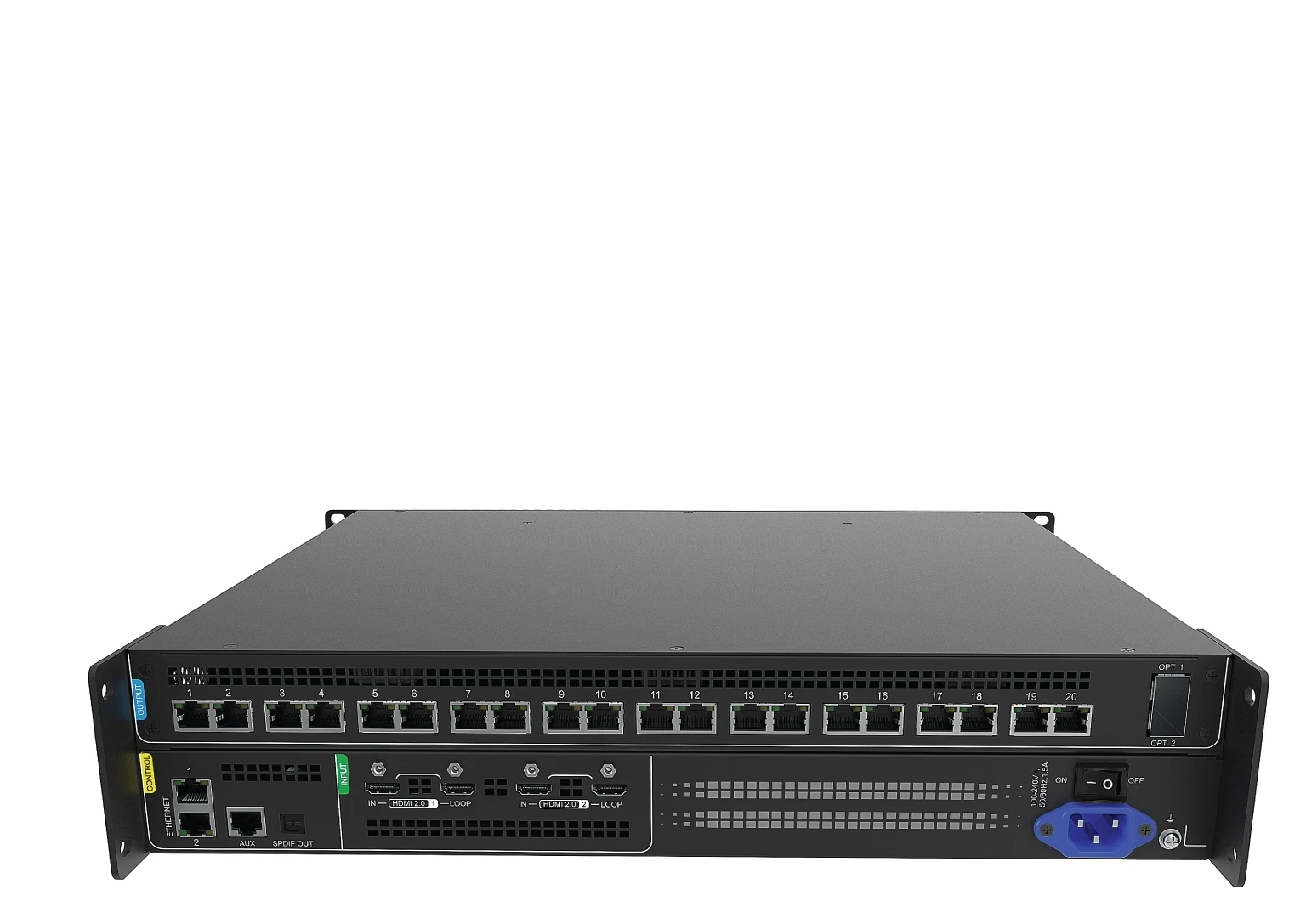
What is the NovaStar SP60 Pro for?
Choose the NovaStar SP60 Pro when the LED wall is built for dynamic sub-pixel, also called virtual-pixel, rendering. It combines video processing and LED control for that screen type; a conventional LED wall with an unrelated receiving-card design should be evaluated against a standard COEX controller instead.
| Planning point 1 | Designed for dynamic sub-pixel LED screens, not a generic conventional-wall replacement. |
|---|---|
| Planning point 2 | Two HDMI 2.0 inputs with loop output, 20 Gigabit Ethernet outputs, two 10G optical outputs and VMP control. |
| Planning point 3 | Confirm a compatible dynamic sub-pixel receiving card before configuration: A8s Pro, A10s Pro, MRV532, NV3210, BR624L or NS6323A. |
| Planning point 4 | Choose layout, bit depth and frame rate before mapping the 17.69M sub-pixel device total and each output port. |
NovaStar SP60 Pro key features for dynamic sub-pixel LED screens
For a sub-pixel screen, the useful combination is two HDMI 2.0 inputs with loop output, two layers, 20 Gigabit Ethernet outputs, two 10G optical groups and VMP control. The controller also supports Delta1, Delta3, Delta4 and RGGB layouts, so the feature set follows the module and receiving-card design rather than a generic port-count comparison.
NovaStar SP60 Pro specifications: HDMI inputs, layers and sub-pixel capacity
The SP60 Pro accepts two HDMI 2.0 inputs with loop output and supports one layer up to 8K×2K or two layers up to 4K×2K. Its maximum is 17.69M sub-pixels, not ordinary LED pixels; the usable load for each port and the device total changes with the selected layout, bit depth and refresh rate.
- HDMI source
- SP60 Pro
- Ethernet outputs or OPT 1/OPT 2 10G distribution groups
- dynamic-sub-pixel-compatible receiving cards
- sub-pixel LED cabinets
Can the NovaStar SP60 Pro drive your dynamic sub-pixel LED screen?
It can when the cabinet or module design and receiving card support the documented dynamic sub-pixel path. Confirm A8s Pro, A10s Pro, MRV532, NV3210, BR624L or NS6323A before configuration, then check the selected layout, bit depth, refresh rate, per-port map and 17.69M sub-pixel device total in VMP.
NovaStar SP60 Pro receiving-card compatibility and VMP configuration
The receiving card is part of the purchase decision, not a later software detail. Match the exact card and cabinet files in VMP, and keep the screen's Delta1, Delta3, Delta4 or RGGB layout beside the project record; a controller with 20 Ethernet ports is not automatically compatible with every NovaStar receiver.
SP60 Pro rendering modes, low latency and calibration in real installations
Use Standard as the general starting point, Video for moving-image playback and Document for dense text, presentations or PDF-style content. Send-only mode is documented at 0 frame, less than 1 ms, while all-in-one mode is one frame; low latency cannot be combined with 3D. Dynamic Booster requires A10s Pro and a named colorimeter, while full-grayscale calibration requires A8s Pro or A10s Pro plus a C3200 or CC60 camera.
NovaStar SP60 Pro Ethernet and 10G optical output mapping
Use the 20 Gigabit Ethernet outputs as the cabinet-side map, or use the two optical distribution groups for a remote route: OPT 1 carries Ethernet ports 1–10 and OPT 2 carries ports 11–20. Ethernet and optical outputs can be mixed, but when both associated paths are connected, optical has priority; these are distribution groups, not automatic redundant optical outputs.
NovaStar SP60 Pro vs conventional COEX controllers
Choose SP60 Pro for a confirmed dynamic sub-pixel screen and compatible receiving-card path. Choose a conventional COEX controller when the wall uses ordinary pixel mapping, then compare sources, layers, Ethernet or fiber topology and receiver support; selecting by 20-port count alone can put the wrong controller in the system.
NovaStar SP60 Pro Manual, PDF and VMP Software
Use the exact SP60 Pro datasheet for product limits and the VMP platform manual for software workflow. The manual card is labelled as a VMP manual because a verified SP60 Pro manual is not currently hosted on this site.
Direct PDF links: SP60 Pro V1.2.0 Datasheet PDF · VMP Vision Management Platform User Manual V1.5.0 PDF.
SP60 Pro setup and ordering FAQs
Can I use SP60 Pro with any NovaStar receiving card?
No. SP60 Pro needs a receiving card that supports dynamic sub-pixel rendering. The current official list names A8s Pro, A10s Pro, MRV532, NV3210, BR624L and NS6323A.
Is the 17.69M rating a normal LED-pixel capacity?
No. It is a maximum sub-pixel load. Choose the sub-pixel layout, bit depth and refresh rate first, then check both every port and the device total.
How do the two 10G ports map to the 20 Ethernet ports?
OPT 1 carries Ethernet ports 1–10 and OPT 2 carries ports 11–20. They are distribution groups, not two automatic redundant paths; when associated optical and Ethernet outputs are both connected, optical has priority.
Can I use low latency and 3D at the same time?
No. The official limitations table says low latency cannot be enabled simultaneously with 3D. In send-only mode the controller is documented at 0 frame, less than 1 ms, while all-in-one mode is documented at one frame.
Does Dynamic Booster work with every compatible receiving card?
No. Dynamic Booster requires A10s Pro and one of the named colorimeters for gamut and brightness correction. Full-grayscale calibration has its own A8s Pro/A10s Pro and camera requirements.
Does the SP60 Pro have two 8K layers?
No. It supports one layer up to 8K×2K, or two layers of 4K×2K. Plan the content composition around those documented limits.
SP60 Pro order check
Before requesting a quote, confirm the screen technology, receiving card, rendering layout, source plan and output map that the SP60 Pro will actually run:
- The LED modules/cabinets are a dynamic sub-pixel design and the receiving-card model is A8s Pro, A10s Pro, MRV532, NV3210, BR624L or NS6323A.
- The selected layout, bit depth, refresh rate and per-port map stay within the documented sub-pixel limits; 17.69M is not a conventional-pixel rating.
- The HDMI source modes, one-layer/two-layer composition and all-in-one versus send-only workflow are confirmed before the VMP project is built.
- The OPT 1/OPT 2 fiber groups, Ethernet ports, low-latency/3D choice and any Dynamic Booster or calibration hardware are written into the order plan.
Send us the screen layout, cabinet or module details, receiving-card model and source plan through our contact page. We can then confirm whether SP60 Pro is the right controller before you order.
Reviews
There are no reviews yet.