
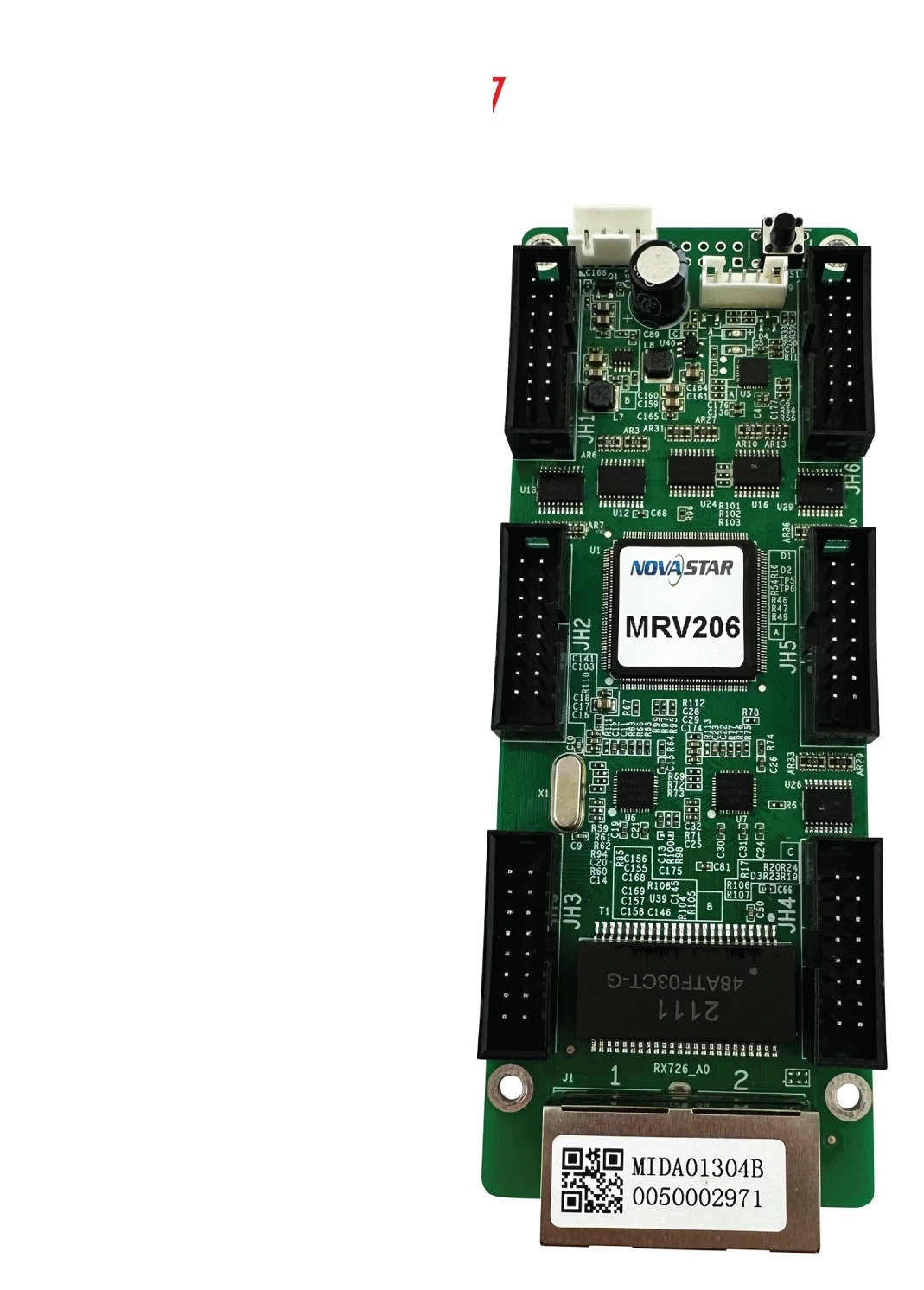
What is the NovaStar MRV206 receiving card?
The NovaStar MRV206 is a receiving card installed inside an LED cabinet. It receives screen data from a NovaStar controller or the previous cabinet, then drives the LED modules through the cabinet’s matching hub board or output interface.
Most MRV206 buyers are repairing a cabinet that already uses one. The safe order is an exact spare after the card label, cabinet connectors, power and saved configuration have been checked. A nearby MRV card with an appealing headline specification can still produce a black or scrambled cabinet if it does not match the existing design.
MRV206 key features
Exact cabinet identity
The MRV206 label identifies more than pixel capacity. The replacement has to match the hardware already inside the cabinet, including its hub or connector layout, power and saved configuration.
Configuration continuity
A saved working configuration shortens a replacement. Reading the old card before removal gives the installer a known cabinet map instead of rebuilding scan, wiring and pixel order from memory.
NovaStar MRV206 specifications
NovaStar no longer publishes an exact current MRV206 specification sheet in its public library. These are the facts that can be verified without borrowing figures from a different MRV card.
| Product type | LED receiving card |
|---|---|
| Verified firmware | NovaStar MRV206 V4.5.1.0 legacy package |
| Before ordering | Match the installed card label, cabinet interface, power and cabinet documentation |
| Not published here | Exact capacity, connector count and data-group limit; these need the cabinet’s original record |
Will the MRV206 fit your LED cabinet?
A safe MRV206 replacement matches the model printed on the old card, the cabinet interface, voltage and the saved configuration. Equal dimensions or equal headline capacity do not prove that another receiving card will work.
- Card label: confirm the complete MRV206 model and suffix.
- Cabinet interface: match the hub board, connectors, pinout and module data groups.
- Working files: save the receiving-card program and RCFGX cabinet file before removal.
- Power: verify the cabinet voltage and available power before the new card is connected.
Start with a clear photo of both sides of the old card and the hub board it plugs into. A replacement that fits the mounting holes can still be wrong if the cabinet uses a different module wiring pattern. The usual symptom is not a subtle quality issue: one cabinet can stay black, show repeated blocks, or light in the wrong order while the rest of the wall works.
If the old card still runs, read it before it is removed. That gives the installer something far more useful than a generic setup guide: the actual settings that made this cabinet work. If it has already failed, keep the cabinet label, module model, hub-board photo and any original configuration file together before ordering a substitute.
MRV206 configuration and cabinet files
For an existing cabinet, the fastest setup starts before the old MRV206 is removed. Read the working card in NovaLCT and save its receiving-card program plus its RCFGX cabinet file.
The cabinet file carries scan, wiring and pixel-map data for that specific module layout. A file from a screen that merely looks similar can send data in the wrong order, so keep the original file with the cabinet serial or location.
If the failed card can no longer be read, do not overwrite the replacement with a file from another cabinet just to make it light up. Keep the original cabinet drawing, module model and any saved file together, then confirm the match before programming the spare. A short delay here is safer than turning one failed cabinet into a wall-wide configuration problem.
MRV206 load information before ordering
A current product-specific load table for the MRV206 was not available in the verified library, so we do not borrow a capacity from a nearby MRV model.
Use the installed card label, original cabinet drawing and saved NovaLCT configuration to recover the actual module map. For a new design, choose a current receiving card with published limits.
This distinction matters when one quote covers a repair and another covers a new cabinet. A repair buyer needs the part that restores the existing module layout. A new-build buyer needs a receiving card selected with the cabinet maker around documented load, driver, scan and hub-board requirements. The MRV206 name alone cannot answer that second question, so it should not be used as a shortcut for a new screen design.
If a supplier suggests a newer card as an alternative, treat it as a new cabinet design question, not an automatic MRV206 substitute. Confirm the connector path, power, module data order and configuration-file method together before approving the change.
MRV206 firmware, NovaLCT and replacement files
Before replacing a working card, use NovaLCT to save both the receiving-card program and the cabinet configuration file. NovaStar’s legacy MRV206 V4.5.1.0 archive is available here in a ZIP wrapper that preserves the original file. Use it only when the PCB and driver chips match the installed card; an old exact package is a recovery option, not a reason to update a screen that already works.
The firmware is the program on the receiving card. The RCFGX file stores the cabinet’s scan, wiring and pixel map. Keep both, along with photos of the old board and hub, so a replacement can be checked against the cabinet instead of selected by name alone.
MRV206 firmware V4.5.1.0 ZIPThe verified legacy NovaStar archive, retained unchanged inside the ZIP.
NovaStar download centerCheck other legacy resources without substituting a different MRV model.
MRV206 match and quantity pricingSend the card label, hub-board photo and cabinet file for a specific spare check.
NovaStar MRV206 FAQ
What does the MRV206 do?
The MRV206 sits inside an LED cabinet. It receives screen data from the controller or the previous cabinet and sends the correct pixel data to the LED modules connected to that cabinet.
How should I verify MRV206 capacity?
Use the exact card label and the original cabinet documentation. A current product-specific capacity sheet was not available in our verified library, so we do not substitute a value from a different model.
Can the MRV206 replace a different receiving card?
Do not assume so. Match the exact model, connector or HUB layout, pinout, voltage, firmware and saved cabinet file before changing card families.
Can I use an RCFGX file from another MRV206 screen?
Only if the module, driver IC, scan, wiring and cabinet layout are identical. Read the working cabinet whenever possible.
Should I update MRV206 firmware before a repair?
Save the working program first. Update only when the package matches the hardware and addresses a specific need.
What should I save before replacing a MRV206?
Read the working card in NovaLCT and save both its receiving-card program and its RCFGX cabinet file. They serve different purposes, so keep both.
Can I get a quote for several MRV206 spares?
Yes. Send the number of cabinets, a clear photo of the installed card and hub board, and the saved cabinet file if available. We can check the replacement match before providing quantity pricing.
Can I request MRV206 volume pricing or Net 30 terms?
Yes. Include the cabinet count, spare quantity and replacement evidence when requesting volume pricing or eligible Net 30 terms. That lets the quote and the match review happen together.
How is MRV206 warranty coverage handled?
Cards supplied through our authorized US NovaStar channel include three years of serial-tracked manufacturer coverage. Keep the card label and order details with the cabinet service record.
Reviews
There are no reviews yet.