
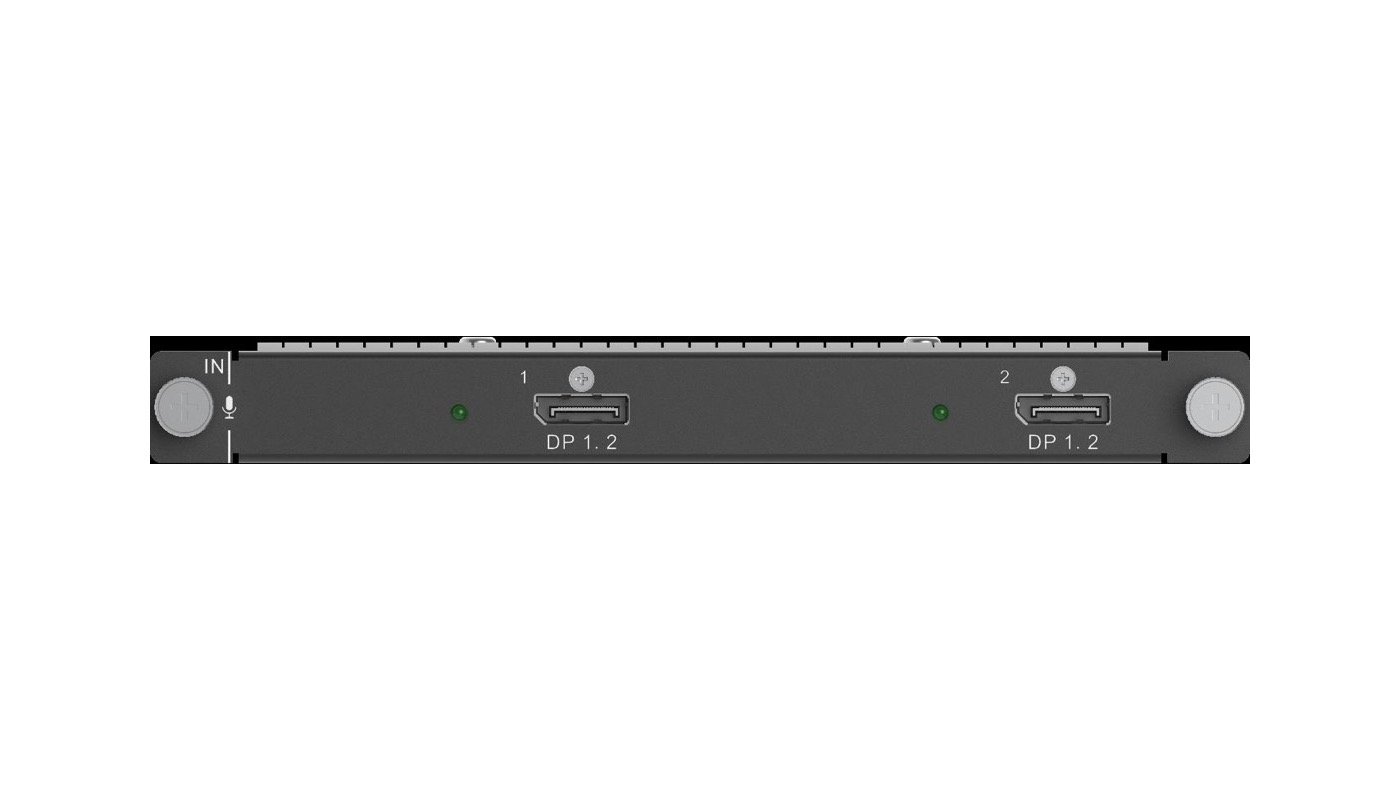
What is NovaStar H_2xDP1.2 input card?
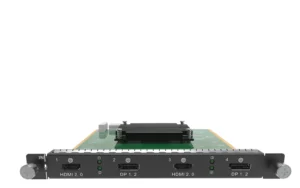
The NovaStar™ H Series 2x DisplayPort 1.2 Input Card (H_2xDP1.2) is a source input card for a modular H Series video wall splicer. It works by bringing two prepared DisplayPort sources into one compatible H Series input-card slot. The chassis then places those sources in the chosen screen layout, while a separately installed LED output card sends that finished layout to the LED cabinets.
This is a practical choice when the screen plan already has two DP sources—for example, a graphics workstation and a media server—or when one source is a prepared wide canvas. Each connector supports up to 4096 × 2160 at 60 Hz or 8192 × 1080 at 60 Hz. The card brings video into the system; it is not a standalone video wall splicer and it is not an LED output card.
Before ordering, confirm three things: two DisplayPort source paths are actually required; each source uses a supported progressive timing; and the selected chassis has a compatible input-card slot. If the plan needs one DP source only, a one-input card may preserve a slot for HDMI, SDI or another source type.
Request H_2xDP1.2 bulk pricing →
For confirmed multi-card H Series or volume quantities. Direct checkout is available when the two source timings and a compatible input-card position are already confirmed.
NovaStar H_2xDP1.2 input card key features: what makes it different?
- Two DisplayPort source paths in one card slot: Put two planned DP sources into the same compatible H Series input-card position rather than consuming two slots. That is useful when a show needs a graphics computer and a playback system ready at the same time.
- 4K60 or a prepared wide source canvas: Each DP 1.2 connector accepts up to 4096 × 2160 at 60 Hz or 8192 × 1080 at 60 Hz. A wide source can be a clean fit for a wide LED layout, but the chassis—not this input card—decides how that picture is placed on the screens.
- Useful when an older DP source remains in the plan: The card is backward compatible with DP 1.1, so a compatible existing workstation can stay alongside newer equipment without changing the source side of the design.
- Clear checks before the rack is closed: Embedded audio and HDCP 2.2 are supported. The card also lists 144 Hz input support, but that is not a blanket 4K144 promise; verify the actual resolution, frame rate and source format. Interlaced video is not supported.
NovaStar H_2xDP1.2 input card specifications
These are source-side limits for the card. The H Series chassis builds the layout, and the selected LED output card and cabinet map determine the final path to the display.
Can your DisplayPort sources use NovaStar H_2xDP1.2?
Check the output timing reported by each real graphics computer, media server or playback device. A DisplayPort connector by itself does not prove that the source is a fit—the resolution, refresh rate and progressive format must fit the published card limit.
NovaStar H_2xDP1.2 input card setup and compatibility
Use this sequence to keep the purchase scope clear: the card receives the two DisplayPort sources, the compatible chassis creates their layout, and a separately selected LED output path carries that layout to the cabinets. The input card does not replace either of the other two parts.
- Set each source to the planned progressive DP timing. Confirm the real output of the workstation or media server before connecting it to either DP 1.2 port.
- Bring both sources into the H Series chassis. The H_2xDP1.2 makes the two source paths available to the chassis in one input-card slot.
- Place the pictures on the required screen layout. The chassis crops, scales and positions the sources across the configured LED screen or screens.
- Send the finished layout to the cabinets. A separately selected H Series LED output card sends its assigned picture data to the matching NovaStar receiving cards. Use NovaLCT for receiving-card settings and cabinet mapping once the output path is selected.
H_2xDP1.2 input card vs H_1x DP1.2: two source paths or one
Both cards are for bringing a DisplayPort source into an H Series system. Choose H_2xDP1.2 when the design has two DP sources to keep connected through one card. Choose H_1x DP1.2 when only one DP source is planned and the remaining slot capacity is more valuable for another input type. Neither card is an LED cabinet output.
NovaStar H_2xDP1.2 input card applications
This card suits systems where two prepared DisplayPort sources are already part of the display plan. The scenes below describe the source side; the chassis and installed LED output card still determine the final LED canvas and cabinet path.
Graphics plus playback
Keep a graphics workstation and a playback server connected to one H Series chassis, then choose when each source appears in the planned LED layout.
Main visual plus data screen
Bring a main visual feed and a separate data or dashboard feed into the chassis together when both are known DP paths within the per-input limit.
Prepared wide LED canvas
Use one suitable DP connector for a prepared wide source such as 8192 × 1080 at 60 Hz, then let the chassis position it on the configured LED display.
DP workstation upgrades
Keep a suitable DP 1.1 workstation in the design while adding a newer DP source, provided both source timings fit the documented card limits.
NovaStar H_2xDP1.2 input card manual, specifications and H Series firmware
NovaStar documents this card in the current H20 specifications and H Series family resources rather than publishing a card-only download. The exact card reference and the chassis-family resources are labelled separately below.
NovaStar H_2xDP1.2 Input Card specifications (PDF, H20 V1.8.0)
Official H20 specification that documents this two-DisplayPort input card, source timing limits and operating boundaries.
NovaStar H Series user manual (PDF, V1.15.0)
H Series family manual for installation, card configuration and operating procedures; not an H_2xDP1.2-only manual.
NovaStar H Series firmware (ZIP, V2.2.0.0)
Verified H Series family firmware package, not H_2xDP1.2 Input Card-only firmware.
NovaStar H Series firmware release notes (TXT, V2.2.0.0)
Version changes and update notes for the same verified H Series family firmware package.
NovaStar H_2xDP1.2 input card FAQs
Is H_2xDP1.2 a video wall splicer or an LED output card?
No. It is an H Series source input card. It receives DisplayPort sources; the chassis creates the picture layout, and a separately installed LED output card carries that layout to the cabinets.
How many DisplayPort sources can connect to this card?
The card has two DP 1.2 input connectors. Select it when the H Series design needs two planned DisplayPort source paths through one compatible input-card slot.
What is the maximum resolution for each DP connector?
Each connector supports up to 4096 × 2160 at 60 Hz or 8192 × 1080 at 60 Hz. Confirm the actual source timing rather than relying on the connector label alone.
Can I use a custom wide or tall source timing?
The documented maximum custom width is 8192 pixels and the maximum custom height is 8188 pixels. Confirm the exact timing on the graphics device and in the selected H Series configuration before installation.
Will a DP 1.1 source work?
Yes, when it uses a supported timing. The H_2xDP1.2 card is backward compatible with DP 1.1.
Does 144 Hz support mean every 4K144 source will work?
No. The card lists 144 Hz input support and separately lists its maximum per-input resolution. Verify the chosen resolution, refresh rate and source format before ordering.
Can it accept an interlaced DisplayPort signal?
No. Set the source to a supported progressive output before connecting it to this card.
Does this card configure the LED cabinets?
No. After the chassis and LED output path are set, use NovaLCT for receiving-card configuration and cabinet topology.
Is the firmware file a card-only H_2xDP1.2 update?
No. The available file is an H Series chassis/family package. Review its release notes and the selected chassis documentation before any update.
Can two maximum-size DisplayPort sources be assumed to work together?
Not automatically. The published maximum applies to each DP connector, but the finished system still needs enough compatible chassis capacity for its chosen source layout and LED output plan. Confirm the two real source timings and the completed H Series configuration before ordering.
Reviews
There are no reviews yet.