
If you are sizing a large rental wall, a broadcast installation or an OEM display package, the VX2000 Pro and VX1000 Pro may appear in the same proposal because they share the VX Pro operating workflow.
The real difference is the scale of the system around them: the VX1000 Pro covers up to 6.5 million pixels through ten outputs, while the VX2000 Pro is built for up to 13 million pixels through twenty outputs and a denser source plan.
That extra capacity matters only when your wall map, source list or operating plan needs it. If your project fits comfortably within the VX1000 Pro, the larger chassis adds cost and planning work without improving the picture by itself.
If the wall needs more output banks, more layer resources or a wider source arrangement, the VX2000 Pro may prevent a second controller or a later rack rebuild.
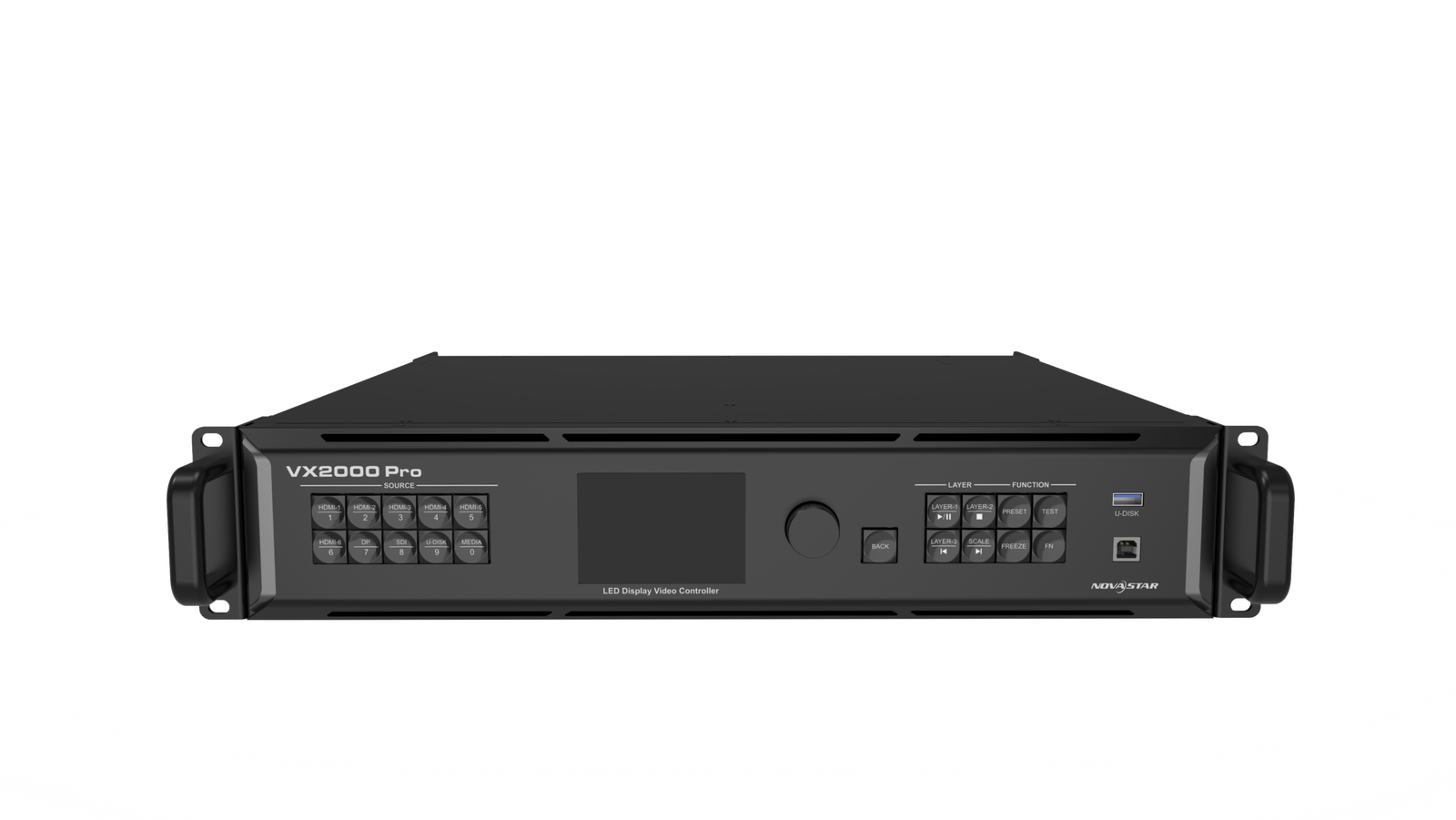
What Are the Differences Between NovaStar VX2000 Pro and VX1000 Pro?
The shared VX Pro workflow is why these models can be used by the same production team and compared in the same project. Both support 4K-capable source handling, layer-based screen composition, presets and LED output scaling.
The practical comparison starts when you map the actual LED wall and source chain: how many pixels the wall has, how many outputs the cabinet layout needs, how many source connectors must be available at the same time and how many layer resources the show uses.
What changes in LED wall capacity and Ethernet outputs?
The VX1000 Pro can load up to 6.5 million pixels through 10 Gigabit Ethernet outputs. The VX2000 Pro can load up to 13 million pixels through 20 Gigabit Ethernet outputs. The official maximum canvas width also increases from 10,240 pixels to 16,384 pixels; both models list a maximum height of 8,192 pixels.
That is useful for a large rental wall or a wide fixed installation, but total pixel capacity is only the first check. A cabinet map can be below 6.5 million pixels and still be inconvenient on ten outputs if the rows cannot be divided evenly or if the receiving-card and cable plan leaves one port overloaded.
The same principle applies to the VX2000 Pro: twenty ports give more routing room, but every port still needs its own cabinet-load check.
The extra outputs can also change the rack design. A production company may keep a main wall, side wings and delay screens on separate output paths. An LED manufacturer may want a repeatable twenty-port cabinet map for a large package.
A rental company may prefer one VX2000 Pro for a wall that would otherwise need two smaller controllers. None of those choices is automatic; the physical cabinet resolution and receiving-card limits decide whether the extra ports are useful.
What changes in input connectors and source formats?
The VX1000 Pro provides one HDMI 2.0 input with loop-through, two HDMI 1.3 inputs, one 3G-SDI input with loop-through, one 10G optical input and one USB 3.0 input. This covers a common event source list: a 4K-capable media server, one or two HDMI feeds, an HD-SDI camera or switcher path, and USB playback for testing or backup content.
The VX2000 Pro adds a broader input panel: one DP 1.2 input, two HDMI 2.0 inputs, four HDMI 1.3 inputs, one 12G-SDI input with loop-through, two optical inputs and one USB 3.0 input. That matters when a broadcast or live-production rack has several sources connected at once, when a workstation uses DisplayPort, or when a 4K camera or switcher path needs 12G-SDI rather than 3G-SDI.
For a rental company, the difference is less about using every connector on every job and more about accepting different client source packages without rebuilding the rack. For an LED manufacturer, the larger input set can reduce the need for an external converter in a standardized system.
The source format still has to match the documented connector and frame-rate limits. The presence of a connector does not make every signal combination valid.
What changes in layer resources and show layouts?
The VX1000 Pro has six shared 2K x 1K layer resources. The VX2000 Pro has twelve. These are processing resources, not twelve identical full-size 4K windows.
For planning purposes, a 2K x 1K layer uses one resource, a 4K x 1K layer uses two, and a 4K x 2K layer uses four. That means the VX2000 Pro can support a much denser composition, such as a large main camera or presentation canvas plus several supporting windows, logos and playback sources.
The VX1000 Pro is still enough for a simpler main image with a few smaller windows when the resource budget fits.
This distinction matters during show design. A buyer who only needs one full-screen source and two overlays does not gain much from twelve resources. A production company that needs several camera windows, graphics and independent playback areas may reach the six-resource limit before reaching the VX1000 Pro’s 6.5-million-pixel wall limit.
Both models provide 256 presets. The VX2000 Pro does not become more valuable because it saves more presets; its advantage is having more room in the live layout and a larger output/source plan.
What changes in fiber outputs, backup and timing?
The VX1000 Pro has two 10G optical output paths alongside its ten Ethernet outputs. The VX2000 Pro has four optical ports and divides its twenty Ethernet outputs into two ten-port banks. In the documented arrangement, OPT1 carries the first bank, ports 1-10, while OPT2 carries the second bank, ports 11-20. The additional optical ports can copy or back up the corresponding banks.
That architecture is useful when the wall is physically split into two large sections, when the rack needs a clearer primary-and-backup fiber plan, or when a rental company wants to test a repeatable data path before dispatch.
You still need a complete redundancy test. The receiving cards, fiber converters, cabinet map, cable routing and backup behavior must all be compatible with the intended design.
Genlock is another difference to consider in a larger production system. It is relevant when the LED controller must share a timing reference with cameras, switchers or other processors. It is not a general image-quality setting for a single wall. If the project does not have a system-level timing requirement, Genlock should not decide the purchase by itself.
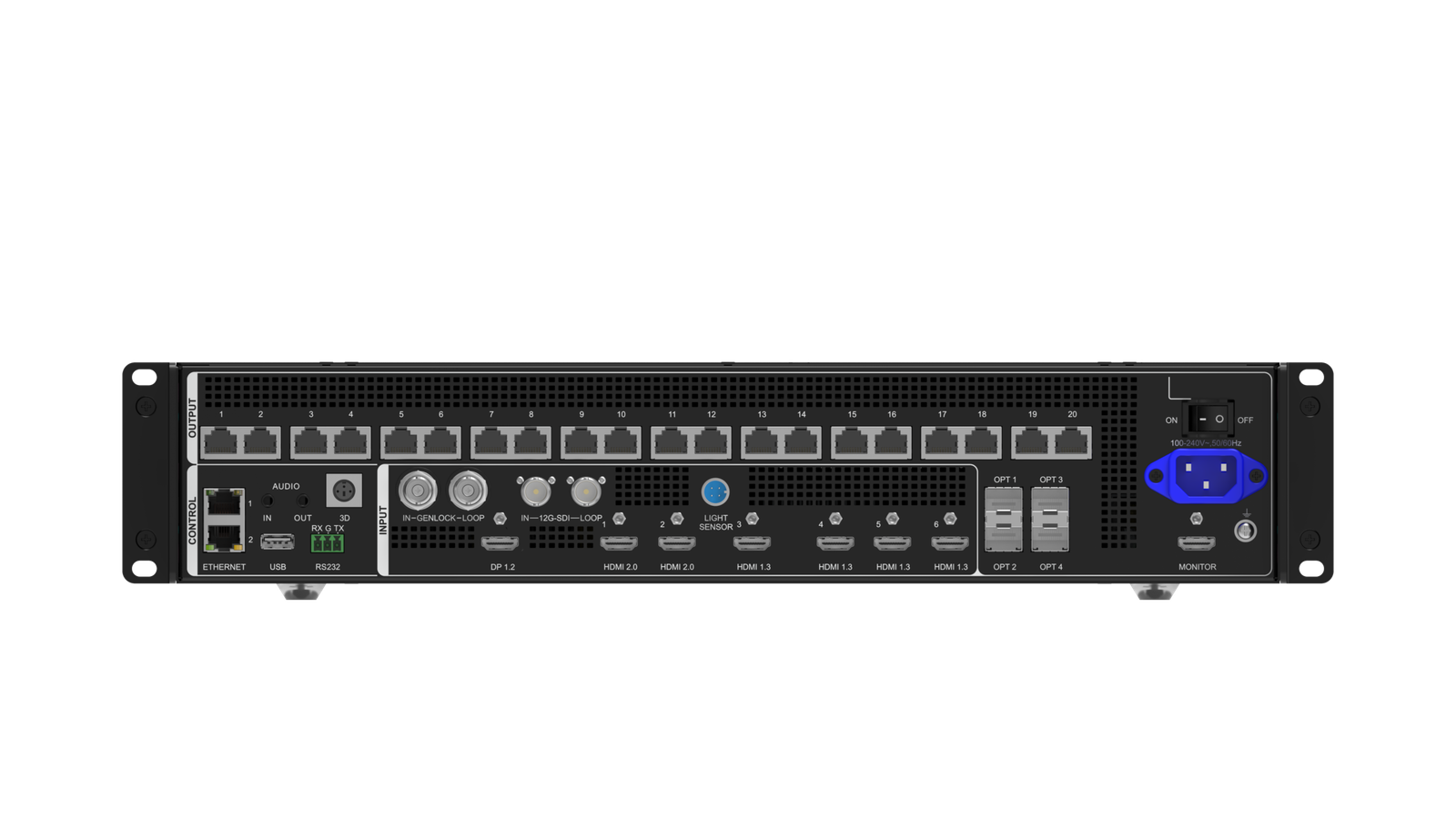
| Difference | VX1000 Pro | VX2000 Pro |
|---|---|---|
| Maximum LED load | Up to 6.5 million pixels | Up to 13 million pixels |
| Ethernet outputs | 10 x Gigabit Ethernet | 20 x Gigabit Ethernet |
| Maximum output width | 10,240 pixels | 16,384 pixels |
| Maximum output height | 8,192 pixels | 8,192 pixels |
| Shared layer resources | 6 x 2K x 1K | 12 x 2K x 1K |
| Main source difference | HDMI 2.0, HDMI 1.3, 3G-SDI, one optical input | DP 1.2, 2 x HDMI 2.0, HDMI 1.3, 12G-SDI, two optical inputs |
| Optical output paths | 2 x 10G optical | 4 x 10G optical |
| Main buying reason | A 6.5M-pixel wall with a conventional source chain | A larger wall, denser source list, more layers or two-bank output plan |
VX2000 Pro and VX1000 Pro Specifications
Use the table to compare the controller against the actual source list, cabinet map and operating plan. The maximum pixel number does not replace a per-port load check, and the number of layer resources does not equal the number of full-size windows.
| Specification | NovaStar VX1000 Pro | NovaStar VX2000 Pro |
|---|---|---|
| Listed price | $2,067.00 | $4,064.00 |
| Product class | All-in-one LED video controller | All-in-one LED video controller |
| LED loading capacity | 6.5 million pixels | 13 million pixels |
| Maximum output width | 10,240 pixels | 16,384 pixels |
| Maximum output height | 8,192 pixels | 8,192 pixels |
| Ethernet outputs | 10 x Gigabit Ethernet | 20 x Gigabit Ethernet |
| Optical ports | 2 x 10G optical | 4 x 10G optical |
| HDMI 2.0 | 1 x IN/LOOP | 2 x inputs |
| HDMI 1.3 | 2 x inputs | 4 x inputs |
| DisplayPort | Not listed | 1 x DP 1.2 |
| SDI | 1 x 3G-SDI IN/LOOP | 1 x 12G-SDI IN/LOOP |
| USB | 1 x USB 3.0 | 1 x USB 3.0 |
| Monitoring | HDMI monitoring output | HDMI monitoring output |
| Layer resources | 6 x 2K x 1K | 12 x 2K x 1K |
| Presets | 256 | 256 |
| 4K source path | HDMI 2.0-based 4K workflow within documented formats | DP 1.2, HDMI 2.0 and 12G-SDI-based 4K workflow within documented formats |
| Control and setup | Front panel, NovaLCT, Unico and VICP workflow where applicable | Front panel, NovaLCT, Unico and VICP workflow where applicable |
The VX2000 Pro’s 13-million-pixel rating is almost twice the VX1000 Pro’s 6.5 million. That does not mean it will make a 4-million-pixel wall look better. It means the larger controller can carry a larger cabinet map, a wider canvas or more independently routed screen sections without splitting the job between smaller controllers.
The layer number needs the same care. Six shared 2K resources can be enough for a main 4K x 2K image plus two 2K-class supporting layers, depending on the configured layout. Twelve resources give the VX2000 Pro more room for several large windows, but the exact combination still has to fit the resource budget and source format.
The source table also shows why the models are not interchangeable for every production rack. The VX2000 Pro is the model to investigate when DP 1.2 or 12G-SDI is part of the signal chain. The VX1000 Pro remains a good fit when the rack is built around one HDMI 2.0 path, HDMI 1.3, 3G-SDI and USB playback.
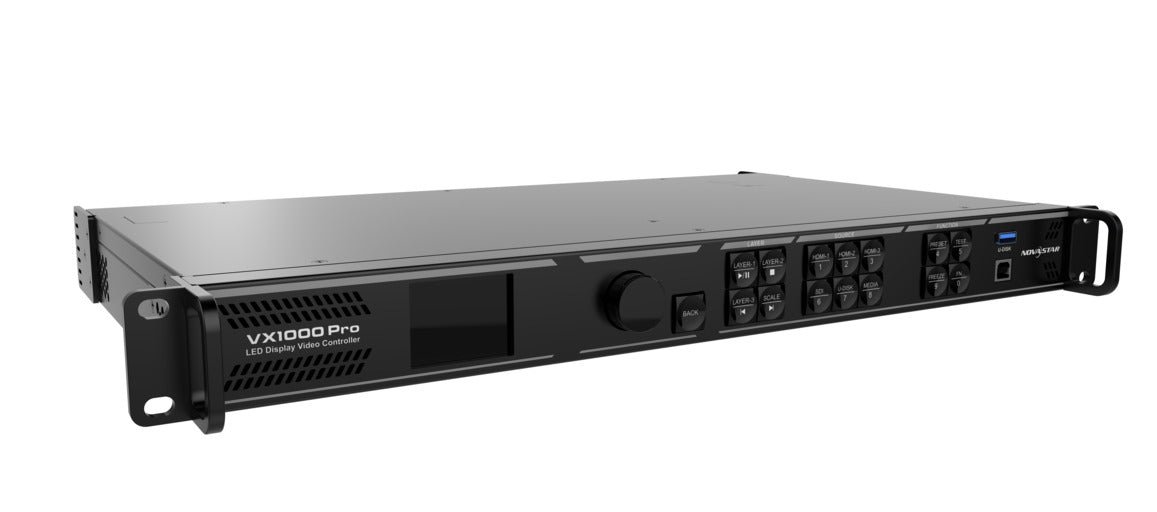
NovaStar VX2000 Pro vs VX1000 Pro: Which One Should You Choose?
Choosing the VX2000 Pro or VX1000 Pro depends on the LED wall map, source list, layer plan, rack strategy and expected expansion. Start with the installed system or the new project requirements, then check the conditions below.
Are you replacing an existing VX1000 Pro or building a new large LED wall?
If you are replacing a VX1000 Pro in an installed rack, choose another VX1000 Pro when the existing cabinet file, operator workflow, spare strategy and tested show presets already work. A like-for-like replacement is often the quickest way to return a rental package or fixed installation to service.
If you are building a new wall, do not start with the controller name. Start with the cabinet resolution, total pixel count, source formats, output map and required live windows. A new wall that fits comfortably below 6.5 million pixels can still be a VX1000 Pro project even if the physical wall is wide or visually impressive.
Is the LED wall above 6.5 million pixels?
Choose the VX2000 Pro when the actual wall exceeds 6.5 million pixels, the cabinet map needs more than ten Ethernet outputs, or the canvas needs the model’s 16,384-pixel maximum width. This is the clearest reason to move up.
For a wall under 6.5 million pixels, the VX1000 Pro is usually the more efficient choice if ten ports and six layer resources are enough. It keeps the system smaller and the port map easier to document. Do not buy the VX2000 Pro solely because the wall is physically larger; a low-resolution wall may still fit comfortably in the smaller controller.
Calculate the pixel load from the actual cabinet width, height and pixel pitch. Then check how the cabinets divide across each Ethernet port. A wall that is below the total limit but cannot be distributed cleanly is not a successful capacity calculation.
How many sources and live windows will the show use?
Choose the VX1000 Pro when the show uses a conventional source chain: one 4K-capable HDMI path, a few HDMI sources, 3G-SDI and USB playback, with a layout that fits six shared 2K resources.
Choose the VX2000 Pro when the rack needs DP 1.2, two HDMI 2.0 sources, 12G-SDI, more HDMI inputs or a twelve-resource composition. This can be useful for a production company combining a media server, camera feeds, a switcher output, graphics and several live windows. It can also help an OEM package support different client source lists without adding an external converter.
More connectors do not automatically make a show better. If most inputs will remain unused and the layout has one main source plus two overlays, the VX1000 Pro is likely enough.
Do you need twenty outputs or a four-optical-port plan?
The VX2000 Pro is worth considering when the output plan naturally divides into two ten-port banks. For example, a large stage wall may have a main screen and side sections that need separate fiber paths, or a rental package may require a primary and tested backup path for each bank.
The VX1000 Pro is easier to justify when the entire wall fits cleanly across ten Ethernet ports and two optical paths. A smaller output plan can reduce cabinet-map errors and shorten the time needed to test a replacement unit.
Treat the optical ports as part of a system design, not as a promise of instant redundancy. Confirm the receiving-card model, fiber converter or optical route, cabinet order and failover procedure before specifying the backup arrangement.
Is the price difference worth it for this project?
At LED Control Depot, the VX1000 Pro is listed at $2,067.00 and the VX2000 Pro at $4,064.00, a difference of $1,997.00.
That difference is easier to justify when the larger controller avoids buying two smaller units, adding an external converter, splitting the wall into separate processing paths or rebuilding the rack for the next project. It is harder to justify when the wall stays below 6.5 million pixels, the source chain is simple and the extra layer and output resources will not be used.
Production companies should compare the larger controller with the cost of an additional processing path and the risk of a more complicated event rack. Rental companies should compare it with the number of wall configurations one unit can cover. LED manufacturers should compare it with the repeatability of the standard package, cabinet map and service inventory.
Confirm current price, availability and volume terms before placing a rental-fleet or OEM order. Use a project quotation when the order includes a complete cabinet, receiving-card or backup plan.
NovaStar VX2000 Pro vs VX1000 Pro Project Examples
The right choice changes with the customer workflow. The same controller that is oversized for a fixed 4K wall may be the simpler option for a large rental package with several input and output variations.
Large rental stage with a wide main wall and side screens
A rental company is preparing a large stage package with a main LED wall, two side sections and several cabinet rows. The combined wall is above 6.5 million pixels, the cabinet map needs more than ten Ethernet paths, and the production rack must accept both a DisplayPort workstation and a 12G-SDI camera path.
Choose the VX2000 Pro. The extra pixel capacity, twenty Ethernet outputs, DP input, 12G-SDI input and two-bank optical design address the actual rack requirements. The VX1000 Pro would require a different routing plan or another processing path.
Broadcast or live production rack below 6.5 million pixels
A production company is driving a 5.5-million-pixel wall. The show uses one HDMI 2.0 media server, a 3G-SDI camera feed, one presentation laptop and a small number of picture-in-picture windows. The cabinet layout fits cleanly across eight Ethernet ports.
Choose the VX1000 Pro. The wall, source chain and six-resource layout fit the smaller controller. The VX2000 Pro would provide unused capacity unless the production plan is expected to change substantially.
LED manufacturer standardizing a 13-million-pixel OEM package
An LED manufacturer is building a repeatable large-wall package for multiple integrators. The package needs a 20-port map, two output banks, four optical paths and twelve shared 2K resources so different customer layouts can be loaded without redesigning the controller section.
Choose the VX2000 Pro and standardize the cabinet file, receiving-card model, port order, software versions and backup test. In this case, the value is repeatable integration across projects, not simply a larger number in a specification table.
Existing VX1000 Pro rental inventory with smaller walls
A rental company already owns several VX1000 Pro units. Most jobs are below 6.5 million pixels, use ten or fewer ports and arrive with HDMI 2.0, HDMI 1.3 or 3G-SDI sources. The company wants matching spares and familiar operator workflows.
Keep the VX1000 Pro as the standard inventory controller. If a single project occasionally exceeds its capacity, compare the cost of a VX2000 Pro with renting or adding a larger unit for that job. Buying the larger model for every package may tie up budget in capacity the fleet rarely uses.
NovaStar VX2000 Pro and VX1000 Pro Software, Manuals and Datasheets
Use the NovaStar VX1000 Pro product page and NovaStar VX2000 Pro product page for the current product information, listed price and ordering details.
For the LED wall and receiving-card configuration, use NovaLCT and keep the cabinet file with the controller record. Use the applicable Unico and VICP workflow for controller operation and project management. The exact software version should match the controller firmware and the rental or OEM package documentation.
Before ordering or changing firmware, check the model-specific VX1000 Pro datasheet, VX1000 Pro manual, VX2000 Pro datasheet and VX2000 Pro manual pages. Save the working configuration first, then confirm the source formats, receiving-card data, Ethernet port map and backup behavior with the actual hardware.
The NovaStar VX Pro Series manual is useful for the documented operating modes and optical-bank behavior. Use the local product and download pages as the customer-facing starting point, and verify any firmware package against the exact model before applying it.
NovaStar VX2000 Pro vs VX1000 Pro FAQs
What is the main difference between NovaStar VX2000 Pro and VX1000 Pro?
The VX1000 Pro loads up to 6.5 million pixels through ten Gigabit Ethernet outputs and provides six shared 2K layer resources. The VX2000 Pro loads up to 13 million pixels through twenty outputs and provides twelve shared 2K resources. It also has a denser input and optical-output set, including DP 1.2 and 12G-SDI.
Is the VX2000 Pro twice as powerful as the VX1000 Pro?
It has roughly twice the LED loading capacity and twice the Ethernet output count, but “twice as powerful” is too broad for a system specification. The useful comparison depends on the wall map, source formats, layer resources, optical plan and operating mode.
Is 13 million pixels enough for my LED wall?
It may be, but calculate the actual cabinet width, height and total pixel count first. Then check the maximum width, per-port load, receiving-card limit, cable direction and backup design. A total below 13 million pixels does not remove the need for an output-port plan.
How do the VX2000 Pro’s twenty Ethernet outputs work?
They are arranged as two ten-port output banks. The documented optical arrangement uses OPT1 for ports 1-10 and OPT2 for ports 11-20, while the additional optical ports can copy or back up the corresponding banks. Confirm the complete receiving-card and fiber design before treating the paths as redundant.
Does the VX2000 Pro have more layers or more full-size 4K windows?
It has twelve shared 2K x 1K resources rather than the VX1000 Pro’s six. A 4K x 2K layer consumes four of those resources, so twelve resources do not mean twelve full-size 4K windows. The actual layout must fit the resource budget.
Which model accepts DP 1.2 and 12G-SDI?
The VX2000 Pro provides one DP 1.2 input and one 12G-SDI input with loop-through. The VX1000 Pro provides HDMI-based inputs, 3G-SDI with loop-through, one optical input and USB 3.0.
Can the VX1000 Pro handle 4K60 input?
The VX1000 Pro supports a documented 4K-capable HDMI 2.0 workflow, but the exact resolution, frame rate and connector must match the specification. If the system specifically needs DP 1.2, 12G-SDI or more than one HDMI 2.0 source, check the VX2000 Pro instead.
Are both models compatible with NovaLCT and Unico?
Both belong to the VX Pro workflow and can be configured and operated through the applicable NovaStar software tools. Use NovaLCT for the LED wall and receiving-card side, and confirm the Unico/VICP and firmware version for the specific controller before deployment.
Is the VX2000 Pro worth the extra $1,997?
It is worth comparing when the project needs more than 6.5 million pixels, more than ten Ethernet outputs, twelve layer resources, DP/12G-SDI inputs, or a two-bank optical plan. If the wall and source chain already fit the VX1000 Pro, the extra capacity may not create a practical benefit.
Can I use multiple VX1000 Pro units instead of one VX2000 Pro?
Sometimes, but the two designs are not identical. Multiple controllers introduce additional source, timing, synchronization, cabinet-map and operator checks. Compare the cost and complexity of that design with one VX2000 Pro, then test the complete system with the actual receiving cards.
Does the VX2000 Pro improve image quality on the same wall?
Not automatically. Image quality depends on the source, scaling, LED cabinets, receiving cards, calibration and viewing conditions. The VX2000 Pro adds capacity, inputs, layer resources and routing options; it does not add physical pixels to an existing wall.
What should a rental company check before ordering?
Check the wall sizes in the fleet, cabinet resolutions, pixels per Ethernet port, common client source formats, number of live windows, optical and backup requirements, software versions, spare strategy and the cost of dispatching a larger unit. Then compare those requirements with the VX1000 Pro’s six-resource/ten-port plan and the VX2000 Pro’s twelve-resource/twenty-port plan.
Conclusion
Choose the VX1000 Pro when the LED wall stays within 6.5 million pixels, ten Ethernet outputs are enough, the source chain fits HDMI/3G-SDI/USB, and six shared 2K layer resources cover the show layout.
Choose the VX2000 Pro when the wall exceeds 6.5 million pixels, needs more than ten output paths, requires a 16,384-pixel maximum width, uses DP or 12G-SDI, needs twelve layer resources, or benefits from two ten-port optical banks and a larger backup plan.
The best choice is the smallest controller that fits the complete project without forcing a second processing path or a later rack rebuild. Compare the actual cabinet map and source list before treating the VX2000 Pro’s larger capacity as an upgrade you need.