
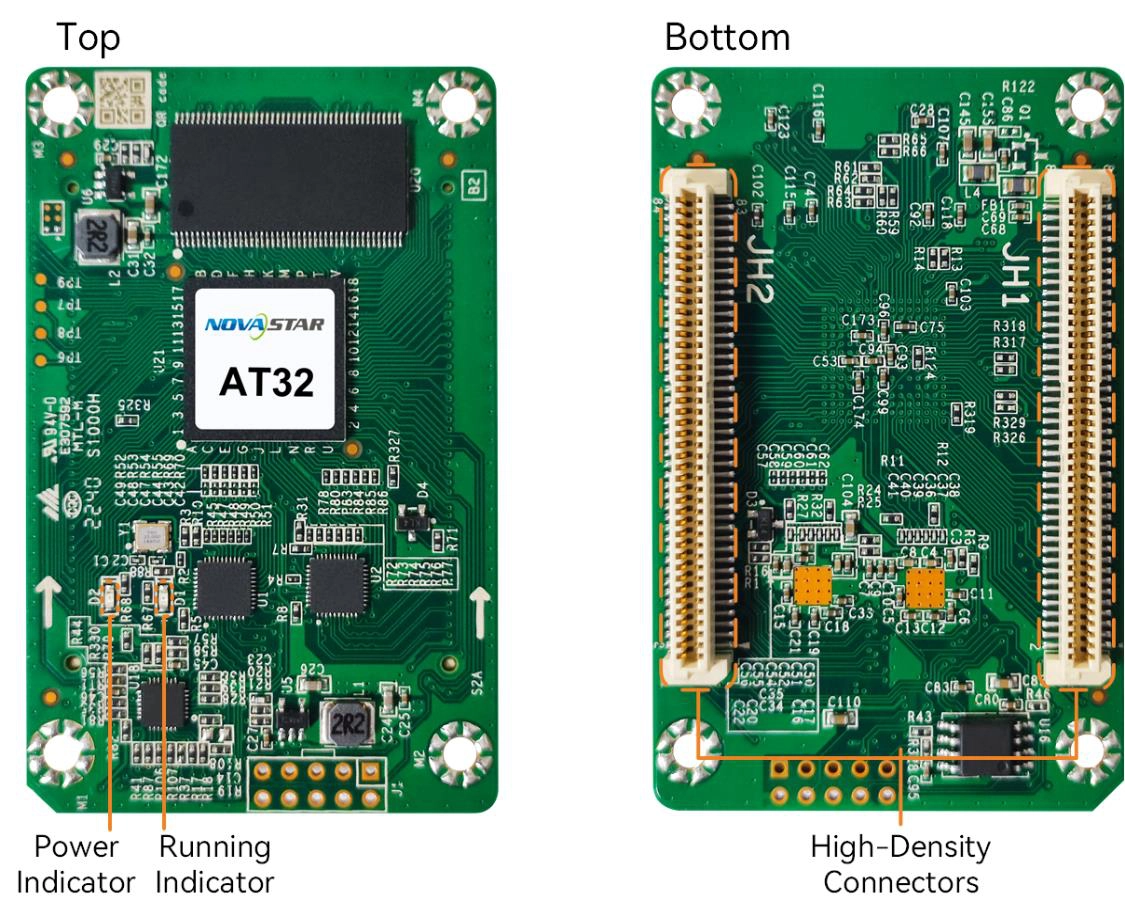
What is the NovaStar AT32 receiving card?
The NovaStar AT32 is a small receiving card that sits inside an LED cabinet. It receives the mapped image from the controller, then sends the right pixel data to the LED modules in that cabinet. It is a sensible choice only when the cabinet’s hub board, module wiring, power rail and saved configuration all match the AT32.
For a new cabinet design, the most important AT32 question is not simply its total pixel count. Its maximum height changes with the source bit depth: one card can cover 512×384 pixels at 8-bit, but only 512×192 at 10-bit or 12-bit. That difference can decide whether one card is enough before the cabinet reaches the shop floor.
AT32 key features
Cabinet image calibration
Pixel-level calibration and seam correction help reduce the bright or dark joins that can appear where modules meet. Multi-batch adjustment is useful when a later cabinet or module run looks slightly different from the original wall.
Cabinet mapping
Mapping can show a cabinet’s receiving-card number and Ethernet port. With compatible cabinet hardware, the AT32 can also report card temperature, voltage and Ethernet bit errors, helping a technician find the affected cabinet before pulling parts.
Stored image
A stored image can keep a panel from going black when its normal source path is absent. A loop or dual-card backup path is separate: it works only when the cabinet hub, cabling and configuration have been designed for it.
90° image rotation
In a supported system, the AT32 can rotate the image in 90-degree steps, making a portrait cabinet layout easier to map while keeping the physical modules and their cabinet wiring in place.
NovaStar AT32 specifications
Use these values to check the source format, module data wiring, hub-board spacing and power rail before ordering. They are based on NovaStar’s AT32 Receiving Card Specifications V1.3.2.
| Load at 8-bit | 512×384 pixels at 60 Hz with PWM driver ICs |
|---|---|
| Load at 10/12-bit | 512×192 pixels at 60 Hz with PWM driver ICs |
| Module data | Up to 32 parallel RGB groups or 64 serial groups; serial mode can expand to 128 groups |
| Input voltage | DC 3.8 V to 5.5 V |
| Rated current / power | 0.6 A / 3.0 W |
| Dimensions | 70.0 × 45.0 × 8.7 mm |
| Hub-board spacing | 8.0 mm after the high-density connectors mate; an 8.0 mm copper pillar is recommended |
| Static protection | 2 kV; use ESD-safe handling during installation |
| Operating environment | −20°C to +70°C; 10% to 90% RH, non-condensing |
| Certifications | RoHS and EMC Class B |
AT32 capacity at 8-bit, 10-bit and 12-bit
An AT32 can be planned around a 512×384 cabinet only when the source stays at 8-bit and the modules use PWM driver ICs. Moving that same cabinet to a 10-bit or 12-bit source does not merely add more color precision: it cuts the documented height per AT32 to 192 pixels.
| Example cabinet map | 8-bit source | 10/12-bit source | Planning result |
|---|---|---|---|
| 512×384 | Within the documented limit | Too tall for one AT32 | Use 8-bit, divide the cabinet across cards, or redesign the source/cabinet plan |
| 512×192 | Within the documented limit | Within the documented limit | Can fit one card at either source depth after scan and data-group checks |
| 384×192 | Within the documented limit | Within the documented limit | Leaves room to verify scan and data-group assignment |
Check the source bit depth before adding up pixels. A cabinet with fewer total pixels can still exceed the 192-pixel height limit at 10-bit or 12-bit. Folded module wiring, unusual scan patterns and unused pixels can reduce the practical limit further, so the finished cabinet map is the final check.
Pixel capacity is only the first fit check. The AT32 supports up to 32 parallel RGB groups, so the hub board and LED modules must stay within that data path too. Before ordering, match the AT32 label, high-density connector layout, 3.8–5.5 V rail, module driver IC, scan method and RGB data groups. A board with similar dimensions can still be the wrong card for the cabinet.
AT32 multi-batch adjustment for expanded LED walls
Two cabinets built months apart can show a visible brightness or color step even when neither one is faulty. Their LEDs may come from different production batches. AT32 multi-batch adjustment gives a technician a way to bring those cabinets closer together after the cabinet data and calibration process are in place.
It is useful when a lobby wall grows in phases, one cabinet is replaced, or a fixed installation receives a later production run. It cannot repair a wrong scan setting, incompatible module, missing calibration data or damaged LED. Confirm the hardware and configuration match first, then use adjustment to reduce the remaining batch difference.
AT32 datasheet, firmware and NovaLCT
These files answer different questions. Use the datasheet to confirm capacity, size and electrical limits. Use NovaLCT to read, save and send the AT32 cabinet configuration. Before removing a working card, save its program, receiving-card parameters, calibration data and cabinet .rcfgx file. The card program operates the receiver; the cabinet file tells it the cabinet’s scan, wiring and pixel map. Keep both.
Use the exact AT32 firmware package only after the PCB and module-chip combination have been confirmed. A newer package alone is not a reason to update a stable screen. Test a changed card or file on one cabinet before applying it to the rest of the wall.
NovaStar AT32 FAQ
What does the AT32 receiving card do?
The AT32 sits inside one LED cabinet. It receives the image data mapped by the controller and sends the assigned pixel data to that cabinet’s LED modules through the matching hub board.
How many pixels can one AT32 load?
With PWM driver ICs, the current AT32 specification lists up to 512×384 pixels at 60 Hz for an 8-bit source and 512×192 at 60 Hz for a 10-bit or 12-bit source. The actual cabinet also has to fit the scan and data-group layout.
Why does AT32 capacity change at 10-bit or 12-bit?
Higher-bit-depth sources increase the card’s data requirement. For the AT32’s documented PWM load, that reduces the maximum height from 384 pixels at 8-bit to 192 pixels at 10-bit or 12-bit.
Can a similar-sized receiving card fit in place of an AT32?
Not safely based on size alone. The replacement must also match the high-density connector layout, hub board, voltage, module driver IC, scan, RGB data groups and cabinet configuration.
Can I use AT32 multi-batch adjustment to fix every color problem?
No. It can help reduce differences between module or cabinet production batches after the hardware, scan configuration and calibration data are correct. It cannot fix a wrong module, wiring fault or incompatible configuration.
What should I save before replacing an AT32?
Read back the working card program, receiving-card parameters and calibration data in NovaLCT, then save the cabinet’s RCFGX file. Firmware and the cabinet file serve different purposes, so keep both.
Can an AT20 or AT30 replace an AT32?
Not automatically. Match the exact card, hub-board layout, module driver IC, power rail, scan, RGB data groups and saved cabinet configuration before changing receiving-card families.
What is the safe AT32 installation step after the new card arrives?
Power the cabinet off, protect the card from static, align both high-density connectors and test the saved configuration on one cabinet first. Check its image, temperature, voltage and Ethernet status before changing the rest of the wall.
What details help confirm an AT32 spare order?
Send the AT32 label, clear photos of both card sides and the hub board, cabinet size, module type, source bit depth and any saved configuration file. Those details are more useful than board dimensions alone.
Can I request AT32 volume pricing or Net 30 terms?
Yes. Send the cabinet count and spare quantity for volume pricing or eligible Net 30 terms. Include the cabinet model if the order is a replacement.
How does AT32 warranty coverage work?
AT32 cards supplied through our authorized US NovaStar channel include three years of serial-tracked manufacturer coverage. Keep the card serial information with the cabinet service records.
Reviews
There are no reviews yet.