
If you searched for NovaStar VX2000 vs VX2000 Pro because a seller offered a replacement, a rental company needs a spare, or you are specifying a new large LED wall, you may expect two clearly documented products.
There is a naming issue to resolve first: NovaStar’s current materials document the VX2000 Pro, while the standard VX comparison lists the VX400, VX600 and VX1000 rather than a separate standard VX2000. Some reseller pages still use VX2000 for an older or differently labelled unit and describe it as a roughly 6.5-million-pixel controller.
That changes how you should read the comparison. Before comparing price or pixel capacity, ask the seller for the unit’s rear-panel model label and the datasheet for that exact hardware. Until those match, do not assume that a listing called “VX2000” has the same inputs, Ethernet outputs, software, cabinet files or backup behavior as the VX2000 Pro.
After the hardware is identified, the purchase path becomes clear. For a new large LED wall, evaluate the current VX2000 Pro and its documented 13-million-pixel capacity. For an installed unit labelled VX2000, verify compatibility first; then decide whether you need a like-for-like spare or a planned move to the Pro platform.
What Is the Difference Between NovaStar VX2000 and VX2000 Pro?
The comparison starts with identification, not performance. Does the quote refer to a separately documented standard VX2000, or is the seller using “VX2000” as a shortened name for the VX2000 Pro?
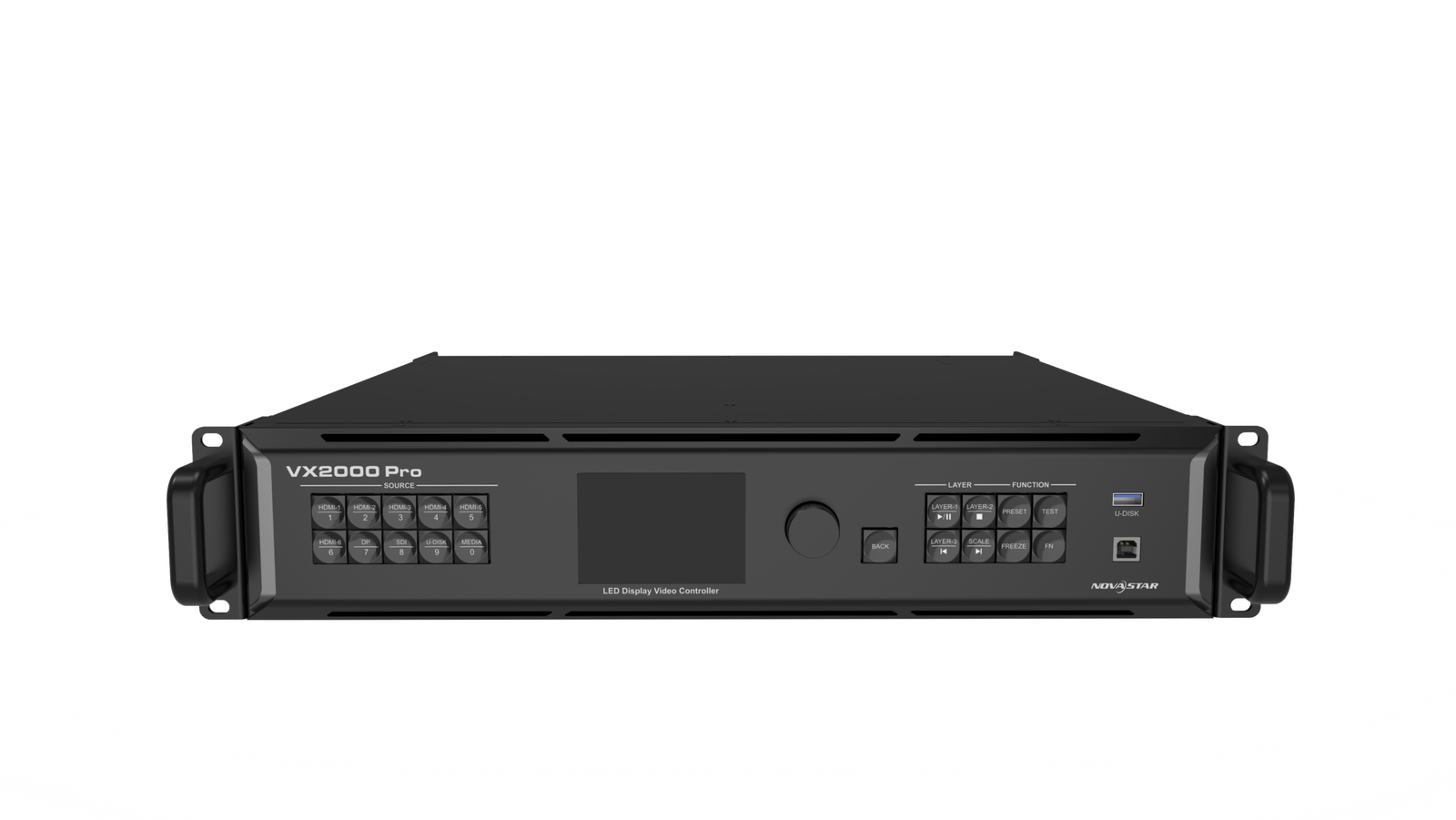
Once the hardware is identified, the performance and compatibility questions become much easier to answer. The VX2000 Pro is the documented current model with 13 million pixels, 20 Ethernet outputs, more input choices, more layer resources and a wider canvas.
Is there an official current NovaStar VX2000?
NovaStar’s current VX Pro materials document the VX2000 Pro as the largest model in the Pro family. The same comparison lists the standard VX400, VX600 and VX1000, followed by the VX400 Pro, VX600 Pro, VX1000 Pro and VX2000 Pro. There is no separate standard VX2000 entry in that current comparison.
That does not mean every older unit labelled VX2000 is fake or unusable. It means the name alone is not enough to identify the hardware. A seller should be able to show the exact unit’s rear label, specifications and manual before you compare it with the VX2000 Pro.
For a replacement or quote, ask the supplier for all of the following:
- A clear photo of the front and rear model label.
- The serial number or a redacted serial-number photo.
- The exact NovaStar datasheet and user manual revision.
- The input and output connector list for that revision.
- The software and firmware versions used by the unit.
- A written warranty and return policy that name the model.
If a seller sends you the current VX2000 Pro PDF for a product advertised simply as VX2000, the model has not been verified. That is a small naming difference with a large purchasing consequence.
What does the VX2000 Pro officially add?
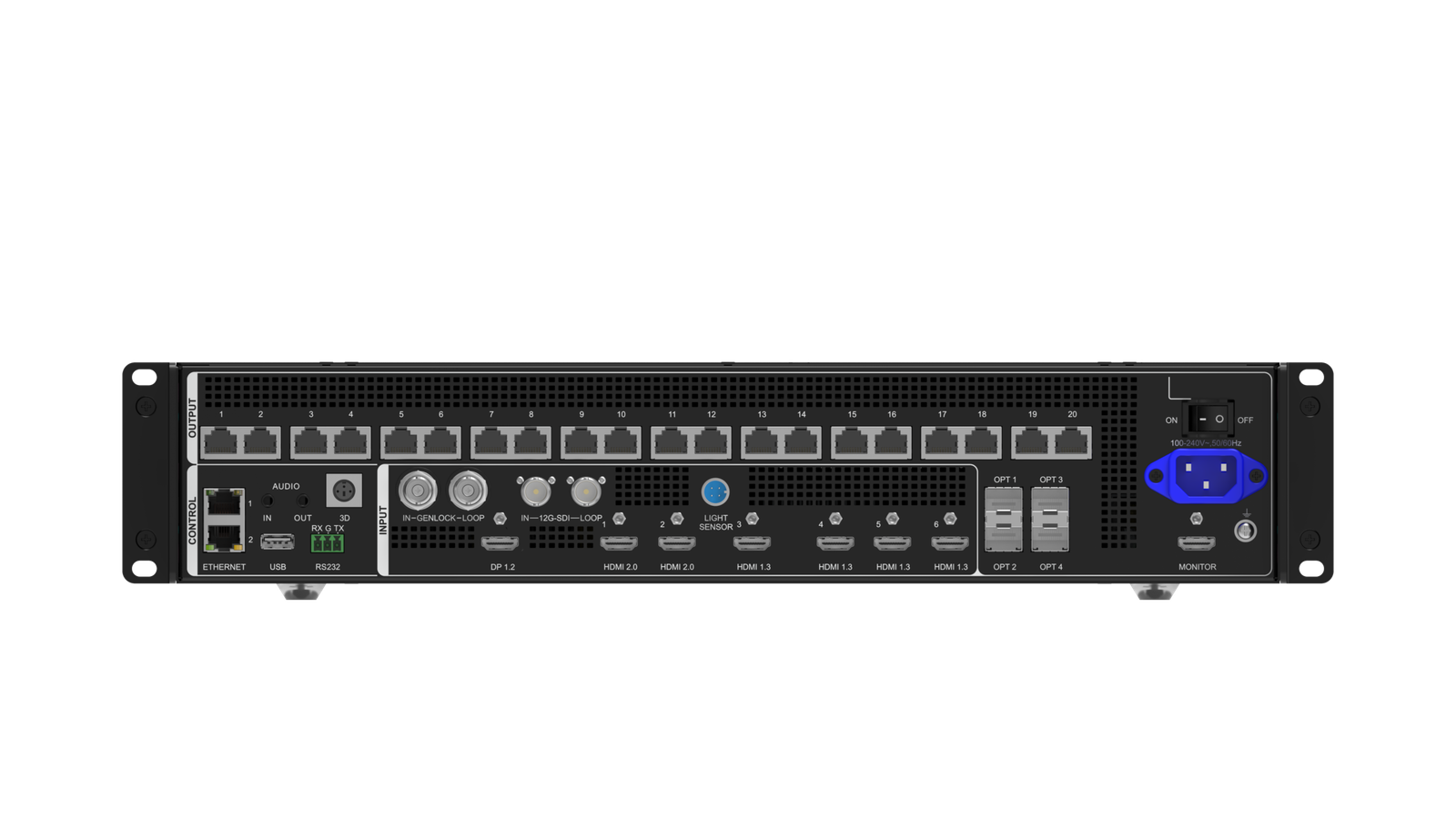
The current VX2000 Pro is an all-in-one LED controller that combines video processing and LED sending. It can drive up to 13 million pixels through 20 Gigabit Ethernet outputs, with a maximum output width of 16,384 pixels and a maximum height of 8,192 pixels.
Its input panel is also designed for a denser production rack: one DP 1.2 input, two HDMI 2.0 inputs, four HDMI 1.3 inputs, one 12G-SDI input with loop-through, two 10G optical input ports and one USB 3.0 port.
In practical terms, a production company can connect a DisplayPort workstation, multiple HDMI sources and a 12G-SDI camera or switcher path without treating a small controller as the center of a chain of converters.
The controller provides twelve shared 2K x 1K layer resources and 256 presets. It also documents four optical output ports. OPT1 and OPT2 send the two ten-port Ethernet banks; OPT3 and OPT4 can copy or back up the corresponding banks.
The exact failover behavior still depends on the receiving cards, optical route and tested configuration, but the hardware gives a large system more room to build that plan.
Why do online VX2000 specifications disagree?
Third-party comparison pages often describe a standard VX2000 as a 6.5-million-pixel, 10-port unit with two optical outputs, six layers and ten presets. Other pages use VX2000 as a shortened name for VX2000 Pro. Some tables then mix the reported standard values with the Pro model’s current inputs and software.
That is why copying a table from another website is risky here. A buyer may think they are comparing two separate products when the two columns actually describe an older listing and the current Pro model. The same problem can affect a quote: a lower price may be for an older controller, a used unit, a regional listing or a model whose documentation is missing.
Use third-party numbers as questions to ask, not as final ordering specifications. The final check should be the physical unit and the exact NovaStar document supplied with it.
Is this a performance upgrade or a replacement decision?
For a new LED wall, the VX2000 Pro is a current product with a published capacity and connector map. For an installed system, changing from an older VX2000-labelled unit to a VX2000 Pro may alter the way the rack is wired and operated.
The input source may move from an older HDMI, DVI or 3G-SDI path to DP, HDMI 2.0 or 12G-SDI. The operator may move from an older V-Can or NovaLCT workflow to a current Unico, NovaLCT or VICP workflow. The receiving-card configuration, cabinet map, optical breakout and backup test may all need to be repeated.
So the Pro is not automatically a plug-in replacement simply because the name is similar. It is a new controller choice unless the complete system has been checked.
NovaStar VX2000 vs VX2000 Pro specification comparison
The table below separates what is currently documented from what is commonly reported for a standard VX2000. This distinction is intentional. It gives a buyer useful direction without presenting an unverified listing as an official NovaStar specification.
| Specification | VX2000 | VX2000 Pro |
|---|---|---|
| Current official product status | No separate current standard VX2000 page or current official comparison entry verified | Current NovaStar VX Pro model with official specification documentation |
| Pixel capacity | Commonly reported as 6.5M in third-party listings; verify the exact unit | Up to 13M pixels |
| Ethernet outputs | Commonly reported as 10; verify the rear panel and datasheet | 20 x Gigabit Ethernet |
| Optical ports | Commonly reported as 2; verify whether they are input, output or copy paths | 4 x 10G optical outputs; OPT1/2 send the two output banks and OPT3/4 copy or back up them |
| Maximum width | Commonly reported as 10,240 pixels; verify | 16,384 pixels |
| Maximum height | Commonly reported as 8,192 pixels; verify | 8,192 pixels |
| Layer resources | Commonly reported as 6; verify the exact revision | 12 shared 2K x 1K resources |
| Presets | Commonly reported as 10; verify | 256 |
| Input panel | Listings vary; older HDMI/SDI combinations are reported | DP 1.2, 2 x HDMI 2.0, 4 x HDMI 1.3, 12G-SDI, 2 x 10G optical inputs and USB 3.0 |
| Monitoring output | Verify on the exact unit | HDMI monitoring output |
| Software | Listings vary between NovaLCT and V-Can | NovaLCT, Unico and VICP are documented in current product materials |
| Current LED Control Depot price | No separate current product price | $4,064.00 |
Use the standard VX2000 column only as a verification checklist. If a quote gives you a standard VX2000 price, the seller should be able to fill that column with a model-specific source. If the seller cannot, you do not yet know what you are buying.
The Pro column is easier to verify. Its 13-million-pixel total does not mean every port can carry an unlimited part of the wall. Each cabinet group still needs a valid port assignment, and the receiving-card, frame-rate and bit-depth conditions still matter. The same is true of its twelve layer resources: they are shared 2K x 1K resources, not twelve full-size 4K windows.
NovaStar VX2000 vs VX2000 Pro: Which One Should You Choose?
Choosing between these names depends first on the status of the hardware, then on the LED wall, source chain, software and spare strategy. The right decision for a rental company replacing a known unit is different from the right decision for an LED manufacturer building a new 13-million-pixel package.
Are you replacing an installed VX2000?
Start by treating the installed controller as a specific piece of hardware, not as a product name in a spreadsheet. Photograph the label, save the current configuration and record every cable connected to the unit. Note the input used by the media server or switcher, the Ethernet port order, the optical route and the receiving-card model.
If a matching legacy unit can be verified and the goal is a spare, like-for-like replacement may be the lowest-risk choice. The spare should boot with the expected firmware, accept the saved configuration and follow the same operator workflow as the installed units.
Choose the VX2000 Pro instead when the project is also being upgraded: for example, when the wall is growing beyond the old capacity, the production team needs DP or 12G-SDI, or the fleet is moving to a new documented controller standard. In that case, plan a migration rather than describing the purchase as a simple replacement.
Is this a new purchase for a wall above 6.5 million pixels?
For a new system that needs more than 6.5 million pixels, more than ten output paths or a canvas wider than 10,240 pixels, the VX2000 Pro is the current documented model to evaluate. Its 13-million-pixel capacity, twenty Ethernet outputs and 16,384-pixel maximum width address a different scale of cabinet map.
Do the calculation from the actual cabinet resolution. A physically large outdoor wall can remain below the limit if its pixel pitch is large; a smaller fine-pitch wall can exceed it quickly. Then divide the cabinets across the outputs and check the per-port loading, not only the total number in the product headline.
If the new wall is comfortably below 6.5 million pixels and its source, layer and output requirements fit the smaller models, compare the VX1000 Pro or VX600 Pro before paying for the larger chassis. A bigger controller is useful when its outputs, source inputs or layer resources are part of the design. It is not automatically better for a wall that does not use them.
Does the source chain need DP, 4K60, 12G-SDI or USB playback?
The VX2000 Pro is the clear starting point when those interfaces are part of the production plan. A DisplayPort workstation can connect directly. Two HDMI 2.0 inputs can accept modern media-server or laptop sources within the documented format limits. A 12G-SDI path can carry a compatible 4K camera or switcher signal, and USB playback can provide test content or a simple local fallback.
That does not mean every connector accepts every signal at the same frame rate and bit depth. Check the exact source table for the chosen connector. For instance, DP, HDMI 2.0 and 12G-SDI have different format and color-sampling conditions, while the HDMI 1.3 inputs are intended for a smaller source class.
If the existing rack is built around an older HDMI/DVI/3G-SDI workflow and the wall is already stable, the Pro’s newer inputs may create work rather than immediate value. The question is whether the new source requirements justify the migration.
Does the team depend on NovaLCT, Unico or an older V-Can workflow?
Software is part of the controller purchase. A rental company may have technicians who know the existing unit by memory. An LED manufacturer may have standardized cabinet files and receiver-card commissioning around one software path. A production company may need fast preset recall and remote control from a browser or app.
The current VX2000 Pro materials refer to NovaLCT, Unico and VICP. Confirm the exact firmware and software combination for the unit you will receive. Do not assume that a V-Can project file, an old cabinet file or an older operator procedure will transfer unchanged.
Before a replacement arrives on site, test the complete sequence on a spare wall or bench:
- Connect the intended source and set its documented timing.
- Load the receiving-card configuration for the actual cabinets.
- Rebuild or import the cabinet map and verify port order.
- Save a known-good controller project and receiver-card backup.
- Test source change, preset recall, optical path and any backup behavior.
That test is more useful than choosing a model because a comparison page says “Pro” is newer.
Is the lower-priced VX2000 listing worth the risk?
There is no current LED Control Depot product price for a separate standard VX2000 to compare against the VX2000 Pro’s $4,064.00 listing. A supplier quoting a lower-priced VX2000 should be asked to identify the exact hardware before the price is treated as a saving.
Ask whether the unit is new, used, refurbished or discontinued. Ask for the warranty term, firmware version, included accessories, exact input/output list and return conditions. If the supplier uses a VX2000 Pro datasheet for a unit labelled only VX2000, ask them to correct the quote or explain the model designation in writing.
For a rental fleet or OEM order, the cost of an incorrectly specified unit includes more than the box: a failed show, a second shipping charge, a reworked cabinet map and an emergency replacement can erase the original price difference quickly.
NovaStar VX2000 vs VX2000 Pro project examples
The right choice depends on why you are comparing the models. These examples focus on real purchasing situations and system fit, not a generic list of application industries.
Rental company buying a like-for-like spare
A rental company has several older controllers labelled VX2000 in its warehouse. The units are used with the same cabinet family, the same receiving cards and a known 3G-SDI/HDMI signal chain. The immediate requirement is a spare for a show next month.
The company should first verify the existing model and request a matching unit. Photograph the rear panel, record the firmware and save the working configuration.
If the supplier cannot identify the standard VX2000 with a model-specific document, do not assume that a VX2000 Pro will be a drop-in spare. It may be the better long-term platform, but it needs a controlled migration and a new test plan.
Production company specifying a new 4K stage wall
A production company is building a new stage wall above the 6.5-million-pixel class. The rack needs a DisplayPort workstation, multiple HDMI sources, a 12G-SDI camera path, separate output banks and a repeatable optical backup plan.
The VX2000 Pro is the sensible starting point because those requirements match its current documented inputs and output architecture. The company should still validate the complete source timing, receiving cards, fiber route and cabinet map before purchase.
LED manufacturer standardizing a 13-million-pixel package
An LED manufacturer wants one controller package that can be integrated into several large display designs. The package needs a twenty-port map, twelve shared layer resources and a standard procedure for primary and backup optical paths.
The VX2000 Pro can be the standard, but the integration specification should include the receiving-card family, cabinet configuration file, firmware, Unico/NovaLCT versions, port numbering, fiber modules and acceptance test. The value comes from repeatability across projects, not just the 13M headline.
Fixed installation with a smaller canvas
A fixed installation has a 4-million-pixel wall, one HDMI source and a simple layout. A supplier offers a used VX2000 under a listing that does not show a model label or official datasheet.
The buyer should not choose it solely because the price is low. A verified VX600 Pro or VX1000 Pro may be easier to support as a current product, while a verified legacy controller may still be acceptable if the team already has the exact workflow and spare parts. The deciding factor is documented compatibility and serviceability, not the name on a marketplace listing.
NovaStar VX2000 and VX2000 Pro software, manuals and datasheets
For the current model, use the NovaStar VX2000 Pro product page, VX2000 Pro datasheet and VX2000 Pro user manual. The product page is the right place to confirm the current product record, listed price and purchase path.
The current software resources are the NovaLCT download, Unico download and VICP download. Confirm the software named by the exact firmware revision before preparing a show file. The VICP link is retained as a related NovaStar control resource; it should not be read as proof that every VX2000-labelled unit uses the same application.
For a standard VX2000 listing, ask the seller for a model-specific manual and datasheet. Do not accept a generic VX Pro manual as proof that the hardware is a VX2000 Pro, and do not accept a VX2000 Pro manual as proof that an older unit has the same connectors or capacity.
NovaStar VX2000 vs VX2000 Pro FAQs
Is NovaStar VX2000 the same as VX2000 Pro?
Do not assume that they are the same. The current documented product is the VX2000 Pro, while third-party pages use VX2000 for different descriptions. Check the model label and the exact NovaStar datasheet.
Does NovaStar currently make a standard VX2000?
NovaStar’s current public VX/VX Pro comparison documents VX400, VX600 and VX1000 in the standard VX line and VX400 Pro through VX2000 Pro in the Pro line. It does not provide a current standard VX2000 entry in that comparison. An older or regional unit may still exist, but it needs model-specific verification.
Why do some websites list VX2000 as 6.5 million pixels?
Those pages commonly describe a standard, older or legacy listing with 6.5 million pixels and ten Ethernet outputs. Because the current official comparison does not provide a standard VX2000 entry, use those values as claims to verify rather than as final ordering specifications.
How can I identify a VX2000 from the rear panel?
Read the model label and record the connector layout, but do not rely on the connector layout alone. Send the label, serial number and rear-panel photo to the supplier or NovaStar channel and request the matching datasheet and firmware information.
Can VX2000 Pro replace an older VX2000?
It may replace it as part of a planned upgrade, but it should not be treated as a guaranteed drop-in replacement. Check source connectors, cabinet files, receiving cards, software, port order, optical equipment and operator workflow first.
Does VX2000 Pro support 4K60?
The VX2000 Pro’s DP 1.2 and HDMI 2.0 inputs support documented 4K-class formats, including 4096 x 2160 at 60 Hz under the connector-specific conditions. The 12G-SDI input also has its own documented format table. Check the exact input, color format, bit depth and frame rate before designing the source chain.
How many Ethernet outputs does VX2000 Pro have?
It has twenty Gigabit Ethernet outputs. The total wall still has to fit the controller’s pixel capacity and each port needs a valid cabinet-load assignment.
Which model supports DP and 12G-SDI?
The current VX2000 Pro supports one DP 1.2 input and one 12G-SDI input with loop-through. A standard VX2000 listing should be checked against its own document rather than assumed to have those inputs.
Does VX2000 Pro use NovaLCT or Unico?
Current VX2000 Pro materials reference NovaLCT, Unico and VICP. Use the software and firmware combination documented for the exact unit, especially when moving from an older controller or an older saved project.
Should I buy a used VX2000 or a new VX2000 Pro?
Buy the used unit only when its exact model, configuration, firmware, input/output panel, warranty and return terms are verified. Choose the VX2000 Pro for a new system when its 13M capacity, modern inputs, larger layer budget or two-bank optical plan are actually needed.
Is the VX2000 Pro worth the price for a wall below 6.5M pixels?
It can be, if the system needs DP, 12G-SDI, more simultaneous sources, twelve layer resources or the current backup and control workflow. If the wall and source chain are simple, a VX600 Pro or VX1000 Pro may provide a better-sized current platform.
What documents should I request before buying a VX2000 listing?
Request the exact model datasheet, user manual, rear-panel photo, serial/model label, firmware version, warranty terms, software requirements, included accessories and a written confirmation of the input/output configuration. If these documents describe VX2000 Pro but the quote says VX2000, resolve that mismatch before paying.
Confirm the model before confirming the order
The safest way to compare NovaStar VX2000 and VX2000 Pro is to separate two decisions. First, confirm what the seller means by VX2000. Second, decide whether the current VX2000 Pro’s 13-million-pixel capacity, twenty outputs, modern inputs, twelve resources and optical-bank design solve a real project requirement.
For a new large LED wall, the VX2000 Pro is the verifiable current model to evaluate. For a spare or replacement, the correct choice may be an exact legacy match, a planned Pro migration or a smaller current VX Pro. The model label, cabinet map and source chain should agree before the purchase does.